
1. Introduction
The LoraTap Wireless Remote Control Outlet (Christmas Edition) provides a convenient and efficient way to manage your holiday lights and small appliances. This system features a pre-programmed outlet and a magnetic remote switch, allowing for easy control without complex wiring or setup. Its festive design integrates seamlessly with your holiday decor, offering both functionality and aesthetic appeal.
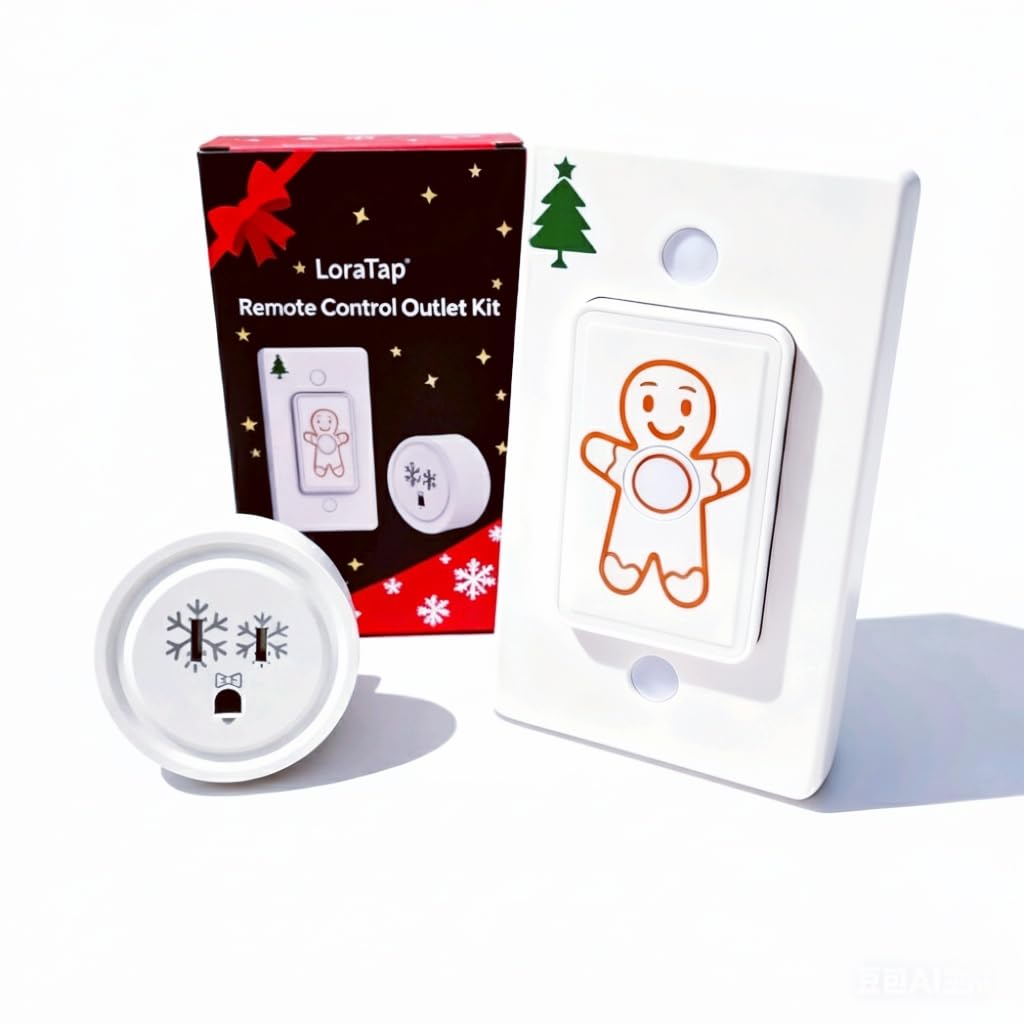
Figure 1: LoraTap Remote Control Outlet Christmas Edition components.

Figure 2: Christmas tree lights controlled by the LoraTap remote outlet.
2. Product Features
- Christmas-Themed Design: Features delicate snowflake patterns and festive color accents, designed to complement holiday decorations such as Christmas trees and string lights.
- 2-in-1 Magnetic Remote: The remote can be mounted on its magnetic base as a wall switch or used as a portable remote. This allows for flexible placement and easy access.
- 100ft Indoor Long-Range Control: Utilizes a 915Mhz wireless signal that can penetrate walls and doors, providing control up to 100 feet indoors.
- Compatibility: Designed to work with existing LoraTap classic outlets and multi-pack models, allowing for expanded home appliance control beyond the holiday season.
- Plug-and-Play & Memory Function: The system is pre-paired at the factory for immediate use. It includes a built-in memory function that restores the last on/off state after a power outage.

Figure 3: Effortless control of Christmas lights.

Figure 4: Comparison of manual unplugging versus remote control convenience.

Figure 5: LoraTap device interconnection for multi-device control.
3. Setup and Installation
The LoraTap Wireless Remote Control Outlet is designed for quick and easy setup. The remote and outlet are pre-paired at the factory, eliminating the need for complex configuration.
3.1. Initial Setup
- Plug the LoraTap remote control outlet into a standard wall socket.
- Plug your desired appliance (e.g., Christmas tree lights, lamps) into the LoraTap remote control outlet.
- The system is now ready for use with the included remote switch.
3.2. Remote Switch Installation
The remote switch can be used handheld or mounted for convenience.
- Magnetic Mounting: The remote switch features a magnetic back, allowing it to be attached to metal surfaces like refrigerators.
- Wall Mounting: The included wall plate can be mounted using screws or double-sided adhesive tape (not included) to any non-magnetic surface. The remote then magnetically attaches to this plate, functioning as a wall switch.

Figure 6: Easy installation steps for the remote switch.

Figure 7: Plug and Play setup for immediate use.
4. Operating Instructions
Operating the LoraTap Wireless Remote Control Outlet is straightforward due to its single-button design.
4.1. Basic On/Off Control
- Press the central button on the remote switch once to turn the connected appliance ON.
- Press the central button again to turn the connected appliance OFF.
The remote's strong RF signal allows control from up to 100 feet indoors, even through walls and doors, providing flexibility in placement and use.

Figure 8: Remote control in use for Christmas tree lights.

Figure 9: User operating the remote control.
5. Maintenance
5.1. Battery Replacement
The remote switch is powered by a CR2032 coin cell battery. When the remote's indicator light dims or it becomes unresponsive, it's time to replace the battery.
- Carefully open the battery compartment on the back of the remote switch.
- Remove the old CR2032 battery.
- Insert a new CR2032 battery, ensuring the positive (+) side is facing up.
- Close the battery compartment securely.
5.2. Cleaning
To clean the remote control and outlet, use a soft, dry cloth. Avoid using liquid cleaners or abrasive materials, as these may damage the device.
6. Troubleshooting
If you encounter issues with your LoraTap Wireless Remote Control Outlet, please refer to the following common troubleshooting steps:
- Device Not Responding:
- Check if the remote control outlet is securely plugged into a working wall socket.
- Ensure the appliance is correctly plugged into the remote control outlet.
- Replace the battery in the remote switch (CR2032).
- Verify that the remote is within the 100ft indoor operating range.
- Lights Not Turning On/Off:
- Confirm the appliance itself is functional by plugging it directly into a wall outlet.
- If the remote and outlet lose pairing, refer to the product packaging or manufacturer's website for re-pairing instructions.
- Interference: While designed for strong signal, extreme electromagnetic interference might affect performance. Try relocating the outlet or remote if issues persist.
7. Specifications
| Feature | Detail |
|---|---|
| Model Number | SP111Q1-US-V3-CS |
| Product Dimensions | 1.25 x 1.8 x 1.8 inches |
| Item Weight | 4.66 ounces |
| Batteries | 1 CR2032 (included) |
| Operation Mode | ON-OFF |
| Current Rating | 10 Amps |
| Operating Voltage | 120 Volts (AC) |
| Mounting Type | Wall Mount |
| Control Method | Remote |
| Wattage | 1100 watts |
8. Warranty and Support
For warranty information, technical support, or any inquiries regarding your LoraTap Wireless Remote Control Outlet, please refer to the contact information provided on the product packaging or visit the official LoraTap website. Keep your purchase receipt for warranty claims.