1. Introduction
Welcome to the user manual for your Goldair GIM-30 Commercial Plumbed-In Ice Maker. This manual provides essential information for the safe and efficient operation, installation, and maintenance of your appliance. Please read it thoroughly before use and retain it for future reference.
2. Important Safety Instructions
To reduce the risk of fire, electric shock, or injury when using your ice maker, follow these basic precautions:
- Read all instructions before using the appliance.
- Connect to potable water supply only.
- Ensure the appliance is properly grounded.
- Do not immerse the power cord, plug, or the appliance itself in water or other liquids.
- Unplug the appliance from the power outlet before cleaning or performing any maintenance.
- Keep children away from the ice maker.
- Do not operate any appliance with a damaged cord or plug, or after the appliance malfunctions or has been damaged in any manner.
- Use only manufacturer-recommended attachments.
- Do not use outdoors.
3. Product Overview
3.1 Product Features
- Automatic Ice Production: Produces up to 30 kg of ice per 24 hours.
- LCD Display: Provides real-time status, ice production level, and alerts.
- Ice Storage Capacity: 4 kg.
- Water Reservoir Capacity: 2.2 Litres.
- Ice Cube Production: 32 pieces per cycle.
- Compact Design: Dimensions of 339mm (D) x 345mm (W) x 602mm (H).
- Material: Constructed from high-quality plastic, sheet metal, and copper components.
- Color: Matt Black finish.
3.2 Components
Familiarize yourself with the main components of your ice maker:

Figure 1: Front view of the Goldair GIM-30 Ice Maker, showing the control panel, LCD display, and ice viewing window.
4. Installation
4.1 Unpacking
- Carefully remove the ice maker from its packaging.
- Remove all packing materials, including any tape or protective film.
- Inspect the appliance for any damage during transit. If damage is found, do not operate and contact your retailer.
4.2 Placement
- Place the ice maker on a firm, level surface that can support its weight when full of ice and water.
- Ensure adequate ventilation around the unit. Maintain at least 10 cm of space on the sides and back for proper airflow.
- Avoid placing the unit near heat sources (e.g., ovens, radiators) or in direct sunlight.
- The ideal ambient temperature for optimal performance is around 20°C.
4.3 Plumbing Connection
The Goldair GIM-30 is a plumbed-in ice maker. It is highly recommended to hire a certified plumber for the installation to ensure proper functionality and compliance with local plumbing codes.
- Drain Point: The drain point must be lower than the ice maker due to its gravity-fed design. Ensure a clear path for water drainage.
- Water Supply: Connect the ice maker to a potable water supply using the provided installation kit. Ensure all connections are secure and leak-free.
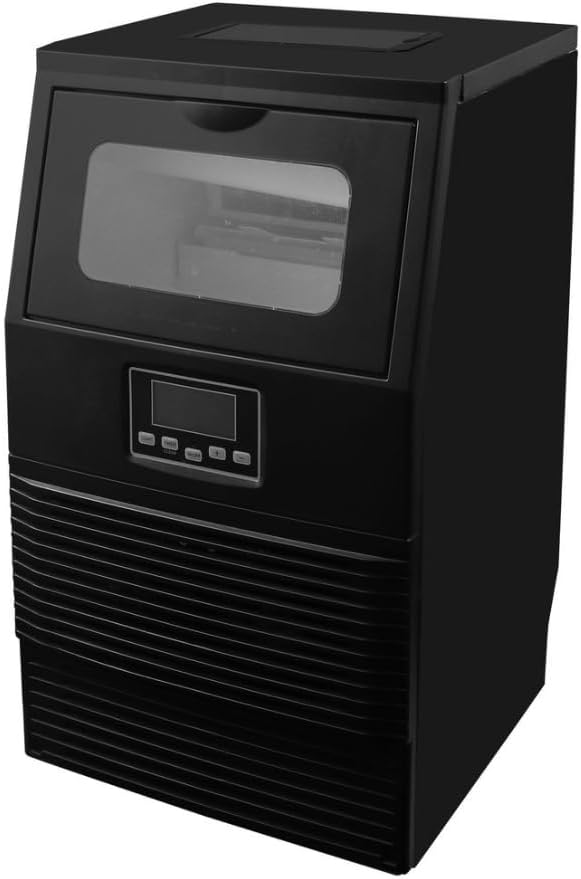
Figure 2: Angled view of the Goldair GIM-30 Ice Maker, illustrating its compact form factor suitable for various installations.
5. Operating Instructions
5.1 Initial Setup
- After installation, clean the interior of the ice maker with a mild detergent and warm water. Rinse thoroughly.
- Ensure the water supply is turned on and the unit is plugged into a grounded power outlet.
5.2 Using the Control Panel
The ice maker features an intuitive LCD display and push-button controls:
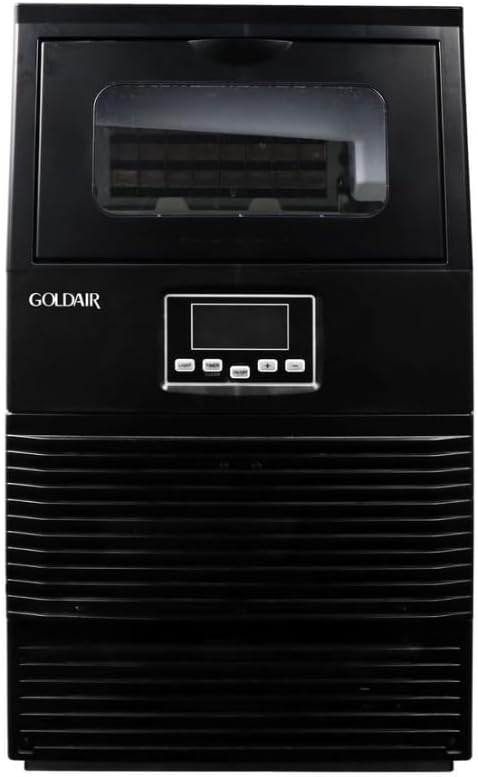
Figure 3: Front view of the Goldair GIM-30 Ice Maker, highlighting the brand logo and user interface.
- Power Button: Press to turn the unit on or off.
- LCD Display: Shows current status (e.g.,
Related Documents - GIM-30

Goldair 107cm Evaporative Tower Fan (GCEV200) - Operating Instructions & Safety Guide
Comprehensive operating instructions, safety guidelines, component details, assembly steps, cleaning, maintenance, and warranty information for the Goldair 107cm Evaporative Tower Fan, Model GCEV200.
Goldair GIFH200 Tradesman 2000W Workshop Fan Heater - User Manual and Safety Guide
Comprehensive user manual and safety guide for the Goldair GIFH200 Tradesman 2000W Workshop Fan Heater. Includes operating instructions, care and cleaning, safety features, technical specifications, and warranty information.
Goldair Select GSIR220 800W Radiant Heater: Operating Instructions and Safety Guide
Comprehensive operating instructions, safety guidelines, and warranty information for the Goldair Select GSIR220 800W Radiant Heater. Learn how to use, clean, and maintain your heater safely.
Goldair 2000W Micathermic Heater: Operating Instructions, Safety, and Warranty
Detailed operating instructions, essential safety guidelines, assembly steps, care instructions, and the two-year warranty for the Goldair 2000W Micathermic Heater, Model GSMH120.
Goldair App: WiFi Downloading and Setup Guide
Step-by-step instructions for downloading and setting up the Goldair mobile app for WiFi device pairing, including registration and verification. Learn how to connect your device using the 2.4GHz network.
Goldair 2000W Micathermic Heater (GMH130) - Operating Instructions and Warranty
Comprehensive operating instructions, safety guide, assembly steps, and warranty information for the Goldair 2000W Micathermic Heater (Model GMH130). Learn how to safely use, assemble, and care for your heater.