
1. Introduction
Thank you for choosing the DODO MEKIA P20 Automatic Foaming Soap Dispenser. This device provides a touchless and hygienic way to dispense foam soap, featuring adjustable foam levels and a rechargeable battery. Please read this manual thoroughly before use to ensure proper operation and maintenance.

Image: Overview of the DODO MEKIA Automatic Foaming Soap Dispenser highlighting its key features.
2. Safety Information
- Do not immerse the entire dispenser in water. The device is IPX5 waterproof, meaning it is protected against low-pressure water jets, but not full submersion.
- Keep out of reach of children unless supervised.
- Use only the provided USB-C cable for charging.
- Avoid direct sunlight or strong artificial light on the sensor, as this may affect its performance.
- Do not use corrosive chemicals to clean the dispenser.
3. Package Contents
Verify that all items are present in the package:
- DODO MEKIA P20 Automatic Foaming Soap Dispenser
- USB-C Charging Cable
- Wall Mount Adhesive Stickers (2 pieces)
- User Manual
4. Setup
4.1. Charging the Dispenser
Before first use, fully charge the dispenser. A full charge takes approximately 3 hours and provides up to 90 days of operation.
- Locate the USB-C charging port on the back of the dispenser.
- Connect the provided USB-C cable to the dispenser and a suitable USB power adapter (not included).
- The digital display will show the charging status. Once 100% is displayed, the dispenser is fully charged.

Image: The dispenser being charged via its USB-C port, with the battery level visible on the display.
4.2. Filling the Soap Reservoir
The dispenser has a 400ml (13.53oz) capacity reservoir. It is compatible with foaming soap, liquid soap, and gel soap.
- To access the reservoir, gently twist the top section of the dispenser counter-clockwise and lift it off the base.
- If using foaming hand soap, pour it directly into the reservoir.
- If using ordinary liquid soap or gel soap, it must be diluted with water. The recommended dilution ratio is 1 part soap to 4-6 parts water (1:4 to 1:6). Stir the mixture gently to combine.
- Pour the prepared soap solution into the reservoir through the wide filling port. Do not overfill.
- Align the top section with the base and twist clockwise until securely locked.

Image: The dispenser highlighting its 400ml capacity and wide filling port.
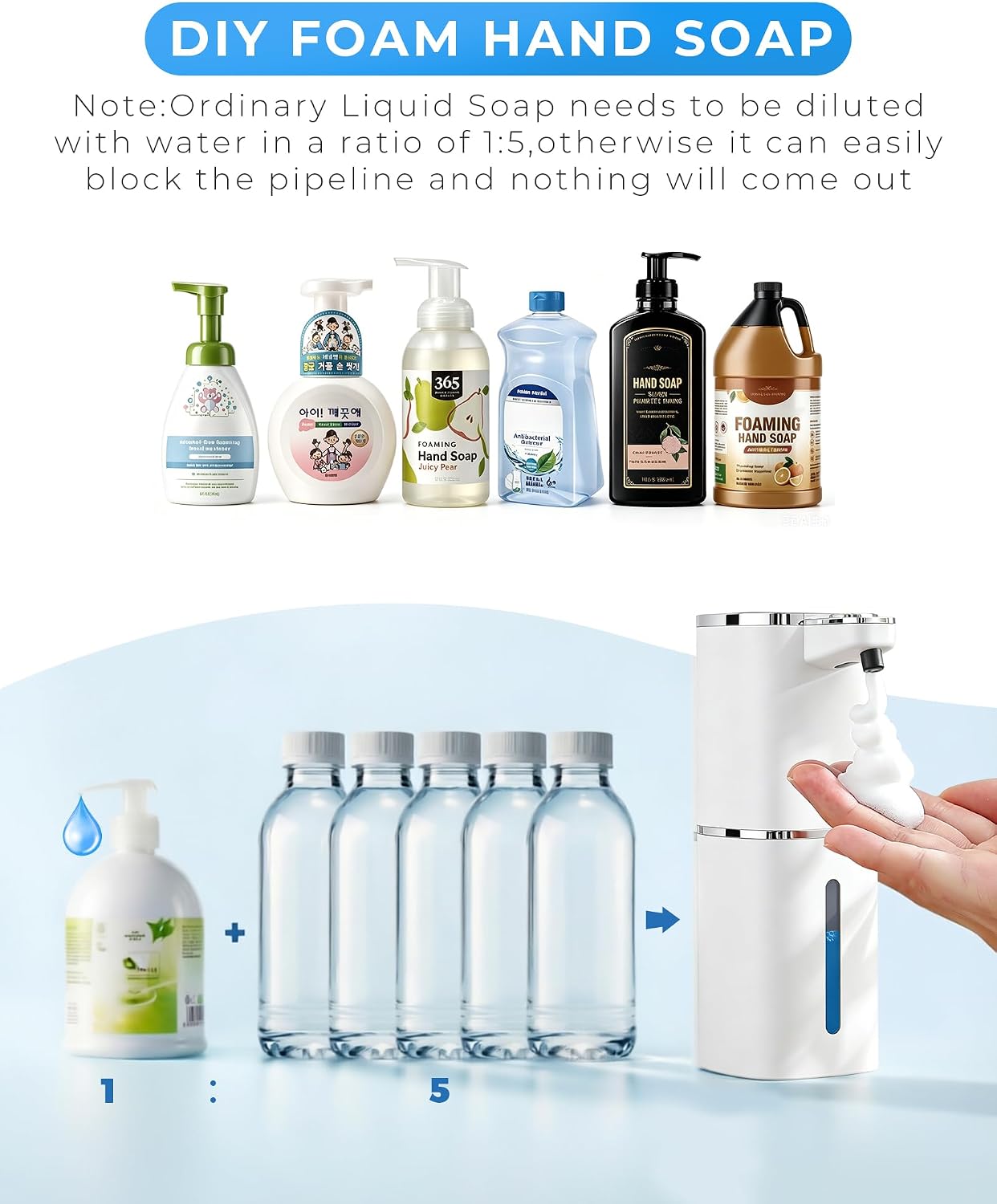
Image: Instructions for diluting liquid soap for optimal foam production.
4.3. Installation (Tabletop or Wall-Mounted)
The dispenser can be placed on a countertop or mounted on a wall.
- Tabletop Use: Place the dispenser on a flat, stable surface. The non-slip base ensures stability.
- Wall-Mounted Use: Use the provided traceless adhesive stickers. Clean and dry the desired wall surface. Apply the stickers to the back of the dispenser, then firmly press the dispenser onto the wall. Ensure it is level and secure before filling with soap. No drilling is required.

Image: The dispenser demonstrating both countertop and drill-free wall-mounted installation options.
5. Operating Instructions
5.1. Power On/Off
To turn the dispenser on or off, press and hold the power button (center button) on the top panel for 3 seconds.
5.2. Dispensing Foam
The dispenser features a touchless infrared sensor for hygienic operation.
- Place your hand approximately 0.25-2 inches (0.6-5 cm) under the nozzle.
- The infrared sensor will detect your hand, and foam will be dispensed automatically within 0.25 seconds.
- Remove your hand to stop dispensing.
5.3. Adjusting Foam Levels
The dispenser offers 9 adjustable foam levels to suit your preference, from a gentle mist to a full lather.
- Press the "+" button to increase the foam output level.
- Press the "-" button to decrease the foam output level.
- The current level (1-9) will be displayed on the digital screen.

Image: The control panel with battery/level display and adjustment buttons.

Image: Illustration of the 9 adjustable foam levels, from gentle to plentiful.
5.4. Digital Display
The integrated digital display provides real-time information:
- Battery Level: Shows the remaining battery percentage (1%-100%).
- Foam Intensity: Displays the current foam output level (1-9 gears).
Video: Official DODO MEKIA video demonstrating the automatic soap dispenser's features and operation.
6. Maintenance
6.1. Automatic Cleaning Function
The dispenser includes an automatic cleaning function to prevent blockages and extend its lifespan.
- To activate, ensure the reservoir is filled with water (or a very dilute soap solution).
- Press and hold the "-" button for 3 seconds. The dispenser will cycle water through its internal mechanism.
- Repeat this process periodically, especially if you change soap types or notice reduced foam output.

Image: The dispenser demonstrating its automatic cleaning function by dispensing water.
6.2. General Cleaning
The IPX5 waterproof rating allows for easy external cleaning.
- Wipe the exterior of the dispenser with a soft, damp cloth.
- Do not use abrasive cleaners or solvents.
- Avoid getting water into the charging port.
7. Troubleshooting
| Problem | Possible Cause | Solution |
|---|---|---|
| Dispenser does not turn on. | Low battery or not powered on. | Charge the dispenser fully. Press and hold the power button for 3 seconds to turn on. |
| No foam dispensed. | Empty reservoir, clogged nozzle, or incorrect soap dilution. | Refill the reservoir. Run the automatic cleaning cycle. Ensure liquid soap is diluted correctly (1:4 to 1:6 with water). |
| Foam is too watery or too thick. | Incorrect soap dilution or foam level setting. | Adjust the soap dilution ratio. Use the "+" and "-" buttons to change the foam output level (1-9). |
| Sensor is unresponsive. | Obstruction, low battery, or strong light interference. | Ensure nothing is blocking the sensor. Charge the dispenser. Move the dispenser away from direct sunlight or strong artificial light. |
| Cannot open the container to refill. | Container is twisted too tightly or incorrect opening method. | Gently twist the top section counter-clockwise to separate it from the base. Do not force it. |
8. Specifications
| Feature | Detail |
|---|---|
| Model Number | P20 |
| Brand | DODO MEKIA |
| Color | White Foam |
| Liquid Volume | 400 ml (13.53 oz) |
| Product Dimensions (L x W x H) | 4.41" x 2.83" x 7.95" (11.2 cm x 7.2 cm x 20.2 cm) |
| Waterproof Rating | IPX5 |
| Charging Type | USB-C Rechargeable |
| Charging Time | Approx. 3 hours |
| Battery Life | Up to 90 days (approx. 3 months) |
| Foam Levels | 9 adjustable levels |
| Sensor Response Time | 0.25 seconds |
9. Warranty and Support
For warranty information or technical support, please refer to the product packaging or contact DODO MEKIA customer service directly. Contact details can typically be found on the manufacturer's official website or through your purchase platform.