1. Introduction
This manual provides detailed instructions for the ZOSI 1080p HD-TVI Surveillance Camera, designed for both outdoor and indoor security monitoring. This 2MP dome camera features 360° pan and 140° tilt capabilities, audio recording, and infrared night vision, ensuring comprehensive coverage and clear footage.

Image 1.1: ZOSI 1080p HD-TVI Surveillance Camera
Package Contents
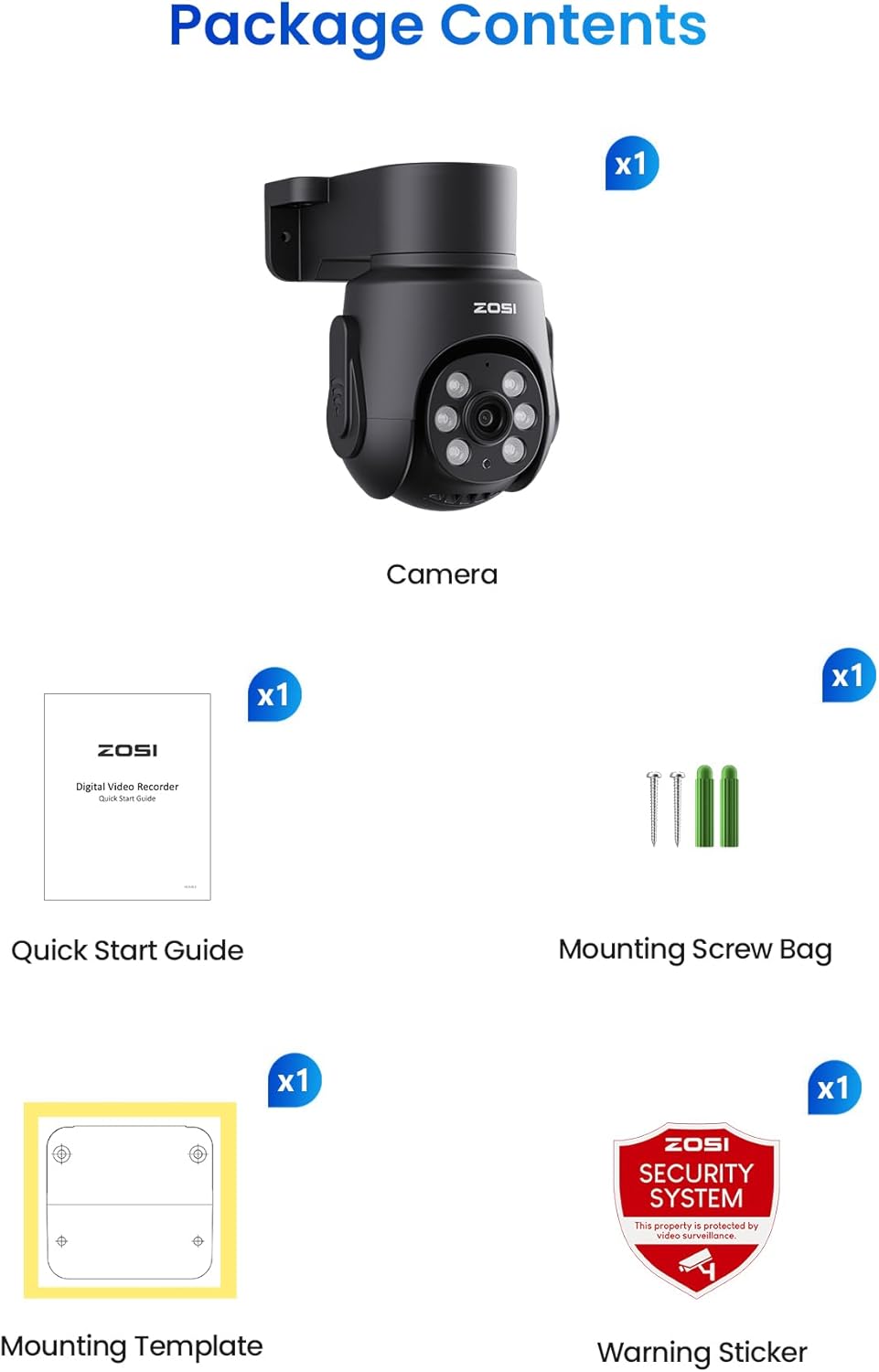
Image 1.2: Contents included with the ZOSI 1080p HD-TVI Surveillance Camera.
- 1x ZOSI 1080p HD-TVI Surveillance Camera
- 1x Quick Start Guide
- 1x Mounting Screw Bag
- 1x Mounting Template
- 1x Warning Sticker
Camera Overview

Image 1.3: Key components of the ZOSI camera, including the microphone, lens, infrared lights, power port, and video output.
- Microphone: For audio recording.
- 4.0mm Lens: Provides a 90° viewing angle.
- Infrared Lights: Up to 65ft night vision.
- Power Port: 12V power input.
- Video Output: BNC connector for DVR.
2. Setup and Installation
DVR Compatibility
This add-on analog camera is designed to work exclusively with ZOSI 1080P/5MP TVI DVRs. Ensure your DVR firmware is updated to v1.8.1 or above for 8CH DVRs (models ZM08JM/ZR08JN/ZR08VM/ZR08VN) and above v1.8.1 for ZOSI 16CH DVRs for full compatibility and optimal performance.

Image 2.1: This camera is an add-on device and works exclusively with ZOSI DVR recorders. DVR, power adapter, and BNC cable are not included.
Connecting the Camera
Connect the camera using a BNC cable for video transmission and a DC12V power supply. For smooth pan/tilt operation, use a 2-in-1 BNC video + DC power Siamese cable made of CCA (copper-clad aluminum) or pure copper to ensure stable power delivery.

Image 2.2: Connection diagram showing the camera connected to a DVR via BNC cable and powered by a DC12V adapter.
Mounting the Camera
The camera features a mini design that supports both ceiling and wall mounts, making it suitable for various home security scenarios.

Image 2.3: Examples of ceiling and wall mounting for the ZOSI camera.
Video: How to Set Up a 4-in-1 Security Camera
Video 2.1: This video demonstrates the setup process for a 4-in-1 security camera, including physical installation and initial configuration. It covers connecting the camera to a DVR and basic operational checks.
3. Operating the Camera
Pan & Tilt Functionality
The camera features a Pan/Tilt design allowing 360° horizontal rotation and 140° vertical tilt. This enables monitoring of wide areas without blind spots, reducing the need for multiple cameras. Control the pan and tilt functions remotely via the dedicated phone application or your DVR interface.

Image 3.1: Remote control of the camera's 360° pan and tilt functions using a smartphone application.
Video and Audio Features
Capture clear and detailed footage with the 2MP CMOS sensor, delivering 1920×1080 resolution. The built-in microphone records high-quality audio, providing a more complete awareness of your property.

Image 3.2: Demonstrates the 1080p Full HD clarity of the camera's video output at 25 frames per second.

Image 3.3: Illustration of the one-way audio feature, allowing listening to sounds from the camera's location.
Night Vision
Equipped with 6 advanced IR LEDs and an automatic ICR filter, this camera provides up to 65ft (20m) of crisp night vision. It automatically switches between color images during the day and clear black-and-white footage at night for 24/7 surveillance.

Image 3.4: Comparison of day and 65ft night vision footage from the ZOSI camera.
Intelligent Detection
The camera features AI-driven motion detection that classifies humans and vehicles, drastically minimizing false alarms. Receive alerts via app push notifications, email, or buzzer.

Image 3.5: Visual representation of AI human and vehicle detection with various alert options.
Remote Access and Playback
Access your security system and smart playback from any device, locally or remotely, for full control anytime. Easily review key moments with smart event detection.

Image 3.6: Demonstrates remote access and smart playback capabilities across various devices like tablets, smartphones, and laptops.

Image 3.7: Screenshot of the smart recording and playback interface, showing event detection logs.
Video: ZOSI 1080P Pan Tilt Wired Security Camera - C280
Video 3.1: This video provides an overview of the ZOSI 1080P Pan Tilt Wired Security Camera (C280), highlighting its key features and operational aspects.
Video: 1080p HD Surveillance Camera Outdoor
Video 3.2: A demonstration of the ZOSI 1080p HD Surveillance Camera in an outdoor setting, showcasing its performance and features.
4. Maintenance
Weatherproof Design
The camera is built with a sturdy ABS housing rated IP66, making it resistant to rain, dust, and snow. It operates reliably in temperatures from -20°C to 55°C, suitable for various weather conditions. Regular visual inspection for debris on the lens and housing is recommended to maintain optimal performance.

Image 4.1: The camera's IP66 weatherproof rating ensures durability against environmental elements.
5. Troubleshooting
No Image Displaying on DVR
If your camera is connected to the DVR and no picture is displaying, you may need to switch the camera's signal mode to match your DVR's supported format (TVI, AHD, CVI, or CVBS/960H). This camera supports 4-in-1 video modes.
To switch modes, locate the OSD (On-Screen Display) button on the camera's cable. Press and hold the OSD button in the specified direction for 5 seconds, then release. The screen will turn from blank to picture, indicating a successful mode switch.
- Push Up: Switch to CVBS/960H mode.
- Push Down: Switch to CVI mode.
- Push Left: Switch to AHD mode.
- Push Right: Switch to TVI mode.
If there is still no image after switching, try another direction until a picture appears.
Video: ZOSI 4-in-1 Camera Mode Switching Guide
Video 5.1: This video demonstrates how to switch between different video modes (TVI, AHD, CVI, CVBS/960H) on a ZOSI 4-in-1 camera using the OSD button, which is essential for compatibility with various DVRs.
6. Specifications
| Feature | Detail |
|---|---|
| Brand | ZOSI |
| Connectivity Technology | Wired |
| Video Capture Resolution | 1080p |
| Special Feature | Night Vision |
| Color | Black |
| Power Source | Corded Electric |
| Item Dimensions L x W x H | 4.9 x 3.5 x 5.5 inches |
| Recommended Uses For Product | Indoor/Outdoor |
| Compatible Devices | ZOSI 1080P/5MP TVI DVRs |
| Manufacturer | Ansjer Electronics Co.,Ltd |
| Item Weight | 13.4 ounces |
| Item Model Number | 1AC-2802B-US-VC |
7. Warranty and Support
ZOSI is committed to providing reliable products and excellent customer service. Your purchase includes the following:
- 30-Day Hassle-Free Return Policy: For your peace of mind.
- Lifetime Technical Support: Dedicated support for any technical inquiries.
- 2-Year Coverage: Comprehensive warranty for your device.
30-Day Return Policy
Lifetime Technical Support
2-Year Coverage


