1. Introduction
This manual provides detailed instructions for the installation, setup, and operation of your CAMECHO 4G+64G Android 15 Autoradio. Please read this manual thoroughly before using the product to ensure proper function and safety. This device is designed to enhance your driving experience with advanced navigation, entertainment, and connectivity features.
2. Applicable Models
This 7-inch double DIN car radio, featuring Android 15 with 4GB RAM and 64GB ROM, is specifically designed for the FIAT Panda models from 2013 to 2020.
Note: To confirm perfect compatibility, especially if you are unsure, please send a photo of your car's central console and a photo of the back of your original CD player to customer support before purchase.

Image: Comparison of the car dashboard before and after installing the CAMECHO Autoradio in a FIAT Panda (2013-2020). The image highlights the seamless integration of the new unit.
3. Product Features
The CAMECHO Autoradio comes equipped with a range of features designed for convenience and performance:
- Display: 7-inch 1080P HD Touchscreen.
- Processor: 4-Core Chipset for smooth operation.
- Connectivity: Built-in WiFi, Bluetooth 5.0 for hands-free communication and audio streaming.
- Smartphone Integration: Wireless and Wired CarPlay, Wireless and Wired Android Auto, and MirrorLink for seamless smartphone connectivity.
- Navigation: Built-in GPS navigation (supports GPS/Beidou/Galileo/Glonass).
- Audio: 32-Band Equalizer (EQ) for customized sound, FM/RDS Radio for real-time traffic, news, and weather.
- Control: Steering Wheel Control compatibility, Voice Control support.
- Safety: Supports AHD Rear View Camera input (camera optional).
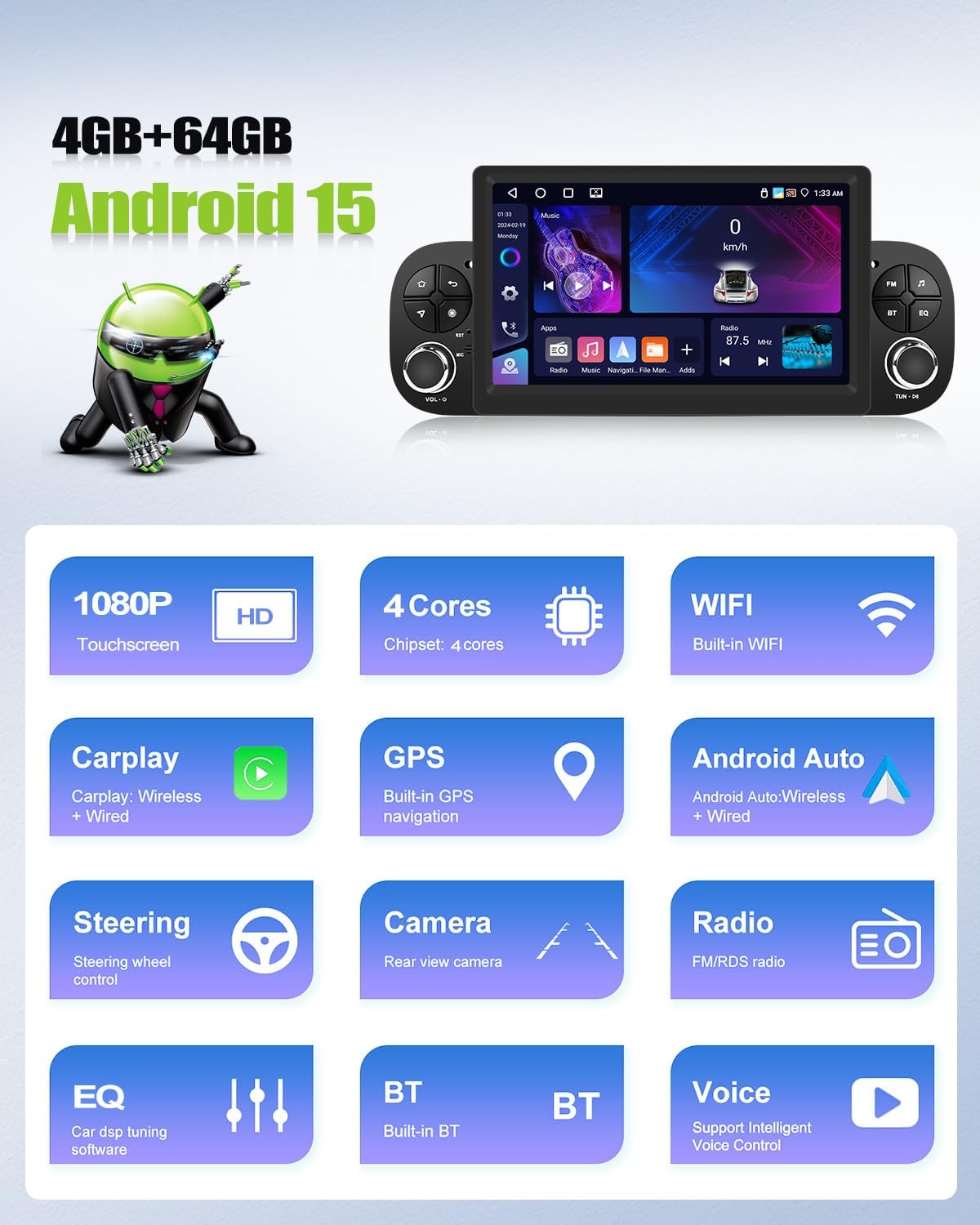
Image: Visual summary of the main features of the CAMECHO Autoradio, including display resolution, processor, connectivity, and integrated functions.
4. Installation
4.1. Package Contents
Before installation, ensure all components are present:
- CAMECHO Autoradio Unit
- Power Cable
- RCA Input/Output Cables
- Reversing Camera Input Cable
- USB Cables (2x)
- GPS Antenna
- Radio Antenna
- Original Car Camera Cable (if applicable)
- User Manual
- Canbus (if required for your vehicle)
- Antenna Adapter (if required)
4.2. Dimensions and Connections
The unit measures approximately 247mm (9.7 inches) in width, 105mm (4.1 inches) in height, and 173mm (6.8 inches) in depth. Familiarize yourself with the rear panel connections:
- Power Cable connection
- RCA Input/Output ports
- Reversing Camera Input
- USB Cable ports
- GPS Antenna port
- Radio Antenna port

Image: Detailed view of the product dimensions, rear panel connections, and a list of all items included in the package.
Professional installation is recommended to ensure correct wiring and functionality.
5. Setup
5.1. Wireless CarPlay / Android Auto
To connect your smartphone wirelessly:
- For iPhone (CarPlay):
- Activate Bluetooth on your iPhone and pair it with the car radio.
- Open the 'Zlink' application on the car radio.
- If connection fails, connect your phone to the car stereo's hotspot, then click 'Zlink' again.
- Maintain both Bluetooth and Hotspot connections.
- For Android Phone (Android Auto):
- Ensure the Android Auto application is installed on your phone.
- Activate Bluetooth on your phone and pair it with the car radio.
- Open the 'Zlink' application on the car radio.

Image: Step-by-step guide for establishing wireless CarPlay and Android Auto connections.
5.2. MirrorLink
MirrorLink allows you to duplicate your smartphone screen onto the car radio display.
- For iPhone:
- Activate your iPhone's hotspot.
- Connect the car radio to your phone's hotspot.
- Open the 'Phone Link' application on the device.
- Method 1: Enter the AirPlay function on your iPhone and select the car radio to mirror.
- Method 2: Scan the QR code to download the application on your phone and use the connection function.
- For Android Phones:
- Click on 'Phone Link' and scan the QR code to download the application.
- Follow the instructions to select the link via USB cable or WLAN.
- For USB connection: Go to your phone's developer options and enable 'USB debugging', then configure USB as data transmission.

Image: Guide on how to set up and use the MirrorLink feature for both iOS and Android devices.
5.3. WiFi / GPS Navigation
The car radio supports connection to WiFi or a mobile hotspot. Once connected, you can download necessary applications like Waze, YouTube, TikTok, etc., from the app store. The integrated GPS/Beidou/Galileo/Glonass system ensures fast, accurate, and stable location services.

Image: Demonstrates GPS navigation in action, the process of connecting to WiFi, and the split-screen feature.
6. Operating
6.1. Bluetooth 5.0
Bluetooth 5.0 enables hands-free communication, voice chat, and wireless audio streaming. The system automatically loads your phonebook for convenience during your journey.
6.2. 32-Band Equalizer (EQ)
Customize your audio experience with the professional 32-band equalizer. Adjust frequencies to make your music sound richer and more layered, tailored to your preferences.
6.3. FM/RDS Radio
The built-in FM/RDS radio provides access to real-time information such as traffic conditions, news, and weather forecasts, keeping you informed on the road.

Image: Illustrates the 32-band equalizer interface, Bluetooth connection screen, and the FM/RDS radio display.
6.4. Rear Camera Function
When reversing, the screen automatically switches to the AHD rear camera view, providing a clear image for safer parking and maneuvering. The camera (optional) offers HD image quality, is waterproof, and provides a wide-angle night vision view.
6.5. Steering Wheel Control
The unit supports original steering wheel controls, allowing you to manage calls, change songs, adjust volume, and more without taking your hands off the wheel. To set up, enter the steering wheel control interface, press 'Start', then press the desired button on your steering wheel, and finally press 'Save'.
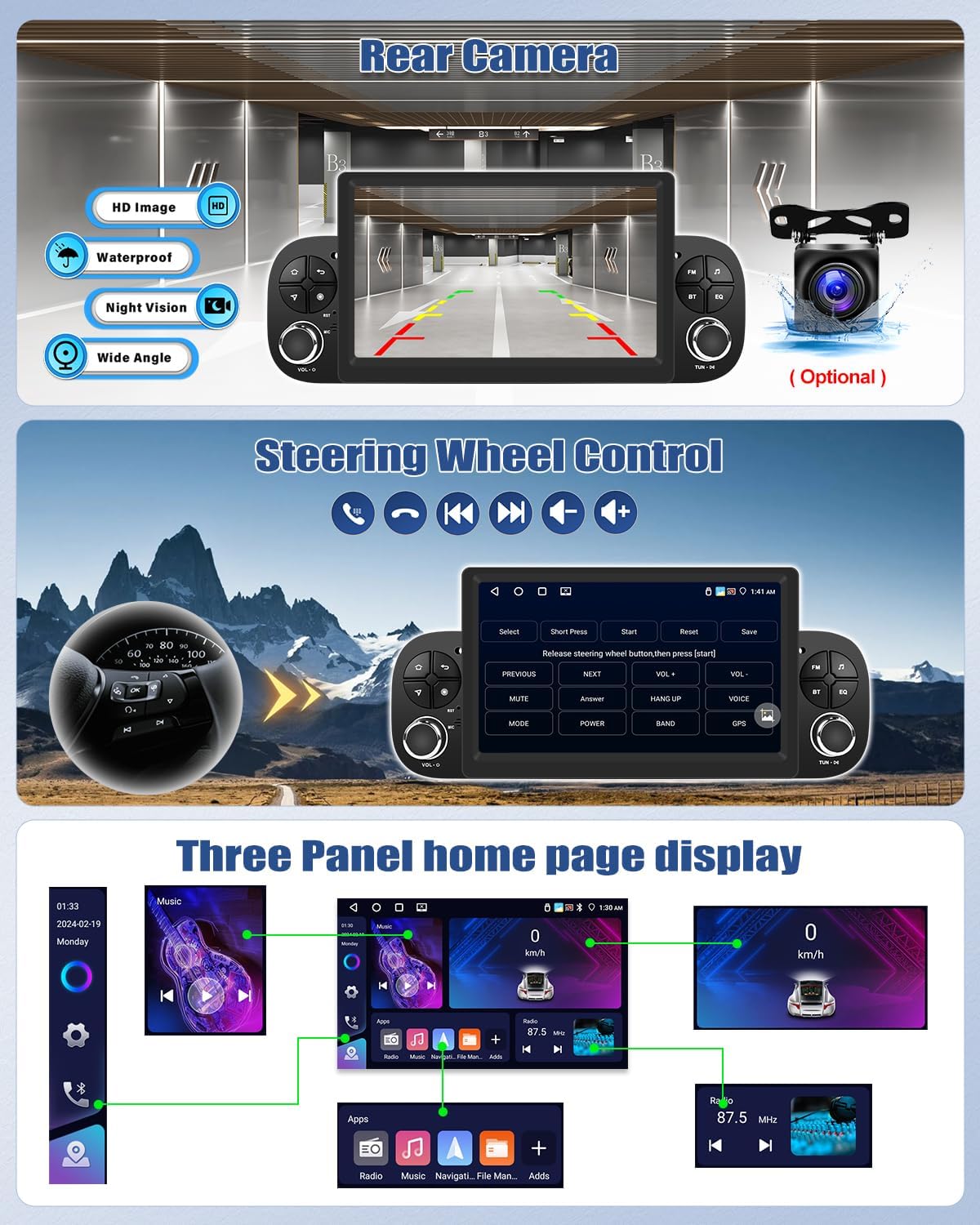
Image: Displays the rear camera functionality, the interface for programming steering wheel controls, and an example of the customizable three-panel home screen.
6.6. Split Screen
The split-screen feature allows you to run two applications simultaneously on the display, such as navigation and music, or a radio and a phone call interface, enhancing multitasking capabilities.
7. Optional Functions
The following functions are not included as standard but can be purchased separately to expand the capabilities of your Autoradio:
- DVR (Digital Video Recorder): For recording driving footage.
- DAB+ (Digital Audio Broadcasting): For enhanced digital radio reception.
- 360 Panoramic Camera: For a comprehensive view around your vehicle.
- OBD2 (On-Board Diagnostics): For vehicle diagnostics and monitoring.
- Video Output: To connect external displays.
- External Microphone: For improved voice clarity during calls or voice commands.
Please contact customer support for information on purchasing these optional accessories.

Image: Displays various optional accessories that can be integrated with the Autoradio to enhance its functionality.
8. Specifications
| Feature | Specification |
|---|---|
| Brand | CAMECHO |
| Manufacturer | CAMECHO |
| Model | 4G+64G Android 15 Autoradio |
| Operating System | Android 15 |
| RAM | 4GB |
| ROM | 64GB |
| Screen Size | 7 inches |
| Display Resolution | 1080P HD |
| Processor | 4 Cores |
| Connectivity Technology | WiFi, Bluetooth 5.0 |
| Output Wattage | 180 Watts |
| Number of Channels | 4 |
| Product Weight | 1.32 kg |
| Package Dimensions | 31.2 x 18.3 x 17.2 cm |
| Compatible Devices | Smartphones |
| Special Features | Touchscreen, GPS Navigation, CarPlay, Android Auto, MirrorLink, RDS/FM Radio, 32-Band EQ, Rear Camera Input, Steering Wheel Control |
| Country/Region of Origin | China |
9. Maintenance
To ensure the longevity and optimal performance of your CAMECHO Autoradio, follow these maintenance guidelines:
- Cleaning: Use a soft, dry cloth to clean the screen and exterior. Avoid abrasive cleaners or solvents that could damage the surface.
- Software Updates: Periodically check for software updates to ensure you have the latest features and bug fixes. Updates can usually be found through the system settings or the manufacturer's website.
- Temperature: Avoid exposing the unit to extreme temperatures, both hot and cold, for extended periods.
- Power: Ensure the vehicle's electrical system is stable. Fluctuations can affect the unit's performance.
10. Troubleshooting
If you encounter issues with your Autoradio, refer to the following common solutions:
- No Power: Check all power connections and the vehicle's fuse box. Ensure the ignition is on.
- No Sound: Verify volume settings, check speaker connections, and ensure the audio source is correctly selected.
- Touchscreen Unresponsive: Try restarting the unit. If the issue persists, a factory reset might be necessary (note: this will erase all user data).
- GPS Not Working: Ensure the GPS antenna is properly connected and has a clear view of the sky. Check GPS settings in the system.
- Bluetooth/CarPlay/Android Auto Connection Issues: Ensure Bluetooth is enabled on both devices. Try unpairing and re-pairing. Check the 'Zlink' app for specific connection steps. Ensure your phone's software is up to date.
- Rear Camera Not Displaying: Check the camera's power and video input connections. Ensure the vehicle is in reverse gear.
For persistent issues, please contact CAMECHO customer support.
11. Warranty and Support
CAMECHO products are covered by a standard manufacturer's warranty. Please refer to the warranty card included in your package or visit the official CAMECHO website for detailed warranty terms and conditions.
For technical support, troubleshooting assistance, or inquiries regarding optional accessories, please contact CAMECHO customer service through the following channels:
- Email: Refer to your product packaging or the official CAMECHO website for the most current contact email.
- Online Support: Visit the CAMECHO brand store on Amazon or their official website for FAQs and support resources.
When contacting support, please have your product model number (4G+64G Android 15 Autoradio) and purchase date ready.


