
Product Overview
The VEVOR 24-Inch 2.0 Channel Compact Sound Bar is designed to enhance your audio experience for smart TVs, projectors, PCs, and home theater systems. It features 80W maximum output power, Bluetooth 5.0 connectivity, and multiple wired input options for versatile use. This soundbar offers three distinct sound effect modes to optimize audio for movies, music, and news content.
Key Features:
- Stereo Surround Sound: 2.0 channel design with 80W max power for authentic, layered audio.
- Multiple Inputs: Supports Bluetooth 5.0, HDMI, AUX, and USB connections for various devices.
- Sound Effect Modes: Three optimized modes (Movie, Music, News) for tailored audio experiences.
- Dual Control: Operate via remote control or integrated buttons on the soundbar.
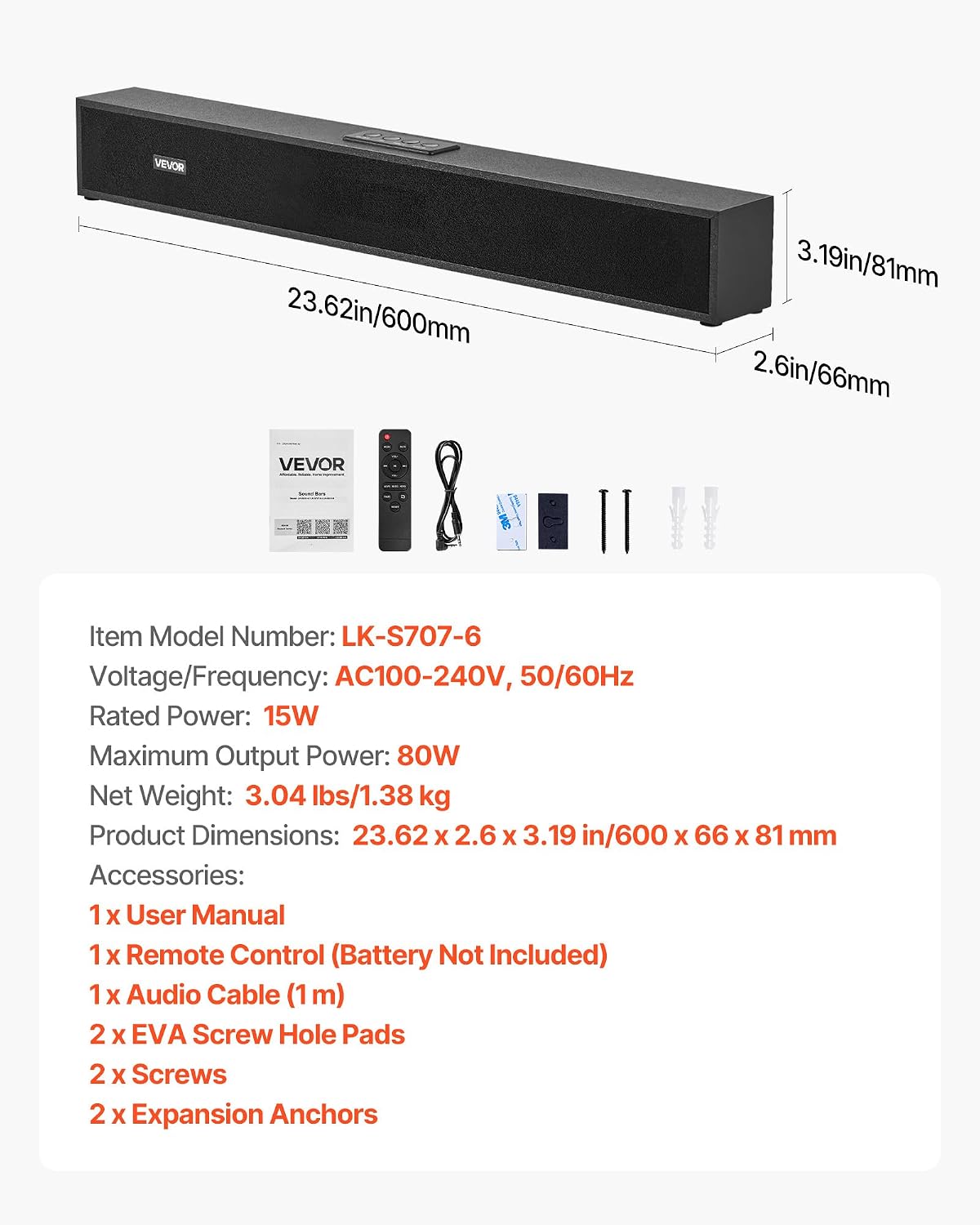
- Space-Saving Design: Compact 23.62 x 2.6 x 3.19 inch dimensions, suitable for wall mounting or tabletop placement.
What's in the Box
- 1 x VEVOR Sound Bar (Model LK-S707-6)
- 1 x User Manual
- 1 x Remote Control (Battery Not Included)
- 1 x Audio Cable (1m)
- 2 x EVA Screw Hole Pads
- 2 x Screws
- 2 x Expansion Anchors
Setup Instructions
The VEVOR Sound Bar offers flexible setup options, allowing it to be used as a single soundbar unit or as two separate vertical speakers. It can be placed on a tabletop or mounted on a wall.
1. As a Single Sound Bar:
- Align the two speaker units and connect them using the short audio patch cable provided. Ensure a secure fit.
- Place the assembled soundbar on a flat surface below your TV or mount it on the wall using the provided screws and anchors.
- Connect the power cable to the DC IN port on the soundbar and plug it into a power outlet.
- Connect the soundbar to your TV or audio source using one of the available input options: HDMI (ARC), AUX, or Bluetooth.

2. As Two Vertical Speakers:
- Separate the two speaker units.
- Attach each speaker unit to its respective stand (if provided or purchased separately).
- Place the two speakers on either side of your TV or desired listening area.
- Connect the power cable to one speaker unit. Use the longer audio cable (if provided) to connect the two speaker units to each other.
- Connect the primary speaker unit to your TV or audio source using HDMI (ARC), AUX, or Bluetooth.

Video Guide: Setup and Features

Operating Instructions
Operate your VEVOR Sound Bar using either the included remote control or the integrated buttons on the unit.
1. Power On/Off:
- Press the power button on the remote or the soundbar to turn the unit on or off.
2. Input Selection:
- Press the 'MODE' button on the remote control or the soundbar to cycle through available input sources: Bluetooth, AUX, HDMI (ARC), and USB. The current mode will be displayed on the soundbar's LED screen.

3. Volume Control:
- Use the 'VOL+' and 'VOL-' buttons on the remote or soundbar to adjust the volume.
- Press the 'MUTE' button on the remote to mute or unmute the sound.
4. Sound Effect Modes:
- Select from three optimized sound modes using the dedicated buttons on the remote: 'MOVIE' for enhanced surround sound, 'MUSIC' for authentic musical details, and 'NEWS' for clear vocals.

5. Bluetooth Pairing:
- Switch the soundbar to Bluetooth mode. The LED display will indicate 'BT'.
- On your device (phone, tablet, etc.), enable Bluetooth and search for 'LK-S707-6' (or similar model name).
- Select the soundbar to pair. A confirmation sound will indicate successful pairing.

Maintenance
- Keep the soundbar clean by wiping it with a soft, dry cloth. Avoid using abrasive cleaners or solvents.
- Ensure proper ventilation around the unit to prevent overheating.
- Store the soundbar in a cool, dry place when not in use for extended periods.
Troubleshooting
- No Sound: Check all cable connections (power, audio input). Ensure the correct input mode is selected on the soundbar and your TV. Verify volume levels on both the soundbar and the connected device.
- Bluetooth Pairing Issues: Ensure the soundbar is in Bluetooth pairing mode. Turn off and on Bluetooth on your device. Move your device closer to the soundbar.
- Remote Control Not Working: Check the battery in the remote control. Ensure there are no obstructions between the remote and the soundbar's sensor.
Specifications
| Brand | VEVOR |
| Model Number | LK-S707-6 |
| Speaker Maximum Output Power | 80 Watts |
| Rated Power | 15 Watts |
| Number of Audio Channels | 2.0 |
| Connectivity Technology | Auxiliary, Bluetooth, HDMI, USB |
| Mounting Type | Wall Mount |
| Item Dimensions (D x W x H) | 23.62"D x 2.6"W x 3.19"H (600 x 66 x 81 mm) |
| Item Weight | 2.87 Pounds (1.38 kg) |
| UPC | 197988713036 |
Warranty & Support
This VEVOR Sound Bar comes with a 1-Year Warranty as per the manufacturer's description.
For further assistance, troubleshooting, or warranty claims, please visit the official VEVOR Support Center or contact their customer service.
You can find more information and support resources on the VEVOR Brand Store.