
1. Important Safety Information
Please read and understand all instructions before assembling, installing, or operating this product. Failure to follow these instructions may result in electric shock, fire, property damage, or personal injury.
- Keep combustible materials, such as furniture, pillows, bedding, papers, clothes, and curtains at least 3 feet (0.9 m) from the front of the heater.
- Do not insert or allow foreign objects into any ventilation or exhaust opening as this may cause an electric shock or fire, or damage the heater.
- Do not operate any heater with a damaged cord or plug or after the heater malfunctions, has been dropped or damaged in any manner.
- Always unplug the fireplace when not in use.
2. Package Contents
Your Nordivale 70-inch Fireplace TV Stand is shipped in two separate boxes. Please ensure all components are present before beginning assembly. Refer to the included assembly guide for a detailed parts list.
- TV Stand components (wood panels, hardware)
- Electric Fireplace insert
- Acrylic support columns
- RGB LED light strips and controller
- Fireplace remote control
- LED light remote control
- Crystal stones for fireplace bed
3. Assembly Instructions
Assembly of the Nordivale 70-inch Fireplace TV Stand is designed to be straightforward. It is recommended to have two people for assembly. Follow the step-by-step instructions provided in the separate assembly manual.
- Unpack all components and verify against the parts list.
- Assemble the main TV stand frame according to the diagrams.
- Install the acrylic support columns for the elevated shelf.
- Insert the electric fireplace into its designated opening.
- Attach the side cabinets and doors.
- Apply the RGB LED light strips as indicated in the manual.
Note: The fireplace and mantel may be delivered in two separate packages and on different days.

Figure 3.1: Product dimensions and packaging information.
4. Operating the Electric Fireplace
The integrated 36-inch electric fireplace offers realistic flame effects and heating capabilities. It can be controlled via the included remote or the control panel on the unit.
4.1 Fireplace Features:
- Flame Brightness: 5 adjustable levels for realistic flame effects.
- Flame Colors: 12 distinct flame color options.
- Heat Settings: Two heat modes (750W/1500W) to provide auxiliary heating for up to 400 square feet.
- Temperature Control: Adjustable temperature from 62°F to 82°F.
- Timer Function: Set the fireplace to automatically shut off between 0 and 8 hours.
- Safety: Features overheat protection and an auto shut-off timer. CSA & ETL certified for safety.
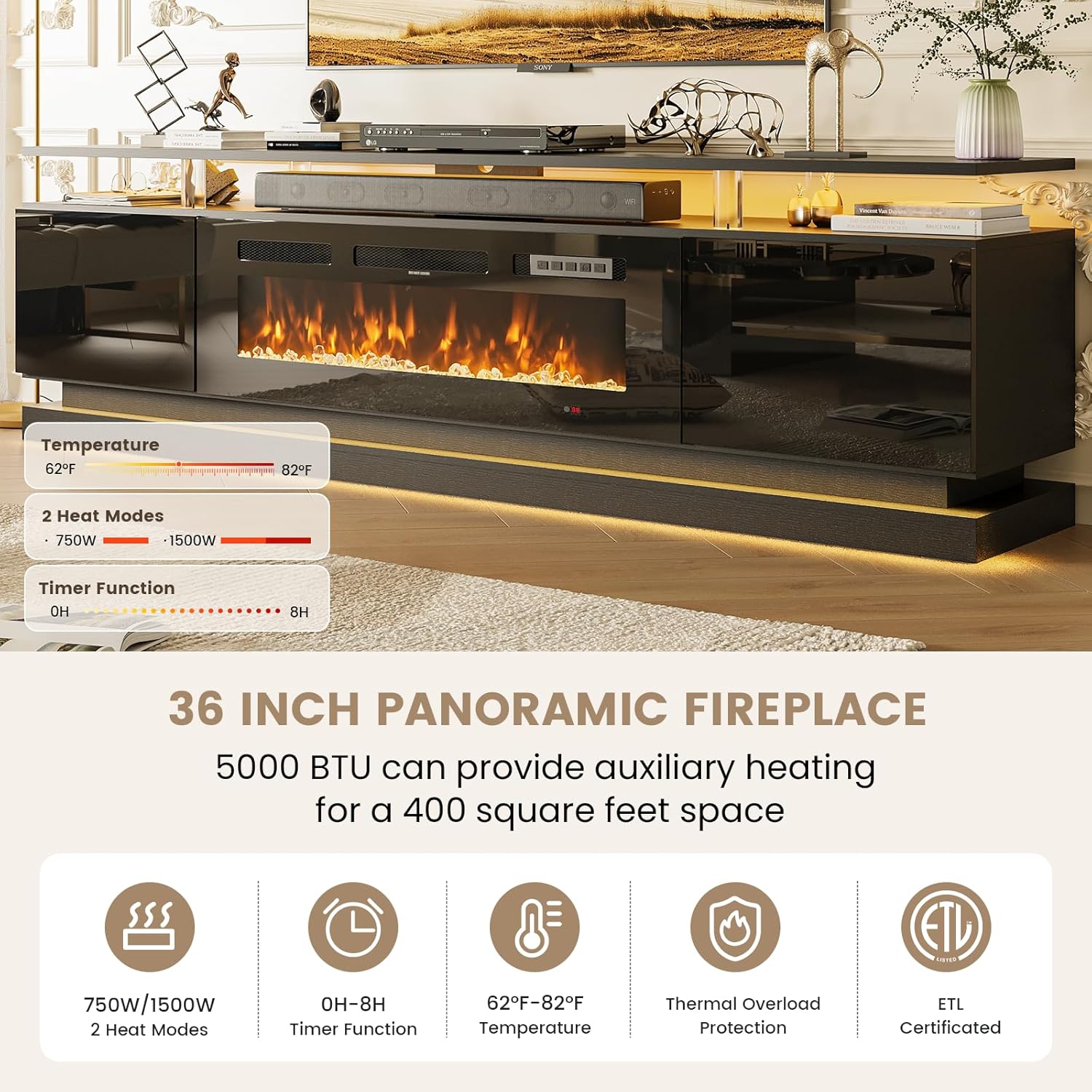
Figure 4.1: Fireplace control panel details.

Figure 4.2: Visual representation of flame brightness and color options.
4.2 Controls:
Use the dedicated fireplace remote control or the touch panel on the fireplace unit to adjust settings. The remote allows for power on/off, flame color and brightness adjustment, heat level selection, and timer activation.
Video 4.1: Demonstration of the Modern Black Fireplace TV Stand, showcasing its features and operation.
5. Operating the RGB LED Lighting
The TV stand features unique RGB LED light strips that enhance the ambiance of your living space. These lights can be controlled via a separate remote control or a dedicated mobile application.
- Multiple Lighting Modes: Choose from various dynamic lighting effects.
- 12 Backlight Colors: Select from a spectrum of 12 colors to match your mood or decor.
- Voice & Music Control: Control the light strip's changing rhythm with your voice or synchronize it with music via the mobile app.

Figure 5.1: RGB LED strip and acrylic column details.
6. Design and Storage Features
The Nordivale TV stand combines modern aesthetics with practical storage solutions.
- Sleek Modern Design: High-gloss, mirror-like surface for contemporary elegance.
- Large Capacity Storage: Equipped with a wide tabletop and two side cabinets for media devices, books, and other items.
- Four Acrylic Column Supports: Provides stability and adds a modern, technological touch.

Figure 6.1: Spacious storage cabinets.

Figure 6.2: Detail of the mirror-like cabinet door.
7. Maintenance
To ensure the longevity and appearance of your TV stand, follow these maintenance guidelines:
- Cleaning: Use a soft, damp cloth for general cleaning. Avoid abrasive cleaners or harsh chemicals that may damage the high-gloss finish.
- Dusting: Regularly dust the surfaces with a dry, soft cloth.
- Fireplace Care: Ensure the fireplace vents are clear of obstructions. Refer to the fireplace insert manual for specific cleaning instructions.
8. Troubleshooting
If you encounter any issues with your Nordivale Fireplace TV Stand, refer to the following common troubleshooting tips:
- Fireplace Not Turning On: Check if the power cord is securely plugged into a working outlet. Ensure the main power switch on the unit is in the 'ON' position.
- No Heat Output: Verify that the heat function is activated via the remote or control panel and the temperature setting is above the ambient room temperature. Check for any obstructions in the heat vents.
- LED Lights Not Working: Ensure the LED light strips are properly connected and the remote control batteries are functional. Try resetting the power to the unit.
- Remote Control Issues: Replace batteries if necessary. Ensure there are no obstructions between the remote and the unit's sensor.
For further assistance, please contact Nordivale customer support.
9. Specifications
| Feature | Detail |
|---|---|
| Brand | Nordivale |
| Model Number | H21426-70BKBKW |
| Dimensions (W x D x H) | 70 x 13.8 x 23.4 inches |
| Item Weight | 78 pounds |
| Tabletop Weight Capacity | 132 lbs |
| Shelves Weight Capacity | 33 lbs |
| Fireplace Size | 36 inches |
| Heat Output | 750W/1500W (5000 BTU) |
| Heating Area | Up to 400 sq ft |
| Temperature Range | 62°F - 82°F |
| Flame Brightness Levels | 5 |
| Flame Colors | 12 |
| LED Backlight Colors | 12+ modes |
| Certifications | CSA & ETL |
10. Warranty and Support
Nordivale products are designed for quality and durability. For information regarding product warranty, returns, or customer support, please refer to your purchase documentation or contact Nordivale-service directly. You may also find assistance through the retailer where the product was purchased.
Nordivale-service offers 30-day easy returns and dedicated customer support.