
1. Product Overview
The HIRREO TX12 Military Smart Watch is designed for durability and comprehensive functionality, featuring a large HD display, long battery life, and extensive health and fitness tracking capabilities.
Key Features
- 2.01-inch HD Large Square Screen: Provides a clear and intuitive visual experience with a wider display area.
- 900mAh Ultra Long Battery Life: Offers extended usage without frequent charging, ideal for travel and outdoor activities.
- LED Flashlight Function: Integrated flashlight for convenience during night activities or emergencies.
- 100+ Sports Modes: Supports a wide range of activities with detailed data monitoring.
- Sports Data Monitoring: Tracks calories, steps, distance, and sleep to promote a scientific lifestyle.
- Bluetooth Call & Notification: Enables stable and fast connections for answering calls and receiving smart message reminders.
- Durable Design: Square and tough appearance with wear-resistant, scratch-resistant materials, IP68 waterproof rating.
Package Contents
- HIRREO TX12 Smart Watch
- Instruction Manual
- Stainless Steel Strap
- Silicone Straps
- Strap Accessories (tool for adjustment)
- USB Charger
- Type-C Charger
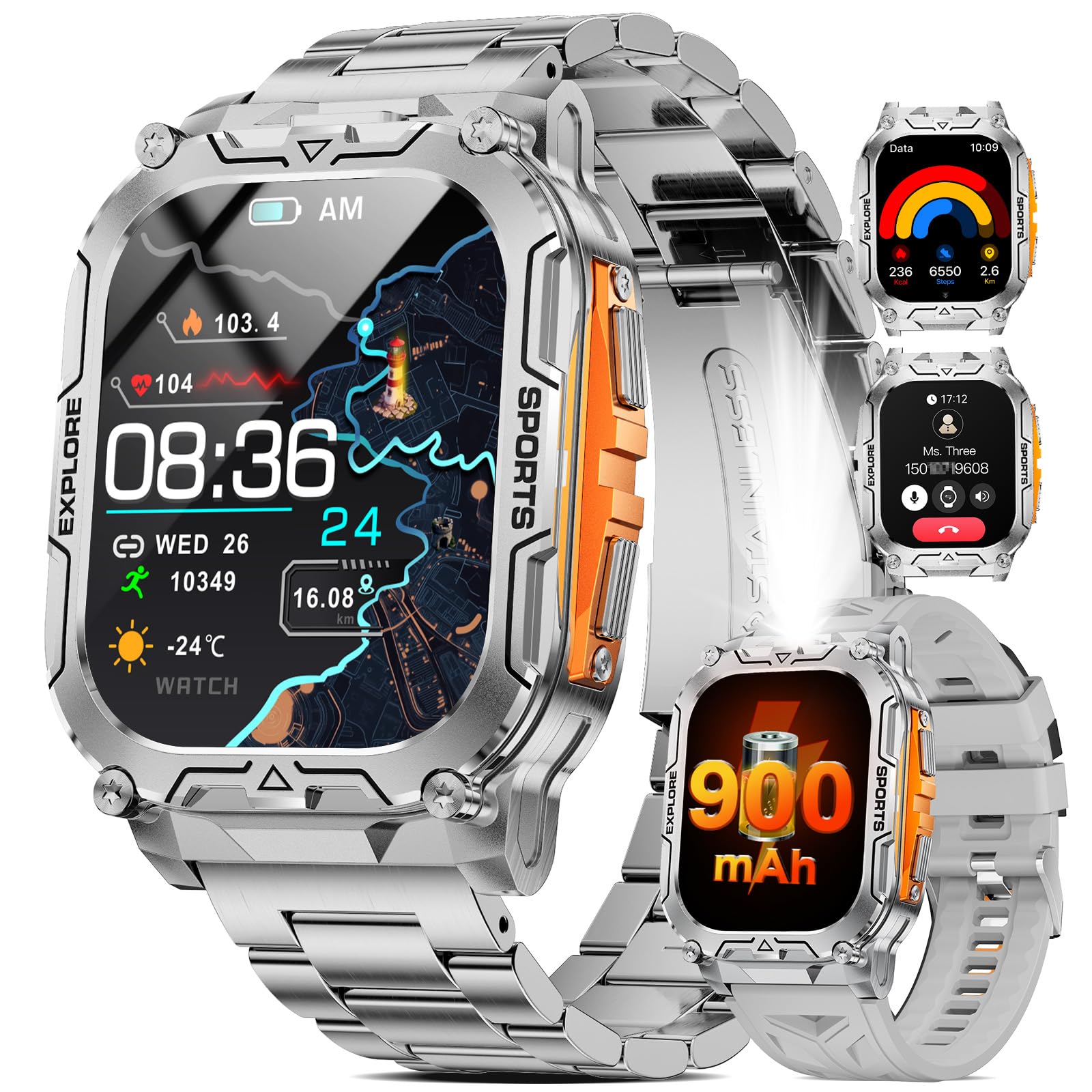
The HIRREO TX12 Military Smart Watch, showcasing its robust design and digital display.
2. Setup Guide
2.1 Charging the Smart Watch
Before initial use, fully charge your smart watch. The device comes with a 900mAh battery and typically requires 3 hours for a full charge.
- Connect the provided USB or Type-C charger to a power source.
- Attach the magnetic charging pins to the corresponding contacts on the back of the watch.
- Ensure the watch screen indicates charging.

The smart watch connected to its magnetic charger, indicating the charging process.
2.2 App Installation and Pairing
To unlock the full potential of your TX12 Smart Watch, download and connect it to the companion app.
- Download the FitCloudPro app from the App Store (iOS) or Google Play (Android).
- Enable Bluetooth on your smartphone.
- Open the FitCloudPro app and follow the on-screen instructions to search for your device.
- Select "TX12" from the list of available devices to pair.
- Confirm the pairing request on both your phone and the smart watch.
- Allow the smart watch to display notifications when prompted by the app.

Visual guide for connecting the smart watch to your smartphone via the FitCloudPro app.
This video demonstrates the unboxing, strap changing, app installation, and pairing process for the smart watch.
2.3 Strap Adjustment
The TX12 Smart Watch comes with both stainless steel and silicone straps. Use the provided tool to adjust the length of the stainless steel strap by removing or adding links.
- To remove a link, align the tool's pin with the strap pin and gently push to release.
- To attach a strap, align the spring bar with the lug holes on the watch body and slide it into place.

The smart watch featuring its metal strap, which can be adjusted for fit.
3. Operating Your Smart Watch
3.1 Basic Navigation
Navigate the watch interface using the touchscreen and physical buttons:
- Swipe Up/Down: Scroll through menus and notifications.
- Swipe Left/Right: Access quick functions or widgets.
- Tap: Select an item or confirm an action.
- Side Buttons: Used for power, back, and quick access to sports modes.
3.2 Watch Faces
Customize your watch's appearance with a variety of watch faces available through the FitCloudPro app. You can choose from over 100 pre-designed faces or create custom ones using your own photos.

A digital watch face showing time, steps, and heart rate data.
This video showcases various watch faces and UI navigation on the smart watch.
3.3 Bluetooth Calls and Notifications
With Bluetooth 5.3 connectivity, the TX12 allows you to manage calls and receive notifications directly on your wrist.
- Answering Calls: Tap the green icon on the watch screen when an incoming call is received.
- Dialing: Access the dial pad or contact list from the watch to make calls.
- Notifications: Receive alerts for messages, social media, and other app notifications from your paired smartphone.

The smart watch showing an incoming call and various message notifications.
3.4 LED Flashlight
Activate the built-in LED flashlight for quick illumination in dark environments.
- Access the flashlight function from the watch's quick settings or menu.
- Tap to turn on/off the light.

The smart watch's LED flashlight providing illumination in a dark setting.
This video demonstrates the durability of the smart watch and its flashlight function.
4. Health and Fitness Tracking
4.1 Sports Modes
The TX12 Smart Watch offers 8 built-in sports modes and over 100 additional modes accessible via the app. It tracks various metrics to help you monitor your performance.
- Select your desired sport from the watch menu.
- The watch will record data such as steps, calories, distance, and heart rate.
- Review your workout summaries in the FitCloudPro app.

The smart watch interface showing different sports modes and real-time activity data.
4.2 Health Monitoring
Monitor your health with continuous tracking of vital signs and sleep patterns.
- Heart Rate (HR): Continuously monitors your heart rate throughout the day.
- Blood Oxygen (SpO2): Measures blood oxygen levels.
- Blood Pressure: Provides estimates of blood pressure.
- Sleep Tracking: Automatically detects sleep stages (light, deep, REM) and provides insights into sleep quality.
- Stress Tracker & Breathing Training: Helps manage stress levels through guided breathing exercises.
*Note: Health data is for reference purposes only and cannot be used for professional medical diagnosis.

The smart watch showing real-time health metrics including heart rate, blood oxygen, and breathing exercise prompts.
4.3 GPS Tracking
The TX12 Smart Watch supports GPS tracking via your smartphone, allowing you to accurately record your outdoor activities.
- Ensure your smart watch is connected to your smartphone with GPS enabled.
- Start an outdoor activity in the sports mode to track your route, distance, and pace.
This video demonstrates the built-in GPS, barometer, altimeter, and compass functions of the smart watch, useful for outdoor navigation.
5. Durability and Design
The HIRREO TX12 is engineered for rugged environments, featuring a durable construction that withstands various conditions.
- IP68 Waterproof: Resistant to water and dust, suitable for swimming and daily use.
- Anti-Impact & Shockproof: Designed to absorb shocks and impacts, protecting the internal components.
- Wear-resistant Materials: Constructed with robust materials to ensure longevity and maintain aesthetic appeal.

The smart watch highlighting its robust construction, including waterproof, shockproof, and dustproof capabilities.
This video demonstrates the durability of the smart watch through various tests, including exposure to ice, water, and impact.
6. Other Functions
The TX12 Smart Watch includes several additional features to enhance your daily experience:
- Music Control: Control music playback on your smartphone directly from the watch.
- Camera Control: Use the watch as a remote shutter for your phone's camera.
- Weather Forecast: Get real-time weather updates on your wrist.
- Alarm Clock & Timer: Set alarms and use the timer function for various activities.
- Drinking Water & Sedentary Reminders: Receive alerts to stay hydrated and active.
- Find Phone: Locate your misplaced smartphone by triggering an alert from your watch.
- Voice Assistant: Interact with your phone's voice assistant for hands-free control.
- Calculator: A convenient calculator function for quick calculations.

The smart watch interface showing quick access to music control, flashlight, camera control, weather, alarm, and drink reminders.
7. Specifications
| Brand | HIRREO |
| Model | TX12-C-CA |
| Screen Size | 2.01 Inches |
| Display Type | LCD |
| Battery Capacity | 900 Milliamp Hours |
| Battery Average Life | 7 days |
| Charging Time | 3 Hours |
| Waterproof Rating | IP68 |
| Connectivity Technology | Bluetooth 5.3 |
| Compatible Devices | iOS 11.0+ (calls iOS 13+), Android 5.0+ |
| Special Features | LED Flashlight, Weather Forecast, Stopwatch, Pedometer, Timer, Music Control, Brightness Adjustment, Find Phone, Alarm Clock, Camera Control, Calculator, Drinking Water Reminder, Sedentary Reminder, Do Not Disturb Mode, All-Day Activity Tracker, 100+ Sports Modes, Fitness Tracker, Stress Tracker, Sleep, Calorie Counter, Answer/Dial Calls, Messaging Notification, Voice Assistant, Multi-Language |
8. Maintenance
Proper maintenance ensures the longevity and optimal performance of your smart watch.
- Cleaning: Regularly wipe the watch screen and straps with a soft, dry cloth. For stubborn dirt, use a slightly damp cloth and mild soap, then rinse and dry thoroughly.
- Water Exposure: While IP68 waterproof, avoid prolonged submersion in hot water or exposure to high-pressure water jets. Dry the watch completely after exposure to water.
- Battery Care: Avoid fully discharging the battery frequently. Charge the watch when the battery level is low to maintain battery health. Store in a cool, dry place if not used for extended periods.
- Avoid Extreme Temperatures: Do not expose the watch to extreme hot or cold temperatures, as this can affect battery life and component integrity.
9. Troubleshooting
If you encounter issues with your HIRREO TX12 Smart Watch, try the following steps:
- Watch Not Turning On: Ensure the watch is fully charged. Connect it to the charger and wait a few minutes before attempting to power it on.
- Pairing Issues: Make sure Bluetooth is enabled on your phone and the watch is within range. Restart both your phone and watch, then try pairing again. Check if the FitCloudPro app is updated to the latest version.
- Inaccurate Data: Ensure the watch is worn snugly on your wrist (not too tight or too loose) for accurate heart rate and other health readings. Calibrate GPS via your phone if outdoor tracking is inconsistent.
- Notifications Not Received: Verify that notification permissions are granted to the FitCloudPro app on your phone and that specific app notifications are enabled within the FitCloudPro settings.
- Screen Unresponsive: Restart the watch by pressing and holding the power button. If unresponsive, allow the battery to fully drain and then recharge.
10. Warranty and Support
Your HIRREO TX12 Smart Watch comes with comprehensive support and warranty coverage.
- Warranty: Enjoy a 24-month warranty from the date of purchase.
- Online Support: Access 24-hour online support for any questions or issues you may encounter.
- Contact: For assistance, please refer to the contact information provided in your product packaging or visit the official HIRREO store.
For more information, visit the HIRREO Store.
