1. Introduction
Welcome to the user manual for your new Fire-Boltt Clickk Smartwatch. This device is designed to enhance your daily life with its advanced features, including a vibrant AMOLED display, integrated front camera, Nano SIM support for standalone communication, and comprehensive health and fitness tracking capabilities. This manual provides essential information for setting up, operating, and maintaining your smartwatch.
2. Package Contents
Please verify that all items are present in your package:
- Fire-Boltt Clickk Smartwatch
- Charging Cable
- User Manual (this document)
3. Setup Guide
3.1. Charging the Smartwatch
Before initial use, fully charge your Fire-Boltt Clickk Smartwatch.
- Connect the provided charging cable to the charging port on the back of the smartwatch.
- Connect the other end of the charging cable to a 5V 1A USB power adapter (not included). Using adapters with higher voltage or amperage may damage the device.
- The smartwatch display will indicate charging status. A full charge typically takes approximately 2.5 hours.
Note: The smartwatch has a 1000 mAh battery. Ensure proper charging practices to maintain battery health.
3.2. Nano SIM Card Installation
The Fire-Boltt Clickk Smartwatch supports a Nano SIM card for standalone calling and network connectivity.
- Locate the SIM card tray on the side of the smartwatch.
- Carefully insert the Nano SIM card into the tray, ensuring the correct orientation as indicated on the tray.
- Gently push the tray back into the smartwatch until it clicks into place.
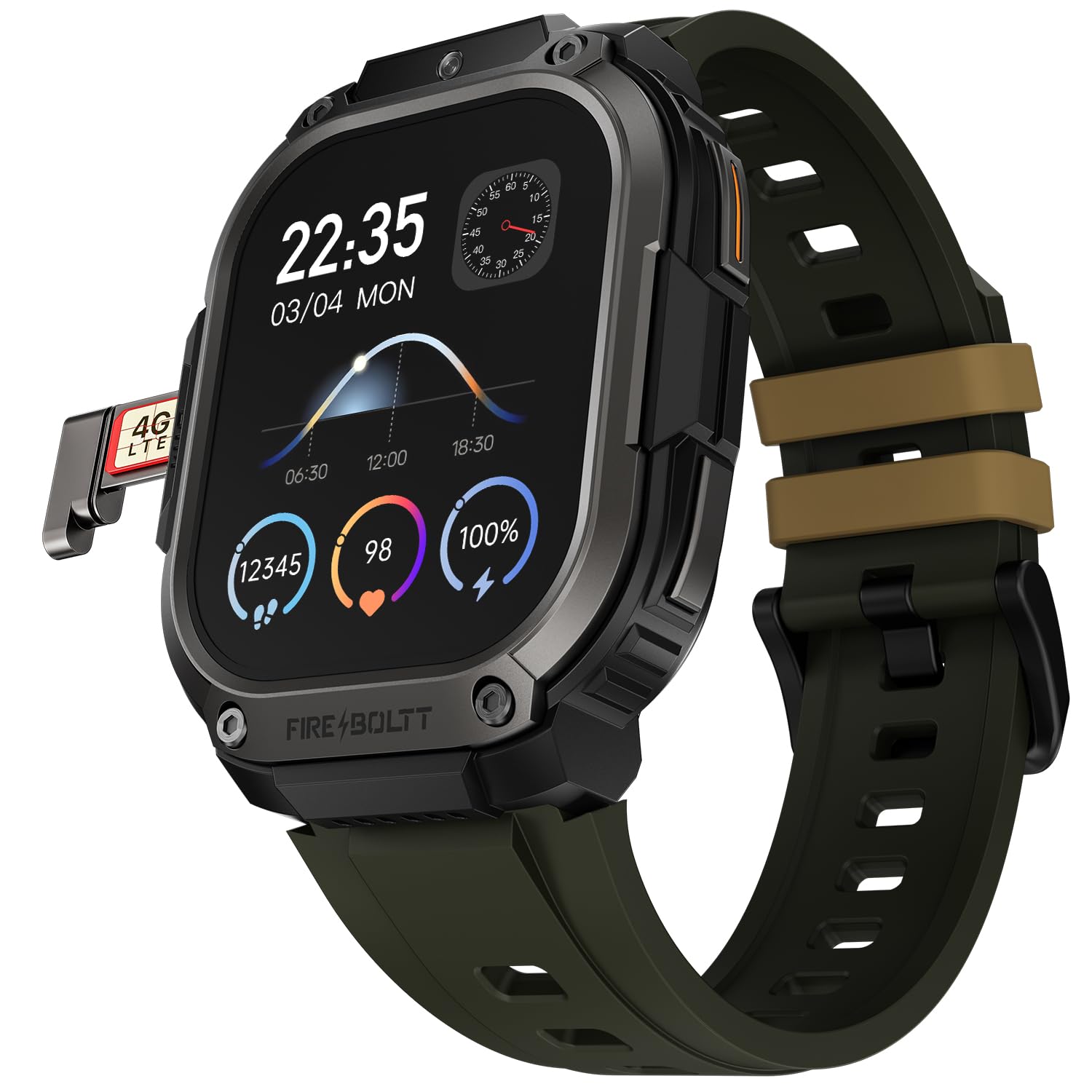
Image 1: The Fire-Boltt Clickk Smartwatch displaying its 54.1mm AMOLED screen and the Nano SIM card tray partially ejected on the left side, showing a "4G LTE" SIM card. The watch face shows time (22:35), date (03/04 MON), and various health metrics like steps, heart rate, and battery percentage.
3.3. Powering On/Off
- To Power On: Press and hold the power button (usually on the side) until the Fire-Boltt logo appears.
- To Power Off: Press and hold the power button, then select "Power Off" on the screen, or navigate to the settings menu and choose "Power Off".
3.4. App Pairing (Bluetooth Connection)
To unlock the full potential of your smartwatch, pair it with the official Fire-Boltt application on your smartphone.
- Download the official Fire-Boltt app from your smartphone's app store (Google Play Store for Android, Apple App Store for iOS).
- Ensure Bluetooth is enabled on your smartphone and the smartwatch.
- Open the Fire-Boltt app, create an account or log in, and follow the on-screen instructions to add your device.
- Select "Fire-Boltt Clickk" from the list of available devices in the app and confirm the pairing request on both your phone and smartwatch.
4. Operating Your Smartwatch
4.1. Basic Navigation
- Touchscreen: Swipe left, right, up, or down to navigate through menus and widgets on the 2.12-inch AMOLED display. Tap to select items.
- Side Buttons: Use the physical buttons on the side for quick access to functions like power on/off, back, or app shortcuts.
4.2. Making and Receiving Calls
- Bluetooth Calling: When paired with your smartphone, you can make and receive calls directly from your smartwatch using Bluetooth.
- Standalone Calling: With a Nano SIM card installed, the smartwatch can function as a standalone phone, allowing you to make and receive calls independently.
4.3. Using the Front Camera
The Fire-Boltt Clickk features a built-in 2 MP front camera.
- Access the camera application from the main menu.
- Use the camera for taking selfies or participating in video calls directly from your wrist.
4.4. Health and Fitness Tracking
Your smartwatch is equipped with advanced sensors for comprehensive health monitoring.
- Heart Rate Monitoring: Continuously track your heart rate throughout the day.
- SpO₂ Tracking: Monitor your blood oxygen levels.
- HRV: Heart Rate Variability tracking.
- Activity Tracking: Utilizes a 3-axis acceleration sensor to track steps, distance, and calories burned.
- Sports Modes: Select from multiple sports modes to accurately track various physical activities.
All health data can be viewed on the smartwatch and synchronized with the Fire-Boltt app for detailed analysis.
4.5. Notifications and Smart Features
- Receive real-time notifications for calls, SMS, emails, and social media apps like WhatsApp directly on your wrist.
- The smartwatch supports Wi-Fi (802.11n) and built-in GPS for enhanced connectivity and location tracking.
5. Maintenance
5.1. Cleaning Your Smartwatch
To keep your smartwatch in optimal condition:
- Wipe the screen and body with a soft, lint-free cloth.
- Avoid using harsh chemicals or abrasive materials.
- Ensure the charging contacts are clean and dry before charging.
5.2. Water Resistance
Information regarding specific water resistance ratings (e.g., IP67, 5ATM) is not provided. To prevent damage, avoid submerging the smartwatch in water or exposing it to high-pressure water jets.
6. Troubleshooting
6.1. Common Issues and Solutions
- Smartwatch not turning on: Ensure the device is fully charged using a 5V 1A adapter.
- Battery drains quickly:
- Reduce screen brightness.
- Limit background app usage.
- Disable unnecessary features like Wi-Fi or GPS when not in use.
- Ensure you are using the correct 5V 1A charger.
- Cannot pair with smartphone:
- Ensure Bluetooth is enabled on both devices.
- Restart both the smartwatch and smartphone.
- Make sure the Fire-Boltt app is updated to the latest version.
- Poor call quality: Ensure good network signal if using a SIM card. If using Bluetooth calling, ensure your phone has good signal and is within range.
For further assistance, please refer to the support section or contact customer service.
7. Specifications
| Feature | Detail |
|---|---|
| Brand | Fire-Boltt |
| Model Number | 221BSWAAY#3 |
| Display Size | 54.1mm (2.12 Inches) |
| Display Type | AMOLED |
| Resolution | 410x502 pixels |
| Front Camera | 2 MP |
| SIM Support | Nano SIM |
| Battery Capacity | 1000 mAh (Lithium Ion) |
| Connectivity | Bluetooth, Wi-Fi (802.11n), GPS (Built-in) |
| Health Tracking | Heart Rate, SpO₂, HRV, 3-axis acceleration sensor |
| Compatible Devices | Smartphone |
| Item Weight | 46 g |
| Mounting Hardware | Charging Cable |
8. Warranty and Support
Your Fire-Boltt Clickk Smartwatch comes with a 1-Year Manufacturer's Warranty from the date of purchase. This warranty covers manufacturing defects. Please retain your proof of purchase for warranty claims.
For technical support, warranty claims, or further inquiries, please visit the official Fire-Boltt website or contact their customer service. You can find more information on the Fire-Boltt Store on Amazon.


