
1. Introduction
Thank you for choosing the Skeri Electric Tricycle ET03. This manual provides essential information for the safe operation, assembly, maintenance, and troubleshooting of your new electric tricycle. Please read this manual thoroughly before your first ride to ensure optimal performance and safety.
The Skeri ET03 is designed for adults, featuring a powerful 750W motor (1350W peak), a 48V 13Ah removable battery, 20"x4" fat tires, and a 3-wheel design for enhanced stability. It includes front and rear baskets for convenience and a differential system for improved maneuverability.
2. Safety Information
Your safety is paramount. Always adhere to the following guidelines:
- Always wear a helmet that meets safety standards.
- Perform a pre-ride inspection before each use, checking brakes, tire pressure, battery charge, and all fasteners.
- Obey all local traffic laws and regulations.
- Do not ride under the influence of alcohol or drugs.
- Be aware of your surroundings and ride defensively.
- Ensure the parking brake is engaged when stopped on an incline or when loading/unloading the baskets.
- Avoid riding in adverse weather conditions or on excessively rough terrain if you are not experienced.
- Keep hands and feet clear of moving parts.
For detailed safety instructions, refer to the full safety manual provided with your tricycle.
3. Setup and Assembly
The Skeri Electric Tricycle ET03 arrives approximately 90% pre-assembled. Follow these steps for final assembly:
- Unpacking: Carefully remove all components from the packaging. Retain packaging for future transport or storage.
- Handlebar Installation: Attach the handlebars to the stem, ensuring they are centered and tightened securely. Adjust the angle for comfortable riding.
- Front Wheel and Fender: Install the front wheel and fender. Ensure the disc brake caliper is correctly aligned with the rotor.
- Pedal Installation: Identify the left (L) and right (R) pedals. Thread them into the crank arms by hand first, then tighten with a wrench. Note that the left pedal is reverse-threaded.
- Seat and Backrest Adjustment: Insert the seat post into the frame and adjust the seat height for comfortable pedaling. Attach the backrest and adjust its position.
- Basket Attachment: Securely attach the front and rear baskets using the provided hardware.
- Battery Installation: Insert the fully charged battery into its compartment and lock it in place.
- Pre-Ride Check: Before your first ride, double-check all bolts, nuts, and quick releases to ensure they are properly tightened. Verify brake function and tire pressure.

Image: The Skeri Electric Tricycle ET03, showcasing its overall structure with front and rear baskets, ready for assembly.

Image: An overview of the Skeri ET03 highlighting features like step-thru design, 7-speed gears, all-terrain tires, integrated headlight, rear differential, 80-mile range, 4-hour charge time, and parking brake.
4. Operating Instructions
4.1 Powering On/Off
To power on the tricycle, press and hold the power button on the LCD display. To power off, press and hold the same button until the display turns off.
4.2 Battery and Charging
The Skeri ET03 is equipped with a UL Certified 48V 13Ah removable lithium-ion battery. A full charge provides up to 50 miles of range in pedal-assist mode. Charging time is approximately 4 hours.
- Charging: Connect the charger to the charging port on the battery or directly to the battery if removed from the tricycle. Plug the charger into a standard wall outlet. The indicator light on the charger will show charging status (usually red for charging, green for fully charged).
- Battery Removal: Use the key to unlock the battery from the frame. Carefully slide the battery out.
- Battery Care: Store the battery in a cool, dry place. Avoid fully discharging the battery for extended periods.

Image: Close-up of the removable 48V 13Ah lithium-ion battery on the Skeri ET03, highlighting its UL certification and specifications.
4.3 Riding Modes
The tricycle offers multiple riding modes:
- Pedal-Assist Mode (PAS): Provides motor assistance as you pedal. The level of assistance can be adjusted via the LCD display. This mode is ideal for extending range and reducing effort.
- Full-Electric Mode (Throttle): Use the twist throttle on the handlebar to engage the motor without pedaling. This mode is suitable for effortless cruising.
- Manual Mode: Ride the tricycle like a traditional bicycle without any motor assistance.
4.4 LCD Display
The central LCD display provides real-time information about your ride:
- Battery Status: Shows the remaining battery charge.
- Speed: Displays current riding speed.
- Pedal Assist System (PAS) Level: Indicates the current level of motor assistance.
- Riding Mode: Shows the active riding mode.
- Distance: Tracks trip distance or total odometer reading.

Image: View of the Skeri ET03 handlebars, showing the central LCD display, dashboard controls, phone holder, twist throttle, horn, and Shimano 7-speed shifter.
4.5 Shifting Gears
The tricycle features a Shimano 7-speed gear system. Use the twist grip shifter on the handlebar to change gears. Shift to lower gears for climbing hills and higher gears for flat terrain or downhill riding.

Image: Close-up of the Shimano 7-speed derailleur system on the Skeri ET03, illustrating the gear mechanism.
4.6 Braking System
The Skeri ET03 is equipped with high-performance front and rear hydraulic disc brakes for reliable stopping power. It also features a hydraulic parking brake for secure parking.
- Engaging Brakes: Squeeze the brake levers on the handlebars to activate the disc brakes. Apply both brakes simultaneously for balanced stopping.
- Parking Brake: To engage the parking brake, squeeze the brake lever and then activate the parking lock mechanism (usually a small lever or button on the brake lever). Ensure the tricycle is stable before dismounting.

Image: Close-up of the hydraulic disc brake system on the front wheel of the Skeri ET03, showing the caliper and rotor.
4.7 Differential System
The innovative rear hub and differential system allow the rear wheels to spin at different speeds, providing superior maneuverability and stability, especially during turns. This reduces the risk of tipping compared to standard trikes.

Image: Diagram illustrating the rear differential system of the Skeri ET03, showing how it enables smoother and safer cornering by allowing wheels to rotate at different speeds.
5. Maintenance
Regular maintenance ensures the longevity and safe operation of your Skeri Electric Tricycle ET03.
- Tires: Check tire pressure before each ride. The 20"x4" fat tires require specific pressure, usually indicated on the tire sidewall. Inspect for wear and punctures.
- Brakes: Regularly check brake pads for wear and ensure brake levers provide firm, responsive stopping power. Adjust or replace as needed.
- Chain: Keep the chain clean and lubricated to prevent rust and ensure smooth shifting.
- Fasteners: Periodically check all bolts, nuts, and screws for tightness. Loose fasteners can lead to unsafe conditions.
- Battery: Keep battery contacts clean. Avoid storing the battery fully discharged. Charge it regularly, even if not in use, to maintain battery health.
- Cleaning: Clean the tricycle with a damp cloth. Avoid using high-pressure washers directly on electrical components.
6. Troubleshooting
This section addresses common issues you might encounter with your Skeri Electric Tricycle ET03.
| Problem | Possible Cause | Solution |
|---|---|---|
| Tricycle does not power on. | Battery not charged, battery not properly seated, power cable loose. | Charge the battery. Ensure the battery is fully inserted and locked. Check all cable connections. |
| Motor not assisting (PAS/Throttle). | Low battery, PAS level set to zero, brake levers engaged, loose motor cable. | Check battery charge. Increase PAS level on display. Ensure brake levers are fully released. Inspect motor cable connections. |
| Brakes feel weak or spongy. | Worn brake pads, air in hydraulic line, misaligned caliper. | Inspect and replace brake pads if worn. Consult a professional for hydraulic brake bleeding or caliper alignment. |
| Difficulty shifting gears. | Derailleur out of adjustment, dirty/dry chain, bent hanger. | Clean and lubricate the chain. Adjust derailleur tension. If hanger is bent, seek professional repair. |
If you encounter issues not listed here or cannot resolve a problem, please contact Skeri customer support.
7. Specifications
| Feature | Detail |
|---|---|
| Model Name | Electric Tricycle |
| Model Number | ET03 |
| Motor | 750W (Peak 1350W) Rear Hub Motor with Differential |
| Battery | 48V 13Ah Removable Lithium-ion (UL Certified) |
| Max Speed | 20 MPH |
| Max Range | Up to 50 miles (PAS mode) |
| Charging Time | Approx. 4 hours |
| Tires | 20" x 4" Fat Tires |
| Brakes | Front & Rear Hydraulic Disc Brakes with Parking Brake |
| Gears | Shimano 7-Speed |
| Frame Material | Aluminum |
| Suspension | Front Suspension Fork |
| Included Components | Front and Rear Baskets |
| Suggested Rider Height | 5'2" - 6'4" |
| Weight Capacity | 450 lbs (rider + cargo) |
| Handlebar Width | 28" |
| Total Width | 31" |
| Total Length | 66.54" |

Image: Detailed diagram of the Skeri ET03 showing handlebar width, total width, ergonomic seating dimensions, front and rear storage rack dimensions, and loading capacity (30 lbs front, 60 lbs rear).

Image: Detailed diagram of the Skeri ET03 showing total length, reach, standover height, seat height, handlebar height min-max, suggested rider height, and weight capacity.
8. Warranty and Support
Skeri provides a comprehensive warranty and dedicated customer support for your Electric Tricycle ET03.
- Warranty: Your Skeri Electric Tricycle ET03 comes with a 2-year manufacturer's warranty. This warranty covers defects in materials and workmanship under normal use. Please refer to the warranty card included with your product for full terms and conditions.
- Customer Support: For any questions, technical assistance, or warranty claims, please contact Skeri customer support. We offer 24/7 online support and step-by-step guides to assist you.
Contact Information:
- Online Support: Visit the official Skeri website or your purchase platform for support resources.
- Email Support: Refer to your product packaging or the Skeri website for the dedicated support email address.

Image: Skeri Care branding, indicating 2-year warranty, technical support, free shipping, 24-hour online support, 30-day risk-free trial, and setup guides.
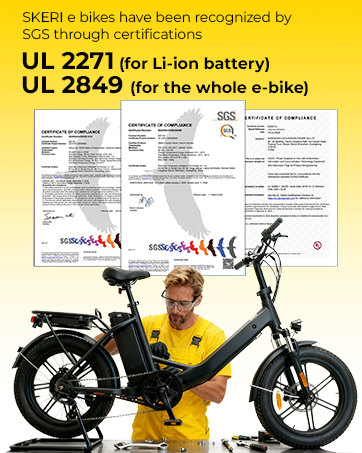
Image: UL 2271 (for Li-ion battery) and UL 2849 (for the whole e-bike) certifications by SGS, ensuring safety standards.