
LODIENTIWI FG300
LODIENTIWI FG300 DDS Schumann Wave Generator User Manual
Model: FG300
1. Introduction
The LODIENTIWI FG300 DDS Schumann Wave Generator is a versatile electronic instrument designed for generating various waveforms, including Schumann waves, across a frequency range of 0.001Hz to 200KHz. It features a 1.8-inch color display and a Type-C 5V power input, making it suitable for a wide array of electronic applications requiring precise signal generation. This manual provides essential information for the proper setup, operation, and maintenance of your device.
2. Setup
Follow these steps to set up your FG300 DDS Schumann Wave Generator:
- Unpacking: Carefully remove the generator and all accessories from the packaging. Verify that all components are present: the FG300 unit, a Type-C USB cable, and any included probes or connectors.
- Power Connection: Connect the provided Type-C USB cable to the Type-C port on the FG300 unit. Connect the other end of the USB cable to a standard 5V USB power source (e.g., a computer USB port, a USB wall adapter). The device will power on automatically.
- Initial Inspection: Before operation, visually inspect the device for any signs of damage. Ensure the screen is clear and the keypad buttons are responsive.
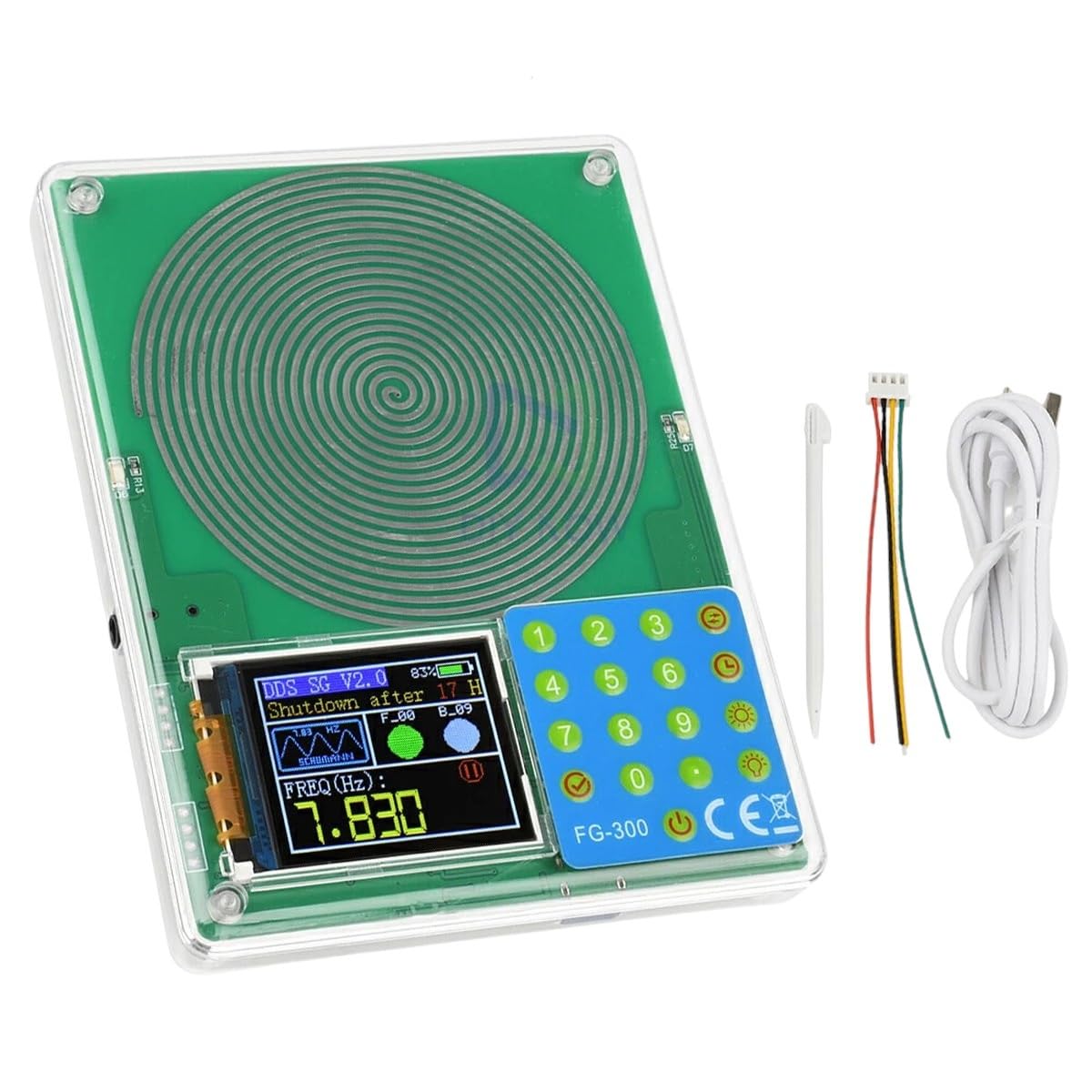
Figure 2.1: The LODIENTIWI FG300 DDS Schumann Wave Generator with its included Type-C cable and output wires. The device features a clear display and a numeric keypad for input.
3. Operating Instructions
The FG300 generator is operated via its 1.8-inch color display and integrated keypad. Below are the basic steps for generating waveforms:
- Power On: Once connected to a 5V Type-C power source, the device will automatically power on and display the main operating interface.
- Frequency Adjustment: Use the numeric keypad (0-9) to input the desired frequency in Hertz (Hz). The display will show the current frequency setting. Press the appropriate function key (e.g., 'Hz', 'KHz') to set the unit.
- Waveform Selection: The device supports multiple waveform outputs. Refer to the on-screen menu or dedicated function keys to cycle through available waveforms such as sine, square, triangle, and Schumann wave.
- Output Amplitude (Vpp): Adjust the peak-to-peak voltage (Vpp) if applicable, using the keypad or dedicated controls. The default Vpp is typically 5V.
- Output Connection: Connect your test equipment or circuit to the output terminals of the FG300 using appropriate cables.
- Start/Stop Output: Use the designated button (often indicated by a play/pause icon) to start or stop the waveform output.

Figure 3.1: A detailed view of the FG300's 1.8-inch color display showing frequency and waveform information, alongside the numeric and function keypad for precise control.
4. Maintenance
Proper maintenance ensures the longevity and optimal performance of your FG300 DDS Schumann Wave Generator:
- Cleaning: Use a soft, dry cloth to clean the exterior of the device. Avoid using abrasive cleaners, solvents, or excessive moisture, which can damage the display or internal components.
- Storage: Store the generator in a cool, dry place away from direct sunlight, extreme temperatures, and high humidity. Keep it protected from dust and physical impact.
- Environmental Conditions: Operate the device within its specified operating temperature and humidity ranges to prevent malfunction.
- Cable Care: Handle the Type-C USB cable and output wires carefully. Avoid sharp bends or excessive pulling that could damage the connectors or internal wiring.
5. Troubleshooting
If you encounter issues with your FG300 generator, refer to the following common problems and solutions:
- No Power/Display Off:
- Ensure the Type-C USB cable is securely connected to both the device and a functional 5V power source.
- Try a different USB cable or power adapter to rule out cable/adapter failure.
- Incorrect or No Output Signal:
- Verify that the output function is enabled (not paused or stopped).
- Check the frequency and waveform settings on the display.
- Ensure output cables are correctly connected to your test equipment and the generator.
- Confirm that the Vpp (amplitude) setting is appropriate for your application.
- Display Issues (e.g., flickering, unreadable):
- Restart the device by disconnecting and reconnecting the power.
- Ensure the device is not exposed to extreme temperatures or strong electromagnetic interference.
If the problem persists after attempting these solutions, please contact customer support.
6. Specifications
| Feature | Specification |
|---|---|
| Model | FG300 |
| Frequency Range | 0.001Hz - 200KHz |
| Display | 1.8-inch Color Screen |
| Power Input | Type-C 5V |
| Output Waveforms | DDS, Schumann Wave, Multiple Waveform Output |
| Material | Electronic Components |
| Manufacturer | LODIENTIWI |
| ASIN | B0FTF7DCRT |

Figure 6.1: A variety of electronic components, illustrating the core materials used in the construction of devices like the FG300 generator.
7. Warranty Information
For detailed warranty information regarding your LODIENTIWI FG300 DDS Schumann Wave Generator, please refer to the documentation provided at the time of purchase or contact the seller directly. Warranty terms typically cover manufacturing defects for a specified period from the purchase date.
8. Customer Support
Should you require technical assistance, have questions about the product, or need to report an issue, please contact LODIENTIWI customer support through the platform where the product was purchased or via the contact information provided by the manufacturer.
We are committed to providing reliable support for our products.
Ask a question about this manual
Ask about setup, troubleshooting, compatibility, parts, safety, or missing instructions. Manuals+ will review the question and use this page’s manual context to help answer it.