1. Introduction
This manual provides essential instructions for the safe and effective use of your KODAK Mini Shot 3 Retro Instant Camera & Photo Printer. Please read this manual thoroughly before operating the device and retain it for future reference.
1.1 Package Contents
- KODAK Mini Shot 3 Retro Instant Camera & Photo Printer (C300R)
- Initial 8-sheet photo paper cartridge
- Additional 60-sheet photo paper cartridges (M50W)
- USB charging cable
- User Manual
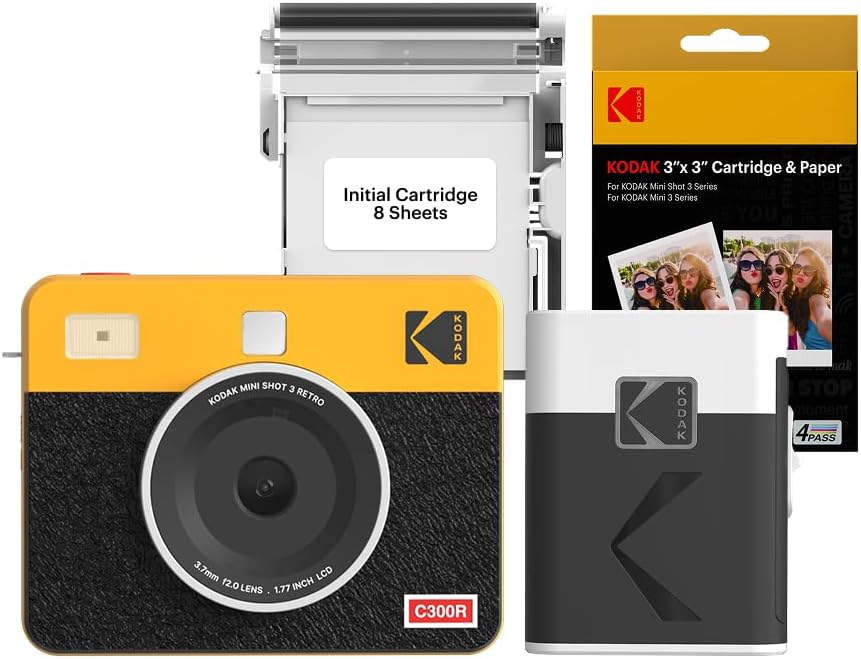
Image 1.1: The KODAK Mini Shot 3 Retro Instant Camera & Photo Printer (C300R) shown with an initial 8-sheet cartridge and a box of KODAK 3"x 3" Cartridge & Paper. The camera is yellow and black, featuring a 3.7mm f2.0 lens and a 1.77 inch LCD. The paper uses 4PASS technology.
2. Safety Information
To ensure safe operation, observe the following precautions:
- Do not expose the device to water or extreme temperatures.
- Keep the device away from direct sunlight for prolonged periods.
- Use only KODAK-approved accessories and consumables.
- Do not attempt to disassemble or modify the device.
- Keep out of reach of children.
- Dispose of batteries and cartridges according to local regulations.
3. Setup
3.1 Charging the Device
Before first use, fully charge the KODAK Mini Shot 3 Retro using the provided USB cable. Connect the cable to the device's charging port and a compatible USB power source. The charging indicator will show the charging status.
3.2 Loading Photo Paper
The KODAK Mini Shot 3 Retro uses KODAK 3"x 3" photo paper cartridges with 4PASS technology. To load a cartridge:
- Open the paper tray cover on the side of the camera.
- Insert the new photo paper cartridge into the tray, ensuring it clicks into place.
- Close the paper tray cover securely.
Each cartridge contains a specific number of sheets, indicated on the packaging (e.g., 8 sheets for the initial cartridge, 60 sheets for additional packs).
3.3 Connecting to the KODAK Photo Printer App
The camera can connect to the KODAK Photo Printer app via Bluetooth for enhanced functionality, including printing photos from your smartphone.
- Download the
Related Documents - Kodak Mini Shot 3 Retro (C300R)

Kodak Mini Shot 3 Retro Instant Camera and Photo Printer User Manual
Comprehensive user manual for the Kodak Mini Shot 3 Retro and Mini Shot 2 Retro instant camera and photo printers, detailing features, operation, and troubleshooting.
Kodak Mini Shot 3 Retro User Manual
User manual for the Kodak Mini Shot 3 Retro 2-in-1 portable wireless instant camera and photo printer. Includes instructions on setup, printing, and maintenance.
KODAK C300/C300R Instant Square Printer Combo User Guide
User guide for the KODAK C300 and C300R Instant Square Printer combo, covering setup, app installation, printing, troubleshooting, and specifications.
KODAK M50 Monochrome Thermal Instant Printer User Manual
Comprehensive user manual for the KODAK M50 Monochrome Thermal Instant Printer (ver 3.0), covering specifications, setup, operation, Bluetooth pairing, app usage, warranty information, and compliance details. Learn how to use your KODAK M50 printer.
Kodak STEP Instant Mobile Photo Printer Quick Start Guide
Get started quickly with your Kodak STEP Instant Mobile Photo Printer. This guide covers setup, pairing, charging, and safety precautions for seamless photo printing.
Kodak Step Slim Instant Mobile Photo Printer Quick Start Guide
A quick start guide for the Kodak Step Slim Instant Mobile Photo Printer, detailing setup, paper loading, Bluetooth pairing, and safety precautions.