
Introduction
Thank you for choosing the Olvy Portable Air Compressor. This device is designed for convenient and efficient inflation of various items, including car, bike, and motorcycle tires, as well as sports balls and inflatable mattresses. Its cordless design, powerful rechargeable battery, and smart features make it an essential tool for on-the-go inflation. Please read this manual carefully before use to ensure proper operation and to maximize the product's lifespan.
Safety Information
- Always keep the device away from children.
- Do not operate the compressor in wet conditions or near flammable liquids or gases.
- Ensure the correct pressure setting for the item being inflated to prevent over-inflation, which can cause damage or injury.
- Do not leave the compressor unattended while in operation.
- Allow the device to cool down after prolonged use to prevent overheating.
- Use only the provided charging cables and adapters.
- Do not disassemble or modify the device. Contact customer support for repairs.
Package Contents
Verify that all items are present in the box:
- 1x Olvy Portable Air Compressor
- 1x USB-C Charging Cable
- 1x 12V Car Charger
- 3x Valve Adapters (Presta, Ball Needle, Inflatable Nozzle)
- 1x Waterproof Storage Pouch
- 1x User Manual

The image above displays the complete set of items you should find in your product box, ensuring you have everything needed for various inflation tasks.
Product Features
- Cordless and Portable Design: Compact 12V air compressor with an integrated 6000 mAh rechargeable battery for inflation anywhere without an electrical outlet.
- High Pressure Performance: Delivers up to 10.3 bar / 150 PSI with a flow rate of 28 L/min.
- Automatic Shut-off: Prevents over-inflation by stopping automatically once the preset pressure is reached.
- Multi-Adapter Compatibility: Includes 4 nozzles/adapters suitable for car tires, bike tires, balls, inflatable mattresses, and other inflatables.
- Smart Digital Display: LCD screen shows pressure in PSI, BAR, KPA, or KG/cm² for precise monitoring during inflation.
- Integrated LED Flashlight: Features an LED light with an SOS mode for emergencies or low-light conditions.
- Power Bank Function: Can be used to charge other devices via its USB output.
- Cooling System: Built-in system to prevent overheating during extended use.

This image highlights the versatility of the digital display, allowing users to select their preferred pressure unit, and also shows the included storage pouch for convenient transport and protection.
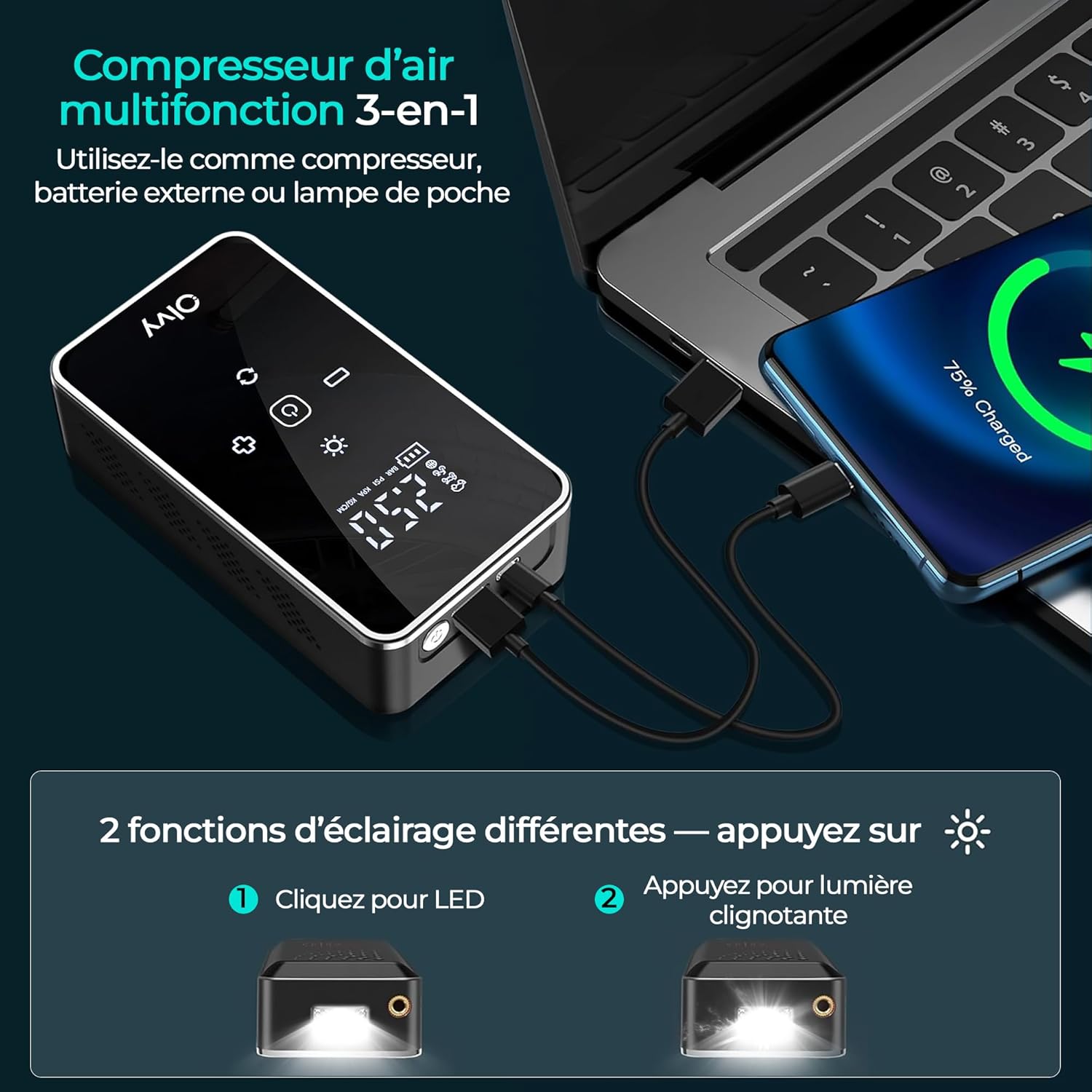
The compressor's multi-functional design allows it to serve as an air pump, a portable power bank for charging electronic devices, and a flashlight with both steady and flashing (SOS) modes for enhanced utility.
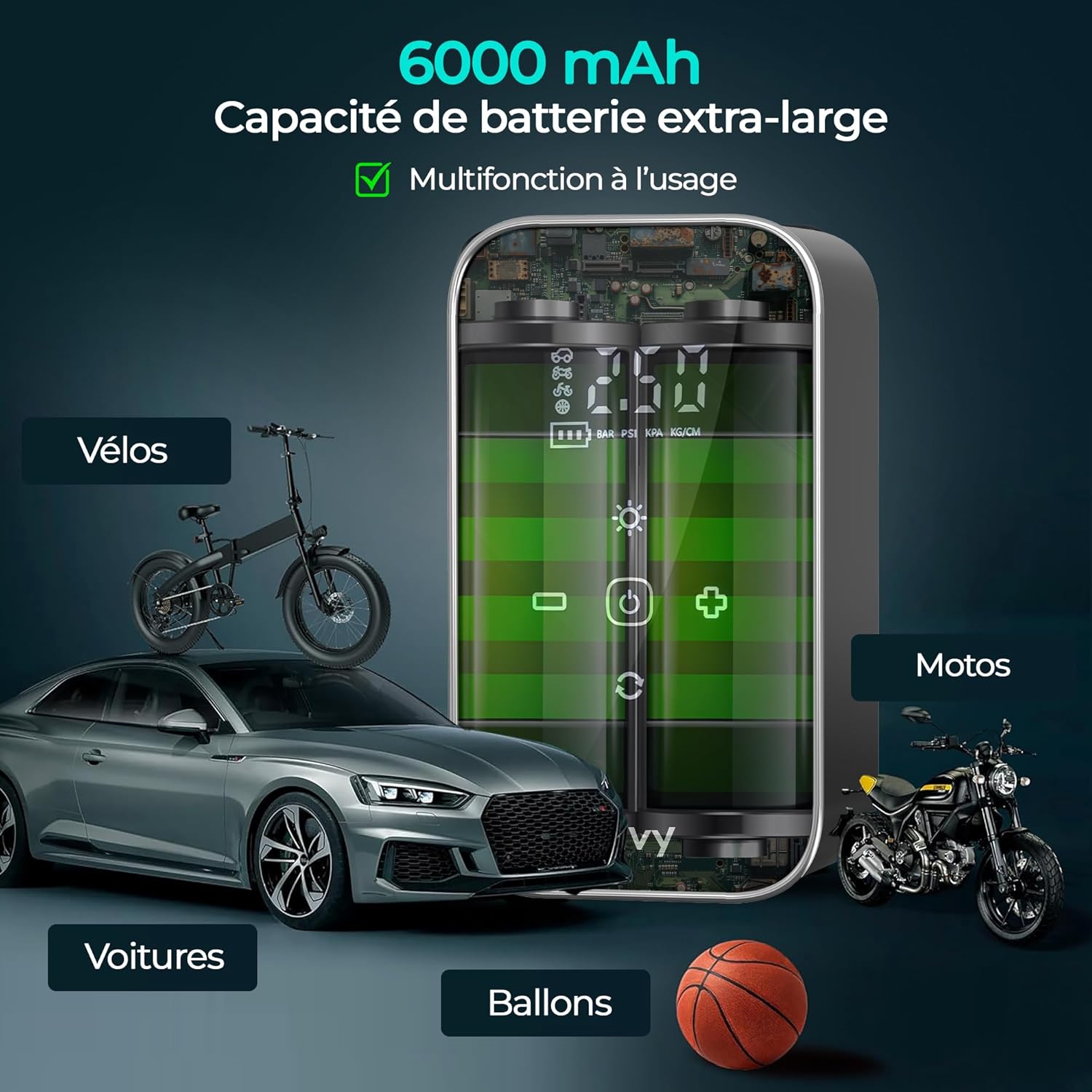
With its substantial 6000 mAh battery, the compressor is capable of inflating a wide range of items, from vehicle tires to sports equipment, making it a versatile tool for many applications.
Getting Started (Setup)
1. Charging the Compressor
Before first use, fully charge the compressor. Connect the provided USB-C cable to the charging port on the device and the other end to a USB power adapter (not included) or use the 12V car charger. The digital display will indicate the charging status. A full charge ensures optimal performance and battery life.
2. Understanding the Display and Controls
The digital display shows the current pressure and allows you to set target pressure. The control buttons typically include:
- Power Button: Turns the device on/off.
- Unit Button: Cycles through pressure units (PSI, BAR, KPA, KG/cm²).
- '+' / '-' Buttons: Adjusts the target pressure.
- Light Button: Activates the LED flashlight and SOS mode.
- Mode Button (often indicated by vehicle/ball icons): Selects preset inflation modes for different items (e.g., car, bike, motorcycle, ball).
Operating Instructions
1. Preparing for Inflation
- Turn On: Press the power button to turn on the compressor. The digital display will light up.
- Select Unit: Press the 'Unit' button to choose your desired pressure unit (PSI, BAR, KPA, or KG/cm²).
- Set Target Pressure: Use the '+' and '-' buttons to set the desired pressure for your item. Refer to the item's manufacturer recommendations for correct pressure.
- Attach Nozzle: Select the appropriate valve adapter and securely attach it to the item's valve. Then, connect the compressor's hose to the adapter.
2. Starting and Stopping Inflation
- Start Inflation: Once the target pressure is set and the nozzle is connected, press the power button again to start inflation. The compressor will begin to pump air, and the display will show the real-time pressure.
- Automatic Shut-off: The compressor will automatically stop once the preset target pressure is reached.
- Manual Stop: You can manually stop inflation at any time by pressing the power button.
- Disconnect: Carefully disconnect the hose from the valve and the adapter from the item.

This visual guide demonstrates the straightforward process of setting the desired pressure, connecting the valve, and initiating inflation, highlighting the convenience of the automatic shut-off feature.
3. Using the LED Light and SOS Mode
Press the 'Light' button once to turn on the LED flashlight. Press it again to activate the SOS flashing mode. Press a third time to turn off the light. This feature is useful for nighttime emergencies or working in dark environments.
4. Using as a Power Bank
To use the compressor as a power bank, connect your device (e.g., smartphone) to the USB output port on the compressor using your device's charging cable. The compressor's battery will then charge your device.
Maintenance
- Cleaning: Wipe the exterior of the compressor with a soft, damp cloth. Do not use harsh chemicals or abrasive cleaners. Ensure the device is off and disconnected from any power source before cleaning.
- Storage: Store the compressor in its waterproof storage pouch in a cool, dry place, away from direct sunlight and extreme temperatures.
- Battery Care: To prolong battery life, charge the compressor at least once every three months, even if not in use. Avoid fully discharging the battery frequently.
- Hose and Adapters: Inspect the inflation hose and adapters regularly for any signs of wear or damage. Replace if necessary to ensure proper sealing and performance.
Troubleshooting
| Problem | Possible Cause | Solution |
|---|---|---|
| Compressor does not turn on. | Battery is depleted. | Charge the compressor fully. |
| Compressor does not inflate. | Hose not securely connected; Adapter not suitable; Target pressure not set. | Ensure hose and adapter are tightly connected. Use correct adapter. Set a target pressure above current pressure. |
| Inaccurate pressure reading. | Loose connection; Sensor malfunction. | Check all connections. If problem persists, contact customer support. |
| Compressor overheats and stops. | Prolonged continuous use. | Allow the compressor to cool down for at least 15-20 minutes before resuming use. |
| Battery drains quickly. | Aging battery; Frequent use at high pressure. | Ensure full charge before use. Battery capacity naturally decreases over time. |
Specifications
| Feature | Specification |
|---|---|
| Model Number | 58613837136221 |
| Manufacturer | Olvy |
| Dimensions | 15.1 x 9.9 x 9.2 cm |
| Weight | 620 grams |
| Color | Black |
| Material | Polyvinyl Chloride |
| Power Source | Battery Powered (12V DC) |
| Battery Capacity | 6000 mAh (Rechargeable) |
| Air Flow Capacity | 28 Liters per minute |
| Maximum Pressure | 10.3 Bars / 150 PSI |
| Noise Level | 80 Decibels |
| Special Features | Cordless, Automatic On/Off, LED Light, Power Bank Function |
| Included Components | 4 Adapters |
Warranty and Support
Olvy products are manufactured to high-quality standards. For warranty information, please refer to the documentation provided with your purchase or contact Olvy customer support. If you encounter any issues or have questions regarding your Olvy Portable Air Compressor, please reach out to our customer service team for assistance. Contact details can typically be found on the product packaging or the official Olvy website.