
Introduction
This manual provides detailed instructions for the assembly, operation, and maintenance of your ONBRILL 70.8" TV Stand with Power Outlet. Please read this manual thoroughly before assembly and use to ensure proper function and safety. Keep this manual for future reference.
Safety Information
Adhering to safety guidelines is crucial for preventing injury and damage to the product. Please observe the following:
- Always assemble the furniture according to the provided instructions.
- Keep the furniture away from heat sources.
- Do not place heavy objects on the top shelves.
- Keep the sliding doors closed when not in use to prevent tip-over risks.
- Be cautious of sharp edges and small parts during assembly and use.
- Ensure the TV stand is placed on a stable, level surface.
- Do not exceed the maximum weight capacity of the shelves or top surface.
Package Contents
Before beginning assembly, verify that all components are present and undamaged. If any parts are missing or damaged, contact customer support.
- TV Stand x 1 (All necessary panels and hardware)
- Assembly Instructions Manual x 1
- Power Outlet Unit x 1
Note: Small parts may be included in a separate hardware bag.
Assembly Instructions
Assembly is estimated to take approximately 50 minutes. It is recommended to have two people for assembly to ensure stability and ease of handling larger components. Follow the included step-by-step diagrams carefully.
- Unpack and Identify Parts: Lay out all components on a clean, soft surface to prevent scratches. Identify each part using the labels provided in the hardware kit and the assembly diagrams.
- Assemble the Base Frame: Connect the support legs to the bottom panel of the TV stand using the designated screws. Ensure all connections are secure.
- Attach Side Panels: Secure the side panels to the base frame.
- Install Interior Shelves: Insert the adjustable shelves into the desired height slots. The shelves have a 3-level height adjustment.
- Mount the Top Panel: Carefully place and secure the top panel to the assembled structure.
- Install Sliding Doors: Insert the sliding doors into their tracks. Ensure they glide smoothly.
- Integrate Power Outlet: Place the power outlet unit into the designated slot on the top surface. Connect the power cord.
- Final Checks: Verify all screws are tightened and the stand is stable.

This image illustrates the overall dimensions of the ONBRILL 70.8" TV Stand, including its length (70.8"), height (21.7"), and depth (15.7"). It also shows the internal storage compartments with their respective dimensions and weight capacities for the shelves (17 lbs each) and the top surface (150 lbs). An icon indicates an assembly time of less than 50 minutes.

This close-up image highlights key features of the TV stand: the adjustable shelf with arrows indicating height modification, a cable hole for wire management, and the integrated table power outlet. The sturdy support leg is also visible, with a height of 5.9 inches.
Product Features
- Mid-Century Modern Design: Features a walnut color and sliding fluted doors for a unique aesthetic.
- Ample Storage: Six storage spaces, including two hidden compartments behind sliding doors.
- Adjustable Shelves: Interior shelves offer 3-level height adjustment to accommodate various items.
- Integrated Power Outlet: Includes 2 USB ports and 2 standard power outlets for convenient device charging and power.
- Cable Management: Three cable holes are provided for organizing wires and maintaining a tidy appearance.
- Versatile Use: Suitable as a TV stand, media console, or general storage cabinet in living rooms, entrances, or hallways.

This image displays the ONBRILL TV stand in a modern living room, showcasing its design and functionality with a television, soundbar, and other media devices placed on and within it. The sliding doors are open, revealing the storage compartments.
Operating Instructions
Using the Sliding Doors:
The TV stand features sliding doors that move horizontally. To open or close a compartment, gently slide the door along its track to the left or right. Ensure no objects obstruct the door's path.
Using the Power Outlet:
The integrated power outlet provides convenient access to power for your electronic devices.
- Plug the TV stand's main power cord into a standard wall outlet.
- Connect your devices (TV, gaming console, phone chargers, etc.) to the 2 standard AC outlets or the 2 USB ports located on the top surface of the stand.
- Utilize the cable holes at the back of the stand to route and organize device cables, keeping them tidy and out of sight.
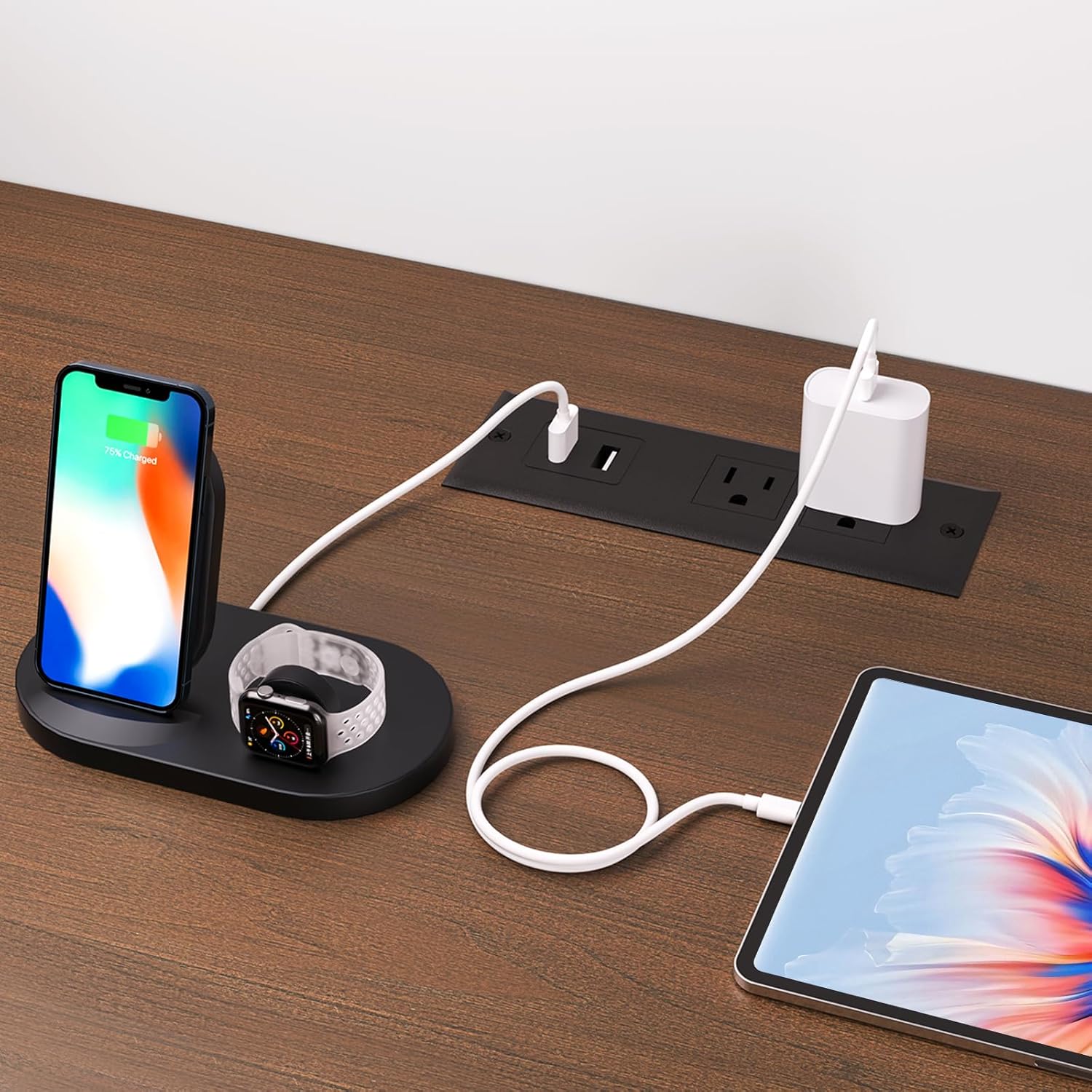
This image shows the integrated power outlet on the TV stand's surface, with two USB ports and two standard AC outlets. It demonstrates the outlets in use, charging a smartphone, smartwatch, and tablet, highlighting its functionality for electronic devices.
Maintenance
To maintain the appearance and longevity of your TV stand, follow these simple maintenance guidelines:
- Cleaning: Wipe surfaces with a soft, damp cloth. Avoid abrasive cleaners or harsh chemicals, as they may damage the finish.
- Spills: Immediately wipe up any spills to prevent staining or water damage.
- Sunlight: Avoid prolonged exposure to direct sunlight to prevent fading or discoloration.
- Hardware: Periodically check and tighten all screws and fasteners to ensure the stand remains stable.
Troubleshooting
| Problem | Possible Cause | Solution |
|---|---|---|
| Stand is wobbly. | Loose fasteners; uneven floor. | Ensure all screws are tightened. Adjust floor levelers if present, or place shims under legs. |
| Sliding doors stick or do not move smoothly. | Debris in tracks; misaligned doors. | Clean tracks of any dust or debris. Re-align doors according to assembly instructions if necessary. |
| Power outlets are not working. | Power cord not plugged in; faulty wall outlet; overloaded circuit. | Ensure the TV stand's power cord is securely plugged into a functional wall outlet. Test the wall outlet with another device. Do not overload the power strip. |
| Missing parts during assembly. | Packaging error. | Contact ONBRILL customer support with your model number and a description of the missing parts. |
Specifications
| Feature | Detail |
|---|---|
| Model Number | OB-JL-004 |
| Color | Walnut |
| Size | 70.8 Inch |
| Item Dimensions (L x W x H) | 70.8 x 15.7 x 21.7 inches |
| Material Type | Engineered Wood |
| Item Weight | 48.6 pounds |
| Style | Modern |
| Power Outlet | 2 USB ports, 2 Standard AC outlets |
| TV Size Compatibility | Up to 75 Inch |
| Assembly Time (Approx.) | Less than 50 minutes |

This image illustrates the ONBRILL TV stand's compatibility with various television sizes, specifically showing how TVs up to 75 inches can be accommodated on its surface.
Warranty and Support
ONBRILL products are manufactured with quality and care. For warranty information, missing parts, or technical support, please contact ONBRILL customer service through the retailer where the product was purchased. Please have your model number (OB-JL-004) and purchase date available when contacting support.
For further assistance, visit the official ONBRILL store: ONBRILL Store
