1. Important Safety Information
- Adult Supervision Required: This product must be used under direct adult supervision at all times.
- Age and Weight Limits: Suitable for children aged 3 to 8 years (37-96 months). Maximum load capacity is 30 kg. Do not exceed these limits.
- Protective Gear: Always ensure the child wears appropriate safety gear, including a helmet, knee pads, and elbow pads.
- Safe Riding Environment: Use the quad in safe, open areas away from public roads, traffic, steep inclines, swimming pools, or other hazards. Ensure the riding surface is flat and clear of obstacles.
- Battery Safety: Only use the provided charger and battery. Do not modify the electrical system. Keep the battery away from heat sources and moisture.
- Assembly: Adult assembly is required before first use. Ensure all parts are securely fastened.
- Braking: Instruct children on how to stop the vehicle safely.
2. Package Contents
Please check the box for the following components:
- Main Quad Body
- Wheels (3)
- Seat
- Handlebar
- Headlights (pre-installed or separate)
- 12V Battery
- Charger
- Assembly Hardware
- Instruction Manual

Image: The AIYAPLAY 12V Electric Quad, showcasing its black and white design with red accents. This image represents the complete product after assembly.
3. Setup and Assembly
Adult assembly is required. Please follow these general steps. Refer to the detailed diagrams in the included paper manual for specific part identification and attachment.
- Unpack Components: Carefully remove all parts from the packaging and verify against the package contents list.
- Install Wheels: Attach the wheels to the quad body according to the instructions, ensuring all fasteners are tightened securely.
- Attach Handlebar: Secure the handlebar to the steering column.
- Connect Battery: Connect the 12V battery to the vehicle's electrical system. Ensure connections are firm.
- Install Seat: Place the seat onto the quad and secure it in position.
- Initial Charge: Before first use, fully charge the battery for the recommended duration (typically 8-12 hours). Do not overcharge.

Image: A diagram illustrating the overall dimensions of the AIYAPLAY Electric Quad (113x74x63 cm) and recommended child height, along with the seat dimensions. This helps in understanding the size for assembly and usage.
4. Operating Instructions
Familiarize your child with the controls before allowing them to operate the quad independently.
- Power On/Off: Press the power button (often marked with a power symbol) to turn the quad on or off.
- Start: The quad features a 'one-click start' for ease of use.
- Speed Control: The quad has two speeds, typically a low speed (approx. 3 km/h) and a high speed (approx. 5 km/h). Select the appropriate speed using the designated switch.
- Forward/Reverse: Use the forward/reverse switch to select the desired direction of travel.
- Acceleration: Press the foot pedal to accelerate. Releasing the pedal will engage the brake.
- Lights: The integrated LED headlights and taillights can be activated for visibility and realism.
- Music and USB: The quad includes an MP3 player with a USB input. Insert a USB drive with MP3 files to play music. Use the control buttons to adjust volume or change tracks.
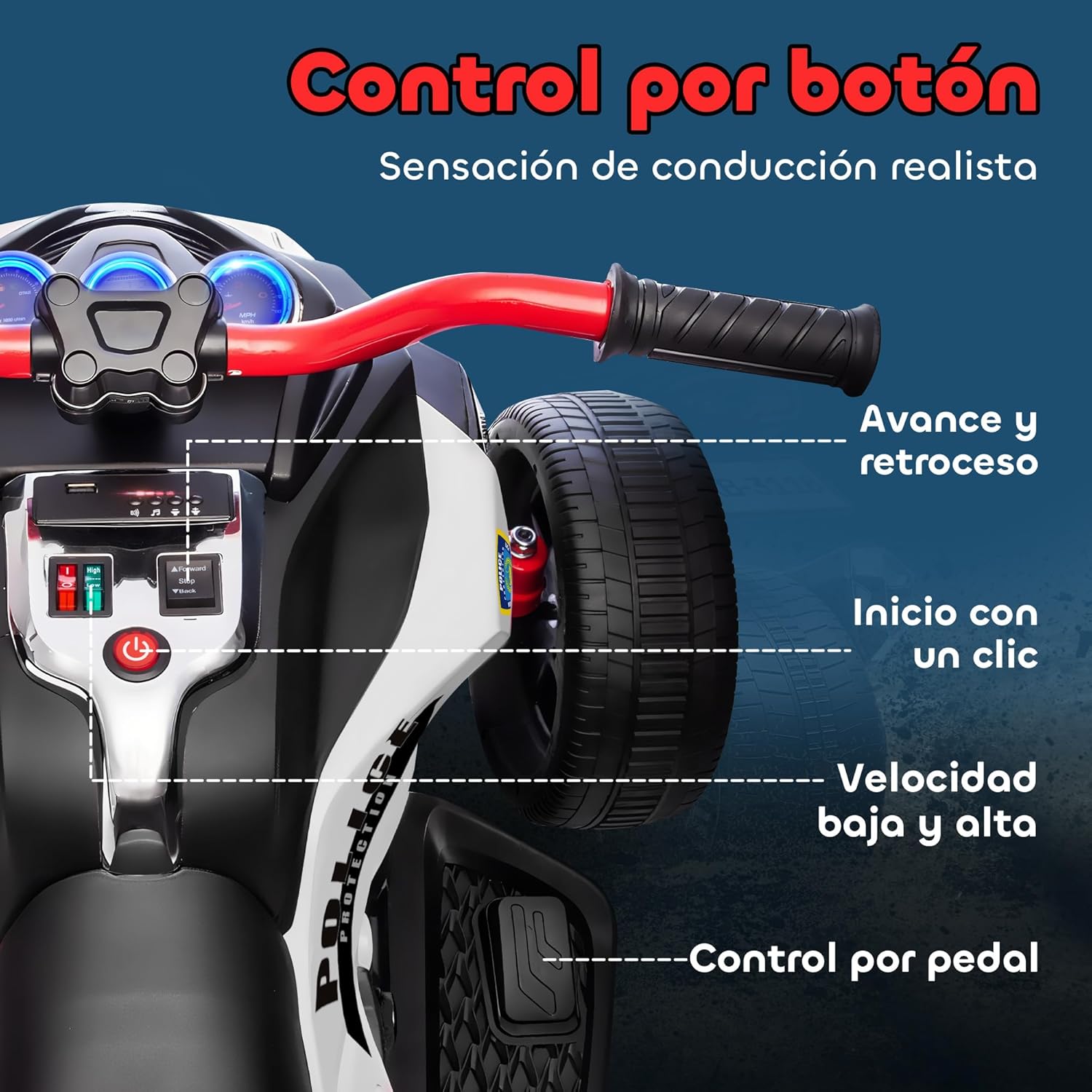
Image: A detailed view of the quad's control panel, highlighting the power button, forward/reverse switch, speed selector, and the USB port for music playback. This image assists users in locating and understanding the vehicle's operational controls.

Image: A close-up of the USB port and music control buttons, indicating the functionality for playing audio files. This image helps users understand how to utilize the integrated music feature.
5. Maintenance
- Battery Charging: Recharge the battery after each use. Do not allow the battery to fully discharge. Store the quad with a fully charged battery if not used for extended periods, and recharge monthly to prolong battery life.
- Cleaning: Wipe the quad with a damp cloth. Do not use abrasive cleaners or solvents. Avoid spraying water directly onto electrical components.
- Storage: Store the quad in a dry, cool place, away from direct sunlight and moisture.
- Inspection: Regularly check all nuts, bolts, and fasteners to ensure they are tight. Inspect tires for wear and tear.
6. Troubleshooting
If the quad is not functioning correctly, please check the following common issues:
- Quad Does Not Start:
- Ensure the battery is fully charged and properly connected.
- Check if the power switch is in the 'ON' position.
- Verify all electrical connections are secure.
- Low Power/Slow Speed:
- The battery may need recharging.
- Ensure the quad is not overloaded (check maximum weight capacity).
- Check if the speed selector is set to the desired speed.
- Lights/Music Not Working:
- Check battery charge.
- Ensure USB device is properly inserted and contains compatible MP3 files.
- Verify connections to lights/speakers.
If problems persist, please contact customer support.
7. Product Specifications
| Brand | AIYAPLAY |
| Model Number | 370-401V90MX |
| Overall Dimensions (LxWxH) | 113 x 74 x 63 cm |
| Product Weight | 14.7 kg |
| Material Type | Metal, Plastic |
| Battery Type | 12V 4.5AH Battery (Included) |
| Motor | Dual Motors |
| Speed | 3-5 km/h (Two Speeds) |
| Maximum Load | 30 kg |
| Recommended Age | 3-8 years (37-96 months) |
| Assembly Required | Yes |
| Features | LED Headlights, Horn, MP3 Player, USB Input, Suspension System |
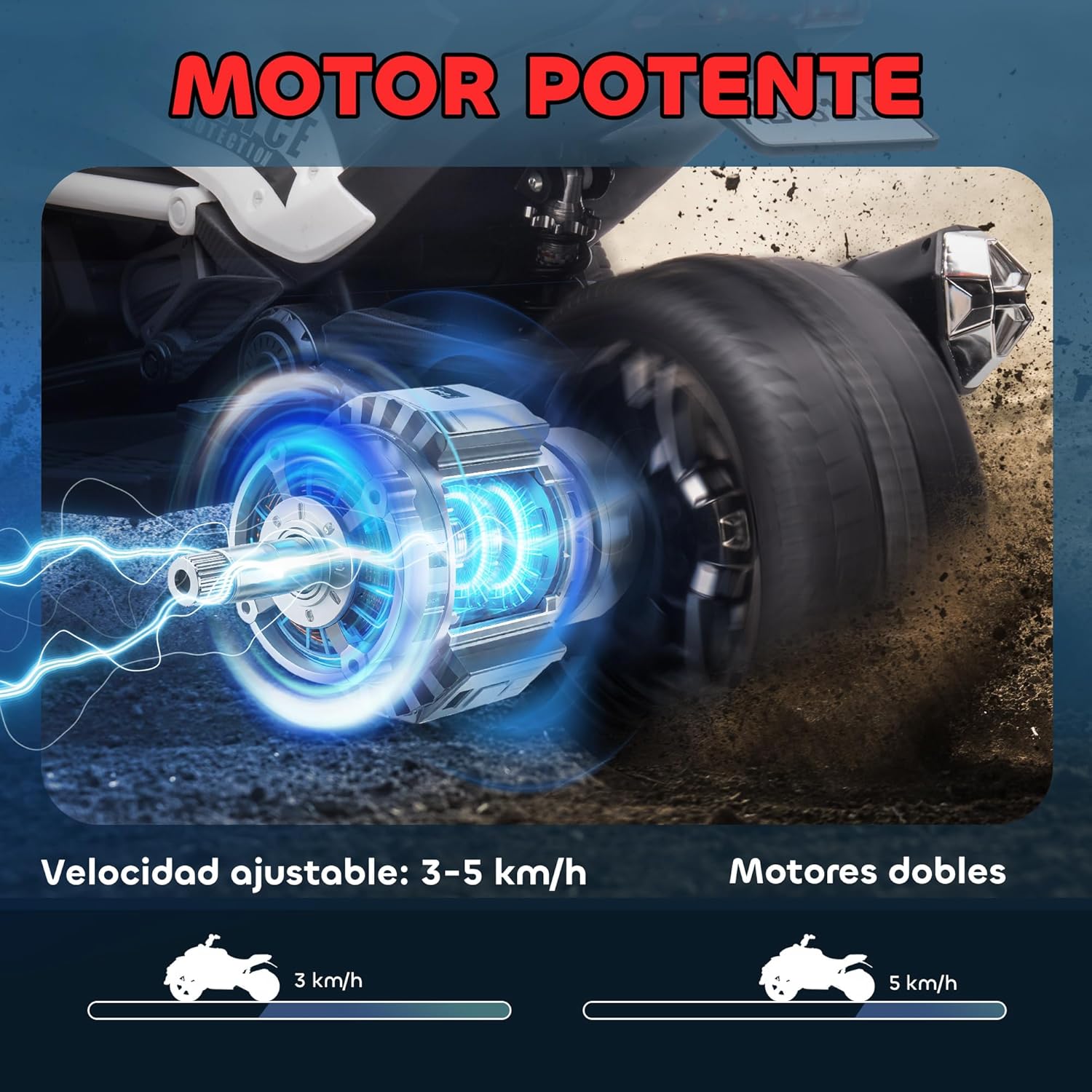
Image: A graphic illustrating the powerful dual motor system and adjustable speed settings (3-5 km/h) of the electric quad. This visually explains the performance capabilities mentioned in the specifications.

Image: A close-up of the rear wheel suspension system, demonstrating the quad's capability to handle various terrains such as asphalt, cement, brick roads, and grass. This highlights the durability and versatility of the product.
8. Warranty and Support
For warranty information, technical support, or replacement parts, please contact the seller or manufacturer directly. Keep your purchase receipt as proof of purchase.
Manufacturer: AIYAPLAY
For further assistance, please refer to the contact information provided at the point of purchase or on the product packaging.


