
1. Product Overview
The XINFUTE MR25GA AKB76046603 is a replacement Magic Voice TV Remote Control designed for compatibility with various LG 2025 TV series, including OLED G5, C5, B5 series, QNED 92A, 85A, 80A Series, and UA77 Series. This remote features intelligent voice recognition, intuitive mouse-like pointing, and wheel control for enhanced navigation.

Image 1: Front view of the XINFUTE MR25GA Magic Remote Control, showcasing its ergonomic design and primary buttons.
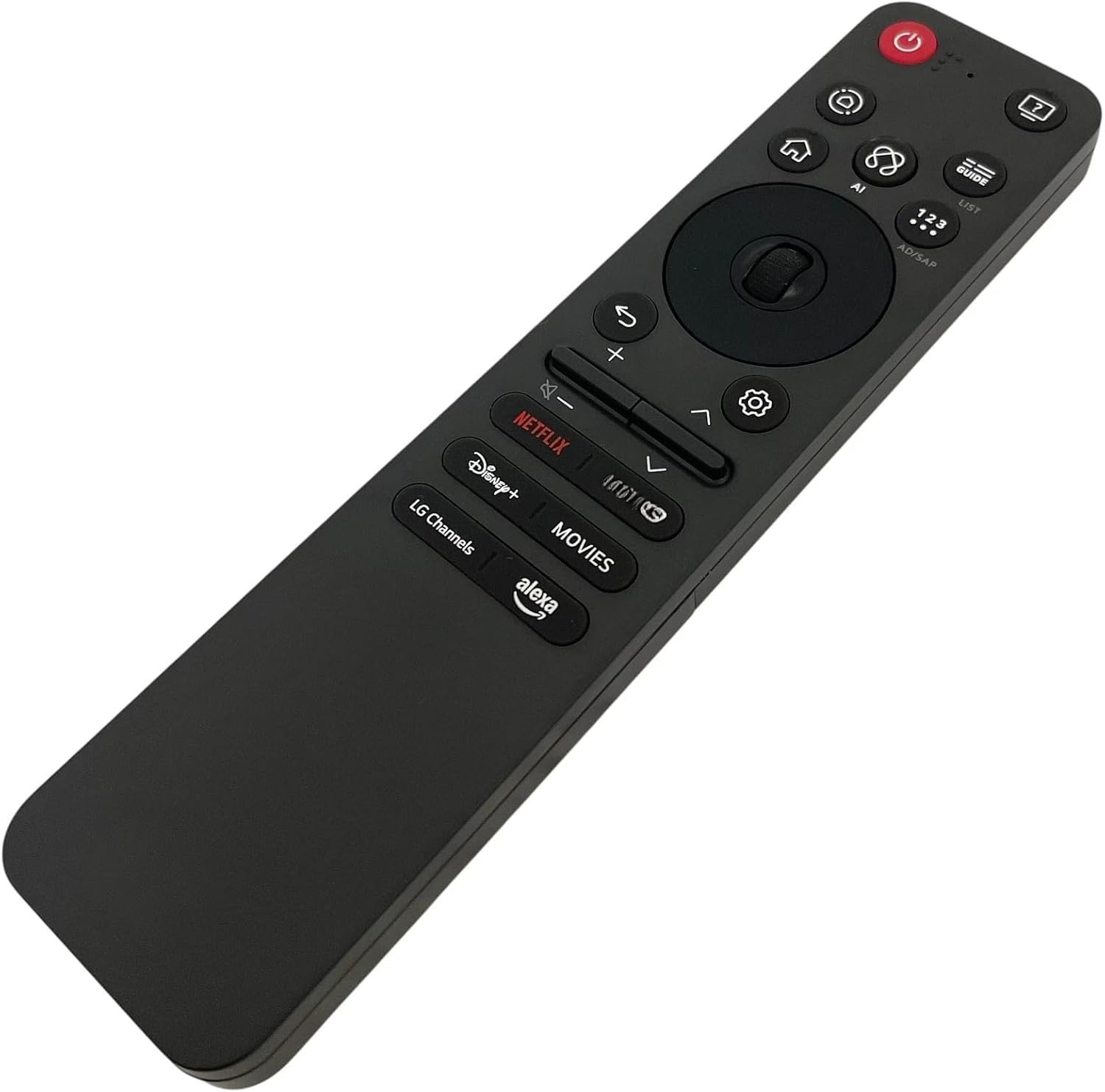
Image 2: Angled view of the XINFUTE MR25GA Magic Remote Control, highlighting the scroll wheel and dedicated app buttons.
2. Setup and Pairing
2.1 Battery Installation
The remote control requires two AAA batteries (not included). To install the batteries:
- Locate the battery compartment on the back of the remote control.
- Slide the battery cover downwards to open it.
- Insert two AAA batteries, ensuring the positive (+) and negative (-) terminals align correctly with the indicators inside the compartment.
- Slide the battery cover back into place until it clicks securely.

Image 3: Back view of the XINFUTE MR25GA Magic Remote Control with the battery compartment open, showing where to insert AAA batteries.
2.2 Initial Pairing with LG TV
To pair your XINFUTE MR25GA remote control with your compatible LG TV:
- Ensure your LG TV is powered on.
- Point the remote control towards the TV.
- Press and hold the OK (Wheel) button on the remote control for approximately 2 seconds.
- The remote's LED indicator will stay on during the pairing process.
- Upon successful pairing, the red LED will flash three times, and your TV screen will display a message confirming that the Magic Remote has been successfully registered.
Video 1: This video demonstrates the initial pairing process of the MR25GA Magic Remote Control with an LG TV, showing how to hold the OK button and the on-screen confirmation.
3. Operating Instructions
3.1 AI Voice Control
The remote features intelligent voice recognition, allowing for hands-free control:
- Press the AI Voice button (often indicated by a microphone icon) on the remote.
- Speak your command clearly into the remote. You can adjust the volume, search for movies, or open applications without needing to manually navigate.
3.2 Intuitive Pointer and Wheel Control
Navigate your TV's interface with precision using the pointer and scroll wheel:
- Pointer Function: Simply point the remote at the TV screen, and a cursor will appear. Move your wrist to guide the cursor and select items.
- Scroll Wheel: Use the central scroll wheel to quickly scroll through menus, web pages, or lists of content. Press the wheel to confirm selections (acting as the OK button).
3.3 Dedicated App Buttons
Access popular streaming services and features instantly with dedicated buttons:
- Press buttons like Netflix, Prime Video, Disney+, LG Channels, or Alexa to launch these applications directly.

Image 4: Side view of the XINFUTE MR25GA Magic Remote Control, illustrating its comfortable grip and button placement.
4. Maintenance
4.1 Battery Replacement
When the remote's performance diminishes or it stops responding, it's time to replace the batteries. Follow the battery installation steps in Section 2.1.
4.2 Cleaning
To clean the remote control, use a soft, dry cloth. Avoid using liquid cleaners or abrasive materials, as these can damage the remote's surface or internal components.
5. Troubleshooting
5.1 Remote Not Responding
- Check if the batteries are correctly installed and have sufficient charge. Replace them if necessary.
- Ensure there are no obstructions between the remote control and the TV's sensor.
- Try re-pairing the remote control with the TV (see Section 5.2).
5.2 Unpairing and Re-pairing
If the remote control is not functioning correctly or you need to pair it with a different TV, you can unpair it:
- On the remote, simultaneously press and hold the Home button and the Back button for approximately 6 seconds.
- A message indicating "Unpairing" or "Remote registration is disconnected" will appear on the top-right of your TV screen.
- The red LED on the remote will blink once per second for three times, confirming successful unpairing.
- Once unpaired, follow the initial pairing steps in Section 2.2 to re-register the remote with your TV.
6. Specifications
| Feature | Detail |
|---|---|
| Model Number | MR25GA AKB76046603 |
| Brand | XINFUTE |
| Compatible Devices | LG 2025 TV's: OLED G5, C5, B5 series, QNED 92A, 85A, 80A Series, UA77 Series |
| Power Source | 2 x AAA Batteries (not included) |
| Special Feature | Ergonomic, Intelligent Voice Recognition, Intuitive Mouse-like Pointing and Wheel Control |
| Product Dimensions | 6 x 3 x 1 inches |
| Item Weight | 2.82 ounces |
7. Warranty and Support
7.1 Warranty Information
Enjoy a one-year warranty on all purchases of this product.
7.2 Customer Support
All goods are inspected before shipment. If you are not satisfied with your purchase, please contact our customer support team within 24 hours of receipt for assistance.