
1. Product Overview
The Acteck Flux Base EC343 office chair is designed for comfort and adaptability in office environments. It features an ergonomic design with a mesh backrest and a soft foam seat for extended use. Key features include adjustable recline, foldable armrests, and a robust base.
Key Features:
- Superior Ergonomics: Mesh backrest and high-softness foam seat provide comfort during long working hours.
- Adjustable Recline: Butterfly mechanism allows recline up to 120° to adapt to various working positions.
- Versatile Armrests: Foldable armrests (up to 90°) facilitate access and allow the chair to be moved closer to the desk.
- Weight Capacity: Sturdy structure with a Class 2 gas lift supports up to 100 kg (220 lbs), ensuring stability and durability.
- Professional Base: EC343 model designed for office use with a stable base and smooth-gliding wheels.

Image 1: Acteck Flux Base EC343 Office Chair highlighting its dimensions (1045mm height, 585mm depth, 560mm width) and a weight capacity of up to 100 kg.

Image 2: Two Acteck Flux Base EC343 office chairs, showcasing both white and black frame variants in an office setting.
2. Assembly Instructions
Follow these steps to assemble your Acteck Flux Base EC343 office chair. It is recommended to have all parts laid out before beginning assembly.
Assembly Video Guide:
Video 1: Detailed installation guide for the Acteck Flux Base EC343 office chair, demonstrating each step of the assembly process.
Step-by-Step Assembly:
- Install Casters and Gas Lift: Insert the five casters into the holes at the end of each leg of the chair base. Then, insert the gas lift cylinder into the central hole of the base.
- Attach Armrests to Backrest: Secure the armrest components to the backrest using the provided M6*25 screws. Ensure they are firmly tightened.
- Attach Backrest to Seat: Align the backrest assembly with the seat cushion and fix it using the M6*30 screws.
- Install Mechanism to Seat: Position the chair mechanism onto the underside of the seat and secure it with the M6*20 screws. Ensure the mechanism lever is facing the front of the seat.
- Place Seat onto Gas Lift: Carefully place the assembled seat onto the gas lift cylinder, ensuring it is centered and stable.
- Install Armrest Covers: Attach the decorative covers to the left and right armrests.
3. Operating Instructions
The Acteck Flux Base EC343 office chair offers several adjustments to customize your seating experience.
Height Adjustment:
To adjust the seat height, locate the lever on the right side under the seat. While seated, pull the lever up to lower the seat. To raise the seat, stand up and pull the lever up. Release the lever at the desired height.
Recline Function:
The chair features a butterfly mechanism allowing the backrest to recline up to 120 degrees. To recline, pull the lever on the left side under the seat. Lean back to the desired angle and release the lever to lock it in place. To return to an upright position, pull the lever again and lean forward slightly.

Image 3: The Acteck Flux Base EC343 office chair showcasing its 120-degree recline capability for enhanced comfort.
Armrest Adjustment:
The armrests are designed to fold up to 90 degrees. This allows for easy access to and from the chair and enables the chair to be pushed closer to a desk when not in use, saving space.

Image 4: The chair's armrests demonstrating their ability to fold up to a 90-degree angle.
Lumbar Support and Ventilation:
The chair's backrest provides integrated lumbar support to promote healthy posture. The mesh material ensures good ventilation, keeping you cool and comfortable.

Image 5: The mesh backrest of the chair, illustrating its breathable design for ventilation.
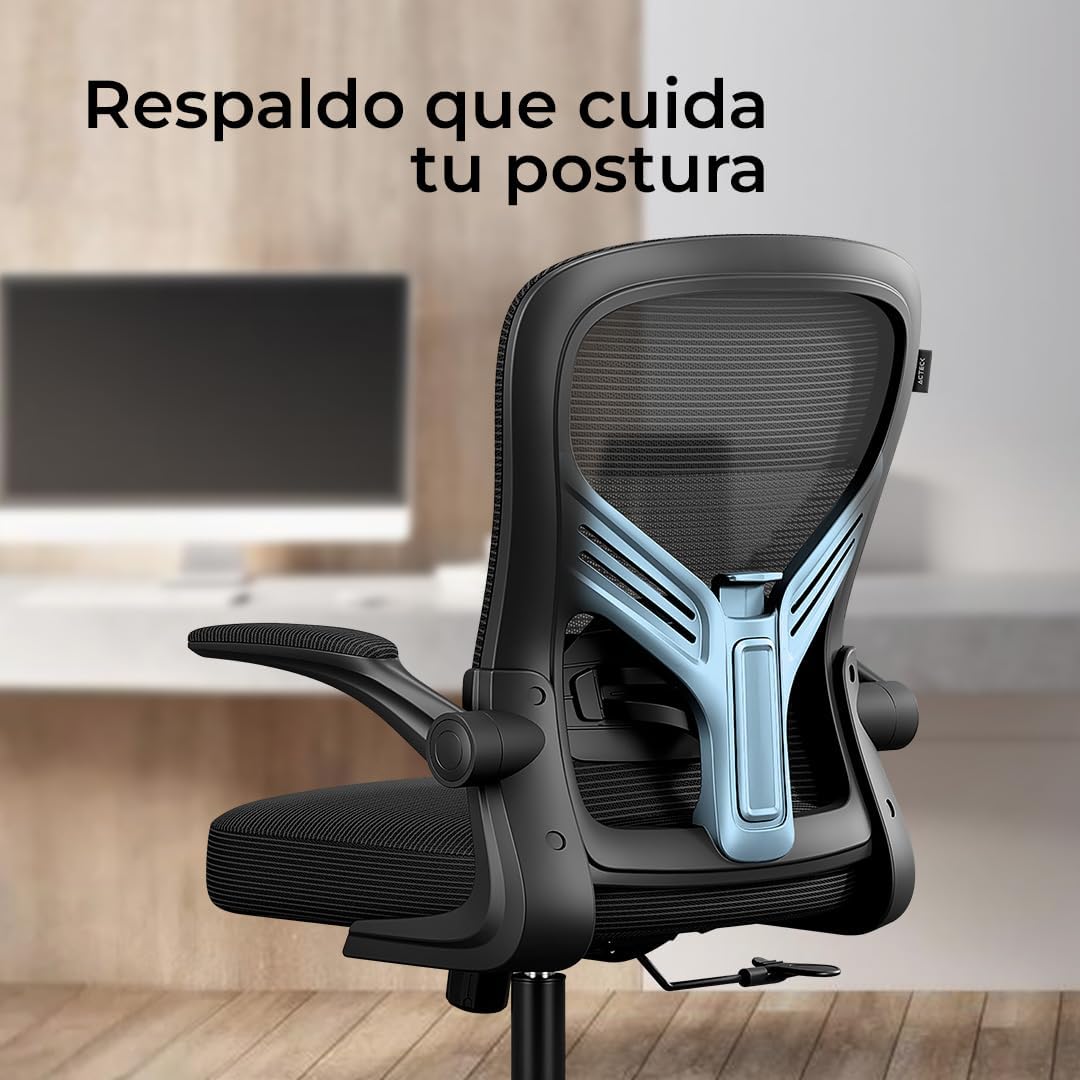
Image 6: The backrest of the chair, highlighting the integrated lumbar support designed to maintain proper posture.
4. Maintenance
Proper maintenance will extend the life and performance of your office chair.
Cleaning:
- For general cleaning, wipe the chair's surfaces (mesh, plastic, metal) with a soft, damp cloth.
- Avoid using harsh chemicals, abrasive cleaners, or solvents, as these can damage the materials.
- For fabric parts, a mild soap solution can be used, followed by wiping with a clean, damp cloth to remove any residue. Allow to air dry completely.
Regular Inspection:
- Periodically check all screws and bolts to ensure they are tight. Re-tighten if necessary to maintain stability and prevent wobbling.
- Inspect the casters for any debris (hair, lint) that might hinder smooth movement. Clean them as needed.
- Check the gas lift for proper function. If the chair does not hold its height, the gas lift may need replacement.
5. Troubleshooting
Here are solutions to common issues you might encounter with your office chair.
Chair is Wobbly or Unstable:
- Ensure all assembly screws are securely tightened. Over time, screws can loosen with use.
- Check that the gas lift is properly seated in the base and the mechanism.
Casters Not Rolling Smoothly:
- Remove any hair, dust, or debris that may be caught in the caster wheels.
- Ensure the casters are fully inserted into the base.
Chair Squeaks:
- Tighten all screws, especially those connecting the seat, backrest, and mechanism.
- Apply a small amount of silicone-based lubricant to moving parts or joints if tightening screws does not resolve the issue.
6. Specifications
| Attribute | Detail |
|---|---|
| Brand | Acteck |
| Model | EC343 |
| Color | White frame (Marco blanco) |
| Product Dimensions (L x W x H) | 58.5 x 56 x 104.5 cm (23 x 22 x 41.1 inches) |
| Material | PP material + Mesh |
| Product Weight | 10 kg (22 lbs) |
| Maximum Weight Capacity | 100 kg (220 lbs) |
| Recline Angle | Up to 120° |
| Armrest Fold Angle | Up to 90° |
7. Warranty and Support
This Acteck office chair comes with a manufacturer's warranty covering defects in materials and workmanship. For specific warranty details, duration, and terms, please refer to the warranty card included with your product or visit the official Acteck website.
Customer Support:
If you encounter any issues or have questions regarding your Acteck Flux Base EC343 office chair, please contact Acteck customer support or the retailer from whom you purchased the product. Have your purchase receipt and product model number (EC343) ready for faster service.
For additional resources and product information, you may visit the Acteck Brand Store on Amazon.