
Introduction
This manual provides comprehensive instructions for the setup, operation, and maintenance of your Bettdow AC1082 Smart Projector. Please read this manual thoroughly before using the product to ensure proper functionality and to maximize your viewing experience.

Image: The Bettdow AC1082 Smart Projector, a compact and modern device designed for versatile projection.
Key Features
- Official Netflix License: Direct access to Netflix, Prime Video, YouTube, and Disney+ without additional devices.
- Native 1080P & 4K Support: Delivers sharp, bright, and rich images with native 1080p resolution and 4K compatibility.
- Electronic Focus & Keystone Correction: Precise and fast electronic focus with ±30-degree keystone correction for optimal image alignment.
- High Brightness: 500 ANSI Lumens (equivalent to 18000 Lumens) for clear visuals in various lighting conditions.
- Advanced Connectivity: Equipped with WiFi 6 and Bluetooth 5.0 for seamless streaming and device pairing.
- Multiple Ports: HDMI2.1, USB, AV, and 3.5mm audio jack for wide compatibility with media devices.
- Long Lamp Life: Up to 30,000 hours of lamp life.

Image: Visual representation of the projector's key features including Netflix compatibility, 1080p native resolution, 4K support, motorized focus and keystone, Wi-Fi 6, Bluetooth 5.0, and 500 ANSI lumens.
Package Contents
Ensure all items are present and in good condition upon unboxing:
- Bettdow AC1082 Smart Projector
- Remote Control
- HDMI Cable
- Power Cable
- AV Cable
- User Manual (this document)

Image: The Bettdow AC1082 projector shown with its included accessories: HDMI cable, power cable, remote control, and AV cable.
Product Overview
Front View
The front of the projector features the projection lens and an infrared receiver for the remote control.
Rear View (Ports)
The rear panel provides various connectivity options:
- USB-1, USB-2: For connecting USB storage devices.
- HDMI-1, HDMI-2: For connecting devices via HDMI cable (e.g., laptops, gaming consoles).
- AV: For connecting devices using the AV cable.
- 3.5mm Audio Jack: For connecting external headphones or speakers.
- Power Input: For connecting the power cable.
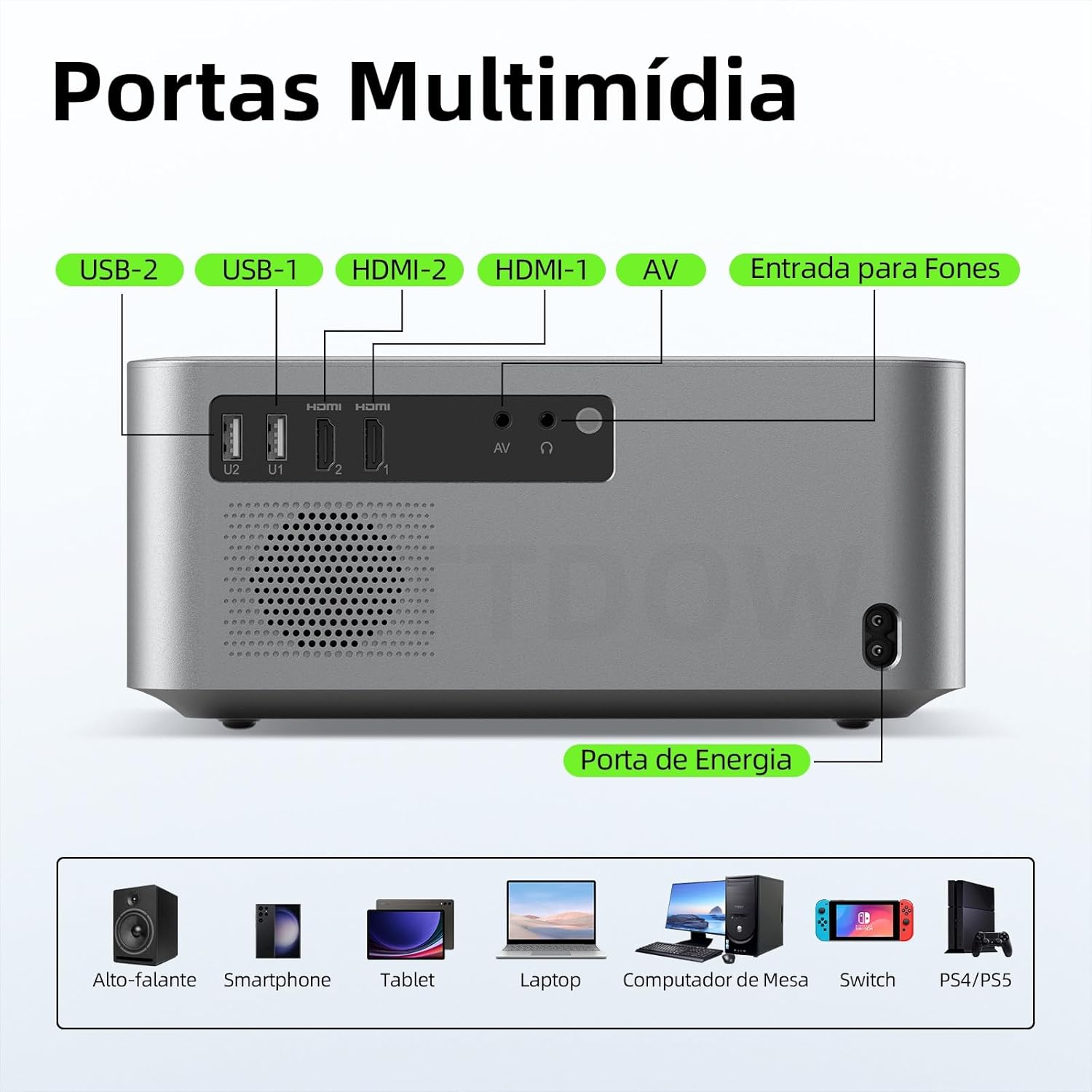
Image: A detailed view of the rear panel of the Bettdow AC1082 projector, highlighting the USB, HDMI, AV, and audio input ports, along with the power input.
Setup
- Placement: Position the projector on a stable, flat surface or mount it according to your preference (desktop, ceiling, tripod). Ensure adequate ventilation around the device.
- Power Connection: Connect the power cable to the projector's power input and then to a power outlet.
- Initial Power On: Press the power button on the projector or the remote control to turn on the device.
- Focus Adjustment: The projector features electronic focus. Use the remote control to adjust the focus until the image is clear.
- Keystone Correction: The projector supports automatic keystone correction. If manual adjustment is needed, use the remote control to correct the image shape for a rectangular display.
- Network Connection: Navigate to the settings menu to connect the projector to your Wi-Fi network (Wi-Fi 6 supported).
- Content Source: Select your desired input source (e.g., HDMI, USB, or built-in streaming apps like Netflix).

Image: Illustrations showing different installation methods for the projector: desktop placement, ceiling mount, and tripod installation.
Operating Instructions
Smart Features (Netflix-Licensed)
The Bettdow AC1082 comes with pre-installed and officially licensed streaming applications, including Netflix, Prime Video, YouTube, and Disney+. Access these directly from the home screen using the remote control.

Image: The smart projector displaying the Netflix interface, highlighting its official license and direct access to popular streaming services.
Focus and Keystone Adjustment
For optimal image clarity, use the electronic focus function via the remote control. The projector also features automatic keystone correction to ensure a perfectly rectangular image, even when projected at an angle. Manual keystone adjustments can be made if necessary.

Image: A visual demonstration of automatic focus and keystone correction, showing how the projector adjusts the image for clarity and proper alignment.
Connectivity
- HDMI: Connect external devices like laptops, Blu-ray players, or gaming consoles using an HDMI cable.
- USB: Insert USB drives to play media files directly.
- Bluetooth: Pair with Bluetooth speakers or headphones for enhanced audio.
- Wi-Fi: Connect to your home network for streaming and online content.

Image: Diagram illustrating the projector's Wi-Fi 6 dual-band and Bluetooth 5.0 capabilities for fast streaming and wireless audio connections.
Usage Scenarios
The Bettdow AC1082 projector is designed for a variety of environments:
- Home Cinema: Enjoy movies and TV shows on a large screen.
- Outdoor Camping: Portable design allows for entertainment outdoors.
- Educational & Business Meetings: Suitable for presentations in classrooms or offices.

Image: A collage showing the projector being used in diverse settings such as a classroom, a home living room, an outdoor camping site, and an office meeting room.
Maintenance
- Lens Cleaning: Use a soft, lint-free cloth and lens cleaning solution to gently wipe the projector lens. Avoid abrasive materials.
- Ventilation: Ensure the projector's ventilation ports are clear of dust and obstructions to prevent overheating.
- Storage: When not in use, store the projector in a cool, dry place, ideally in its protective bag, to prevent dust accumulation and damage.
- Software Updates: Regularly check for and install software updates to ensure optimal performance and access to the latest features.

Image: A diagram illustrating the projector's superior ventilation system, designed for low noise, efficient cooling, and extended product life.
Troubleshooting
| Problem | Possible Cause | Solution |
|---|---|---|
| No image projected | Power cable disconnected, incorrect input source, lens cap on. | Check power connection, select correct input source, remove lens cap. |
| Blurry image | Out of focus, incorrect keystone setting. | Adjust electronic focus using the remote, correct keystone settings. |
| No sound | Volume too low, external audio device not connected properly, incorrect audio output selected. | Increase volume, check audio cable connections, ensure correct audio output is selected in settings. |
| Remote control not working | Batteries depleted, obstruction between remote and projector. | Replace batteries, ensure clear line of sight to the projector's IR receiver. |
Specifications
| Feature | Detail |
|---|---|
| Brand | Bettdow |
| Model | AC1082 |
| Native Resolution | 1080p (Full HD) |
| Supported Resolution | Up to 4K (3840 x 2160) |
| Brightness | 500 ANSI Lumens (18000 Lumens) |
| Contrast Ratio | 800:1 |
| Aspect Ratio | 4:3 / 16:9 |
| Projection Size | 40 - 200 inches |
| Projection Distance | 1.4 - 4.8 meters |
| Lamp Life | 30,000 hours |
| Connectivity | Wi-Fi 6, Bluetooth 5.0, HDMI2.1 (x2), USB (x2), AV, 3.5mm Audio Jack |
| Operating System | Android (with Netflix license) |
| Keystone Correction | Automatic and ±30-degree manual |
| Focus | Electronic |
| Power Source | AC/DC |
| Product Weight | 2.6 Kilograms |
| Dimensions (Packaging) | 31.3 x 28.2 x 18.1 cm |
Warranty and Support
The Bettdow AC1082 Smart Projector comes with a manufacturer's warranty of 6 months. For technical support, warranty claims, or any product-related inquiries, please contact Bettdow customer service through the retailer where the product was purchased or refer to the official Bettdow website for contact information.
Please retain your proof of purchase for warranty validation.
Additional Resources
Product Video
Video: An official product video from Amazon Brasil showcasing various details and features of the projector.
