
1. Introduction
Thank you for choosing the LongPlus Dual Lens Solar Security Camera. This manual provides detailed instructions for the installation, operation, and maintenance of your security camera. Please read this manual thoroughly before use to ensure proper functionality and safety.
2. Product Overview
2.1 Key Features
- Dual Lenses: Provides comprehensive coverage by eliminating blind spots with one fixed lens and one pan-tilt lens (350° horizontal, 90° vertical).
- Solar Power and AOV 24/7 Recording: Equipped with an 8W solar panel and 8800mAh rechargeable battery for continuous operation. Advanced AOV technology records at 15 fps when motion is detected and 1 fps in static environments, reducing power consumption.
- Dual-Band WiFi: Supports both 2.4GHz and 5GHz WiFi for optimal performance, allowing for faster speeds or extended range.
- AI Motion Detection: Features AI-powered humanoid motion detection, triggering audio and strobe light alarms.
- Two-Way Talk: Built-in microphone and speaker enable real-time two-way communication via the app.
- 2K Day/Night Color Vision: Both lenses offer 2K resolution with four LED lights and four infrared lights for vivid day and night vision.
- IP65 Weatherproof: Designed to withstand rain, snow, and other extreme outdoor conditions.
- Storage: Includes a 32GB SD card and supports up to 512GB. Offers a 30-day rolling cloud storage trial for new accounts.
2.2 What's in the Box
- Security Camera with brackets
- 8W Solar Panel
- Pack of Screws and Positioning stickers
- 32GB SD Card
- Install and Quick Start Guide
2.3 Product Components
The camera features dual lenses, a solar panel for power, and integrated antennas for wireless connectivity.

Image: Overview of the LongPlus Dual Lens Solar Security Camera highlighting its features like 24/7 continuous recording, 8W solar panel, AI motion detection, 360-degree auto tracking, 8800mAh battery, and two-way audio.
3. Setup Instructions
3.1 Initial Connection
The camera supports easy connection via the SV360 app. For initial configuration, ensure the camera is as close as possible to your WiFi router to establish a stable connection. The camera automatically selects the best connection between 2.4GHz and 5GHz WiFi bands.
3.2 Mounting the Camera
The camera can be installed using wall mounting or ceiling mounting. Use the provided screws and positioning stickers for secure installation. Ensure the solar panel is positioned to receive maximum direct sunlight for optimal charging.

Image: Illustration of the solar panel connected to the camera, indicating its self-sustaining power capability with just 1-2 hours of direct sunlight.
3.3 SD Card Installation
A 32GB SD card is included. Insert the SD card into the designated slot on the camera. The camera supports up to 512GB SD cards for local storage.
4. Operating Instructions
4.1 SV360 App Control
Control and monitor your camera using the SV360 mobile application. The app allows for live viewing, playback, two-way communication, and managing settings.
4.2 Dual Lens Operation
The camera features two lenses: one fixed lens for monitoring a specific area and one pan-tilt lens that can rotate 350° horizontally and 90° vertically. This dual-lens system provides comprehensive coverage without blind spots.
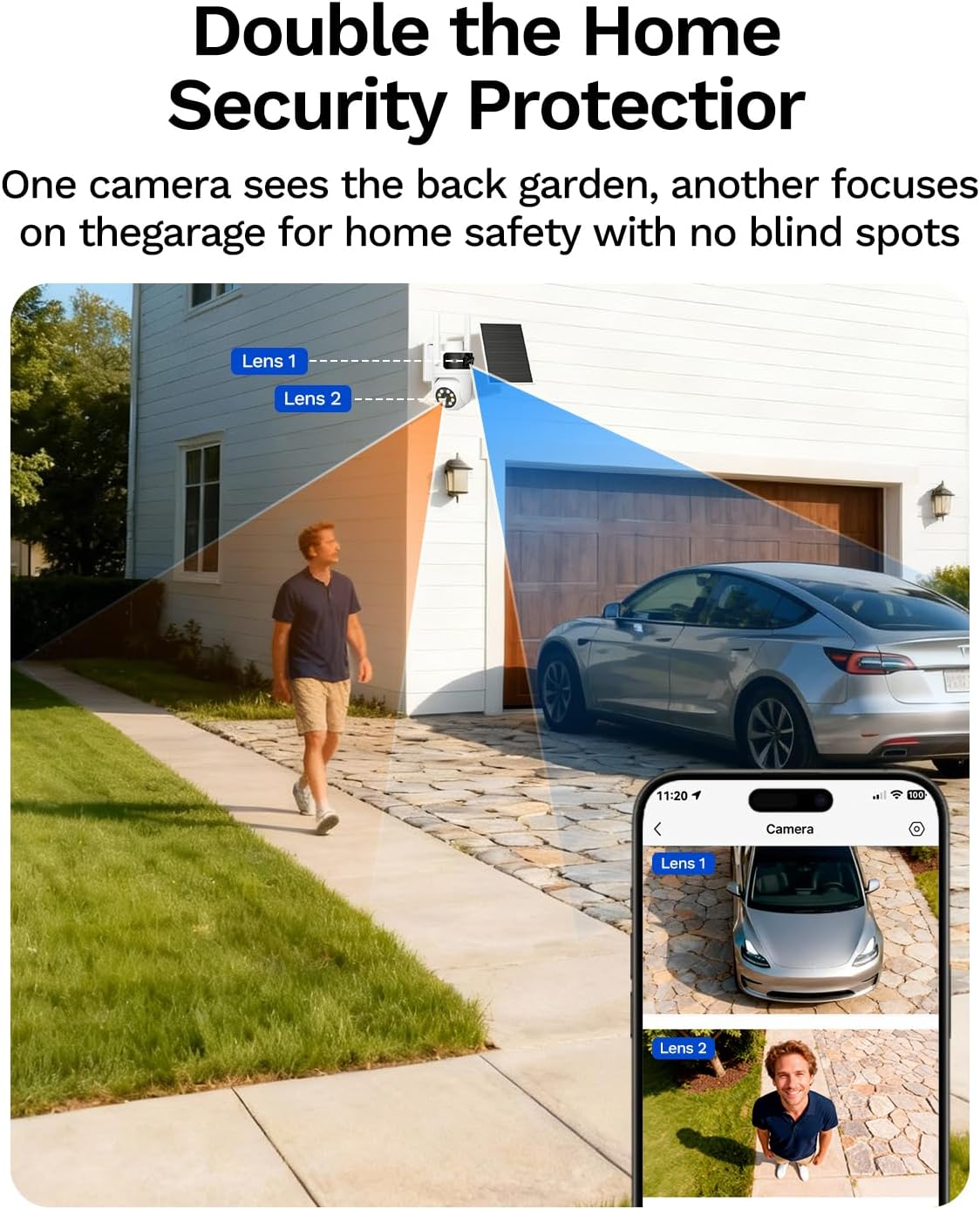
Image: Demonstrates the dual lens coverage, showing one lens focused on a garage and another providing a wider view of a garden, as seen on a smartphone app.
4.3 AOV 24/7 Continuous Recording
The camera utilizes AOV (Always-On Video) technology for continuous recording. It records at 15 frames per second (fps) when triggered by a person or vehicle and reduces to 1 fps (adjustable) in static environments to conserve power. This allows for approximately one month of 24/7 recording even without direct sunlight.

Image: Explains AOV technology, showing how the camera switches from low frame rate (1fps) during no motion to high frame rate (15fps) upon detecting a person, optimizing power consumption.
4.4 AI Motion Detection and Alerts
When humanoid motion is detected, the camera automatically triggers an audio and strobe light alarm. You will receive instant push notifications on your smartphone via the SV360 app.
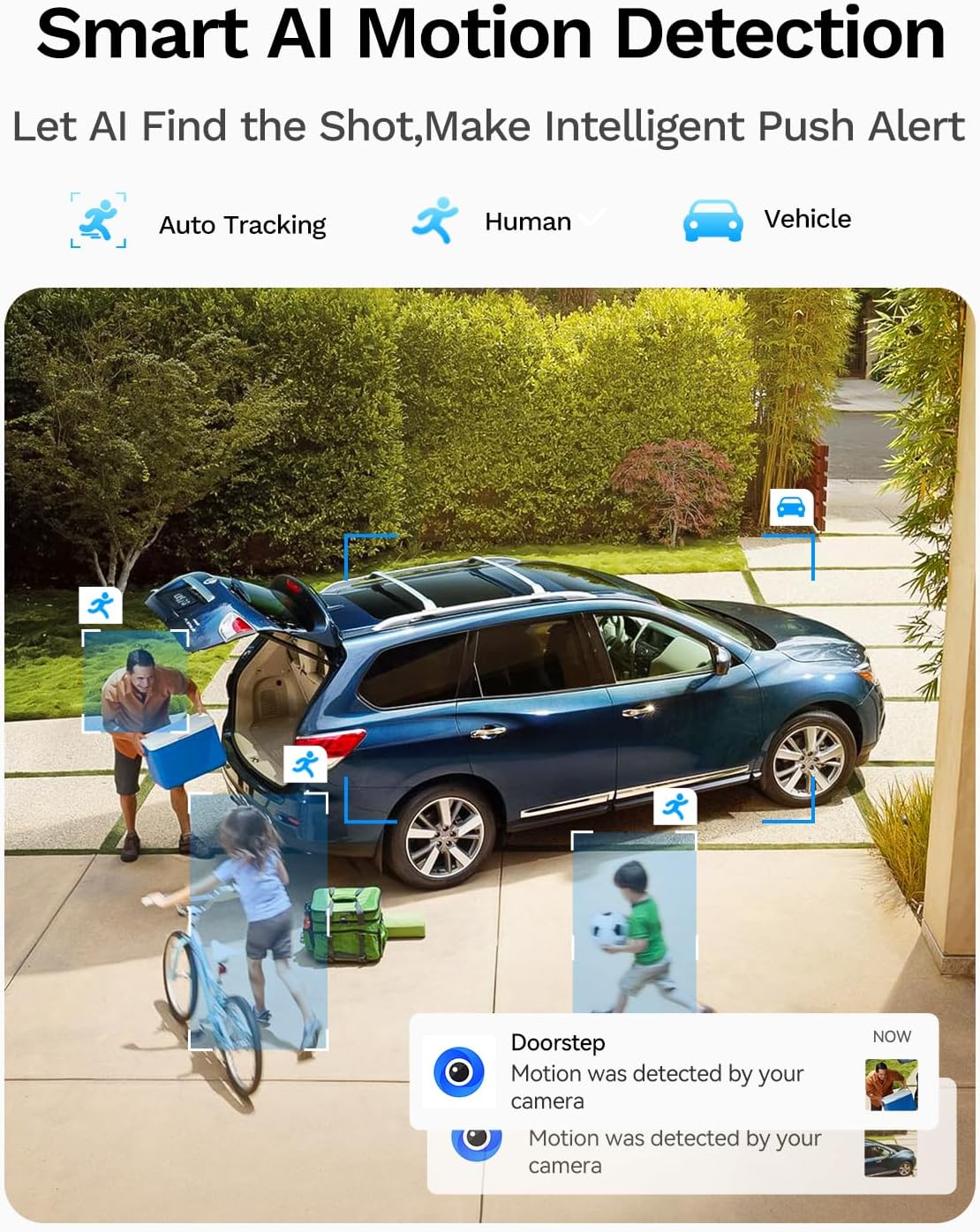
Image: Illustrates smart AI motion detection, showing the camera tracking human and vehicle movement and sending push alerts to a smartphone.
4.5 Two-Way Talk
The built-in microphone and speaker allow for real-time two-way communication. You can speak through the app to deter intruders or communicate with visitors.

Image: Depicts the two-way audio function, showing a person interacting with the camera via a smartphone app, with options for push alerts, person detection, and siren activation.
4.6 Color Night Vision
The camera provides 2K resolution with both full-color night mode (using LED lights) and infrared mode for clear vision in low-light conditions. It offers a visible distance of 40-60ft and a detection range of 30-40ft.

Image: Shows the camera's full-color night vision capabilities, displaying a clear, illuminated view of a backyard at night on a smartphone screen.
4.7 360 Degree Panoramic View
The pan-tilt lens allows for a 360-degree panoramic view, ensuring no area is left unmonitored. You can remotely adjust the camera's angle through the app.

Image: Illustrates the camera's 360-degree panoramic view, showing its ability to cover a wide outdoor area with pan and tilt functionality.
4.8 Smart Playback
Access recorded footage through the app's smart playback feature. Easily review events triggered by motion detection.
Video: Demonstrates the smart playback feature of the LongPlus camera, showing how to review recorded events and detected motion through the mobile application.
4.9 Thumbnail Notifications
Receive instant notifications with a quick preview image directly on your phone's lock screen, allowing for immediate awareness of detected events.

Image: Shows a smartphone receiving a thumbnail notification from the camera, indicating motion detection with a preview image.
4.10 Family Sharing
The camera's feed and controls can be shared with family members, allowing multiple users to monitor the property simultaneously.
5. Maintenance
5.1 Weather Resistance
The camera has an IP65 weatherproof rating, ensuring its functionality in various outdoor conditions. While designed for durability, avoid direct high-pressure water jets on the camera.
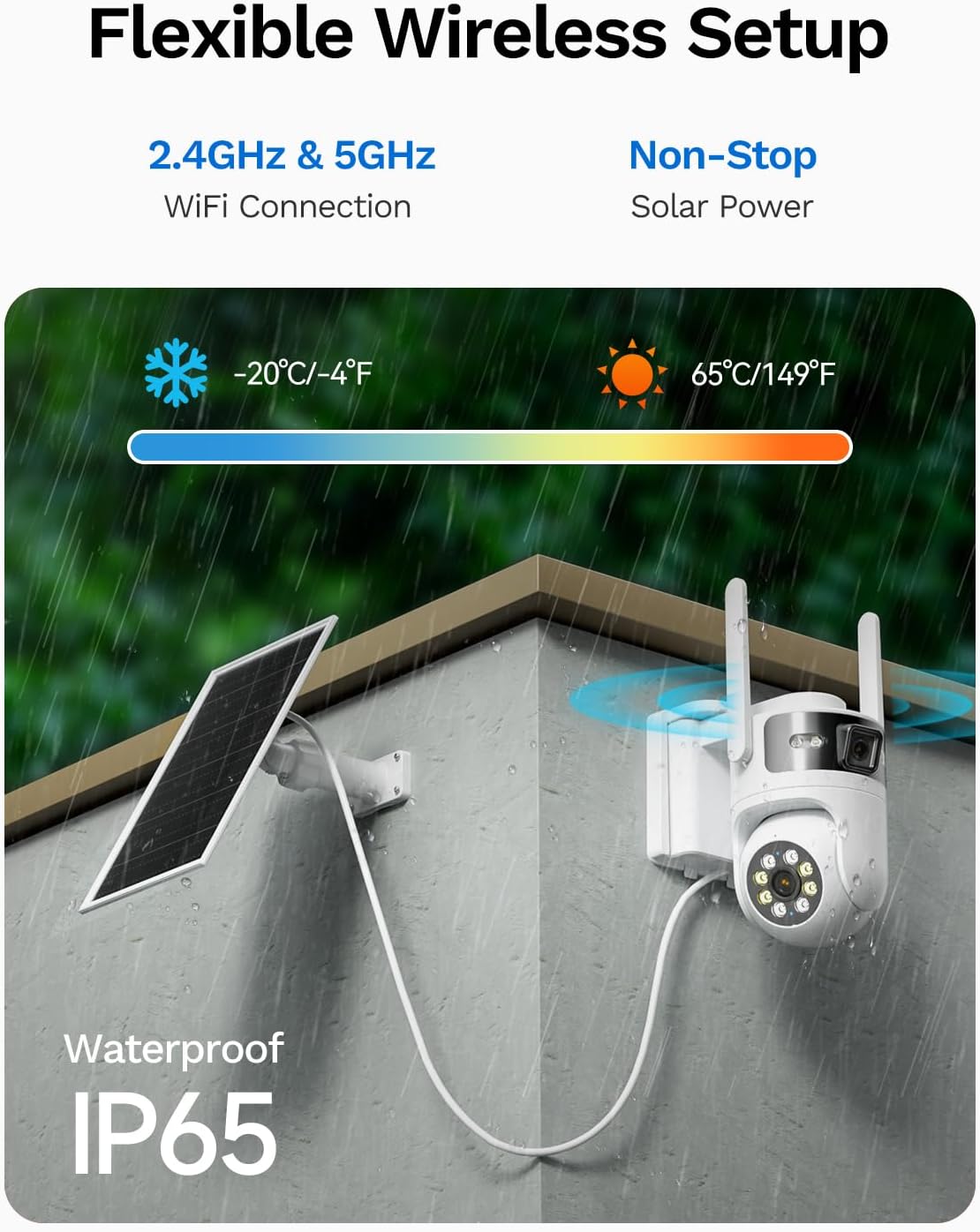
Image: Displays the camera and solar panel mounted outdoors, illustrating its IP65 weatherproof design and ability to operate in various temperatures.
5.2 Solar Panel Care
Periodically clean the surface of the solar panel to ensure optimal sunlight absorption and charging efficiency. Remove any dust, dirt, or debris that may accumulate.
5.3 Storage Management
Regularly check the storage status of your SD card through the SV360 app. If using cloud storage, ensure your subscription is active. Back up important footage as needed.
6. Troubleshooting
6.1 Connectivity Issues
- Camera offline: Ensure the camera is within WiFi range and has sufficient battery power. Restart the camera and your router.
- Slow live stream: Check your WiFi signal strength. Try moving the camera closer to the router or reducing network congestion.
6.2 Motion Detection Problems
- False alarms: Adjust the AI motion detection sensitivity settings in the app. Ensure the camera's field of view is clear of moving objects like tree branches.
- No detection: Verify that motion detection is enabled in the app. Check the camera's placement to ensure it covers the desired area.
6.3 Power Issues
- Low battery: Ensure the solar panel is clean and receiving direct sunlight for several hours daily. If prolonged cloudy weather occurs, manual charging may be necessary.
6.4 Video Quality
- Blurry images/video: Clean the camera lenses. Ensure there is no obstruction in the camera's view.
- Poor night vision: Check if the LED/infrared lights are obstructed. Ensure the camera is in an area with adequate ambient light for color night vision, or switch to infrared mode.
7. Specifications
| Feature | Specification |
|---|---|
| Brand | LongPlus |
| Model Name | CLQ1-W22 |
| Connectivity Technology | Wireless (2.4GHz & 5GHz Wi-Fi) |
| Effective Still Resolution | 2 MP (per lens) |
| Video Capture Resolution | 4MP (combined) |
| Special Features | 2-Way Audio, 24/7 Local Recording, 2K Color Night Vision, AI Motion Detection, AOV Technology |
| Indoor/Outdoor Usage | Outdoor |
| Controller Type | SV360 App |
| Mount Type | Ceiling Mount/Wall Mount |
| Color | White-Dual Lens |
| Enclosure Material | High Quality ABS |
| Flash Memory Supported Size Maximum | 512 GB (32GB SD Card included) |
| Night Vision Range | 66 Feet |
| Power Source | Solar Powered |
| Voltage | 5 Volts |
| Item Dimensions | 4.49 x 5.94 x 5.28 inches |
8. Warranty and Support
For warranty information and customer support, please refer to the documentation included with your product or visit the official LongPlus website. Professional and responsive customer service is available to assist you with any inquiries or issues.