
Introduction
Thank you for choosing the HOMCOM Sit/Stand Height Adjustable Desk. This manual provides essential information for the safe assembly, operation, and maintenance of your new desk. Please read these instructions carefully before use and retain them for future reference.
This versatile desk is designed to enhance your workspace flexibility, allowing you to switch between sitting and standing positions. It features a two-tier design, a tilting front surface, and mobile casters for easy relocation.

Figure 1: The HOMCOM Sit/Stand Height Adjustable Desk in use, showcasing its two-tier design and mobile nature.
Setup Instructions
Carefully unpack all components and verify against the parts list (not provided in this manual, refer to your product packaging for a complete list). Ensure all parts are present and undamaged before beginning assembly.
Assembly Steps:
- Prepare the Area: Choose a clean, flat, and spacious area for assembly. Lay down a blanket or cardboard to prevent scratches to the desk components or your floor.
- Attach Casters: Securely attach the four casters to the base frame. Ensure that the two casters with locking mechanisms are placed on the same side for easier access.
- Assemble the Frame: Connect the vertical support poles to the base frame and the upper support bars. Hand-tighten all fasteners initially.
- Install Desktop Panels: Attach the main tilting desktop panel and the fixed upper shelf to the assembled frame using the provided hardware.
- Final Tightening: Once all components are in place, systematically tighten all screws and bolts. Do not overtighten.
- Check Stability: Gently shake the desk to ensure it is stable. If any wobbling occurs, recheck all connections.
Operating Instructions
Height Adjustment:
The desk's height can be adjusted from 70.5 cm to 120 cm. To adjust the height, loosen the adjustment knobs located on the vertical support poles. Carefully raise or lower the desktop to your desired height. Once the desired height is reached, securely tighten the adjustment knobs to lock the desk in position.
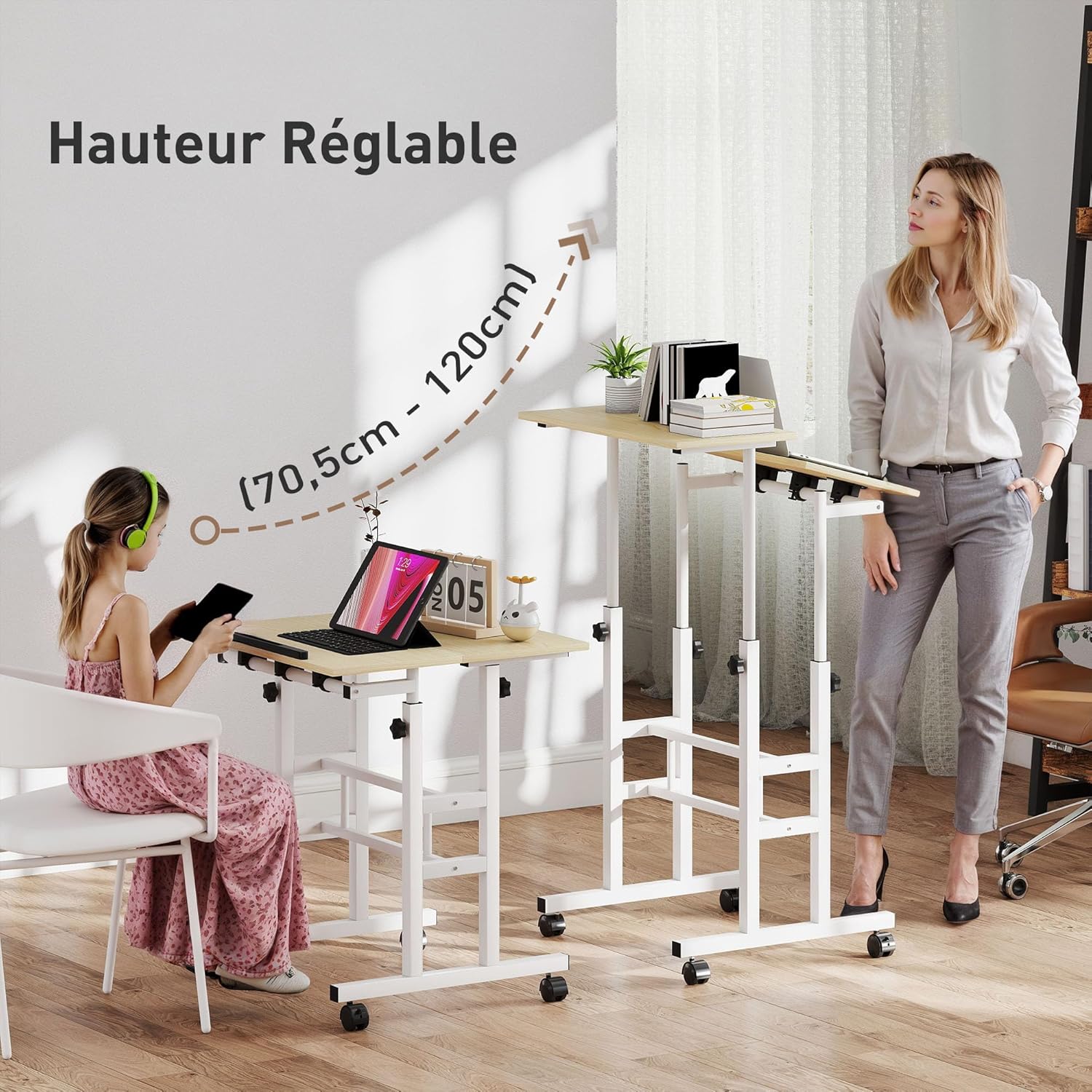
Figure 2: Illustration of the desk's height adjustment mechanism, demonstrating its versatility for both sitting and standing use.
Tilting Desktop Operation:
The front desktop surface can be tilted from 0° to 45° for ergonomic comfort during reading, writing, or typing. To adjust the tilt, locate the tilt adjustment mechanism beneath the front desktop. Loosen the mechanism, set the desktop to your preferred angle, and then tighten to secure it. A stopper bar is integrated at the bottom edge of the tilting surface to prevent items from sliding off.

Figure 3: Detail of the tilting front desktop, showing the adjustable angle and the integrated stopper bar.
Mobility and Locking Casters:
The desk is equipped with four smooth-rolling casters for easy movement. Two of these casters include locking mechanisms to secure the desk in place. To move the desk, ensure both locking casters are in the unlocked position. To stabilize the desk, push down the levers on the locking casters until they click into the locked position.
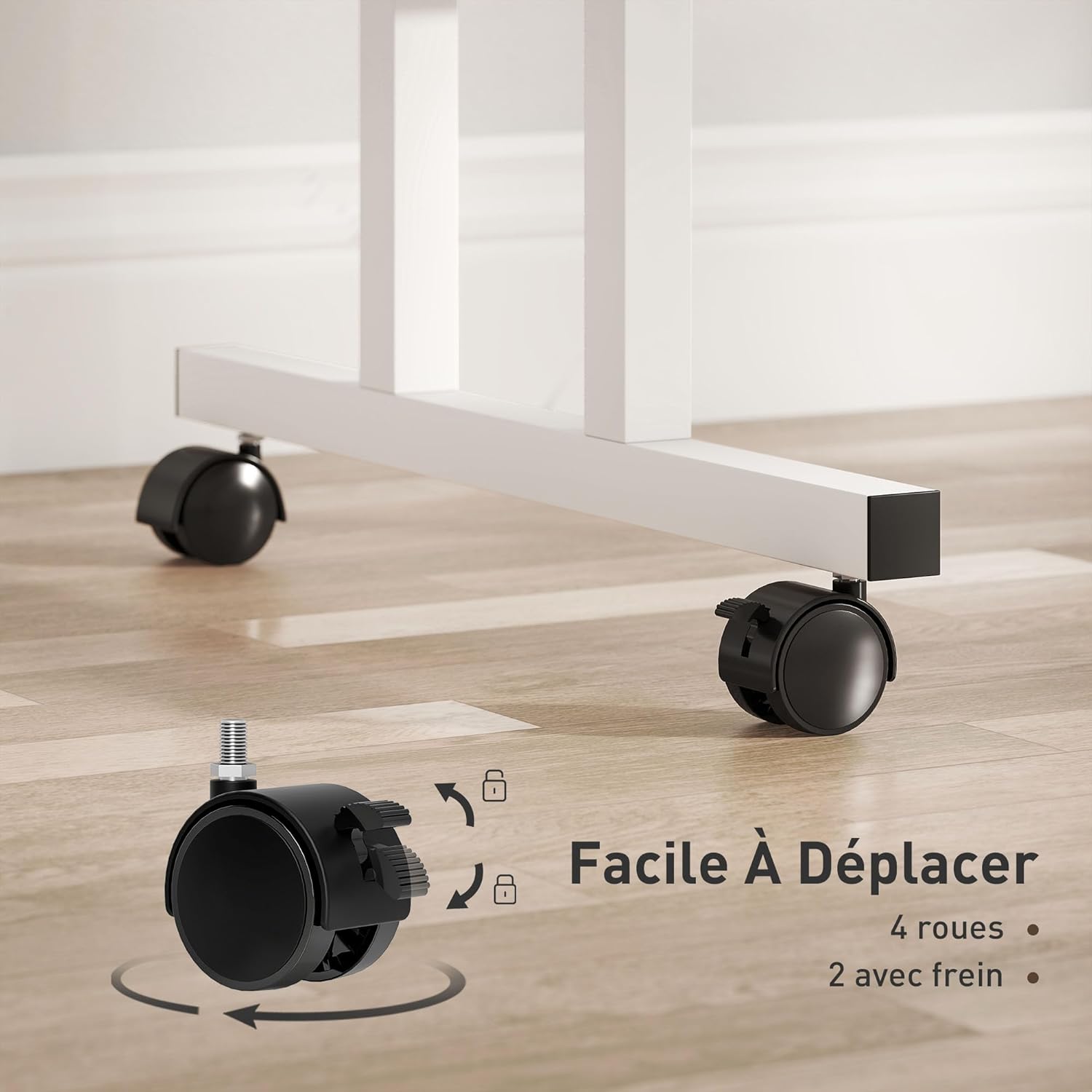
Figure 4: Detailed view of the desk's casters, illustrating the locking feature for stability.
Maintenance
Regular maintenance ensures the longevity and safe operation of your HOMCOM desk.
- Cleaning: Wipe surfaces with a soft, damp cloth. Avoid abrasive cleaners or harsh chemicals that may damage the finish.
- Fastener Check: Periodically check all screws and bolts to ensure they remain tight. Retighten if necessary to maintain stability.
- Caster Inspection: Keep casters free of debris. If movement becomes difficult, clean the wheels and axles.
Troubleshooting
Desk is Wobbly:
- Ensure all assembly screws and bolts are securely tightened.
- Verify that the floor surface is even.
- Check if the casters are fully engaged or disengaged as intended.
Difficulty Adjusting Height:
- Ensure the height adjustment knobs are fully loosened before attempting to change height.
- Do not apply excessive force. If the mechanism feels stiff, check for any obstructions.
Items Sliding Off Tilting Surface:
- Ensure the stopper bar is correctly installed and positioned at the bottom edge of the tilting surface.
- Avoid placing heavy or unstable items on the tilting surface at extreme angles.
Product Specifications
| Feature | Specification |
|---|---|
| Model Number | FR836-647V00ND |
| Overall Dimensions | 60L x 60W x 70.5-120H cm |
| Desktop Panel Dimensions (each) | 60L x 30W cm |
| Height Adjustment Range | 70.5 cm to 120 cm |
| Tilting Angle (Front Panel) | 0° to 45° |
| Material | Engineered Wood (MDF), Metal |
| Maximum Load Capacity (Total) | 100 kg |
| Maximum Load Capacity (Lowest Position) | 80 kg |
| Maximum Load Capacity (Highest Position) | 20 kg |
| Special Features | Height adjustable, Two-tier design, Tilting front panel, Stopper bar, 4 Casters (2 with brakes) |
| Product Weight | 9.8 kg |

Figure 5: Detailed dimensions of the HOMCOM Sit/Stand Height Adjustable Desk.
Warranty and Support
For warranty information or technical support, please refer to the documentation included with your purchase or contact HOMCOM customer service directly. Contact details can typically be found on the manufacturer's website or your purchase receipt.
When contacting support, please have your model number (FR836-647V00ND) and purchase date available.