
Introduction
This manual provides comprehensive instructions for the safe and effective use of your DEFENTAC DF-52 HD1080P Camera and 500 Lumens Flashlight Combo (Model DF-909D). Please read this manual thoroughly before operating the device and retain it for future reference.
Safety Information
- Do not look directly into the flashlight beam.
- Keep the device away from water and moisture.
- Do not attempt to disassemble or modify the device.
- Use only the provided charging cable.
- Ensure the device is securely mounted before use.
- If the device includes a laser component, ensure its power output is less than 5mW and it is classified as Class IIIa. Avoid direct eye exposure to any laser beam.
Package Contents
Verify that all items are present in your package:
- DEFENTAC DF-909D Camera and Flashlight Combo
- USB Charging/Data Cable
- Mounting Bolt / Allen Wrench
- Rail Mount Adapter
- User Manual (Printed)

Image: Package contents of the DEFENTAC DF-909D, showing the device, USB cable, mounting hardware, and printed manual.
Product Overview
Familiarize yourself with the components of your DEFENTAC DF-909D device:

Image: Labeled diagram of the DEFENTAC DF-909D, highlighting the Flashlight Switch, Charging/Data Port, Power Indicator, Mounting Bolt, Camera On/Off/Pause Switch, Camera Working Indicator, Camera Reset Button, and Microphone.
- Flashlight Switch: Controls the flashlight functions.
- Charging/Data Port: For charging the internal battery and connecting to a computer for data transfer.
- Power Indicator: Shows the device's power status.
- Mounting Bolt: Secures the device to a rail system.
- Camera On/Off/Pause Switch (DV ON/OFF): Controls camera recording.
- Camera Working Indicator: Indicates camera recording status.
- Camera Reset Button (DV RESET): Resets the camera function.
- Microphone (MIC): Records audio during video capture.
Setup
1. Charging the Device
Before first use, fully charge the device. Connect the provided USB cable to the Charging/Data Port on the device and plug the other end into a USB power source (e.g., computer, wall adapter). The Power Indicator will show charging status.
2. Mounting the Device
The DF-909D features an adjustable rail system for secure attachment.
- Align the device's rail mount with your compatible rail system.
- Use the provided Allen wrench to tighten the Mounting Bolt until the device is firmly secured.
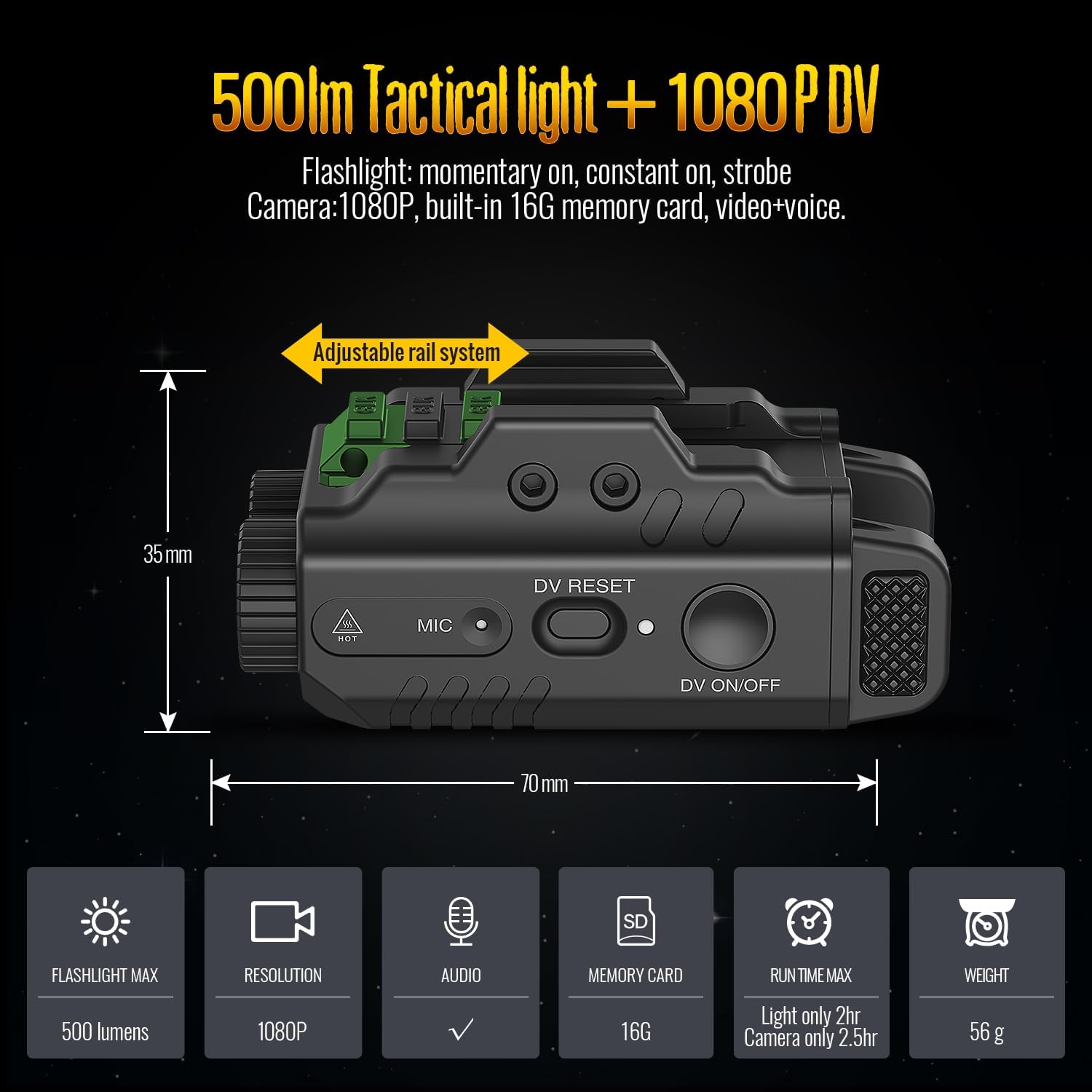
Image: Side view of the DEFENTAC DF-909D, illustrating its dimensions and the adjustable rail system for mounting.
Operating
1. Camera Operation
- On/Off: Press and hold the Camera On/Off/Pause Switch (DV ON/OFF) for 3 seconds. The camera will begin a 5-second booting process, indicated by a blue light. Once the blue indicator starts flashing, video recording is in progress.
- Pause/Resume: While recording, click the Camera On/Off/Pause Switch (DV ON/OFF) to pause recording (indicator light remains solid blue). Click again to resume recording (indicator light flashes blue).
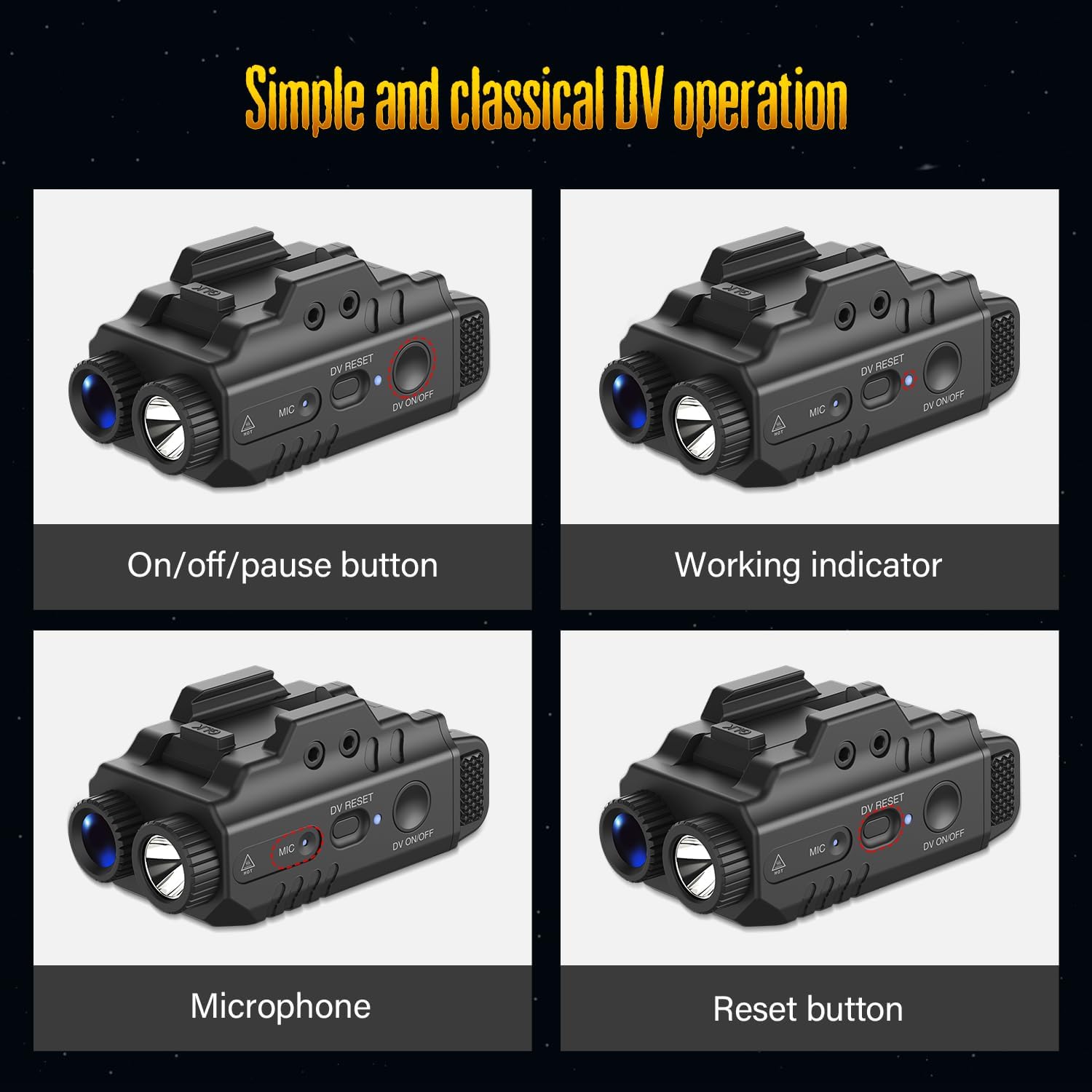
Image: Detailed views of the DEFENTAC DF-909D highlighting the On/Off/Pause button, Working Indicator, Microphone, and Reset button for camera operation.
2. Flashlight Operation
The 500 Lumens flashlight offers multiple modes:
- Momentary On: Press and hold the Flashlight Switch. Release to turn off.
- Constant On: Click the Flashlight Switch once. Click again to turn off.
- Strobe: Double-click the Flashlight Switch. Click once to turn off.
3. Combined Operation Modes
The device supports various combinations of flashlight and camera functions:
- Light and Video: Activate both the flashlight and camera simultaneously.
- Light Only (Constant On/Strobe): Use the flashlight independently.
- Only Video: Record video without activating the flashlight.

Image: The DEFENTAC DF-909D demonstrating its three operational modes: Light and Video, Light Only (Constant On/Strobe), and Only Video.
4. Data Transfer
To access recorded videos and audio, connect the device to a computer using the USB Charging/Data Cable. The device will appear as a removable storage drive, allowing you to easily read and download files.
Maintenance
- Cleaning: Use a soft, dry cloth to clean the device. Do not use abrasive cleaners or solvents.
- Storage: Store the device in a cool, dry place away from direct sunlight and extreme temperatures.
- Battery Care: For optimal battery life, charge the device regularly, even if not in frequent use. Avoid fully discharging the battery for extended periods.
Troubleshooting
- Device not turning on: Ensure the device is fully charged. If the issue persists, try resetting the camera using the DV RESET button.
- Camera not recording: Check the camera working indicator. If it's solid blue, recording is paused; click the DV ON/OFF switch to resume. Ensure there is sufficient memory.
- Cannot connect to computer: Try a different USB port or cable. Ensure the device is powered on when connecting.
Specifications
| Feature | Specification |
|---|---|
| Flashlight Output | 500 Lumens |
| Camera Resolution | 1080P |
| Memory Card | Built-in 16GB |
| Audio Recording | Yes (Video + Voice) |
| Run Time (Light Only) | Approx. 2 hours |
| Run Time (Camera Only) | Approx. 2.5 hours |
| Weight | 56 grams |
| Dimensions (L x H) | 70 mm x 35 mm |
Warranty
DEFENTAC offers a limited warranty for this product. Please refer to the official DEFENTAC website or contact customer support for detailed warranty terms and conditions.
Support
For technical assistance, troubleshooting, or further inquiries, please visit the official DEFENTAC website or contact their customer support team. Contact information can typically be found on the manufacturer's website or in the printed manual included with your product.