
1. Introduction
This manual provides essential information for the safe and effective installation, operation, and maintenance of your DALY 60A 7S-17S Smart Battery Management System (BMS). This BMS is designed to protect and manage lithium battery packs (Li-ion, LiFePO4, LTO) with configurations ranging from 7S to 17S, supporting various applications such as e-bikes and scooters. Please read this manual thoroughly before use.

Image: DALY Smart BMS 60A 7S-17S unit with an electric scooter in the background, highlighting its application.
2. Safety Information
- Always wear appropriate personal protective equipment (PPE) when handling batteries and BMS units.
- Ensure all connections are correct and secure before applying power. Incorrect wiring can cause damage to the BMS, battery, or connected devices, and poses a fire risk.
- Do not short-circuit the battery terminals.
- Keep the BMS away from water, moisture, and extreme temperatures.
- Only use the BMS with compatible battery chemistries (Li-ion, LiFePO4, LTO) and cell counts (7S-17S) as specified.
- If the BMS or battery shows signs of damage or malfunction, disconnect power immediately and consult a professional.
3. Package Contents
Verify that all items are present in the package:
- DALY Smart BMS Unit
- User Manual (this document)
- DIO cable
- B-P- output line
- NTC (Negative Temperature Coefficient) sensor
- Sampling cable (balance wires)
- Screws
- B+ line

Image: Contents of the DALY Smart BMS package, showing the BMS unit, various cables, NTC sensor, screws, and the instruction manual.
4. Product Overview and Features
The DALY Smart BMS offers advanced protection and monitoring for your battery pack. Key features include:
- Wide Application: Supports 7S to 17S battery packs (24V-60V) for Li-ion, LiFePO4, and LTO chemistries.
- Smart Monitoring: Integrated Bluetooth allows real-time monitoring of individual cell voltage, pack temperature, and current via a dedicated mobile application. Customizable protection limits and instant alerts enhance safety.
- Enhanced Safety Protections: Includes safeguards against overcharge, overdischarge, overcurrent, high/low temperature, ESD, pre-charge issues, connection loss, and short circuits.
- Easy Auto-Detection: Automatically recognizes the battery pack configuration upon initial power-up, simplifying the setup process.
- Low Power Consumption: Features ultra-low operating current (≤10mA) and sleep current (<600µA) to minimize battery drain during active use and storage.
- Flexible Expansion: Built-in parallel balancing module supports safe expansion of battery capacity or voltage in the future without requiring a BMS replacement.

Image: Diagram illustrating the various function features of the DALY Smart BMS, such as multi-series compatibility and protection mechanisms.

Image: Illustration showing how the DALY Smart BMS supports parallel connection for safely expanding battery capacity.
5. Setup and Installation
Careful wiring is crucial for the proper function and safety of the BMS. Follow these steps precisely:
5.1 Wiring Diagram
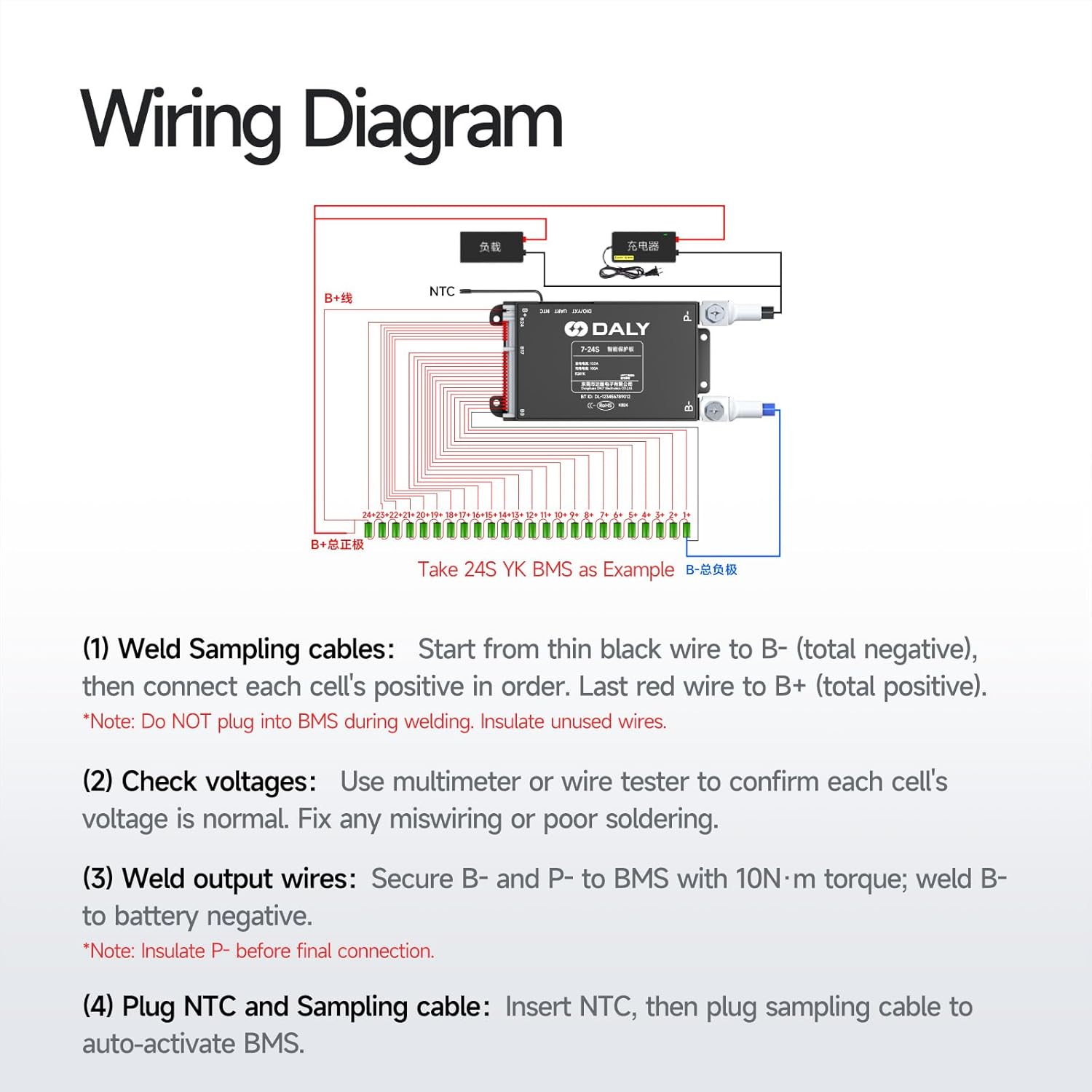
Image: Detailed wiring diagram for the DALY Smart BMS, showing connections for B-, B+, sampling cables, and NTC sensor.
5.2 Installation Steps
- Weld Sampling Cables: Start from the thin black wire to B- (total negative terminal of the battery pack). Then, connect each cell's positive terminal in order using the remaining sampling wires. The last red wire connects to B+ (total positive terminal).
Note: Do NOT plug the sampling cable into the BMS during welding. Insulate any unused wires. - Check Voltages: Use a multimeter or wire tester to confirm that each cell's voltage is normal and that the voltage progression across the sampling wires is correct. Fix any miswiring or poor soldering before proceeding.
- Weld Output Wires: Secure the B- and P- terminals to the BMS with 10N·m torque. Weld the B- wire to the battery negative terminal. The P- wire is the main discharge/charge negative output.
Note: Insulate the P- terminal before making the final connection to your load/charger. - Plug NTC and Sampling Cable: Insert the NTC (temperature sensor) cable, then plug the sampling cable into the designated port on the BMS. This action will auto-activate the BMS.
6. Operating Instructions
The DALY Smart BMS features built-in Bluetooth for monitoring and configuration via a mobile application.
6.1 Bluetooth App Connection
- Download the official DALY BMS application from your smartphone's app store (available for Android and iOS).
- Ensure Bluetooth is enabled on your smartphone.
- Open the DALY BMS app and search for available devices. Select your BMS from the list.
- Follow the on-screen prompts to connect.

Image: A smartphone displaying the DALY Smart BMS application interface, showing real-time battery parameters like voltage, current, and temperature.
6.2 Monitoring and Configuration
Through the app, you can:
- View real-time data for each cell's voltage, total pack voltage, current, and temperature.
- Monitor charge and discharge status.
- Receive alerts for protection events (e.g., overvoltage, undervoltage, overcurrent).
- Adjust certain protection parameters (refer to the app's specific instructions for available settings).
7. Maintenance
- Regularly inspect all wiring connections for tightness and corrosion.
- Keep the BMS unit clean and free from dust and debris.
- Ensure adequate ventilation around the BMS and battery pack to prevent overheating.
- Periodically check battery cell voltages via the app to ensure proper balancing.
- If storing the battery pack for an extended period, ensure it is charged to a suitable storage voltage (typically 50-60% State of Charge) and disconnect the load.
8. Troubleshooting
If you encounter issues with your DALY Smart BMS, consider the following common problems and solutions:
- BMS Not Activating: Ensure the sampling cable is correctly plugged in after all other connections are made. Check individual cell voltages.
- No Power Output: Verify all main power connections (B-, P-). Check for any active protection alerts in the Bluetooth app (e.g., overdischarge, short circuit). A protection event may have triggered the BMS to cut off power.
- Bluetooth Connection Issues: Ensure the BMS is powered on and within range. Restart the app and your phone's Bluetooth.
- Unbalanced Cells: The BMS has a passive balancing function. If significant imbalance persists, ensure the battery pack has undergone several charge/discharge cycles. For severe or persistent imbalance, professional inspection may be required.
- Overheating: Check for proper ventilation. Reduce load if operating continuously at high currents.
For persistent issues not resolved by these steps, contact DALY customer support.
9. Specifications
The following specifications apply to the DALY 60A 7S-17S Smart BMS:
| Feature | Specification |
|---|---|
| Model | 60A 7S-17S |
| Supported Cell Count | 7S to 17S |
| Supported Battery Types | Li-ion, LiFePO4, LTO |
| Continuous Discharge Current | 60A |
| Product Dimensions (L x W x H) | 10.1 x 6.5 x 1.4 cm |
| Weight | 270 g |
| Operating Current | ≤10mA |
| Sleep Current | <600µA |
| Communication | Built-in Bluetooth (Android, iOS, Huawei Android App) |
| Balancing Type | Passive Balance |
| Manufacturer | Dongguan Daly Electronics Co., Ltd. |
| UPC/GTIN | 729767448756 |

Image: Detailed table of product parameters for various DALY BMS models, including current, size, cable specifications, and communication methods.
10. Warranty and Support
10.1 Warranty
The DALY 60A 7S-17S Smart BMS comes with a 5-Year Warranty from the date of purchase. This warranty covers manufacturing defects and malfunctions under normal use. Please retain your proof of purchase for warranty claims.
10.2 Customer Support
For technical assistance, troubleshooting, or warranty inquiries, please contact DALY customer support through the retailer where you purchased the product or visit the official DALY website for contact information.


