1. Introduction
This manual provides essential information for the safe operation, maintenance, and troubleshooting of your AtlanTec AT4000Di Dual Fuel Inverter Generator. Please read this manual thoroughly before operating the generator to ensure proper use and to prevent injury or damage.
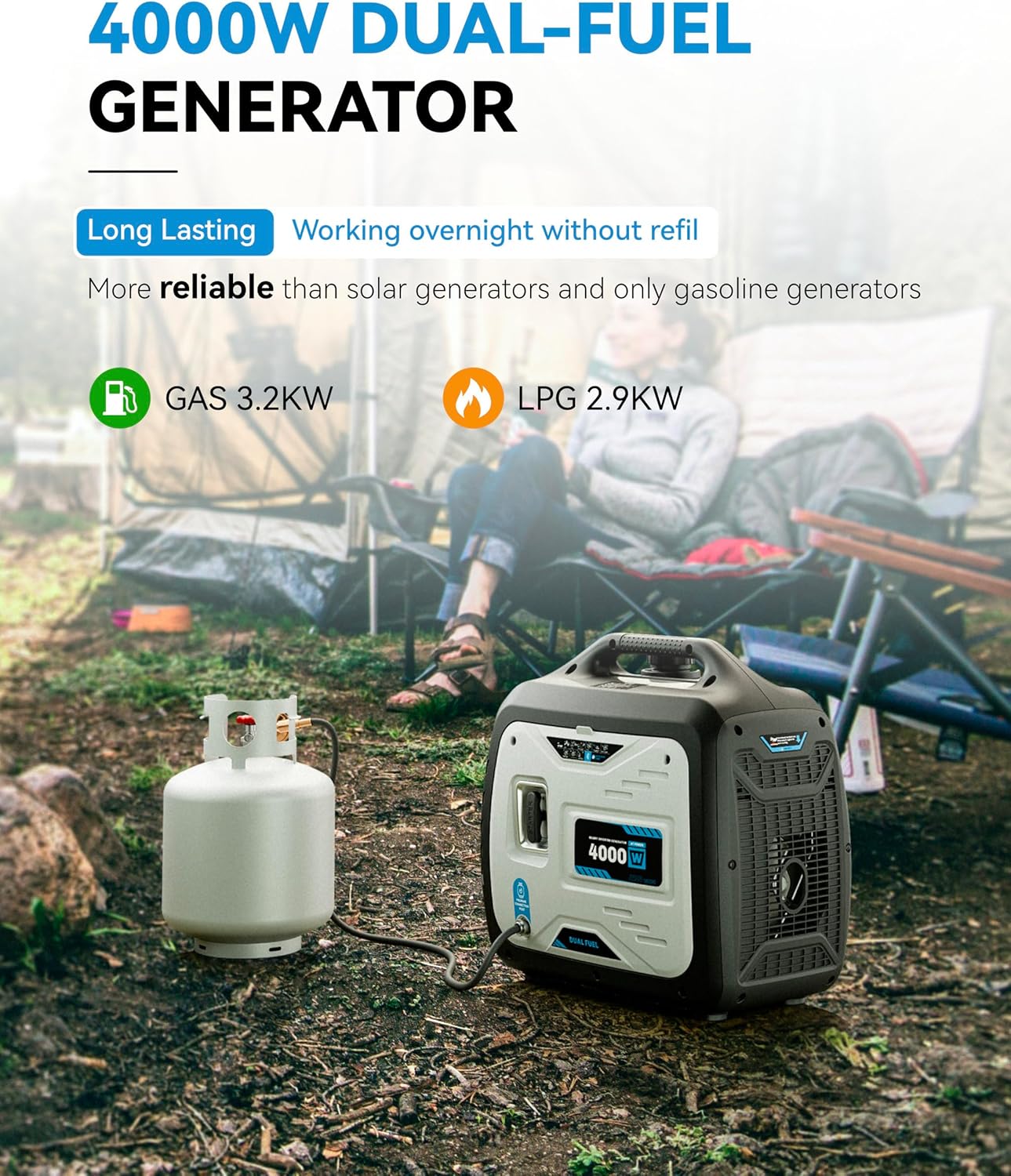
Image 1.1: The AtlanTec AT4000Di Dual Fuel Inverter Generator connected to a propane tank, ready for use in an outdoor environment. This generator offers both gasoline and LPG power options.

Image 1.2: The AtlanTec AT4000Di Dual-Fuel Generator positioned in a camping environment, highlighting its portability and suitability for outdoor power needs.
2. Safety Information
Always follow these safety guidelines to prevent serious injury or death.
- Carbon Monoxide Hazard: Generators produce carbon monoxide (CO), an odorless, colorless, poisonous gas. Operate the generator outdoors only, far away from windows, doors, and vents. Never operate indoors, in a garage, or in any enclosed space. The generator is equipped with a CO Alert safety system that automatically shuts down the unit if unsafe CO levels are detected.
- Fire Hazard: Gasoline and propane are highly flammable. Store fuel in approved containers in a well-ventilated area. Do not refuel while the engine is running or hot. Keep flammable materials away from the generator.
- Electrical Shock Hazard: Never operate the generator in wet conditions. Do not touch the generator with wet hands. Ensure all electrical connections are secure and properly grounded.
- Hot Surfaces: The generator engine and muffler become very hot during operation and remain hot for some time after shutdown. Avoid touching hot surfaces to prevent burns.
- Children and Pets: Keep children and pets away from the generator at all times.
3. Package Contents
Verify that all items listed below are included in your generator package.

Image 3.1: The AtlanTec AT4000Di generator shown alongside its standard accessories, including the user manual, propane hose, various electrical plugs, a screwdriver, a socket wrench, and an oil funnel.
- AtlanTec AT4000Di Dual Fuel Inverter Generator
- User Manual
- Propane Pipe (Hose)
- Electrical Plugs (various types)
- Screwdriver
- Socket Wrench
- Oil Funnel
4. Setup
4.1 Initial Inspection
Before first use, inspect the generator for any signs of damage during shipping. Ensure all covers and panels are securely fastened.
4.2 Adding Engine Oil
The generator is shipped without engine oil. You must add the correct amount and type of oil before starting. Refer to the specifications section for oil type and capacity.
- Place the generator on a level surface.
- Remove the oil fill cap/dipstick.
- Using the provided funnel, slowly add the recommended engine oil until it reaches the upper mark on the dipstick. Do not overfill.
- Securely replace the oil fill cap/dipstick.
4.3 Adding Fuel
The AT4000Di operates on either gasoline or propane (LPG).
4.3.1 Gasoline
- Ensure the generator is off and cool.
- Unscrew the fuel cap.
- Carefully pour fresh, unleaded gasoline (minimum 87 octane) into the fuel tank. Do not fill above the red indicator line.
- Securely replace the fuel cap.
4.3.2 Propane (LPG)
- Ensure the generator is off and cool.
- Connect the propane hose to the generator's LPG inlet and to a standard propane tank. Ensure connections are tight.
- Slowly open the valve on the propane tank.
5. Operating Instructions
5.1 Control Panel Overview
Familiarize yourself with the generator's control panel components before operation.
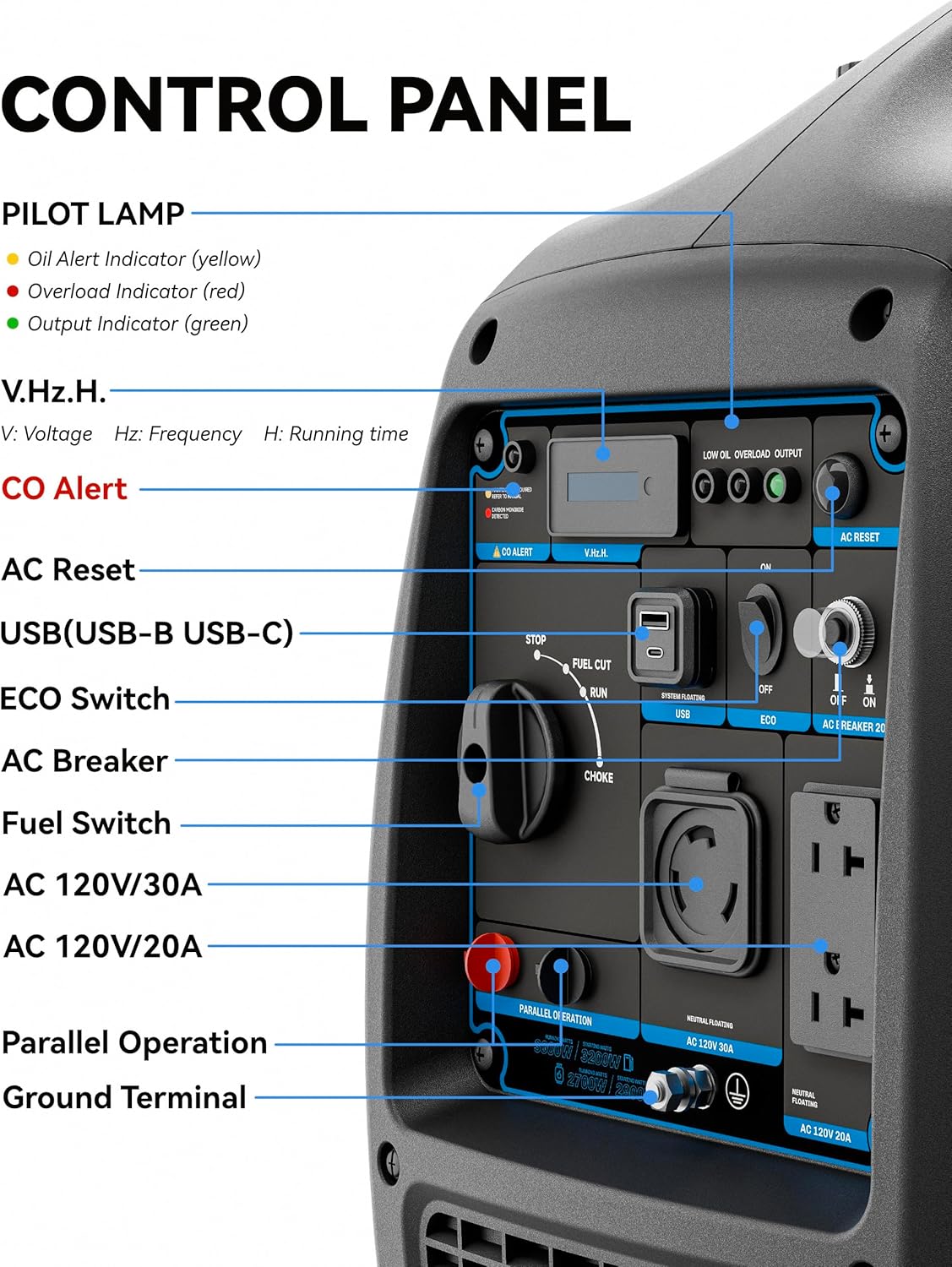
Image 5.1: A close-up view of the AT4000Di control panel, clearly labeling the Pilot Lamp indicators (Oil Alert, Overload, Output), V.Hz.H display, CO Alert button, AC Reset, USB ports, ECO Switch, AC Breaker, Fuel Switch, AC 120V/30A and 120V/20A outlets, Parallel Operation ports, and Ground Terminal.
- Pilot Lamp: Yellow (Oil Alert), Red (Overload), Green (Output).
- V.Hz.H Display: Shows Voltage (V), Frequency (Hz), and Running Time (H).
- CO Alert: Indicator and reset button for the Carbon Monoxide safety system.
- AC Reset: Resets the AC output after an overload.
- USB (USB-B, USB-C): For charging small electronic devices.
- ECO Switch: Engages Eco-mode for fuel efficiency and quieter operation under light loads.
- AC Breaker: Protects AC circuits from overload.
- Fuel Switch: Selects between gasoline and propane, or off.
- AC 120V/30A & AC 120V/20A: Standard AC power outlets.
- Parallel Operation: Ports for connecting two compatible generators for increased power output.
- Ground Terminal: For connecting an external ground wire.
5.2 Starting the Generator
Ensure the generator is on a level surface, outdoors, and away from any obstructions.
5.2.1 Starting with Gasoline
- Turn the Fuel Switch to the 'Gasoline' position.
- Move the Choke lever to the 'Choke' position (cold start).
- Pull the recoil starter handle firmly and smoothly until the engine starts.
- Once the engine starts, slowly move the Choke lever to the 'Run' position.
5.2.2 Starting with Propane (LPG)
- Ensure the propane tank valve is fully open.
- Turn the Fuel Switch to the 'LPG' position.
- Move the Choke lever to the 'Choke' position (cold start).
- Pull the recoil starter handle firmly and smoothly until the engine starts.
- Once the engine starts, slowly move the Choke lever to the 'Run' position.
5.3 Connecting Electrical Loads
Allow the generator to run for a few minutes to stabilize before connecting any electrical devices.
- Plug your appliances into the appropriate AC outlets (120V/20A or 120V/30A).
- Ensure the total wattage of connected devices does not exceed the generator's running wattage.
- For sensitive electronics, the inverter technology provides clean, stable power (Pure Sine Wave).

Image 5.2: This image demonstrates the clean, stable pure sine wave power produced by the AtlanTec inverter generator, suitable for sensitive electronics, contrasted with a less stable modified sine wave.
5.4 ECO Mode
Engage the ECO switch for improved fuel efficiency and reduced noise when operating under light loads. The engine speed will automatically adjust to the load requirements.

Image 5.3: The AtlanTec generator operating in an outdoor setting, illustrating its fuel-saving capabilities and extended run times with both gasoline and LPG.
5.5 Stopping the Generator
- Disconnect all electrical loads from the generator.
- Allow the generator to run for a few minutes without load to cool down.
- Turn the Fuel Switch to the 'OFF' position.
- If using propane, close the valve on the propane tank.
6. Maintenance
Regular maintenance ensures optimal performance and extends the life of your generator. Always perform maintenance with the engine off and cool.
6.1 Maintenance Schedule
| Item | First 20 Hours | Every 50 Hours / Annually | Every 100 Hours / Annually |
|---|---|---|---|
| Check Engine Oil | Check | Check | Check |
| Change Engine Oil | Replace | Replace | |
| Clean Air Filter | Clean | ||
| Check Spark Plug | Check/Adjust | ||
| Clean Fuel Filter | Check/Clean |
6.2 Storage
For long-term storage (more than 30 days), follow these steps:
- Drain the gasoline from the fuel tank and carburetor. Run the engine until it stops from lack of fuel.
- Remove the spark plug and pour a tablespoon of engine oil into the cylinder. Slowly pull the recoil starter a few times to distribute the oil, then reinstall the spark plug.
- Clean the generator thoroughly.
- Store in a clean, dry, well-ventilated area.
7. Troubleshooting
This section covers common issues and their solutions. If you encounter a problem not listed here, contact customer support.
| Problem | Possible Cause | Solution |
|---|---|---|
| Engine will not start | No fuel or low fuel Low engine oil Spark plug issue Fuel switch incorrect | Add fuel Add oil to correct level Check/clean/replace spark plug Ensure fuel switch is on correct fuel type |
| No power output | AC breaker tripped Overload ECO mode engaged with heavy load | Reset AC breaker Reduce connected load Turn off ECO mode for heavy loads |
| Engine runs rough | Stale fuel Dirty air filter Spark plug issue | Drain and replace with fresh fuel Clean/replace air filter Check/clean/replace spark plug |
| CO Alert shutdown | High carbon monoxide levels detected | Move generator to a well-ventilated outdoor area. Allow to clear, then press CO Alert reset button. |
8. Specifications
Key technical specifications for the AtlanTec AT4000Di Dual Fuel Inverter Generator.
- Model Name: AT4000Di
- Brand: AtlanTec
- Starting Wattage: 4000 Watts
- Running Wattage: 3000 Watts (3 KW)
- Output Wattage: 3200 (Peak)
- Voltage: 120 Volts
- Power Source: Fuel Powered (Gasoline, Propane/LPG)
- Item Weight: 54 Pounds
- Product Dimensions: 21"L x 11"W x 22"H
- Special Features: CO Sensor, Dual Fuel, Low Oil Shutdown, Super Quiet, USB Port
- Recommended Uses: Camping, Commercial, Residential
- Material: Metal
- UPC: 766997708984

Image 8.1: The AtlanTec AT4000Di generator shown in a cold, snowy camping scene, demonstrating its ability to operate effectively within a wide temperature range of 23°F to 123°F.
9. Warranty and Support
9.1 Warranty Information
The AtlanTec AT4000Di Dual Fuel Inverter Generator comes with a 1-Year Limited Warranty from the date of purchase. This warranty covers defects in materials and workmanship under normal use. It does not cover damage resulting from misuse, neglect, unauthorized modifications, or normal wear and tear.
9.2 Customer Support
For technical assistance, warranty claims, or to order replacement parts, please contact AtlanTec customer support. Refer to the contact information provided with your purchase documentation or visit the official AtlanTec website.
When contacting support, please have your generator's model number (AT4000Di) and proof of purchase readily available.