
1. Introduction
Thank you for choosing the XIIW 100mm Humidity & Timer Bathroom Extractor Fan. This manual provides essential information for the safe installation, operation, and maintenance of your new ventilation unit. Please read these instructions carefully before use and retain them for future reference.
This extractor fan is designed to improve indoor air quality by effectively removing excess humidity and odors from bathrooms, kitchens, garages, and other damp areas. Its intelligent humidity sensor and adjustable timer ensure optimal performance and energy efficiency.

Image: The XIIW extractor fan helps maintain a dry, clean, and mold-free home environment, promoting health and comfort for families.
2. Safety Information
WARNING: Electrical installation should only be performed by a qualified electrician in accordance with local wiring regulations.
- Always disconnect the power supply before installation, maintenance, or cleaning.
- Ensure the voltage and frequency of your power supply match the specifications of the fan (230V).
- Do not install the fan directly above a shower or bath where it may be exposed to direct water spray. The fan is IPX4 rated, meaning it is protected against splashing water from any direction.
- Ensure adequate ventilation is provided to prevent the backflow of gases from open flues of fuel-burning appliances.
- This appliance can be used by children aged 8 years and above and persons with reduced physical, sensory or mental capabilities or lack of experience and knowledge if they have been given supervision or instruction concerning use of the appliance in a safe way and understand the hazards involved.
- Children shall not play with the appliance. Cleaning and user maintenance shall not be made by children without supervision.
- Do not block the air inlet or outlet of the fan.
- The fan is designed for indoor use only.
3. Product Overview
Key Features
- Automatic Humidity Sensor: Detects humidity levels between 60% and 90% RH and automatically activates the fan to maintain a healthy, dry environment.
- Adjustable Timer: Features a run-on timer adjustable from 0 to 30 minutes, allowing the fan to continue operating after the humidity drops or manual activation ceases, ensuring complete moisture removal.
- Dual Operating Modes: Can be set for automatic activation via the humidity sensor or manual activation via an external switch (e.g., light switch), offering flexible control.
- Quiet Operation: Operates at a low noise level of less than 34 dB, ensuring minimal disturbance.
- Integrated Backdraft Damper: Prevents cold air ingress and odors from outside, ensuring a fresh indoor environment.
- Durable Construction: Made from UV-resistant ABS plastic, designed for longevity and to prevent yellowing.
- High Airflow & Energy Efficient: Provides an airflow of 95 m³/h with a power consumption of only 12W.

Image: The XIIW extractor fan highlights its automatic operation, high airflow (95m³/h), quiet performance (34dB), and splash-proof design (IPX4).

Image: The fan's ultra-quiet operation at only 34 dB ensures a peaceful environment, even in a bathroom.
Components
The XIIW extractor fan typically includes:
- Fan unit with motor and impeller
- Front cover
- Integrated backdraft damper
- Mounting hardware (screws, wall plugs)
- Instruction manual

Image: The double protection backdraft damper prevents cold air and humidity from entering from outside, and effectively blocks insects.
4. Installation
The XIIW extractor fan can be mounted on a wall, ceiling, or window. Ensure the mounting surface is flat and stable. For ceiling mounting, the backdraft damper must be removed.
Mounting Options

Image: The fan is suitable for various applications including bathrooms, ceiling installations, and kitchens, ensuring fresh air throughout the home.

Image: Wall mounting diagram shows air outlet, wall installation, PVC tube, and extractor fan. Ceiling mounting diagram shows PVC tube, wall fixing, exhaust vent, roof, extractor vent, and ventilation outlet. Note: For vertical (ceiling) mounting, the backdraft damper must be removed.
Wiring Diagrams
Refer to the following diagrams for correct electrical connection. Always ensure the power supply is disconnected before wiring.

Image: Wiring diagram for basic installation with one switch (Switch A). When Switch A is OFF, the fan starts automatically via the humidity sensor. When Switch A is ON, the fan operates continuously. LT=phase, N=neutral. Class II, ungrounded. Conforms to DIN EN 61140 (VDE 0140-1).

Image: Wiring diagram for advanced installation with two switches (Switch A and Switch B) and a light. This configuration allows for manual fan operation, automatic humidity sensor operation, and light control. LT=phase, N=neutral. Class II, ungrounded. Conforms to DIN EN 61140 (VDE 0140-1).
5. Operation
The XIIW extractor fan offers intelligent humidity control and an adjustable timer for optimal ventilation.
Adjusting Humidity Sensor and Timer
To access the adjustment potentiometers, you need to carefully open the front cover of the fan. Ensure the power is disconnected before opening.

Image: To adjust settings, gently pry open the front cover of the fan using a screwdriver. Always ensure power is off.

Image: The internal circuit board features a humidity adjustment potentiometer (left), a timer adjustment potentiometer (right), and a humidity indicator light. The humidity range is adjustable from 60% to 90% RH, and the timer from 0 to 30 minutes.
Humidity Adjustment:
- Use a small screwdriver to turn the humidity adjustment potentiometer (labeled 'Humidity adjustment button' in the image).
- Turning clockwise increases the humidity threshold (e.g., fan activates at higher humidity).
- Turning counter-clockwise decreases the humidity threshold (e.g., fan activates at lower humidity).
- The humidity indicator light will show the current setting: 1 light (60% RH), 2 lights (70% RH), 3 lights (80% RH), 4 lights (90% RH).
Timer Adjustment:
- Use a small screwdriver to turn the timer adjustment potentiometer (labeled 'Timer adjustment button' in the image).
- Turning clockwise increases the run-on time (0-30 minutes).
- Turning counter-clockwise decreases the run-on time.
- This timer determines how long the fan continues to operate after the humidity drops below the set threshold or after manual activation is turned off.
2-Mode Function
The fan can operate in two primary modes:
- Automatic Mode: The fan activates automatically when the humidity sensor detects levels above the set threshold and runs until humidity drops, then continues for the set timer duration.
- Manual Mode: The fan can be manually switched ON/OFF via an external light switch or dedicated fan switch. In some wiring configurations, manual activation may override or work in conjunction with the humidity sensor. Refer to the wiring diagrams for specific behavior.
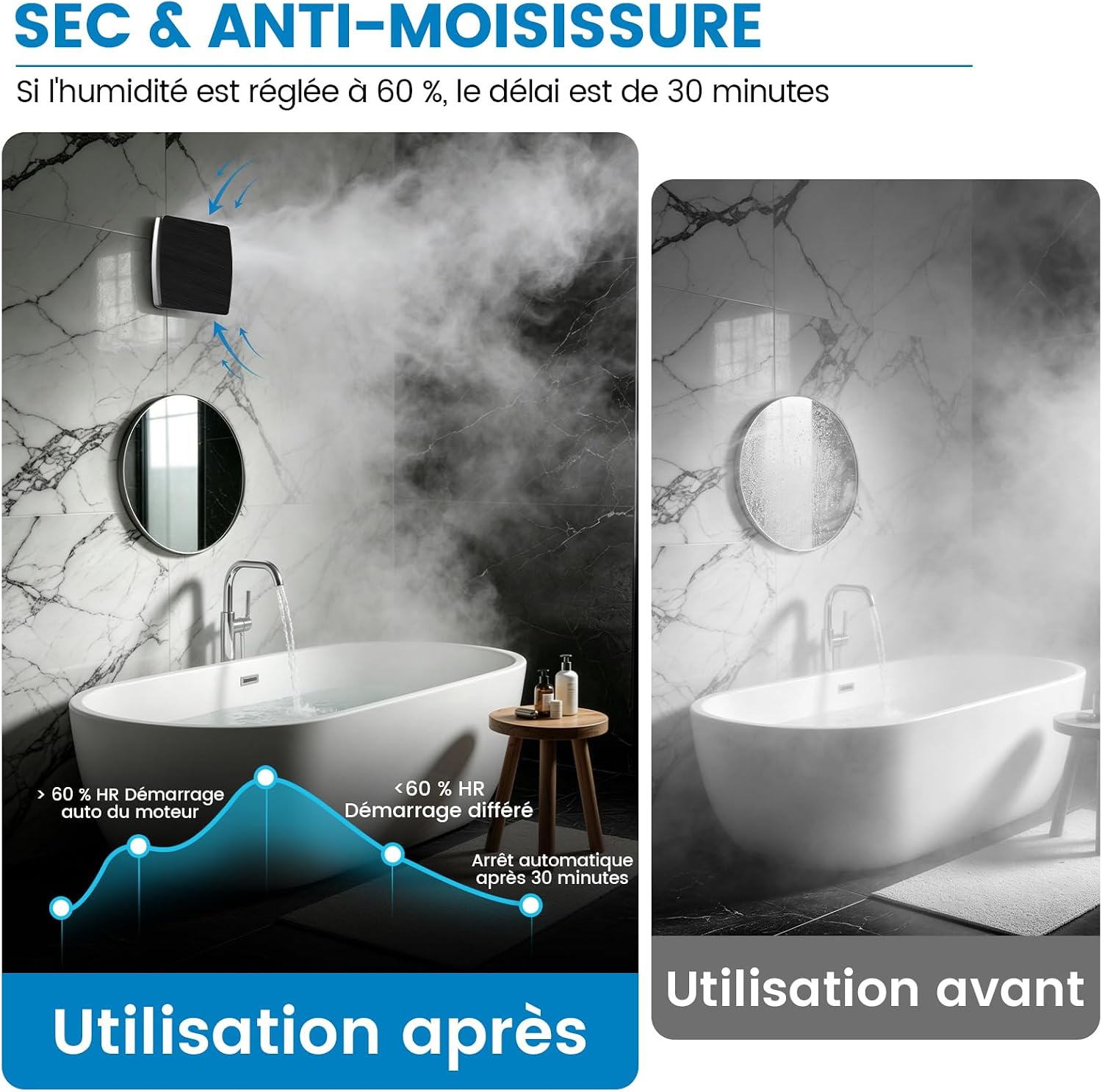
Image: Illustration of humidity control. Before use, a bathroom is steamy. After use, the fan clears the air, demonstrating effective humidity removal. The graph shows automatic motor start above 60% RH and automatic stop after 30 minutes when humidity is below 60% RH.
6. Maintenance
Regular cleaning ensures optimal performance and longevity of your extractor fan.
Cleaning Instructions
- Disconnect Power: Always switch off the power supply to the fan at the main circuit breaker before any cleaning or maintenance.
- Remove Front Cover: Gently pry off the front cover using a small flat-head screwdriver as shown in the 'Opening the Cover' image.
- Clean Fan Blades and Housing: Use a soft, damp cloth and mild detergent to wipe down the fan blades, motor housing, and the inside of the front cover. Do not use abrasive cleaners or solvents.
- Clean Exterior: Wipe the exterior of the fan with a soft, damp cloth.
- Dry Thoroughly: Ensure all parts are completely dry before reassembling the fan.
- Reassemble: Carefully reattach the front cover, ensuring it clicks securely into place.
- Restore Power: Turn the power supply back on.
It is recommended to clean the fan every 3-6 months, or more frequently in dusty or high-humidity environments.
7. Troubleshooting
If you encounter issues with your XIIW extractor fan, refer to the following common problems and solutions:
| Problem | Possible Cause | Solution |
|---|---|---|
| Fan does not turn on. | No power supply. Incorrect wiring. Humidity level below threshold (in auto mode). Timer not set correctly. | Check circuit breaker and wall switch. Verify wiring against diagrams (consult electrician if unsure). Increase humidity threshold or activate manually. Adjust timer setting. |
| Fan runs continuously. | Humidity level consistently above threshold. Timer set too long. Incorrect wiring (manual override). | Decrease humidity threshold. Adjust timer to a shorter duration. Check wiring (consult electrician). |
| Fan is too noisy. | Obstruction in fan blades. Loose mounting. Damaged motor. | Disconnect power and check for obstructions. Clean fan blades. Ensure fan is securely mounted. Contact customer support if motor is damaged. |
| Fan does not remove humidity effectively. | Humidity sensor set too high. Insufficient run-on time. Blocked air ducts. Fan size inadequate for room. | Decrease humidity threshold. Increase timer duration. Check and clear any blockages in ducting. Ensure fan is correctly sized for the room volume. |
If the problem persists after attempting these solutions, please contact customer support.
8. Specifications
| Feature | Specification |
|---|---|
| Model Number | LFWW-09QH-4B |
| Brand | XIIW |
| Dimensions (L x W x H) | 15 x 16 x 16.5 cm |
| Weight | 700 grams |
| Duct Diameter | 100mm |
| Power Source | Electric Cable |
| Voltage | 230 Volts |
| Power Consumption | 12 Watts |
| Airflow | 95 m³/h (Cubic meters per hour) |
| Noise Level | 34 Decibels |
| Humidity Sensor Range | Adjustable 60% - 90% RH |
| Timer Range | Adjustable 0 - 30 minutes |
| Material | ABS Plastic |
| IP Rating | IPX4 (Splash-proof) |
| Mounting Type | Wall Mount (Ceiling mount possible with damper removal) |
| Included Components | 1 bathroom fan |

Image: Detailed dimensions of the fan unit and a summary table of specifications including duct diameter (100mm), airflow (95m³/h), power (12W), and voltage (220V-240V).
9. Warranty and Support
For warranty information and customer support, please refer to the documentation provided with your purchase or contact the retailer. Keep your proof of purchase for any warranty claims.
Manufacturer: DEYITONG COMPANY LIMITED