Introduction
Thank you for choosing the SKMEI 9169 Analog Digital Sport Watch. This manual provides detailed instructions for the proper setup, operation, and maintenance of your watch. Please read this manual thoroughly to ensure optimal performance and longevity of your timepiece.
The SKMEI 9169 features a triple time zone display, 50-meter water resistance, and a comfortable TPU strap, making it suitable for various activities and daily wear.
Product Overview
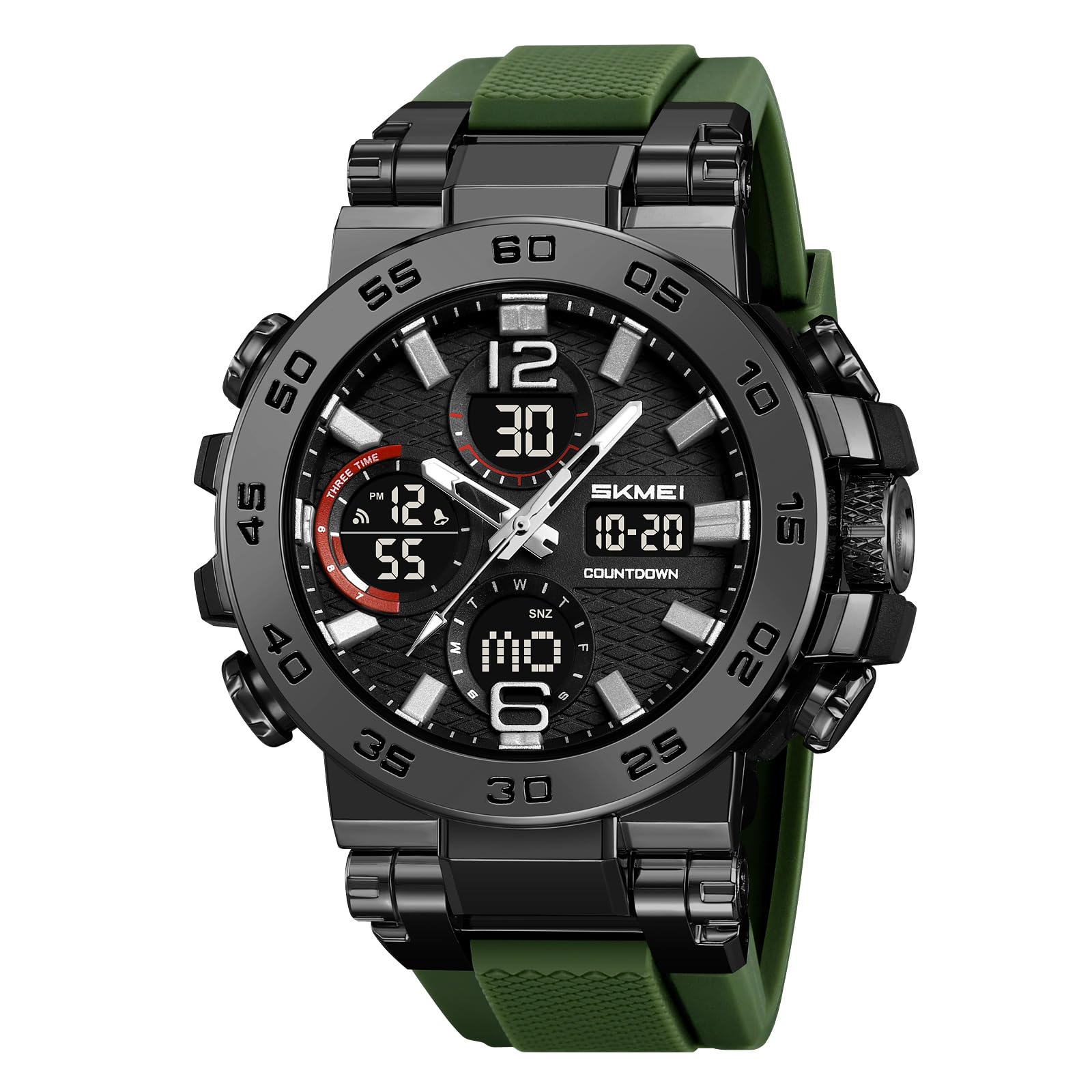
Image: Front view of the SKMEI 9169 Analog Digital Sport Watch, showcasing its large face and dual display.

Image: Diagram illustrating the main components of the SKMEI 9169 watch, including the watch case, dial, band, mirror, clasp, and back cover.
Button Functions

Image: The SKMEI 9169 watch with labels indicating the LIGHT, START/STOP, MODE, and RESET buttons, along with display areas for Seconds, Time, Date, and Week.
- LIGHT Button: Activates the luminous backlight for improved visibility in low-light conditions.
- START/STOP Button: Used to start and stop functions such as the stopwatch or countdown timer.
- MODE Button: Cycles through different display modes (e.g., Time, Alarm, Stopwatch, Countdown).
- RESET Button: Resets values or confirms settings in various modes.
Operating Instructions
Setting Time and Date
- In normal time display mode, press the MODE button repeatedly until the time setting interface appears (usually indicated by flashing digits).
- Use the RESET button to select the digit you wish to adjust (hours, minutes, seconds).
- Use the START/STOP button to increase the selected digit.
- Continue this process for setting the year, month, and day.
- Press the MODE button again to exit the setting mode.
Using the Alarm Function
- Press the MODE button to navigate to the alarm mode.
- Press the RESET button to select the hour or minute digits.
- Use the START/STOP button to adjust the alarm time.
- Press the MODE button to confirm and exit.
- To activate/deactivate the alarm, press the START/STOP button while in alarm mode. An alarm icon will appear/disappear.
Using the Stopwatch
- Press the MODE button to navigate to the stopwatch mode.
- Press the START/STOP button to start the stopwatch.
- Press the START/STOP button again to pause the stopwatch.
- Press the RESET button to clear the stopwatch to zero.
Triple Time Zone Display
The watch features a triple time zone display. The main analog hands show the primary time, while the digital displays can be set to two additional time zones. Refer to the detailed setting instructions for each digital display in the full manual if available.
Water Resistance

Image: A person's wrist wearing the SKMEI 9169 watch being splashed with water, illustrating its 50M water resistance.
This watch is rated for 50 meters (5ATM) water resistance. This means it is suitable for daily use, hand washing, rain, and short periods of recreational swimming. Do not press any buttons while the watch is submerged in water. Avoid hot water, steam, or prolonged exposure to water to prevent damage.
Video: A demonstration of a similar SKMEI analog-digital watch's water resistance and luminous display features.
Luminous Display

Image: Close-up of the SKMEI 9169 watch face with its luminous display activated, showing clear digital time and date in green light.
The watch features an LED luminous display for easy reading in the dark. Press the LIGHT button to activate the backlight. The backlight will remain on for a few seconds before automatically turning off.
Maintenance and Care
- Clean the watch regularly with a soft, dry cloth. For stubborn dirt, use a slightly damp cloth and mild soap, then dry thoroughly.
- Avoid exposing the watch to extreme temperatures, direct sunlight for prolonged periods, or strong magnetic fields.
- Do not use chemical cleaners or solvents, as these can damage the watch's finish or seals.
- If the watch is exposed to saltwater, rinse it with fresh water and dry it immediately.
- For battery replacement or internal repairs, it is recommended to consult a professional watch technician to maintain water resistance and proper function.
Troubleshooting
| Problem | Possible Cause | Solution |
|---|---|---|
| Digital display is blank or dim. | Low battery. | Replace the battery (CR2025/SR626SW). Consult a professional. |
| Time is inaccurate. | Incorrect setting; exposure to strong magnetic fields. | Re-set the time according to the operating instructions. Keep away from strong magnets. |
| Water condensation inside the watch. | Water resistance compromised; exposure to extreme temperature changes. | Stop using the watch and take it to a professional for inspection and repair immediately. |
| Buttons are unresponsive. | Stuck button; internal malfunction. | Ensure buttons are not jammed. If issue persists, seek professional service. |
Specifications

Image: Infographic detailing the product parameters of the SKMEI 9169 watch, including dimensions and materials.
- Brand: SKMEI
- Model Number: 9169
- Weight: 66.2g
- Movement: Digital
- Crystal: Resin
- Case Material: ABS
- Band Material: TPU
- Buckle: Stainless Steel
- Water Resistance: 50M (5ATM)
- Functions: Triple Time, Chronograph, Date, Week, LED Light, 12/24 hour clock, Countdown
- Case Width: 54.7mm / 2.15in
- Case Thickness: 18mm / 0.7in
- Band Width: 30.2mm / 1.19in
- Watch Length: 280mm / 11.02in
- Battery Code: CR2025/SR626SW
Warranty and Support
For warranty information or technical support, please refer to the documentation included with your purchase or contact SKMEI customer service through their official website or the retailer where the watch was purchased. Keep your proof of purchase for warranty claims.


