Introduction
This manual provides detailed instructions for the operation and maintenance of your LINK BITS SA8056T-1Pz Portable Bluetooth Speaker. Please read this manual carefully before use to ensure proper function and to extend the lifespan of your device.
Product Features
- Dual Speakers + Dual Diaphragms: Equipped with 2 speakers for precise sound and clear vocals, 3W dual speakers, and dual diaphragms for dynamic audio.
- Long-lasting Battery: Built-in 1200 mAh rechargeable battery provides 4-8 hours of music playback on a full charge.
- Hands-Free Microphone: Integrated microphone with noise reduction for clear calls when connected via Bluetooth.
- Multiple Connectivity Options: Supports Bluetooth 5.0, USB, TF card, and AUX input for connecting to various devices like smartphones, tablets, PCs, and TVs.
- Elegant and Portable Design: Versatile placement options for home or outdoor use.
- Ambient Light: Features decorative ambient lighting.
- TWS Function: Allows connection of two speakers for enhanced stereo sound.
What's in the Box
Please check the contents of your package. If any items are missing or damaged, contact your retailer.
- LINK BITS SA8056T-1Pz Portable Bluetooth Speaker
- USB Charging Cable (30 cm)
- Wired Microphone (3m)
- User Manual (this document)
Setup
Charging the Speaker
Before first use, fully charge the speaker. Connect the provided USB charging cable to the speaker's charging port and to a 5V USB power adapter (not included). The charging indicator will illuminate. Once fully charged, the indicator may change color or turn off.

Image: Speaker showing battery life and charging details. A full charge provides 4-8 hours of playback.
Powering On/Off
Locate the power switch on the speaker. Slide it to the "ON" position to power on the device. Slide it to "OFF" to power off.
Operating Instructions
Bluetooth Mode
- Power on the speaker. It will automatically enter Bluetooth pairing mode, indicated by a flashing light or an audible prompt.
- On your mobile device (smartphone, tablet, PC), enable Bluetooth and search for available devices.
- Select "LINK BITS" or a similar name from the list of devices.
- Once paired, the speaker will confirm with an audible sound, and the light indicator will become steady.
- You can now play audio from your device through the speaker. The effective range is approximately 10 meters.

Image: Speaker connected via Bluetooth 5.0 to a smartphone, showing a 10-meter connection range.
TWS (True Wireless Stereo) Function
The TWS function allows you to pair two SA8056T-1Pz speakers together for a stereo sound experience.
- Ensure both speakers are powered on and in Bluetooth mode, but not yet connected to any device.
- On one of the speakers, press and hold the TWS button (if available) or the Mode button until you hear a pairing prompt.
- The two speakers will attempt to pair with each other. Once successful, you will hear a confirmation sound.
- Now, connect your mobile device to one of the paired speakers via Bluetooth as described above. Both speakers will play audio in stereo.

Image: Two speakers demonstrating the TWS function for immersive, three-dimensional sound.
USB/TF Card Playback
- Insert a USB flash drive or TF (MicroSD) card into the corresponding port on the speaker.
- The speaker will automatically detect the storage device and begin playing audio files.
- Use the control buttons (Play/Pause, Next/Previous Track) on the speaker to manage playback.
FM Radio Mode
- Press the "Mode" button to switch to FM Radio mode.
- Press and hold the Play/Pause button to initiate an automatic scan for FM stations. The speaker will save all found stations.
- Use the Next/Previous Track buttons to navigate between saved stations.
AUX Input
- Connect one end of a 3.5mm audio cable (not included) to the AUX port on the speaker.
- Connect the other end to the audio output of your non-Bluetooth device (e.g., MP3 player, PC).
- Press the "Mode" button to switch to AUX mode.
- Audio from your connected device will now play through the speaker.
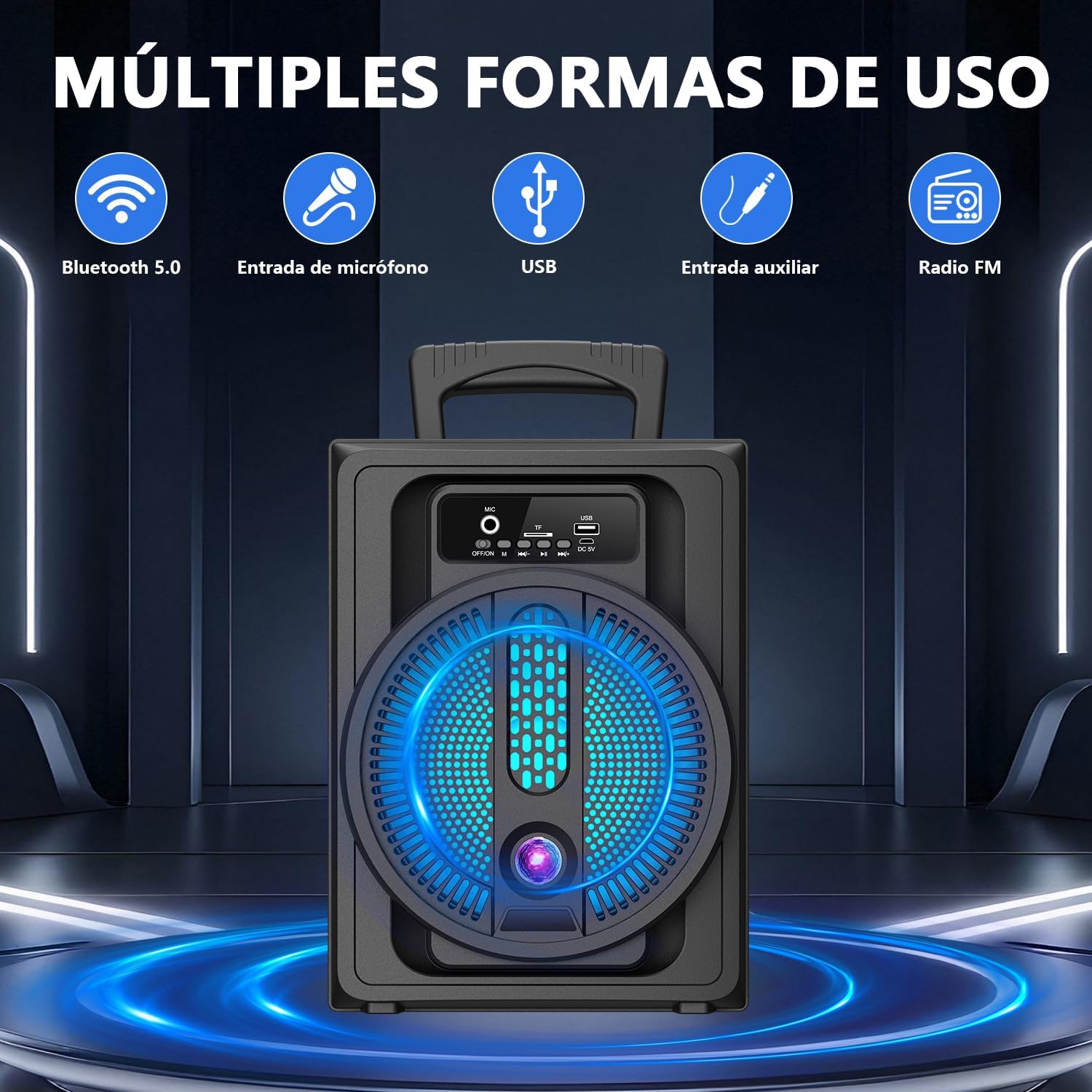
Image: Front panel of the speaker highlighting various input options including Bluetooth, microphone, USB, auxiliary, and FM radio.
Microphone Use
Connect the included wired microphone to the MIC input port on the speaker. You can use the microphone for karaoke or public speaking while audio is playing from other sources.

Image: Speaker with a wired microphone, demonstrating its use for singing, with ambient lighting active.
Ambient Light
The speaker features decorative ambient lighting. The lights typically activate automatically when the speaker is powered on and can cycle through various colors. Refer to the speaker's control panel for any dedicated light control buttons, if available, to change modes or turn off the lights.
Video: A short demonstration of the speaker's ambient lighting feature, showing various color changes.
Maintenance
- Cleaning: Use a soft, dry cloth to clean the speaker's exterior. Do not use abrasive cleaners or solvents.
- Storage: Store the speaker in a cool, dry place away from direct sunlight and extreme temperatures.
- Battery Care: To prolong battery life, avoid fully discharging the battery frequently. Charge the speaker regularly, even if not in use for extended periods.
- Water Resistance: This speaker is NOT waterproof. Avoid exposure to water or high humidity.
Troubleshooting
| Problem | Possible Cause | Solution |
|---|---|---|
| Speaker does not power on. | Low battery; Power switch is off. | Charge the speaker; Ensure the power switch is in the "ON" position. |
| No sound from the speaker. | Volume too low; Incorrect mode selected; Device not connected properly. | Increase volume on both speaker and connected device; Press "Mode" button to select correct input; Reconnect Bluetooth/AUX cable. |
| Bluetooth connection unstable or disconnects. | Device too far from speaker; Interference; Low battery. | Move device closer to speaker (within 10m); Avoid obstacles; Charge the speaker. |
| FM radio not working or poor reception. | Weak signal; No stations scanned. | Move to an area with better signal; Perform an automatic station scan (press and hold Play/Pause in FM mode). |
| Humming noise in AUX mode. | Ground loop interference; Faulty cable. | Try a different AUX cable; Connect to a different power outlet; Consider a ground loop isolator if persistent. |
Specifications
| Feature | Detail |
|---|---|
| Model Name | MB-127 Soundbar |
| Speaker Type | Soundbar |
| Connectivity Technology | Bluetooth 5.0 |
| Power Source | Battery (1200 mAh) |
| Max Speaker Output Power | 3 Watts (per speaker, dual speakers) |
| Frequency Response | 80 Hz |
| Control Method | Touch |
| Product Dimensions | 37cm (D) x 5.5cm (W) x 6.5cm (H) |
| Included Components | USB cable, Wired Microphone |
| Waterproof | No |

Image: Speaker dimensions showing height, width, and handle height for portability.
Safety Information
- Do not expose the speaker to extreme temperatures, direct sunlight, or high humidity.
- Avoid dropping or subjecting the speaker to strong impacts.
- Do not disassemble or attempt to repair the speaker yourself. This will void the warranty.
- Keep out of reach of children.
- Dispose of the battery responsibly according to local regulations.
Warranty and Support
This product comes with a standard manufacturer's warranty. For warranty claims or technical support, please contact your retailer or visit the official LINK BITS website. Keep your purchase receipt as proof of purchase.
Amazon.com.mx offers a 30-day free return policy for this product.
For further assistance, you may visit the LINK BITS Store on Amazon.