1. Product Overview
The Bxmgr AKB76046602 MR25GA is a replacement Magic Remote Control designed for compatible LG Smart TVs. It features AI voice recognition, a pointer function, and pre-set hot keys for convenient access to popular streaming services and functions.

Image: Front view of the Bxmgr AKB76046602 MR25GA remote control, showcasing its buttons and ergonomic design.
2. Compatibility
This remote control is compatible with various LG OLED C5, B5, G5, and M5 Series models. Please verify your TV model against the list below to ensure compatibility.
Compatible LG TV Models:
- OLED42C5PUA
- OLED48B5PUA
- OLED65B5PUA
- OLED65G5WUA
- And other compatible smart TV models.

Image: A detailed chart listing numerous compatible LG TV models for the AN-MR25GA Magic Remote.
3. Setup and Pairing
3.1. Battery Installation
Before first use, install two AAA batteries (not included) into the remote control.
- Locate the battery compartment on the back of the remote.
- Slide down the battery cover to open it.
- Insert two AAA batteries, ensuring correct polarity (+/-).
- Close the battery cover securely.
3.2. Initial Pairing with Your LG TV
The remote control needs to be paired with your LG TV to enable all functions, including AI voice and pointer features.
- Ensure your LG TV is powered on.
- Point the remote control towards the TV.
- Press and hold the Voice button (microphone icon) on the remote.
- Your TV screen will display a prompt instructing you to press the Wheel (OK) button.
- Press the Wheel (OK) button to complete the pairing process.
- A confirmation message will appear on your TV screen indicating successful pairing.

Image: Step-by-step visual guide on how to install batteries and pair the remote control with an LG TV, showing the voice button and wheel (OK) button.
3.3. Unpairing (If Previously Paired)
If you need to unpair a previously connected remote or are experiencing pairing issues, follow these steps:
- Simultaneously press and hold the HOME button and the BACK button on the remote control.
- Continue holding until the indicator light on the remote illuminates, signifying that the previous pairing has been cleared.
- You can then proceed with the initial pairing steps (Section 3.2) to pair the remote again.
4. Operating Instructions
4.1. Basic Functions
- Power Button: Located at the top of the remote, typically red. Turns the TV on or off.
- Volume Up/Down (+/-): Adjusts the TV volume.
- Channel Up/Down: Changes TV channels.
- Home Button: Accesses the TV's home screen or smart menu.
- Back Button: Returns to the previous screen or menu.
4.2. AI Voice Recognition
The remote features AI voice recognition, allowing you to control your TV using voice commands.
- Press and hold the Voice button (microphone icon).
- Speak your command clearly into the remote.
- Release the Voice button when finished speaking.
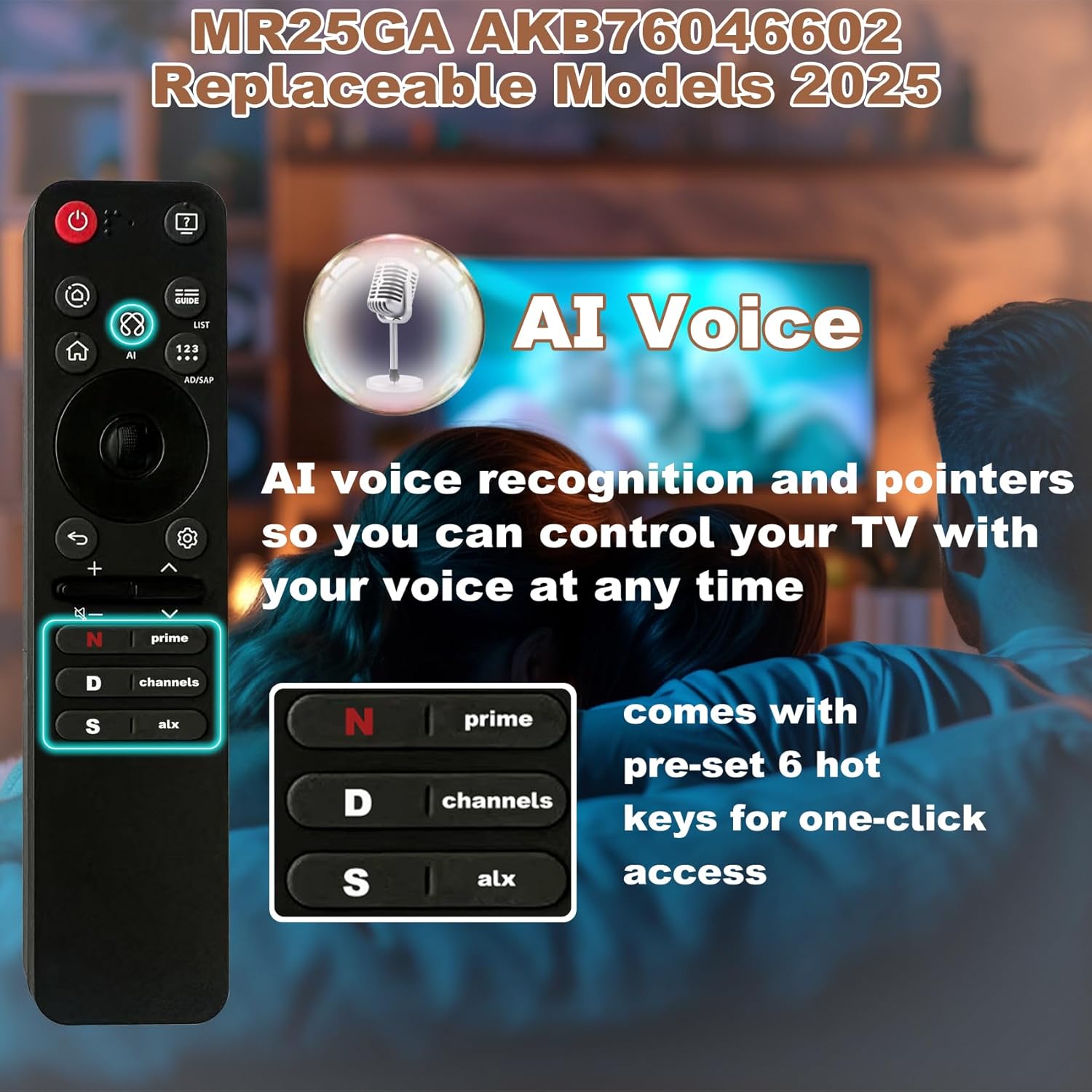
Image: Illustration highlighting the AI Voice feature of the MR25GA remote, showing a microphone icon and text indicating voice control capability.
4.3. Pointer Function (Air Mouse)
The pointer function allows you to navigate the TV screen by moving the remote in the air, similar to a mouse.
- Move the remote control in the air to move the on-screen pointer.
- Use the Wheel (OK) button to select items or confirm actions.

Image: Demonstrates the pointer function, showing a hand holding the remote and moving an on-screen cursor, along with a description of the wheel keys for selection.
4.4. Hot Keys
The remote includes pre-set hot keys for quick access to popular applications or functions.
- Netflix Hot Key (N icon): Directly launches Netflix.
- Prime Video Hot Key (Prime icon): Directly launches Amazon Prime Video.
- Channels Hot Key (D icon): Accesses TV channels.
- Alexa Hot Key (S icon): Activates Alexa voice assistant.
- Additional hot keys may be present depending on the remote version.
5. Maintenance
- Cleaning: Use a soft, dry cloth to clean the remote control. Avoid using liquid cleaners or abrasive materials.
- Battery Replacement: Replace batteries when the remote's responsiveness decreases or it stops functioning. Always replace both batteries at the same time with new ones of the same type (AAA).
- Storage: Store the remote in a dry place away from direct sunlight and extreme temperatures.
- Avoid Drops: Protect the remote from physical impact, as drops can damage internal components.
6. Troubleshooting
- Remote Not Responding:
- Check if the batteries are correctly installed and have sufficient charge. Replace if necessary.
- Ensure there are no obstructions between the remote and the TV's sensor.
- Re-pair the remote control with the TV following the steps in Section 3.2.
- Pointer Not Appearing or Working:
- Ensure the remote is properly paired.
- Try shaking the remote gently to reactivate the pointer.
- If the issue persists, try unpairing and re-pairing the remote (Section 3.3 and 3.2).
- Voice Recognition Not Working:
- Confirm the remote is paired.
- Ensure you are pressing and holding the Voice button while speaking.
- Speak clearly and directly into the remote's microphone.
- Check your TV's settings to ensure voice recognition features are enabled.
- Hot Keys Not Launching Apps:
- Ensure your TV is connected to the internet.
- Verify that the respective applications (e.g., Netflix, Prime Video) are installed and updated on your LG TV.
If troubleshooting steps do not resolve the issue, please refer to the support information in Section 8.
7. Specifications
| Model Number | MR25GA |
| Part Number | AKB76046602 |
| Brand | Bxmgr |
| Compatible Devices | LG Televisions (OLED C5, B5, G5, M5 Series) |
| Special Feature | AI Voice Search, Pointer Function |
| Color | Black |
| Item Weight | 3.2 ounces |
| Package Dimensions | 7.24 x 2.17 x 0.94 inches |
8. Warranty and Support
The Bxmgr AKB76046602 MR25GA Magic Remote Control comes with a 5-year after-sales service. For any assistance, questions, or concerns regarding your product, please contact Bxmgr customer support.
- Customer Support: Contact information is typically provided with your purchase or can be found on the Bxmgr official website.
- Service Hours: Support is available 24 hours a day.
- Return and Exchange: A 365-day return and exchange service is provided.
Please retain your proof of purchase for warranty claims.