1. Introduction and Overview
The WORX Vision Cloud WR306E redefines connected mowing for areas up to 600m². This robot mower features wireless perimeter technology, making it ready for use right out of the box without complex cable installation. Equipped with Vision AI + RTK system, it combines visual recognition with RTK technology for ultra-precise navigation. The robot analyzes and understands every detail of your garden, including obstacles, animals, objects, and accessible zones, adapting its trajectory in real-time for smooth, efficient, and collision-free mowing.
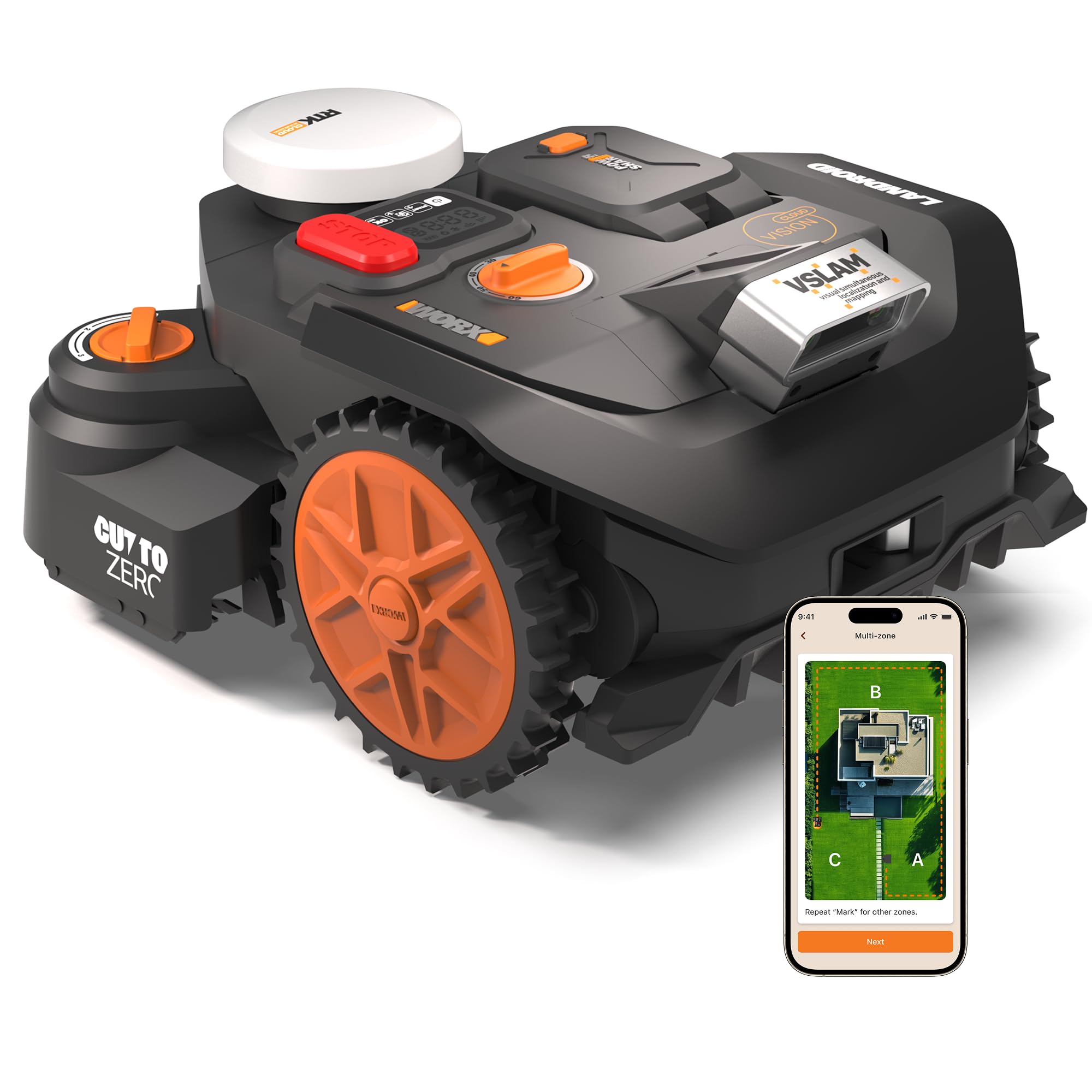
Its automatic mapping function uses millions of border images and learning data to create a precise map without physical markers. The Vision Cloud + V-SLAM combination ensures optimal stability and centimeter-level precision, even under dense foliage or in shaded areas. The integrated Wi-Fi amplifier in the base ensures a stable connection throughout the garden. The included Cut-to-Zero module (WA0925) provides a clean cut right to the lawn edge, minimizing manual finishing.
The Vision Cloud can be customized with additional modules like LED headlights (WA0920) for safe night mowing and an anti-theft module (WA0934) for 24/7 GPS tracking. Its floating cutting deck adapts to terrain irregularities for consistent mowing, and the 3-blade pivoting system with reverse rotation ensures optimal performance and extended blade life. Choose between random or parallel strip mowing modes. The robot manages multiple zones and automatically adjusts its daily mowing schedule. Automatic charging ensures the robot returns to its station when the battery is low or it rains. The Plug-N-Play system allows instant setup. Control and program the Vision Cloud easily via Wi-Fi and Bluetooth using the Landroid app for a simple, intelligent, and fully automated mowing experience.
2. Setup
The WORX Vision Cloud WR306E is designed for effortless setup. It features wireless perimeter technology and automatic mapping, eliminating the need for complex cable installations or physical boundary wires.
2.1 Initial Placement and Automatic Mapping
Simply place the robot mower on your lawn. The integrated Vision AI and RTK Cloud system will automatically scan and map your garden during its first operation. This process creates a precise digital map of your mowing area without any manual configuration.

2.2 Charging Station Placement
The charging station can be placed anywhere, including under a veranda or along a wall, offering maximum flexibility. Ensure it has access to a power outlet and a clear path for the robot to return for charging.

3. Operating Instructions
The Vision Cloud WR306E utilizes advanced AI and navigation technologies to provide an intelligent and efficient mowing experience.
3.1 Intelligent Navigation and Obstacle Avoidance
Equipped with a dual 3D camera and RTK Cloud + V-SLAM fusion, the robot analyzes terrain and obstacles to understand your garden. It identifies obstacles, animals, and garden elements to adapt its trajectory, avoid collisions, and ensure safer daily mowing. This intelligent vision allows for precise navigation even in complex or shaded areas where satellite signals might be weak.


3.2 Mowing Styles and Multi-Zone Management
You can choose your preferred mowing style: structured parallel strips for a professional effect or a homogeneous natural cut. These settings can be changed at any time via the Landroid app. The robot supports advanced multi-zone management, allowing you to create multiple zones, adjust limits, and define passages from the application. The robot can also automatically optimize its routes to efficiently cover the entire lawn.


3.3 Cut-to-Zero Module
The included Cut-to-Zero module (WA0925) allows for a clean cut right to the edge of the lawn, significantly reducing the need for manual trimming along walls and borders (up to 2 cm).

3.4 Landroid App Control
The Vision Cloud connects via Wi-Fi and Bluetooth, allowing easy programming and control through the Landroid app. Monitor progress, manage zones, adjust settings, and maintain control remotely from your smartphone.


4. Maintenance
Regular maintenance ensures optimal performance and longevity of your WORX Vision Cloud robot mower.
4.1 Blade Care
The 3-blade pivoting cutting system ensures optimal mowing performance. The reverse rotation feature doubles their lifespan. Regularly inspect blades for wear and replace them as needed to maintain cutting efficiency. Replacement blades and screws are included.
4.2 Battery Management
The robot features automatic charging; it returns to its station when the battery is low or when it rains, thanks to its integrated rain sensor. The removable PowerShare battery is interchangeable with other Worx tools and can be easily removed for safe winter storage.

4.3 Cleaning
Keep the robot's sensors, wheels, and cutting deck clean from grass clippings and debris. Use a soft brush or cloth. Avoid using high-pressure water jets directly on the robot.
5. Troubleshooting
If you encounter any issues with your WORX Vision Cloud robot mower, please refer to the Landroid app for diagnostic information or consult the online support resources. Common issues can often be resolved by checking the robot's path for obstructions, ensuring the charging station is properly connected, or verifying app settings.
6. Specifications
| Feature | Detail |
|---|---|
| Model Number | WR306E |
| Battery | 20V / 4Ah (WA3644) |
| Charger | 3A |
| Recommended Mowing Area | Up to 600 m² |
| Cutting Width | 18 cm |
| Cutting Height | 3-6 cm (4 positions) |
| Cut-to-Zero Module Cutting Height | 5-7 cm (3 positions) |
| Navigation System | Dual 3D Camera + RTK Cloud + V-SLAM |
| Mowing Time per Charge | 90 minutes |
| Max Slope Accepted | 30% |
| Product Dimensions (L x W x H) | 57.6 x 45.7 x 28.3 cm |
| Item Weight | 15.4 kg |
| Material | Metal, Plastic |
| Power Source | Battery Powered |
| Included Components | 1x 20V 4Ah Battery, 1x Charger, 1x Charging Station, 1x Cut-to-Zero Module (WA0925), 6x Blades and screws, 1x Allen Key, 8x Nails |

7. Warranty Information
The WORX Vision Cloud robot mower comes with a 3-year warranty (2 years standard + 1 year extended upon registration). To extend your warranty, you must register your product on eu.worx.com within 30 days of purchase. Accessories are covered by a 6-month warranty.
8. Support
For any questions, advice, or technical assistance, please contact WORX through their social media channels (e.g., "Worx France") or visit the official Worx website. Their support team can provide guidance on product usage, project suitability, and troubleshooting.