
Important Safeguards
When using electrical appliances, basic safety precautions should always be followed to reduce the risk of fire, electric shock, and/or injury to persons, including the following:
- Read all instructions before using the slow cooker.
- Do not touch hot surfaces. Use handles or knobs.
- To protect against electrical shock, do not immerse the base unit, cord, or plug in water or other liquid.
- Close supervision is necessary when any appliance is used by or near children.
- Unplug from outlet when not in use and before cleaning. Allow to cool before putting on or taking off parts.
- Do not operate any appliance with a damaged cord or plug, or after the appliance malfunctions or has been damaged in any manner.
- The use of accessory attachments not recommended by the appliance manufacturer may cause injuries.
- Do not use outdoors.
- Do not let cord hang over edge of table or counter, or touch hot surfaces.
- Do not place on or near a hot gas or electric burner, or in a heated oven.
- Extreme caution must be used when moving an appliance containing hot oil or other hot liquids.
- Always attach plug to appliance first, then plug cord into the wall outlet. To disconnect, turn any control to "off", then remove plug from wall outlet.
- Do not use appliance for other than intended use.
Product Overview
The GreenPan Electric 6QT Slow Cooker is a versatile 5-in-1 appliance designed for convenient and healthy cooking. It features a durable stainless steel exterior and a removable ceramic nonstick inner pot, free from PFAS, PFOA, lead, and cadmium.
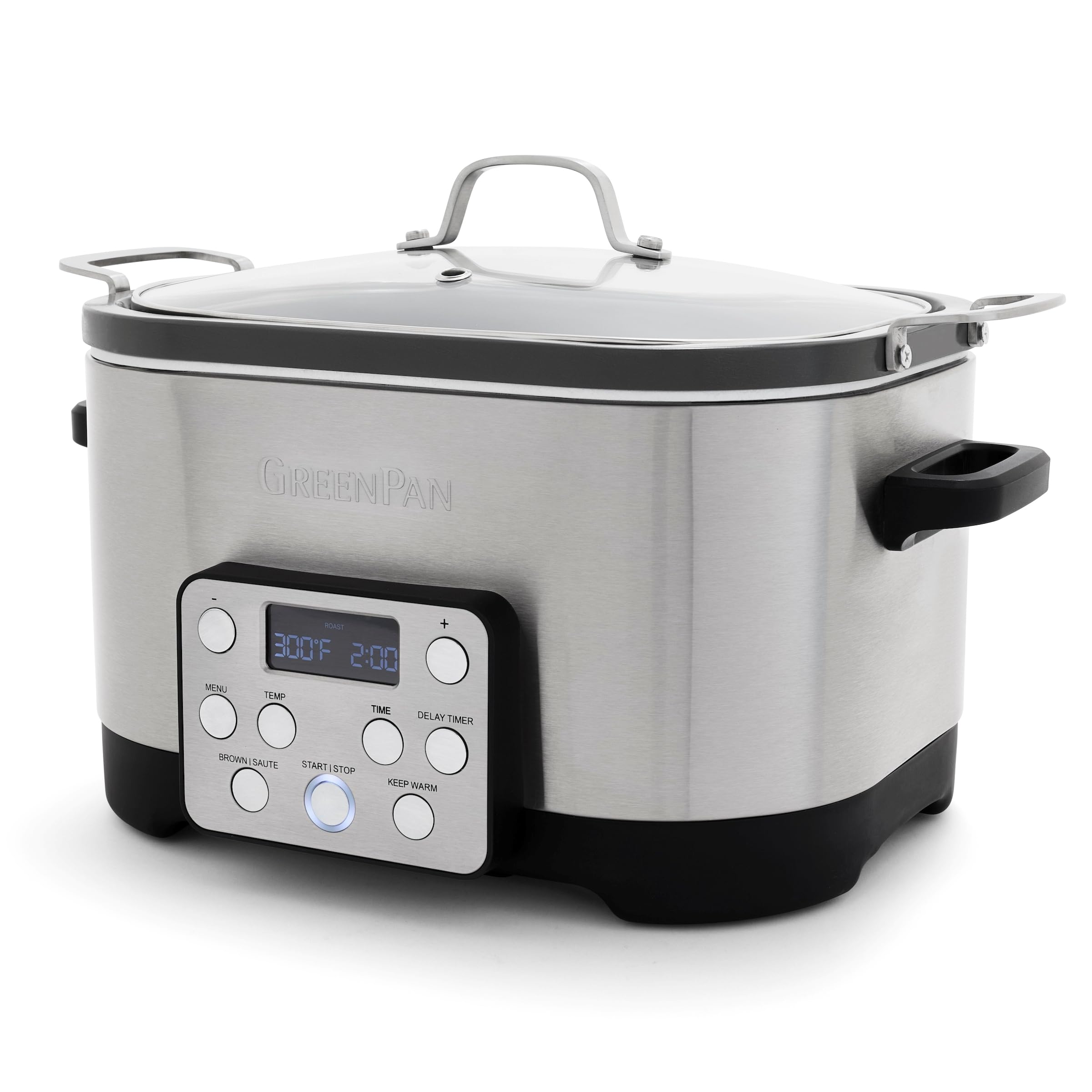
Figure 1: GreenPan Electric 6QT Slow Cooker with lid and food inside.
Key Features:
- Revolutionary Ceramic Nonstick: Thermolon Volt coating, diamond-infused, extra tough, easy to clean, and designed to withstand the strain of modern appliances.
- Large 6QT Capacity: Ideal for family-sized meals, holding up to 5-6 lbs of pork shoulder or 8-10 chicken thighs.
- In-Pot Browning: Brown, sear, and sauté ingredients directly in the pot before slow cooking.
- Removable Hard Anodized Pot: Metal utensil safe, provides fast and even heating, and is dishwasher safe for easy cleaning. The pot is also oven safe.
- Keep Warm Function: Automatically switches to keep warm mode after cooking is complete.
Control Panel:
The intuitive control panel features a digital display and buttons for various functions including MENU, TEMP, TIME, DELAY TIMER, BROWN/SAUTE, START/STOP, and KEEP WARM. These controls allow precise management of cooking settings.
Setup
- Unpack: Carefully remove all packaging materials and any promotional labels or stickers from the slow cooker.
- Initial Cleaning: Before first use, wash the removable inner pot and glass lid in warm, soapy water. Rinse thoroughly and dry completely. The inner pot is dishwasher safe. Wipe the exterior of the base unit with a damp cloth. Do not immerse the base unit in water.
- Placement: Place the slow cooker on a dry, level, heat-resistant surface, away from walls or other appliances to allow for proper ventilation.
- Insert Inner Pot: Place the clean, dry removable inner pot into the base unit.
- Connect Power: Plug the power cord into a standard electrical outlet. The display will illuminate.
The removable inner pot can be easily lifted out of the base unit for cleaning or for use in the oven.
Operating Instructions
The GreenPan Electric Slow Cooker offers multiple cooking functions for various recipes.
1. Slow Cook Function
- Place ingredients into the removable inner pot.
- Cover with the glass lid.
- Press the MENU button until "SLOW COOK" is selected.
- Press the TEMP button to cycle through temperature settings: LOW, MED, HIGH.
- Press the TIME button, then use the + or - buttons to adjust the cooking time.
- Press START/STOP to begin cooking. The display will show the remaining cooking time.
- Once cooking is complete, the unit will automatically switch to the "KEEP WARM" function.
2. In-Pot Browning/Sauté Function
- Add a small amount of oil or butter to the inner pot if desired.
- Press the BROWN/SAUTE button.
- Allow the pot to preheat for a few minutes.
- Add ingredients to brown or sauté. Stir occasionally.
- Once browning is complete, press START/STOP to end the function, then proceed with your slow cook recipe.
3. Keep Warm Function
- This function activates automatically after the slow cook cycle finishes.
- To manually select, press the KEEP WARM button.
- The unit will maintain a safe serving temperature for your food.
4. Delay Timer Function
The Delay Timer allows you to set a start time for your cooking program.
- Select your desired cooking function (e.g., Slow Cook) and set the temperature and time.
- Press the DELAY TIMER button.
- Use the + or - buttons to set the delay time (how long until cooking begins).
- Press START/STOP. The display will count down the delay time, then automatically begin the cooking program.
Care and Maintenance
Proper care ensures the longevity and performance of your GreenPan Slow Cooker.
- Always unplug the appliance and allow it to cool completely before cleaning.
- Removable Inner Pot: The ceramic nonstick inner pot is dishwasher safe. For hand washing, use warm, soapy water and a non-abrasive sponge or cloth. Avoid harsh scouring pads or metal utensils that could damage the nonstick coating.
- Glass Lid: The glass lid is dishwasher safe. Hand wash with warm, soapy water.
- Base Unit: Wipe the exterior of the base unit with a soft, damp cloth. Do not use abrasive cleaners or immerse the base unit in water or any other liquid.
- Storage: Ensure all parts are clean and dry before storing. Store the slow cooker in a cool, dry place.
- Oven Use: The removable inner pot is oven safe, allowing for versatile cooking options.
Troubleshooting
If you encounter issues with your slow cooker, refer to the following common solutions:
| Problem | Possible Cause | Solution |
|---|---|---|
| Appliance does not turn on. | Not plugged in, power outage, or unit not properly assembled. | Ensure the power cord is securely plugged into a working outlet. Check your home's circuit breaker. Verify the inner pot is correctly seated. |
| Food is not cooking properly. | Incorrect temperature or time setting, or lid not sealed. | Confirm the correct temperature and time settings for your recipe. Ensure the lid is securely placed on the pot to retain heat and moisture. Avoid frequently lifting the lid during cooking. |
| Food is burning on the bottom. | Too high temperature setting or insufficient liquid. | Reduce the temperature setting. Ensure there is adequate liquid in the pot for slow cooking. Stir ingredients if using the Brown/Sauté function. |
| Display shows an error code. | Internal malfunction. | Unplug the unit, wait a few minutes, then plug it back in. If the error persists, contact GreenPan customer support. |
Specifications
- Brand: GreenPan
- Model Number: CC010163-001
- Color: Stainless Steel
- Material: Ceramic, Stainless Steel, Tempered Glass
- Product Dimensions: 13.39"D x 18.11"W x 10.47"H
- Capacity: 6 Quarts
- Wattage: 1200 watts
- Voltage: 100 Volts
- Item Weight: 14.55 Pounds
- Dishwasher Safe: Yes (Removable Inner Pot and Lid)
- Control Method: Push Button
- Number of Settings: 4 (Low, Medium, High, Keep Warm)
- UPC: 885837054354
Warranty and Support
For warranty information, product registration, or customer support, please visit the official GreenPan website or contact their customer service department. Keep your purchase receipt as proof of purchase for any warranty claims.
For further assistance, please refer to the manufacturer's official documentation or contact GreenPan customer support directly.


