
1. Introduction
Thank you for choosing the IDEALHOUSE Rattan King Bed Frame. This manual provides essential information for the safe assembly, operation, and maintenance of your new bed frame. Please read these instructions carefully before assembly and retain them for future reference.
This bed frame features a natural rattan headboard, integrated LED lighting, a convenient charging station, and a two-tier storage headboard. It is designed for use without a box spring.

Figure 1: Fully assembled IDEALHOUSE Rattan King Bed Frame.
2. Safety Information
WARNING: Failure to follow these safety instructions may result in injury or damage to the product.
- Be cautious of sharp edges on the rattan headboard during assembly and use.
- Keep the under-bed storage area clear to prevent entrapment or injury.
- Ensure all connections and fasteners are securely tightened during assembly and periodically check for tightness.
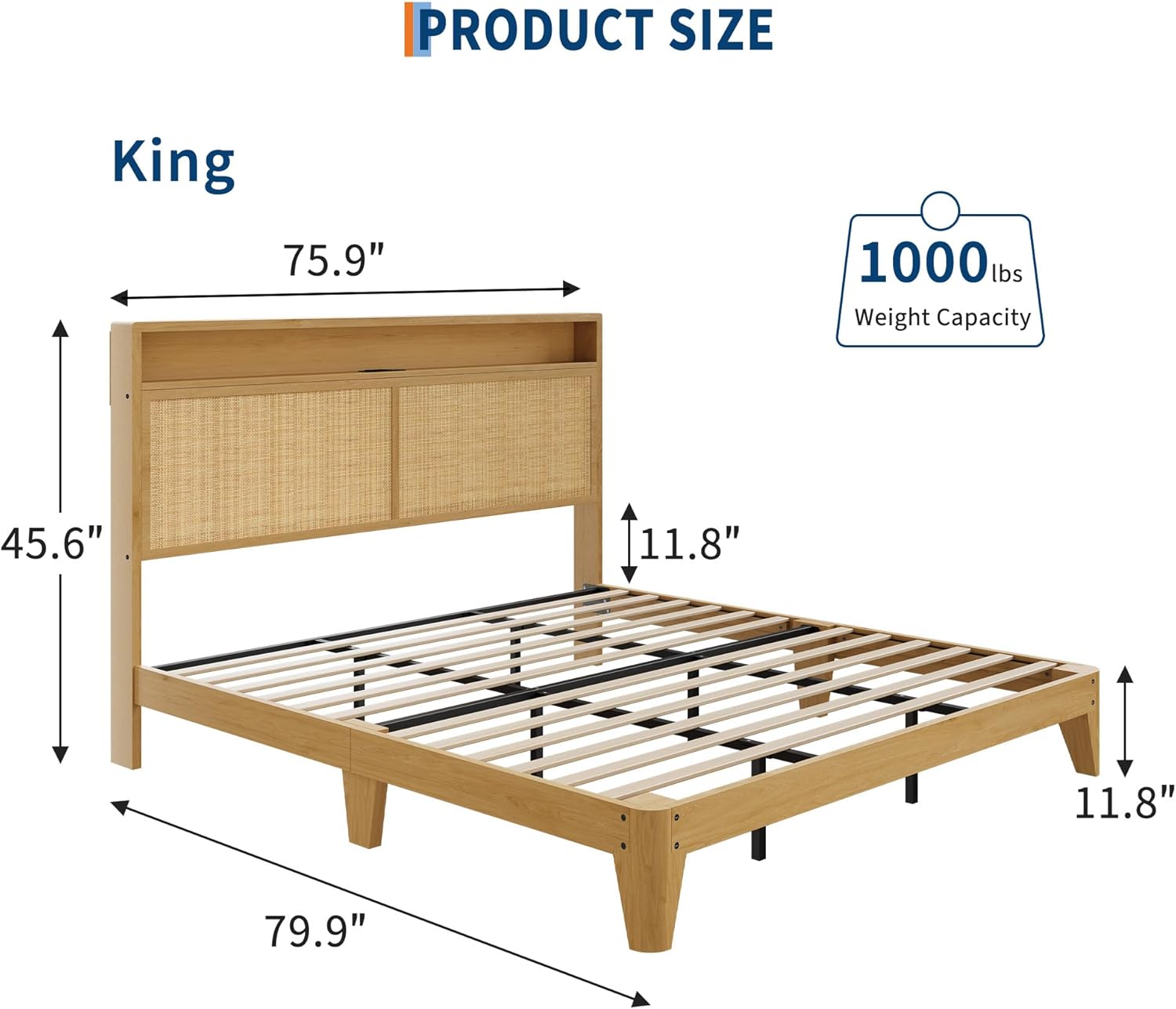
- Do not exceed the maximum weight capacity of the bed frame (1000 lbs).
- Keep electrical components (LED lights, charging station) away from water or excessive moisture.
- Do not allow children to climb on the bed frame or headboard.
3. Assembly and Setup
Before beginning assembly, ensure all parts are present and undamaged. It is recommended to assemble the bed frame with two people.
3.1 Unpacking and Parts Identification
Carefully unpack all components and lay them out on a clean, soft surface to prevent scratches. Refer to the included parts list (not provided in this manual, typically found in the product packaging) to identify all components.
3.2 Assembly Steps
- Assemble the Headboard: Attach the side panels to the rattan headboard sections. Ensure all bolts are finger-tightened initially.

Figure 2: Detail of the headboard with integrated storage and charging ports.
- Attach Side Rails: Connect the assembled headboard to the side rails of the bed frame. Secure with the provided hardware.
- Install Footboard and Legs: Attach the footboard to the side rails. Then, secure the main bed legs to the frame.

Figure 3: Illustration of solid wood bed legs and frame construction.

Figure 4: Detail of the main bed legs, designed for stability.
- Install Center Support System: Place the center support beam(s) and attach the adjustable support legs. Ensure these legs are adjusted to touch the floor firmly.

Figure 5: View of the metal center support structure and legs.
- Place Bed Slats: Position the wooden slats across the bed frame. The slats are designed with small gaps for even force distribution. Ensure silent pads are correctly placed between the slats and the frame to reduce noise.

Figure 6: Detail of the 1-inch bed slats and silent pads for noise reduction.

Figure 7: Proper installation of a bed slat, ensuring secure fit.
- Final Tightening: Once all components are in place, fully tighten all bolts and screws using the provided tools. Do not overtighten.
- Connect Power: Plug the power cord for the LED lights and charging station into a wall outlet.

Figure 8: The complete bed frame after assembly.
4. Operating Instructions
4.1 LED Lighting System
The integrated LED lights in the headboard offer various colors and modes. Control is typically managed via a remote control or a dedicated mobile application (if applicable). Refer to the separate LED light controller manual for detailed instructions on pairing and operating the lights.
- Power On/Off: Use the designated button on the remote or app.
- Color Selection: Choose from over 60,000 colors.
- Brightness Adjustment: Adjust the intensity of the lights.
- Dynamic Modes: Explore various lighting effects, including Music Mode and Mic Mode (reacts to sound).
- Timing Function: Set schedules for the lights to turn on or off.

Figure 9: Bed frame with LED lights illuminated, showcasing ambient lighting.

Figure 10: Example of a mobile application interface for controlling the LED lights.
4.2 Charging Station
The headboard includes a built-in charging hub for your electronic devices.
- AC Outlets: Two 125V/12A AC outlets for standard plugs.
- USB Port: One 5V/2A USB-A port for charging compatible devices.
- Type-C Port: One 5V/2A USB-C port for charging compatible devices.
To use, simply plug your device's charging cable into the appropriate port. Ensure the bed frame's main power cord is connected to a live wall outlet.

Figure 11: Detail of the integrated charging station with AC, USB-A, and USB-C ports.
4.3 Storage Headboard
The two-tier storage headboard provides convenient space for small items such as phones, books, or decorative objects. Ensure items placed in the storage area do not obstruct the LED lights or charging ports.
5. Maintenance
- Cleaning: Wipe the wooden and rattan surfaces with a soft, damp cloth. Avoid harsh chemicals or abrasive cleaners. For rattan, a soft brush can be used to remove dust from crevices.
- Rattan Care: Natural rattan can dry out over time. To maintain its integrity, avoid prolonged exposure to direct sunlight or extreme humidity.
- Fastener Check: Periodically check all bolts and screws to ensure they remain tight. Retighten as necessary to maintain stability and prevent squeaking.
- Electrical Components: Ensure the power cord and charging ports are free from dust and debris. Do not attempt to repair electrical components yourself; contact qualified personnel.
- Under-Bed Area: Keep the area under the bed clear to allow for easy cleaning and to prevent obstruction of robot vacuums.
6. Troubleshooting
6.1 Bed Frame Squeaks or Wobbles
- Solution: Check all assembly bolts and screws. Tighten any loose fasteners. Ensure the center support legs are firmly touching the floor and are properly adjusted. Verify that the silent pads are correctly placed between the slats and the frame.
6.2 LED Lights Not Working
- Solution: Ensure the bed frame's main power cord is securely plugged into a functional wall outlet. Check the connection of the LED light strip to the power adapter. If using a remote, check its battery. If using an app, ensure Bluetooth/Wi-Fi connection is active and the app is correctly paired.
6.3 Charging Station Not Providing Power
- Solution: Verify that the bed frame's main power cord is plugged into a live wall outlet. Test the wall outlet with another device. Ensure your device's charging cable is fully inserted into the charging port. Try a different device or cable to rule out device-specific issues.
7. Specifications
| Feature | Detail |
|---|---|
| Model Number | QHD2K9J9SQeuqeTWpFfeyw7Xe81ch |
| Brand | IDEALHOUSE |
| Size | King |
| Product Dimensions | 85"L x 76"W x 45"H |
| Material | Wood, Rattan, Metal |
| Headboard Material | Rattan |
| Color | Natural |
| Weight Capacity | 1000 lbs (estimated from product images) |
| Charging Station | 1 USB-A Port (5V/2A), 1 USB-C Port (5V/2A), 2 AC Outlets (125V/12A) |
| LED Lights | RGB, App Control, Music Mode, Timing Function, Brightness Adjustable |
| Assembly Required | Yes |
| Item Weight | 104.7 pounds |
| UPC | 199809956059 |
Figure 12: Product dimensions for the King size bed frame.
8. Warranty and Support
Specific warranty information for the IDEALHOUSE Rattan King Bed Frame is typically provided with the product packaging or available on the manufacturer's official website. Please refer to those resources for details regarding warranty coverage and terms.
For technical assistance, missing parts, or any other inquiries, please contact IDEALHOUSE customer support through the retailer where the product was purchased or visit the official IDEALHOUSE website.