
Saker CP97052-X66872
Saker Handheld Steam Cleaner CP97052-X66872 User Manual
Model: CP97052-X66872
1. Introduction
Thank you for purchasing the Saker Handheld Steam Cleaner. This manual provides essential information for the safe and efficient operation, maintenance, and troubleshooting of your device. Please read it thoroughly before first use and keep it for future reference.
This powerful 1050W steam cleaner is designed for deep cleaning various surfaces in your home, car, and kitchen, utilizing high-temperature steam to effectively remove dirt and grime without harsh chemicals.
2. Important Safety Instructions
To reduce the risk of fire, electric shock, or injury, always follow basic safety precautions when using an electrical appliance. Read all instructions before using this steam cleaner.
- Always ensure the safety cap is securely closed before operating. Avoid over-tightening to prevent damage to the rubber ring and ensure proper sealing.
- Do not open the safety cap while the unit is hot or under pressure. If the cap is hard to open after use, wait several minutes for the unit to cool down. Always unplug the device and let the steam cool completely before attempting to open the cap to prevent burns.
- If the cap remains hot, use a cloth and carefully turn it counterclockwise to remove.
- Do not direct steam at people, animals, or electrical appliances.
- Use only clean water in the water tank. Do not add cleaning solutions, perfumes, or other chemicals to the water tank.
- Keep the appliance out of reach of children.
- Unplug the appliance from the power outlet when not in use and before performing any maintenance.
- Do not immerse the appliance in water or other liquids.
- Do not operate the appliance with a damaged cord or plug.
- Use the appliance only for its intended household use as described in this manual.
3. Package Contents
Verify that all items are included in your package:
- Saker Handheld Steam Cleaner Unit
- Extended Nozzle
- Glass-Cleaning Accessory
- Fabric-Cleaning Accessory
- Bent Nozzle
- Round Brushes
- Cone-Shaped Nozzle
- Measuring Cup
- Funnel
- 5 Fiber Cloths

Image: The Saker Handheld Steam Cleaner with all included accessories, such as various nozzles, brushes, and cloths.
4. Product Overview
Familiarize yourself with the components of your Saker Handheld Steam Cleaner:

Image: A diagram highlighting key parts of the steam cleaner: Hose Connection Thread, Steam Nozzle, Power Indicator, Safety Cap, Safety Steam Button, and Handle.
- Hose Connection Thread: Point where various nozzles and accessories attach.
- Steam Nozzle: Directs the steam for cleaning.
- Power Indicator: Light that indicates the device's power status and readiness.
- Safety Cap: Securely seals the water tank. Must be closed tightly before use.
- Safety Steam Button: Activates steam release when pressed.
- Handle: Ergonomic grip for comfortable use.
5. Setup
5.1 Adding Water
Follow these steps to safely fill the water tank:
- Ensure the steam cleaner is unplugged and completely cool.
- Rotate the safety cap counterclockwise to open it.
- Using the provided measuring cup, pour clean water into the measuring cup. The recommended maximum fill is 280ml, even though the tank capacity is 350ml. This allows for proper drying.
- Use the funnel to inject the measured water into the boiler. Do not exceed 280ml.
- Rotate the safety cap clockwise and tighten it securely.
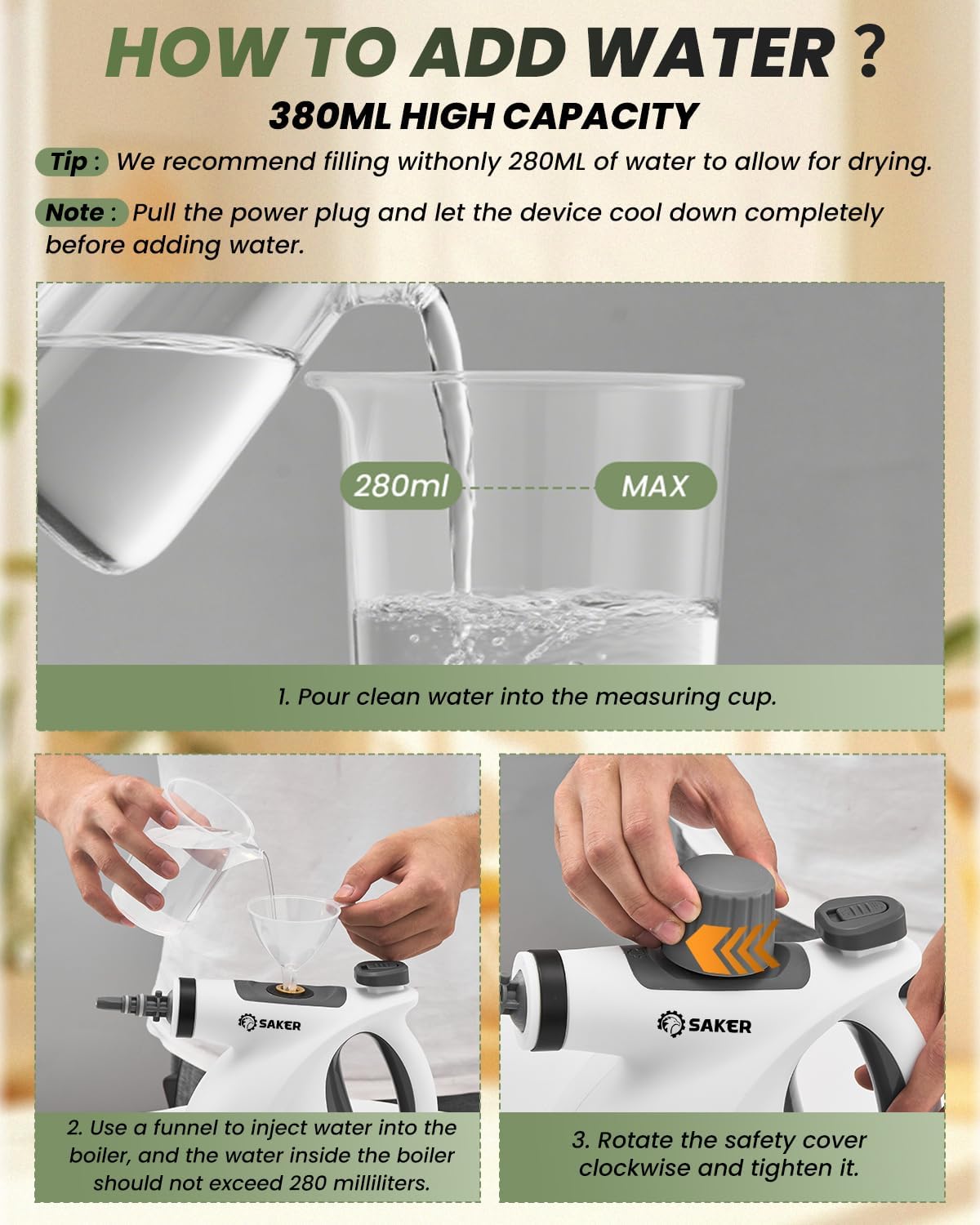
Image: Visual guide demonstrating how to measure water, use a funnel to fill the tank, and secure the safety cap.

Image: An illustrative diagram showing the water filling process, highlighting the 280ml maximum fill line and the internal heating element.
6. Operating Instructions
6.1 First Use and Heating
- After filling the water tank and securing the cap, plug the steam cleaner into a power outlet.
- The power indicator light will illuminate. Wait approximately 2-3 minutes for the device to heat up. The machine is ready for use when the indicator light turns green.
- Push the safety lock forward, then press the steam discharge handle to release steam. Keep your hand away from the safety lock during operation.

Image: A visual guide showing the steps to open the safety cover, fill water, wait for the indicator light, and operate the steam discharge handle.
6.2 Attaching Accessories
Select the appropriate accessory for your cleaning task and securely attach it to the steam nozzle. Ensure it clicks into place or is firmly screwed on.

Image: A collage showing different accessories like the extended nozzle, glass-cleaning accessory, fabric-cleaning accessory, bent nozzle, round brushes, and cone-shaped nozzle, demonstrating their application.
6.3 Cleaning Applications
The Saker Handheld Steam Cleaner is versatile and suitable for various surfaces. Always test on an inconspicuous area first.
- Kitchen: Ideal for stovetops, countertops, sinks, and oven interiors. The high-temperature steam helps break down grease and grime.
- Bathroom: Effective for cleaning tiles, grout, toilets, and showers.
- Floors: Can be used on sealed hard floors with appropriate attachments.
- Cars: Clean car interiors, upholstery, and hard-to-reach areas.
- Upholstery & Fabrics: Use the fabric-cleaning accessory to refresh and sanitize sofas, curtains, and other textiles.
- Windows & Glass: The glass-cleaning accessory provides streak-free results.

Image: A woman using the steam cleaner to clean kitchen surfaces, demonstrating its effectiveness on grease and grime.

Image: A person using the steam cleaner to clean the interior of a car, highlighting its use for automotive detailing.

Image: A person using the steam cleaner on an office carpet, demonstrating its application in commercial or home office settings.

Image: A woman using the steam cleaner to clean a sofa, illustrating its use for refreshing home furnishings.
6.4 Product Demonstration Video
Video: An official product video demonstrating the Saker Handheld Steam Cleaner in action, showcasing its features and various cleaning applications on different surfaces.
7. Maintenance
Regular maintenance ensures the longevity and optimal performance of your steam cleaner.
- Cleaning the Exterior: Wipe the exterior of the unit with a soft, damp cloth. Do not use abrasive cleaners or solvents.
- Draining Water: After each use, ensure the unit is cool, then carefully open the safety cap and drain any remaining water.
- Accessory Care: Clean accessories after each use. Fiber cloths can typically be machine washed.
- Storage: Store the steam cleaner in a cool, dry place, out of direct sunlight and away from children.
- Descaling (if necessary): If you notice reduced steam output or mineral buildup, descaling may be required. Consult a professional or refer to specific descaling instructions for steam appliances.
8. Troubleshooting
If you encounter issues with your Saker Handheld Steam Cleaner, refer to the following common problems and solutions:
| Problem | Possible Cause | Solution |
|---|---|---|
| No steam or low steam output. |
|
|
| Safety cap is hard to open. | Unit is still hot or under pressure. | Unplug the device and allow it to cool down completely for several minutes before attempting to open. Use a cloth if still warm. |
| Water leaking from nozzle. |
|
|
| Power indicator not lighting up. |
|
|
9. Specifications
| Feature | Detail |
|---|---|
| Brand | Saker |
| Model Name | CP97052-X66872 |
| Special Feature | Portable |
| Wattage | 1050W |
| Water Tank Capacity | 350ml (Recommended max fill: 280ml) |
| Heating Time | 2-3 minutes |
| Steam Temperature | 212°F–230°F (100°C–110°C) |
| Item Weight | 3.85 pounds |
| Color | White |
| Package Dimensions | 10.47 x 9.33 x 6.3 inches |
| Surface Recommendation | Tile, Countertop, Window, Car, Furniture, Upholstery, Sink |
10. Warranty and Support
Saker products are manufactured to high-quality standards. For warranty information, technical support, or customer service inquiries, please refer to the contact information provided with your purchase or visit the official Saker website. Please retain your proof of purchase for warranty claims.
Manufacturer: Saker
Website: Visit the Saker Store on Amazon
Ask a question about this manual
Ask about setup, troubleshooting, compatibility, parts, safety, or missing instructions. Manuals+ will review the question and use this page’s manual context to help answer it.