Introduction
This manual provides detailed instructions for the setup, operation, and maintenance of your sajawass Wireless Earbuds, Model BX31. Please read this guide thoroughly to ensure optimal performance and longevity of your device.
What's in the Box
Upon unboxing your sajawass Wireless Earbuds, you should find the following items:
- sajawass Wireless Earbuds (Left and Right)
- Charging Case
- USB Charging Cable
- Multiple sizes of ear tips for a comfortable fit
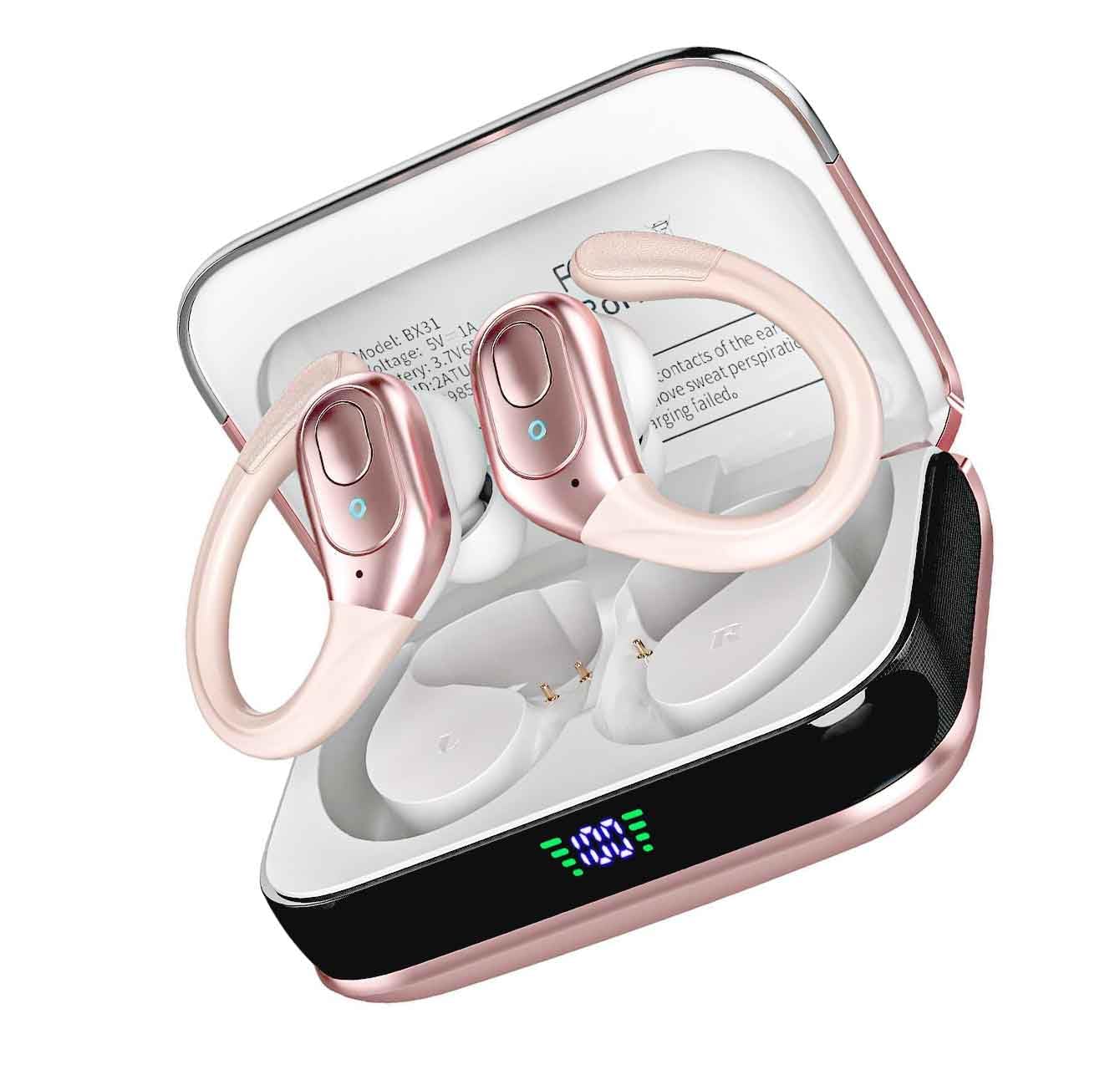
Image: sajawass Wireless Earbuds in their charging case, alongside the USB charging cable and extra ear tips.
Setup
1. Charging the Earbuds and Case
Before first use, fully charge the earbuds and charging case. Connect the provided USB charging cable to the charging port on the case and a power source. The case features a battery indicator to show the current charge level.
Image: Close-up of the charging case showing the USB-C port and battery indicator.
- Charging Time: Approximately 1.5 hours for a full charge.
2. Pairing with a Device
- Ensure the earbuds are in the charging case and the case is open.
- On your device (cellphone, tablet), go to Bluetooth settings and turn Bluetooth on.
- The earbuds should appear as "BX31" in the list of available devices. Select it to pair.
- Once connected, a confirmation sound or message may appear.
Tip for Pairing: If you experience difficulty pairing, especially indoors with many Wi-Fi signals, try moving to an outdoor area to reduce interference. This can make the pairing process smoother.
Image: A single sajawass Wireless Earbud, demonstrating its design for secure fit during activities.
Operating Instructions
The sajawass Wireless Earbuds feature touch controls for easy management of your audio and calls.
- Play/Pause: Tap once on either earbud.
- Next Track: Double-tap the right earbud.
- Previous Track: Double-tap the left earbud.
- Answer/End Call: Tap once on either earbud during an incoming call.
- Reject Call: Press and hold either earbud for 2 seconds during an incoming call.
- Activate Voice Assistant: Triple-tap either earbud.
Refer to your device's manual for specific volume control methods, as this may vary.
Maintenance
To ensure the longevity and optimal performance of your earbuds, follow these maintenance guidelines:
- Cleaning: Gently wipe the earbuds and charging case with a soft, dry cloth. Avoid using harsh chemicals or abrasive materials.
- Water Resistance: The earbuds are rated as waterproof. While they can withstand sweat and splashes, avoid submerging them in water for extended periods. Ensure they are dry before placing them back in the charging case.
- Storage: Store the earbuds in their charging case when not in use to protect them and keep them charged.
- Battery Care: Avoid fully depleting the battery frequently. Charge them regularly to maintain battery health.
Troubleshooting
If you encounter issues with your sajawass Wireless Earbuds, refer to the following common solutions:
| Problem | Possible Cause | Solution |
|---|---|---|
| Earbuds not pairing | Interference from other wireless signals; earbuds not in pairing mode. |
|
| Only one earbud working | One earbud not connected; low battery in one earbud; software glitch. |
|
| No sound or low volume | Device volume too low; earbuds not properly seated; connection issue. |
|
Specifications
| Feature | Detail |
|---|---|
| Connectivity Technology | Wireless |
| Wireless Communication Technology | Bluetooth |
| Bluetooth Version | 5.4 |
| Bluetooth Range | 10 Meters |
| Control Method | Touch |
| Water Resistance Level | Waterproof |
| Battery Life | 8 Hours |
| Charging Time | 1.5 Hours |
| Compatible Devices | Cellphones, Tablets |
| Earpiece Shape | In-ear |
| Material | Plastic |
| Item Weight | 5.3 ounces |
| Item Model Number | BX31 |
Warranty and Support
For warranty information or technical support, please refer to the documentation included with your purchase or visit the official sajawass website. Keep your proof of purchase for warranty claims.


