1. Introduction
Welcome to the world of retro gaming with your new RegiisJoy R50 Ultra Handheld Game Console. This manual provides essential information for setting up, operating, maintaining, and troubleshooting your device. Please read it thoroughly to ensure optimal performance and enjoyment.
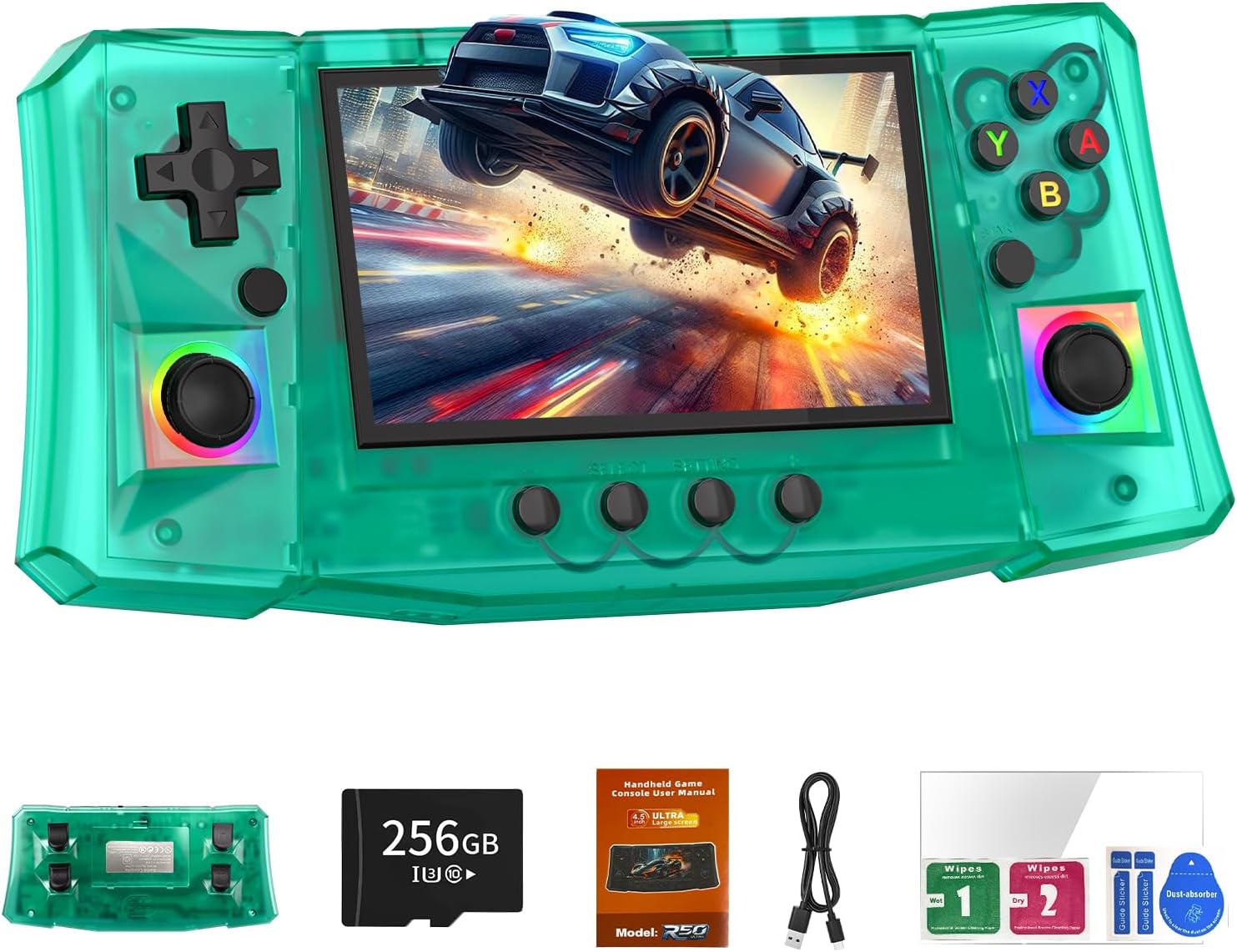
2. Product Overview
2.1. Key Features
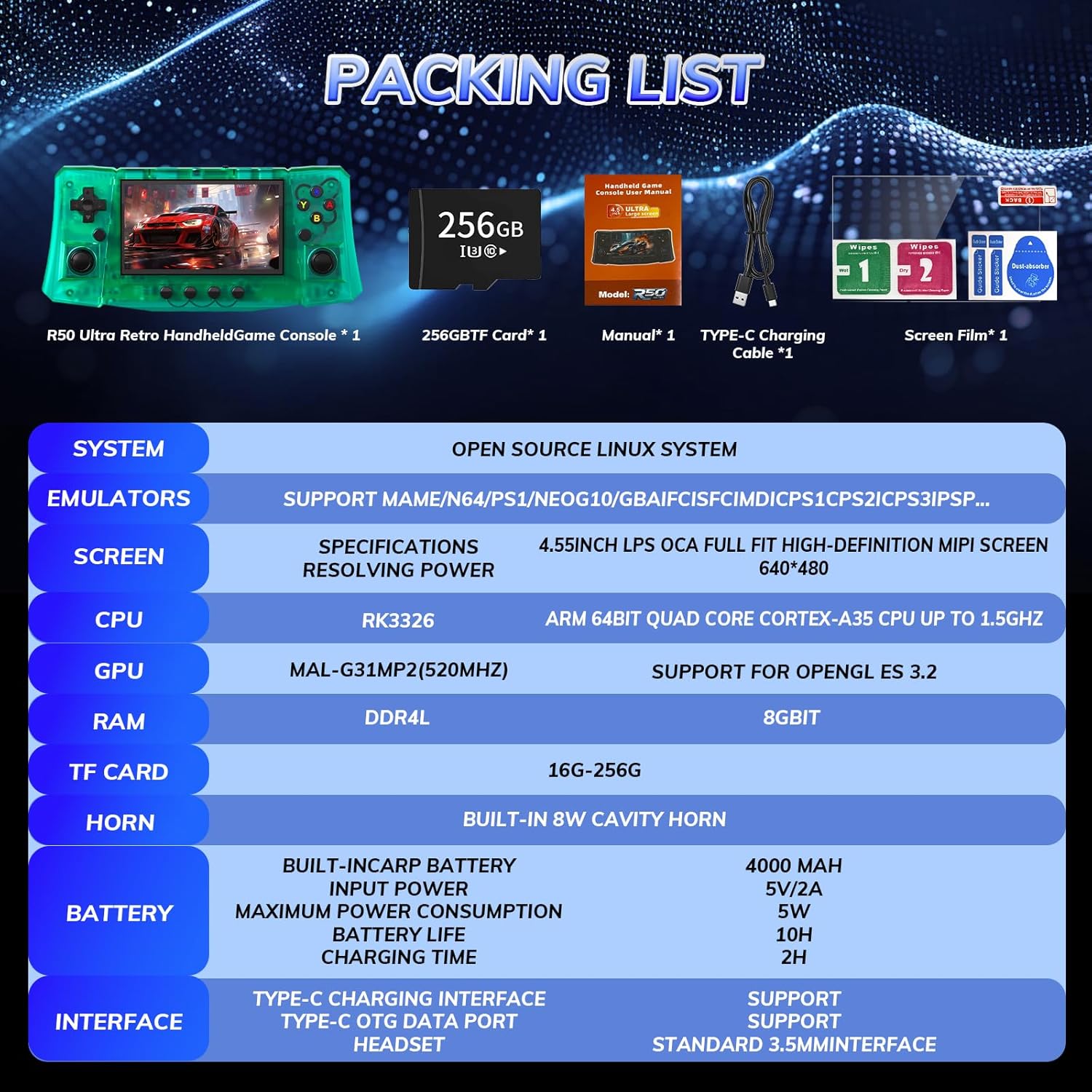
- Processor: RK3326 ARM 64bit Quad Core Cortex-A35 CPU up to 1.5GHz with Mali-G31MP2 (520MHz) GPU.
- Operating System: Open Source Linux System for stable performance and extensive game compatibility.
- Display: 4.5-inch IPS OCA full-fit high-definition MIPI screen (640x480 resolution) with tempered glass.
- Storage: Built-in 256GB TF card, expandable.
- Battery: 4000mAh rechargeable battery providing 6-10 hours of gameplay on a 1.5-hour charge (using a 5V 2A charger).
- Controls: Dual RGB joysticks with colorful backlighting, D-pad, action buttons (Y/X/A/B), Start, Select, Volume controls, and shoulder buttons (L1/L2/R1/R2).
- Audio: High-fidelity stereo speakers and a 3.5mm headphone jack.
- Connectivity: Type-C Charging Interface, Type-C OTG Data Port.
2.2. Console Layout and Components

- Front: 4.5-inch IPS screen, D-pad, Left Rocker, Right Rocker, Y/X/A/B buttons, Start, Select, FN, Volume +/-, Restart buttons.
- Top: L1, L2, R1, R2 shoulder buttons, 3.5mm Headphone Jack, DC charging port, Type-C OTG port, MicroSD card slot (RAM Slot), Power ON/OFF switch.
- Back: Ergonomically designed grip for comfortable holding.

2.3. What's in the Box
- RegiisJoy R50 Ultra Handheld Game Console
- 256GB TF Card (pre-installed)
- Type-C Charging Cable
- User Manual
- Screen Film & Cleaning Wipes
3. Setup
3.1. Initial Charge
Before first use, fully charge the console. Connect the provided Type-C charging cable to the console's DC port and a 5V 2A charger (not included). A full charge takes approximately 1.5 hours and provides 6-10 hours of gameplay.

3.2. Power On/Off
To power on, press and hold the ON/OFF switch located on the top of the console. To power off, press and hold the ON/OFF switch until the device shuts down.
3.3. Screen Protector Application
Use the included screen film and cleaning wipes to protect your console's display from scratches. Follow the instructions provided with the screen film for proper application.
4. Operating Instructions
4.1. Navigating the System
The R50 Ultra runs on an Open Source Linux System. Use the D-pad or joysticks to navigate through menus and select options. The A button typically confirms selections, and the B button usually cancels or goes back.
4.2. Game Selection
The console comes pre-loaded with over 50,000 retro games across various emulators including MAME, N64, PS1, NEOGEO, GBA, GBC, GB, MD, SFC, FC, SWC, NGPC, GG, SMS, ATARI, and PCE. Browse through the emulator categories to find your desired game.
4.3. In-Game Functions
- Saving/Loading Progress: The console supports saving and loading game progress. Specific button combinations or menu options within the emulator will allow you to perform these actions.
- Exiting a Game: To exit a game, typically press a combination of buttons (e.g., FN + SELECT) to bring up the emulator menu, then select 'Exit' or 'Quit'.
- Volume Control: Use the Volume +/- buttons on the front of the console to adjust audio levels.
5. Maintenance
- Cleaning: Use a soft, dry cloth to clean the console's exterior. For the screen, use the provided cleaning wipes or a microfiber cloth. Avoid abrasive cleaners or solvents.
- Storage: Store the console in a cool, dry place away from direct sunlight and extreme temperatures. Use the included hard case for protection during travel or storage.
- Battery Care: To prolong battery life, avoid fully discharging the battery frequently. Charge the device regularly, even if not in use for extended periods.
- Software Updates: Periodically check the manufacturer's website for any available firmware or software updates to ensure optimal performance and compatibility.
6. Troubleshooting
- Device Not Powering On: Ensure the battery is charged. Connect the console to a 5V 2A charger and try powering it on after a few minutes.
- Games Not Loading Properly: Some games may require specific emulator settings. Refer to online communities or the device's support resources for emulator-specific troubleshooting. Ensure the TF card is properly inserted.
- Screen Freezing/Crashing: If the screen freezes or the device crashes, press and hold the ON/OFF switch to force a shutdown, then restart the console. Ensure you are using a 5V 2A charger, as insufficient voltage can cause instability.
- Memory Card Capacity: The 256GB memory card may have a hidden area. To confirm its full capacity, you may need to use a memory card copier or format the card (backing up data first).
7. Specifications
| Feature | Detail |
|---|---|
| Model | R50 Ultra |
| CPU | RK3326 ARM 64bit Quad Core Cortex-A35 CPU up to 1.5GHz |
| GPU | Mali-G31MP2 (520MHz), Support for OpenGL ES 3.2 |
| RAM | 8GBIT DDR4L |
| Operating System | Open Source Linux System |
| Screen | 4.5-inch IPS OCA full-fit high-definition MIPI screen (640x480) |
| Storage | 256GB TF Card (expandable 16G-256G) |
| Battery | Built-in 4000mAh, 5V/2A Input, 6-10 hours battery life, 1.5 hours charging time |
| Audio | Built-in 8W cavity horn, 3.5mm Headphone Jack |
| Interfaces | Type-C Charging, Type-C OTG Data Port |
| Dimensions | 5 x 1 x 9 inches |
| Material | Plastic |
| Recommended Age | 16 years and up |
8. Warranty and Support
For warranty information or technical support, please refer to the documentation included with your purchase or visit the official RegiisJoy website. Contact customer service for any further assistance or inquiries.