
1. Introduction
This manual provides essential information for the safe and efficient use of your IKON 65-inch 4K QLED Smart TV, Model IK-VWQ65. Please read these instructions thoroughly before operating the television and retain them for future reference.
The IKON 65-inch 4K QLED Smart TV delivers an immersive entertainment experience with its stunning 3840 x 2160 UHD resolution and vibrant QLED display technology. It features smart capabilities with Ethernet and Wi-Fi connectivity, allowing seamless access to popular streaming services. Enjoy enhanced audio with integrated Dolby sound support and connect multiple devices via its two HDMI ports and two USB ports. The slim design and included stand ensure stable placement, while the 60Hz refresh rate provides smooth motion for all your content.
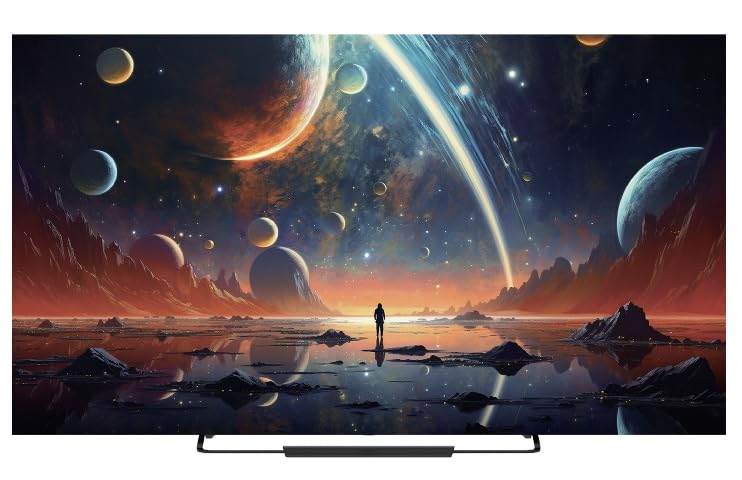
Front view of the IKON 65-inch 4K QLED Smart TV, Model IK-VWQ65, showcasing its large display and sleek design.
2. Safety Information
Always observe the following safety precautions to prevent electric shock, fire, or damage to the television.
- Do not expose the TV to rain or moisture.
- Do not open the TV casing; refer all servicing to qualified personnel.
- Ensure proper ventilation around the TV. Do not block ventilation openings.
- Use only the power cord supplied with the TV.
- Unplug the TV during lightning storms or when unused for long periods.
- Keep the TV away from direct sunlight, heat sources, and strong magnetic fields.
- Do not place heavy objects on the TV or power cord.
- Parental control features are available (Pin-based Content Lock) to manage content access for children.
3. What's Included
Verify that all components are present in the packaging:
- IKON 65-inch 4K QLED Smart TV (Model IK-VWQ65)
- Remote Control (requires AAA batteries)
- TV Stand
- Power Cord
- User Manual (this document)
4. Setup
4.1 Unpacking
Carefully remove the TV and all accessories from the packaging. It is recommended to keep the original packaging for potential future transport or servicing.
4.2 Attaching the Stand
Place the TV screen-down on a soft, flat surface. Align the included stand with the mounting holes on the bottom of the TV. Secure the stand using the provided screws. Ensure the stand is firmly attached before placing the TV upright.
4.3 Wall Mounting
If you choose to wall mount your TV, ensure you use a VESA-compatible wall mount (400 x 400 mm). Follow the instructions provided with your wall mount kit. Professional installation is recommended for wall mounting.
4.4 Connecting Power
Connect the power cord to the TV's power input, then plug the other end into a 220V AC power outlet. The TV consumes 150 Watts of power.
4.5 Connecting External Devices
Your TV offers various connectivity options:
- HDMI Ports (x2): Connect Blu-ray players, game consoles, streaming boxes, or sound systems.
- USB Ports (x2): Connect USB drives for media playback. (Includes 2x USB 2.0 ports)
- Ethernet Port: For wired internet connection.
- Digital Optical Audio Output: For connecting to external audio systems.
- Analog Audio Outputs (x2): For connecting to older audio systems.
5. Operating the TV
5.1 Power On/Off
Press the power button on the remote control or on the TV itself to turn the TV on or off.
5.2 Remote Control
The TV comes with an infrared remote control that supports both button and voice control. Insert AAA batteries into the remote control before use.
5.3 Smart TV Features
Running on the Android operating system with 8GB of memory storage, your TV provides access to a wide range of smart features and applications. Connect to the internet via Ethernet or Wi-Fi to enjoy services like Prime Video, Netflix, and YouTube.
5.4 Screen Mirroring
The TV supports screen mirroring technologies such as Chromecast and Miracast, allowing you to cast content from your mobile device to the TV and vice-versa. Bluetooth 5.0 is also available for wireless connections.
5.5 Audio Settings
The integrated Dolby audio system provides immersive sound. You can adjust audio settings through the TV's menu to optimize your listening experience. The TV features 20 Watts of stereo audio output.
6. Maintenance
6.1 Cleaning the Screen
Gently wipe the screen with a soft, lint-free cloth. For stubborn marks, lightly dampen the cloth with water or a specialized screen cleaner. Never spray liquid directly onto the screen.
6.2 Cleaning the Casing
Wipe the TV casing with a soft, dry cloth. Avoid using abrasive cleaners or solvents.
6.3 Ventilation
Ensure that the ventilation openings on the TV are not blocked to prevent overheating. Regularly dust the vents to maintain proper airflow.
7. Troubleshooting
If you encounter issues with your TV, refer to the following common problems and solutions:
| Problem | Possible Solution |
|---|---|
| No Power | Check if the power cord is securely plugged into the TV and the wall outlet. Ensure the outlet is functional. |
| No Picture, But Sound is Present | Verify the correct input source is selected. Check external device connections (HDMI, etc.). |
| No Sound, But Picture is Present | Check the volume level and ensure the TV is not muted. Verify audio cable connections to external devices. |
| Remote Control Not Working | Replace the AAA batteries. Ensure there are no obstructions between the remote and the TV's IR sensor. |
| Cannot Connect to Wi-Fi/Internet | Check your router and modem. Ensure the Wi-Fi password is correct. Try restarting the TV and your network equipment. |
8. Specifications
| Feature | Detail |
|---|---|
| Model Number | IK-VWQ65 |
| Manufacturing Year | 2024 |
| Screen Size | 65 inches |
| Display Technology | QLED |
| Resolution | 4K Ultra HD (3840 x 2160) |
| Refresh Rate | 60 Hz |
| Aspect Ratio | 16:9 |
| Image Contrast Ratio | 1,000,000:1 |
| Response Time | 8 ms |
| HDR Support | HDR10, HLG |
| Operating System | Android |
| Memory Storage Capacity | 8 GB |
| Audio Output Power | 20 Watts (Stereo) |
| Surround Sound Format | Dolby Digital |
| HDMI Ports | 2 |
| USB Ports | 2 (USB 2.0) |
| Ethernet Port | 1 |
| Wireless Connectivity | Wi-Fi, Bluetooth 5.0 |
| Screen Mirroring | Chromecast, Miracast |
| Mounting Type | Wall Mount (VESA 400 x 400 mm) |
| Power Supply | 220V AC |
| Power Consumption | 150 Watts |
| Item Weight | 18.5 kg |
| Stand Width | 45 cm |
9. Warranty Information
This IKON TV comes with a limited manufacturer warranty. Please refer to the warranty card included in your product packaging for specific terms, conditions, and duration of coverage. Keep your purchase receipt as proof of purchase for warranty claims.
10. Customer Support
For technical assistance, troubleshooting beyond this manual, or warranty inquiries, please contact IKON customer support. Contact details can typically be found on the manufacturer's website or on the warranty card.
- Online Support: Visit the official IKON website for FAQs and support resources.
- Email Support: Refer to your warranty documentation for the support email address.
- Phone Support: Refer to your warranty documentation for the customer service phone number.
