
1. Introduction
Thank you for choosing the DreamQuest Mini PC N95. This compact and powerful desktop computer is designed for efficiency and versatility, featuring an Intel N95 processor, 12GB DDR5 RAM, and a 1TB SSD. It comes pre-installed with Windows 11 Pro and offers extensive connectivity options, including dual USB-C and dual HDMI ports for 4K 60Hz triple-screen output. This manual provides essential information for setting up, operating, maintaining, and troubleshooting your device to ensure optimal performance.
2. Package Contents
Please verify that all items are present in your package:
- DreamQuest Mini PC N95 Unit
- Power Adapter
- HDMI Cable
- User Manual (this document)
3. Product Overview
The DreamQuest Mini PC N95 is a compact computing solution. Familiarize yourself with the device's physical layout and ports.
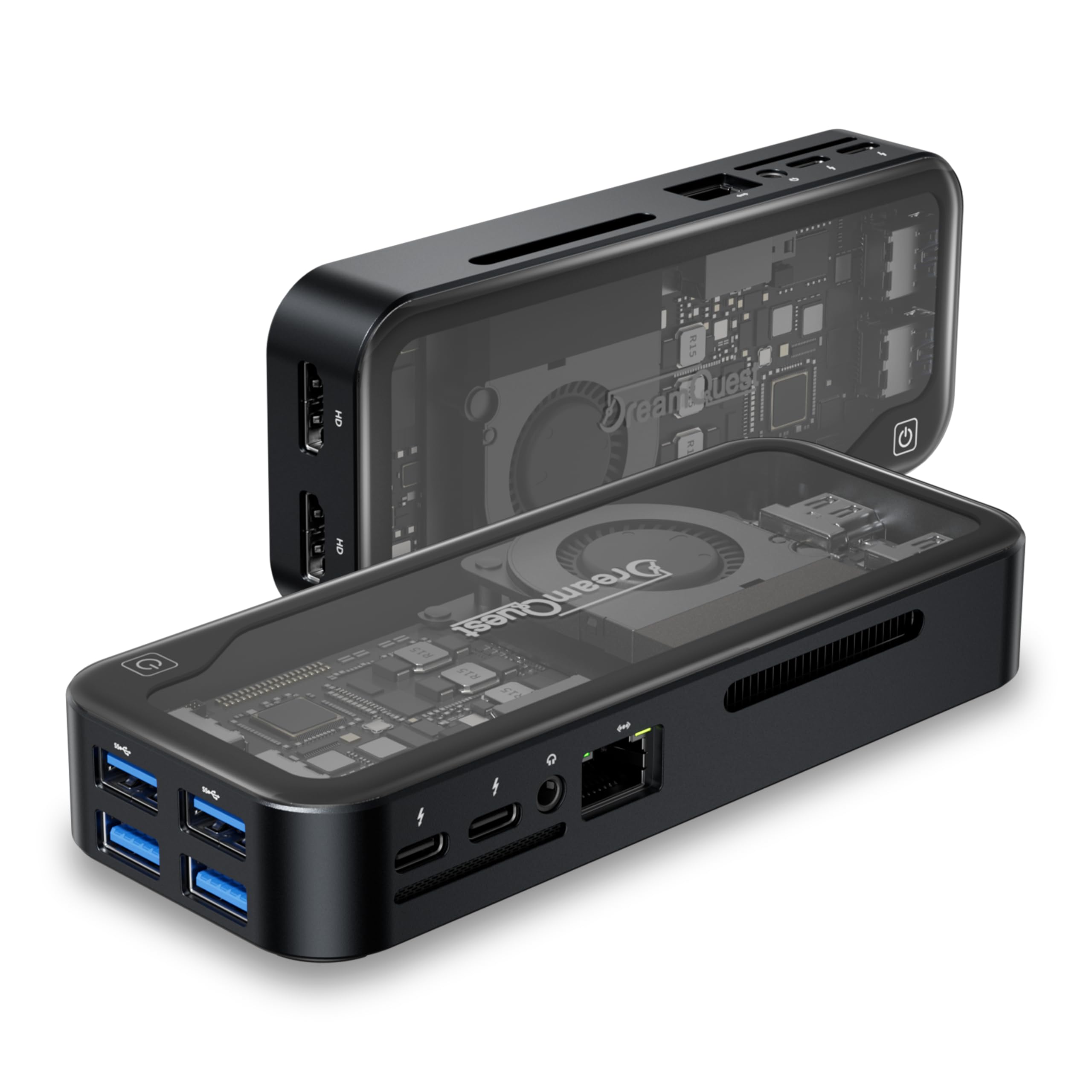
Image: Front and side view of the DreamQuest Mini PC N95, showcasing its compact design and available ports.
3.1. Port Layout
- Power Button: Located below the DreamQuest logo.
- USB-C Ports (x2): Full-function ports supporting fast charging, data transfer, and video output.
- HDMI Ports (x2): For connecting displays, supporting up to 4K@60Hz.
- USB 3.2 Ports (x4): For connecting peripherals such as keyboards, mice, and external storage.
- LAN Port: For wired network connectivity.
- Audio Jack: For headphones or speakers.
4. Setup Guide
4.1. Connecting Peripherals
- Connect Mouse and Keyboard: Plug your USB mouse and keyboard (wired or wireless dongle) into any of the available USB ports. Bluetooth peripherals will be configured later.
- Connect Monitor: Use the supplied HDMI cable to connect your monitor to one of the HDMI ports on the Mini PC. If your monitor supports DisplayPort, you may use a DisplayPort cable (not included).
- Connect Network (Optional): For a wired internet connection, connect an Ethernet cable from your router or modem to the LAN port on the Mini PC. Wireless connectivity will be set up during Windows configuration.
4.2. Powering On
- Connect Power Adapter: Plug the power adapter into the Mini PC's power input, then plug the other end into an AC outlet.
- Power On: Press the power button located below the DreamQuest logo. The power indicator light should illuminate.
4.3. Initial Windows 11 Pro Configuration
Upon first boot, the Windows 11 Pro setup screen will appear. Follow the on-screen prompts to complete the initial configuration. Ensure your mouse and keyboard are functional during this process.
- Region and Keyboard Layout: Select your preferred region and keyboard layout.
- Network Connection: Connect to your Wi-Fi network or ensure your wired connection is active.
- Microsoft Account: You will be prompted to sign in with or create a Microsoft account. It is recommended to set up a new account if you are not migrating settings from another PC.
- Security Settings: Configure Windows security settings, including Windows Defender.
- Privacy Settings: Adjust your privacy preferences.
After completing these steps, Windows 11 Pro will finalize the setup, and you will be presented with the desktop.
5. Operating System and Updates
Your DreamQuest Mini PC comes with Windows 11 Pro pre-installed. To ensure optimal performance and security, it is crucial to keep your operating system updated.
5.1. System Updates
- Access Settings: Click the Start button, then select Settings (gear icon).
- Navigate to Windows Update: Go to Windows Update in the left-hand menu.
- Check for Updates: Click Check for updates. Download and install all available updates. This process may take some time and require multiple restarts.
- Security Updates: Ensure Windows Security is up-to-date. In Settings, go to Privacy & security > Windows Security. Open Virus & threat protection and check for updates. Run a full scan after updates are complete.
During extensive updates, it is advisable to temporarily set your PC's sleep time to 'Never' to prevent interruptions. You can adjust this in Settings > System > Power & battery.
6. Connectivity
The Mini PC offers a range of connectivity options:
- Wi-Fi 6: For high-speed wireless internet access. Configure via Windows Settings > Network & internet > Wi-Fi.
- Bluetooth 5.3: For connecting wireless peripherals such as headphones, speakers, and input devices. Configure via Windows Settings > Bluetooth & devices.
- LAN (Ethernet): Provides a stable and fast wired network connection.
- USB-C (x2): Supports data transfer, video output (DisplayPort Alternate Mode), and power delivery. These ports are versatile for connecting modern peripherals and displays.
- HDMI (x2): Enables connection to up to two external displays, supporting 4K resolution at 60Hz. Combined with USB-C video output, this allows for triple-screen setups.
- USB 3.2 (x4): High-speed ports for connecting various USB devices.
7. Storage and Memory
The DreamQuest Mini PC N95 is equipped with:
- 1TB M.2 2280 SSD: Provides fast storage for the operating system, applications, and files. This SSD can be replaced with a larger capacity M.2 SSD (up to 2TB) if more storage is required.
- 12GB DDR5 RAM: High-speed memory for smooth multitasking and efficient operation.
8. Maintenance
Proper maintenance ensures the longevity and performance of your Mini PC.
8.1. Cleaning
- Exterior: Use a soft, dry, lint-free cloth to wipe the exterior of the device. Avoid abrasive cleaners or solvents.
- Ports: Gently use compressed air to clear dust from ports and vents. Do not insert objects into the ports.
8.2. Software Maintenance
- Regularly check for and install Windows updates.
- Keep your antivirus software updated and perform regular scans.
- Periodically clear temporary files and optimize disk usage through Windows Disk Cleanup or Storage Sense.
9. Troubleshooting
If you encounter issues with your Mini PC, refer to the following common troubleshooting steps:
- No Display:
- Ensure the monitor is powered on and correctly connected to the Mini PC via HDMI or USB-C.
- Try a different HDMI cable or monitor if available.
- Verify the Mini PC is powered on (power indicator light is active).
- No Audio:
- Check speaker/headphone connections and ensure they are powered on.
- Verify audio output settings in Windows: Right-click the speaker icon in the taskbar and select "Sound settings."
- Ensure audio drivers are up-to-date via Device Manager.
- Slow Performance:
- Close unnecessary applications running in the background.
- Check for and install all pending Windows updates.
- Run a virus scan to rule out malware.
- Ensure sufficient free space on the SSD.
- Network Connectivity Issues:
- For Wi-Fi, ensure you are connected to the correct network and the password is correct.
- For wired connection, check the Ethernet cable and router/modem status.
- Restart your router/modem and the Mini PC.
- Peripheral Not Recognized:
- Try connecting the peripheral to a different USB port.
- Ensure the peripheral has its own power source if required.
- Check Device Manager in Windows for driver issues.
9.1. BIOS Settings
The Mini PC supports advanced BIOS settings such as PXE boot, Wake On LAN, RTC Wake, and Auto Power On. To access the BIOS, press the designated key (usually Del or F2) repeatedly during startup. Refer to the on-screen prompts for specific key presses.
10. Specifications
Key technical specifications for the DreamQuest Mini PC N95:
| Feature | Specification |
|---|---|
| Processor | 12th Intel Alder Lake N95 (up to 3.4GHz) |
| Operating System | Windows 11 Pro (Supports Linux, PXE, Ubuntu) |
| RAM | 12GB DDR5 |
| Storage | 1TB M.2 2280 SSD (Expandable up to 2TB) |
| Graphics Coprocessor | Intel UHD Graphics |
| Max Screen Resolution | 3840x2160 (4K) |
| Video Output | 2x HDMI, 2x USB-C (supports 4K@60Hz triple-screen) |
| USB Ports | 2x USB-C (full-function), 4x USB 3.2 |
| Network | LAN, WiFi 6 |
| Wireless | Bluetooth 5.3 |
| Item Weight | 1.23 pounds |
| Package Dimensions | 6.57 x 5.67 x 2.52 inches |
11. Warranty and Support
DreamQuest provides a 1-Year Warranty for this Mini PC. For warranty service or technical support, please follow these steps:
- Log in to your Amazon account.
- Navigate to "My Orders."
- Locate the order ID for your DreamQuest Mini PC.
- Click "Contact Seller" to reach DreamQuest customer support.
For additional assistance, refer to the official DreamQuest store page on Amazon: DreamQuest Store

