
1. Introduction
Thank you for choosing the DOOGEE BoneBeat Swim Lite Bone Conduction Headphones. These headphones are designed for active lifestyles, offering IP68 waterproofing, dual Bluetooth 5.4 and 32GB MP3 modes, and an open-ear design for comfort and situational awareness during various sports activities, including swimming, running, and fitness.
2. Package Contents
Ensure all items listed below are present in your package:
- 1 x DOOGEE BoneBeat Swim Lite Headphones
- 1 x Magnetic Charging Cable
- 1 x Adjustable Elastic Strap
- 1 x Pair of Silicone Swimming Earplugs
- 1 x Pair of Foam Swimming Earplugs
- 1 x Storage Bag
- 1 x User Manual
- 1 x Service Card
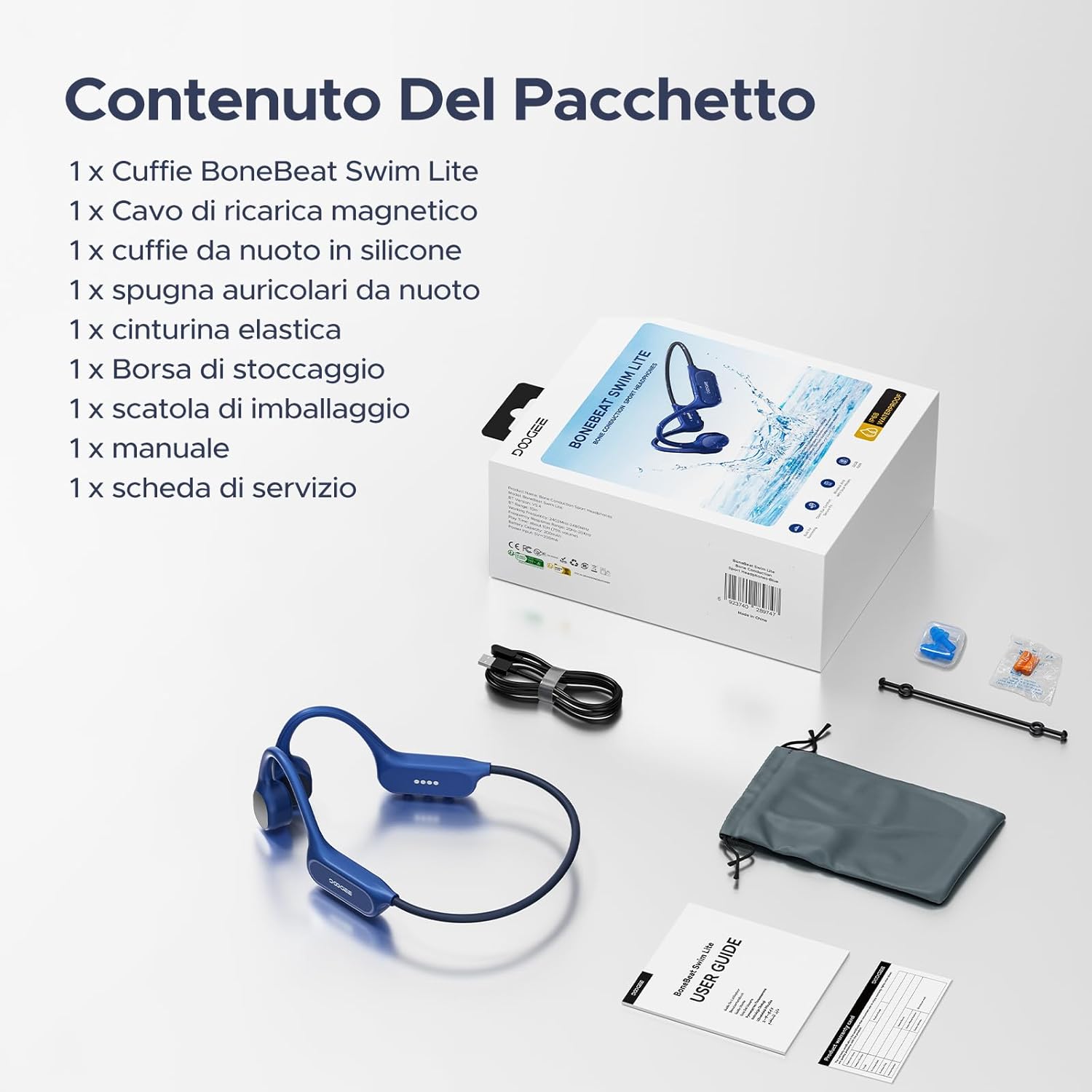
Image: Package contents of the DOOGEE BoneBeat Swim Lite headphones.
3. Setup
3.1 Charging the Headphones
Before first use, fully charge your headphones. Connect the magnetic charging cable to the charging port on the headphones and plug the USB end into a compatible power source (e.g., computer USB port or USB wall adapter). The LED indicator will show charging status. A 10-minute charge provides approximately 2 hours of playback.
3.2 Bluetooth Pairing
- Power on the headphones by pressing and holding the Multi-Function Button (MFB) until the LED indicator flashes.
- On your device (smartphone, tablet, laptop), enable Bluetooth and search for available devices.
- Select "DOOGEE BoneBeat Swim Lite" from the list to pair. The LED indicator will show a solid light when successfully connected.
3.3 MP3 Mode and File Transfer
The headphones feature 32GB of internal storage for MP3 playback, allowing you to store approximately 8,000 standard-quality songs. To transfer music:
- Connect the headphones to your computer using the magnetic charging cable.
- The headphones will appear as a removable disk drive.
- Drag and drop your MP3 audio files into the headphones' storage folder.
- Safely eject the device from your computer before disconnecting the cable.
Note: For underwater use, switch to MP3 mode as Bluetooth signals do not transmit effectively through water.
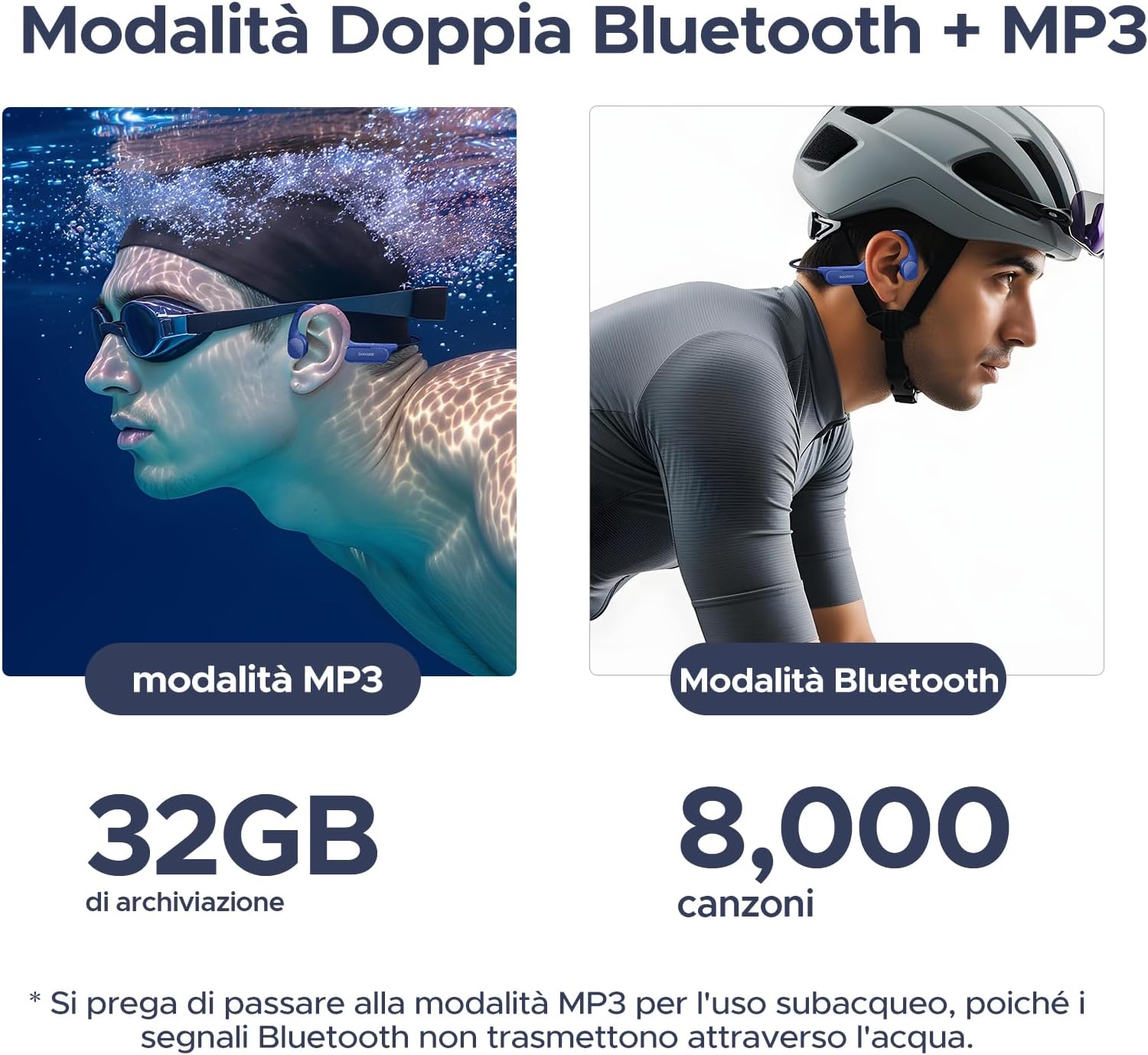
Image: Dual mode functionality for MP3 (swimming) and Bluetooth (cycling).
4. Operating Instructions
4.1 Power On/Off
- Power On: Press and hold the MFB for 3 seconds.
- Power Off: Press and hold the MFB for 5 seconds.
4.2 Music Playback
- Play/Pause: Press the MFB once.
- Next Track: Press and hold the Volume + button for 2 seconds.
- Previous Track: Press and hold the Volume - button for 2 seconds.
- Volume Up: Press the Volume + button.
- Volume Down: Press the Volume - button.
4.3 Call Management
- Answer Call: Press the MFB once.
- End Call: Press the MFB once during a call.
- Reject Call: Press and hold the MFB for 2 seconds.
4.4 Switching Modes (Bluetooth/MP3)
To switch between Bluetooth and MP3 modes, double-press the MFB. A voice prompt will indicate the current mode.

Image: Optimized physical buttons for easy control during sports.
5. Key Features
- IP68 Waterproof Rating: Designed for immersion, allowing use in swimming pools, rain, or showers.
- Secure & Stable Fit: Lightweight (25g) and made from flexible titanium alloy, with an ergonomic design and adjustable strap for a secure fit during intense activities.
- Dual Mode (Bluetooth 5.4 & 32GB MP3): Offers stable, low-latency Bluetooth connectivity and 32GB internal storage for smartphone-free music playback. Supports multipoint connection.
- 10-Hour Battery Life: Provides up to 10 hours of playback in Bluetooth mode and 6 hours in MP3 mode. Quick charge feature offers 2 hours of music from a 10-minute charge.
- Excellent Audio Quality: Advanced bone conduction technology delivers powerful bass and clear treble. Features a noise-canceling microphone for clear calls.
- Open-Ear Design: Ensures situational awareness by keeping your ears open to ambient sounds, enhancing safety during outdoor activities.

Image: DOOGEE BoneBeat Swim Lite headphones in use during swimming, highlighting IP68 waterproofing.

Image: Cyclist wearing DOOGEE BoneBeat Swim Lite headphones, showcasing the open-ear design for safety.

Image: Battery life details for Bluetooth and MP3 modes.

Image: Illustration of advanced bone conduction technology for clear and vibrant sound.
6. Maintenance
- Cleaning: Wipe the headphones with a soft, damp cloth after each use, especially after swimming or heavy sweating. Do not use abrasive cleaners.
- Drying: Ensure the charging port is completely dry before charging to prevent damage.
- Storage: Store the headphones in the provided storage bag in a cool, dry place away from direct sunlight and extreme temperatures.
- Water Exposure: While IP68 rated, it is recommended to rinse the headphones with fresh water immediately after contact with saltwater or chlorinated water to prevent corrosion. Do not wear headphones in hot baths or saunas.
7. Troubleshooting
- No Power: Ensure the headphones are fully charged.
- Cannot Pair Bluetooth: Make sure the headphones are in Bluetooth pairing mode and within range of your device. Try restarting both devices.
- No Sound: Check the volume levels on both the headphones and your connected device. Ensure the correct mode (Bluetooth or MP3) is selected.
- Poor Sound Quality in Water: Switch to MP3 mode for optimal sound quality underwater, as Bluetooth signals are significantly weakened by water. Using the provided earplugs can also enhance sound perception while swimming.
- Music Transfer Issues: Ensure the headphones are properly connected to the computer and recognized as a storage device. Check that the audio files are in a compatible format (e.g., MP3).
8. Specifications
| Brand | DOOGEE |
| Model | BONEBEATSWIMLITE |
| Material | ABS + Titanium Alloy |
| Weight | 25 Grams |
| Water Resistance Level | IP68 (Waterproof) |
| Bluetooth Version | 5.4 |
| Internal Storage | 32GB (approx. 8,000 songs) |
| Battery Life (Bluetooth) | Up to 10 Hours |
| Battery Life (MP3) | Up to 6 Hours |
| Charging Time | 10 minutes for 2 hours playback (quick charge) |
| Control Type | Media Control, Remote |
| Compatible Devices | Bluetooth-enabled devices (mobile phones, tablets, laptops) |
| Additional Features | Built-in Microphone, Wireless |
9. Warranty and Support
DOOGEE products come with a standard manufacturer's warranty. Please refer to the included Service Card for specific warranty terms and conditions. For technical support, troubleshooting assistance, or warranty claims, please contact DOOGEE customer service through their official website or the contact information provided in your product packaging.
Keep your purchase receipt as proof of purchase for warranty purposes.
