
1. Introduction
Thank you for choosing the COMHOMA Ergonomic Office Chair CH90. This manual provides detailed instructions for assembly, operation, maintenance, and troubleshooting to ensure optimal use and longevity of your chair. This chair is designed with an ergonomic structure, adjustable components, and breathable mesh for comfort during extended periods of sitting.
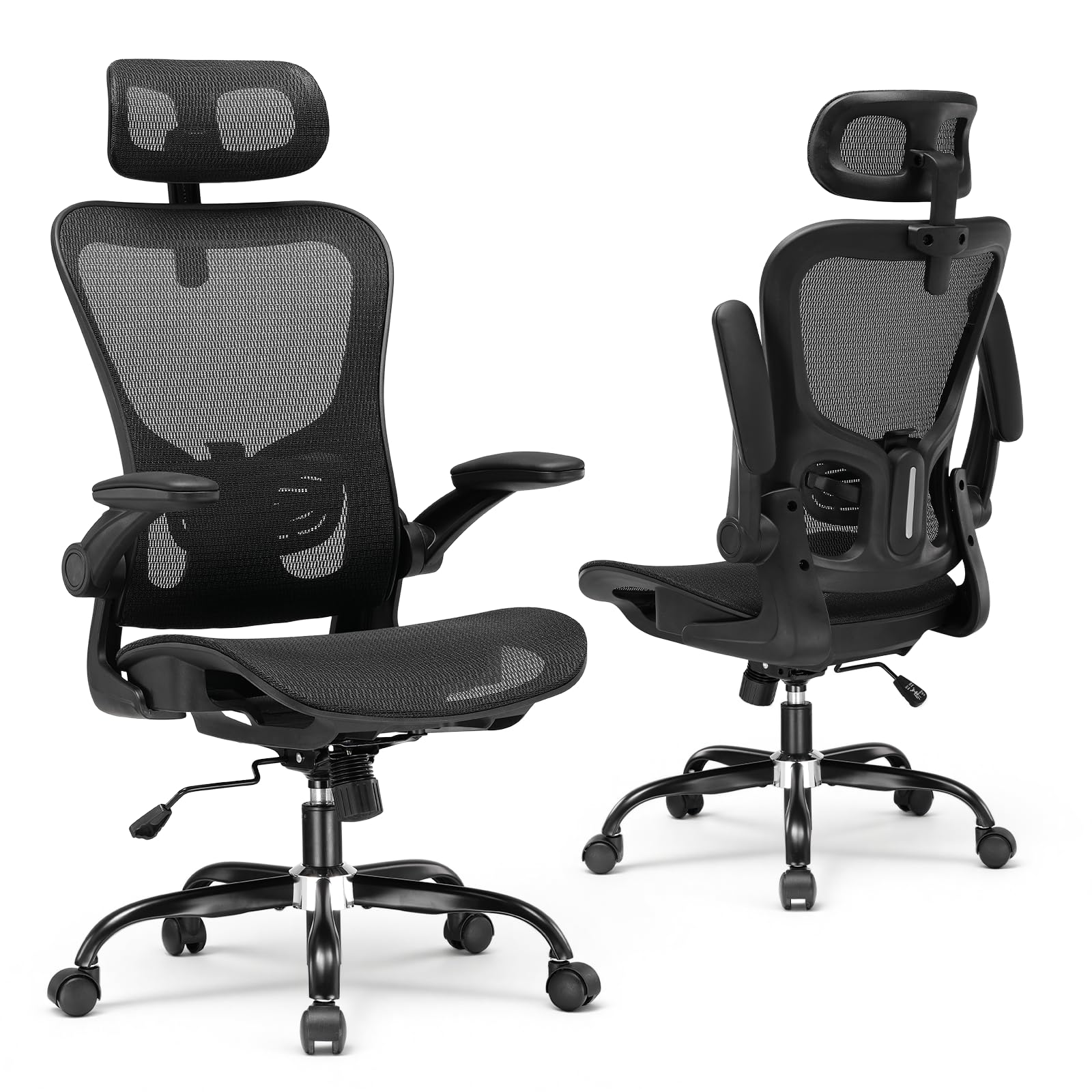
Image 1.1: The COMHOMA Ergonomic Office Chair featuring breathable mesh for enhanced air circulation and comfort.
2. Safety Information
- Observe the maximum weight capacity of 150 kg (330 lbs). Exceeding this limit may cause damage to the chair or personal injury.
- Ensure proper assembly and tighten all screws securely to maintain stability. Regularly check all fasteners for tightness.
- Use the rocking function carefully. Avoid sudden movements or excessive force to prevent injury.
- Keep hands and fingers clear of moving parts during adjustments.
- Do not stand on the chair or use it as a step stool.
3. Package Contents
Before assembly, verify that all components are present. If any parts are missing or damaged, contact COMHOMA customer support.
- Backrest
- Seat Cushion
- Headrest
- Armrests (2)
- Gas Lift Cylinder
- Base (5-star)
- Casters (5)
- Mechanism Plate
- Hardware Kit (screws, washers, Allen wrench)
4. Setup and Assembly
Assembly typically takes 15 to 20 minutes. Follow the clear instructions provided in the included assembly guide. All necessary tools are supplied.
- Attach the casters to the 5-star base by pushing them firmly into the holes.
- Insert the gas lift cylinder into the center hole of the base.
- Attach the mechanism plate to the underside of the seat cushion using the provided screws. Ensure the front of the mechanism faces the front of the seat.
- Attach the armrests to the seat cushion using the designated screws.
- Connect the backrest to the seat cushion and armrests, securing with screws.
- Mount the assembled seat and backrest onto the gas lift cylinder.
- Attach the headrest to the top of the backrest.
- Verify all screws are tightened and the chair is stable before use.

Image 4.1: Overview of the COMHOMA Ergonomic Office Chair, illustrating its various components prior to assembly.
5. Operating Instructions
5.1. Seat Height Adjustment
To adjust the seat height, pull the lever located under the right side of the seat upwards. While standing, the seat will rise. While seated, the seat will lower. Release the lever at the desired height.
5.2. Adjustable Headrest
The headrest can be adjusted for height and angle. Pull the headrest upwards or push downwards to set the desired height. The headrest also rotates up to 45 degrees to support your neck and head comfortably.

Image 5.1: The adjustable headrest, demonstrating its height and rotational capabilities for personalized comfort.
5.3. Folding Armrests
The armrests can be folded up to 90 degrees. This feature allows the chair to be slid further under a desk, saving space when not in use. Simply lift the armrests upwards until they lock into the folded position.

Image 5.2: The chair's armrests shown in their folded-up position, designed for space-saving storage under a desk.
5.4. Lumbar Support
The chair features an ergonomic lumbar support design that conforms to the natural S-curve of the human spine, promoting better posture and physical relaxation. The lumbar support is integrated into the backrest structure.

Image 5.3: Illustration of the ergonomic lumbar support, designed to align with the spine's natural curve for comfort.
5.5. Rocking Function
The chair offers a rocking function with a recline range of 90-120 degrees. To activate the rocking function, pull the lever (same as height adjustment) outwards. To lock the backrest in an upright position, push the lever inwards.
The rocking tension can be adjusted using the round knob located under the seat. Turn clockwise to decrease tension (making it harder to rock) and counter-clockwise to increase tension (making it easier to rock).

Image 5.4: Demonstrates the rocking function lever and the tension adjustment knob for personalized recline control.
6. Maintenance
- Cleaning: Wipe clean with a damp cloth. Avoid harsh chemicals or abrasive cleaners that may damage the mesh or frame.
- Mesh Care: The breathable mesh is abrasion-resistant. For optimal air circulation, keep the mesh clean and free of debris.
- Caster Care: The silent PU casters are designed to glide smoothly on hard floors. Periodically check casters for hair or debris accumulation and clean as needed to maintain smooth movement.
- Fastener Check: Regularly inspect all screws and bolts to ensure they remain tight. Re-tighten if necessary to prevent wobbling and ensure stability.
7. Troubleshooting
- Chair is wobbly: Check all assembly screws and ensure they are fully tightened. Verify the gas lift is properly seated in the base.
- Difficulty adjusting height: Ensure the gas lift lever is fully engaged. If the issue persists, the gas lift cylinder may need replacement.
- Casters not rolling smoothly: Inspect casters for trapped hair, dust, or debris. Clean them thoroughly.
- Rocking function not working: Check if the rocking tension knob is too tight (clockwise). Loosen it by turning counter-clockwise. Ensure the rocking lever is pulled outwards.
If you encounter issues not covered here or require further assistance, please contact COMHOMA customer support.
8. Specifications
- Brand: COMHOMA
- Model Name: CH90
- Color: Black
- Product Dimensions (Overall): 25.59" W x 22.05" D x 45.28" - 54.92" H (65cm W x 56cm D x 115-139.5cm H)
- Seat Area: 20.08" W x 19.29" D (51cm W x 49cm D)
- Seat Height: 18.5" - 22.05" (47cm - 56cm)
- Maximum Weight Recommendation: 150 kg (275 lbs)
- Material: Metal frame, Breathable Mesh, Foam padding
- Special Features: Adjustable Headrest, Folding Armrests, Lumbar Support, Rocking Function (90-120°), Ergonomic Design
- Item Weight: 26.4 pounds

Image 8.1: Detailed product dimensions, including height, width, and depth measurements.
9. Warranty and Support
The COMHOMA Ergonomic Office Chair CH90 comes with a 2-year warranty. This warranty covers manufacturing defects and material flaws under normal use.
For any questions, issues, or warranty claims, please contact the COMHOMA customer support team directly. They are available to provide prompt assistance.
Manufacturer: COMHOMA


