1. Introduction
Thank you for choosing the OUKITEL P1500EPLUS Portable Power Station. This device is a high-capacity, versatile power solution designed for various applications, including outdoor adventures, emergency backup, and off-grid living. Featuring a robust 1536Wh LiFePO4 battery and an 1800W (3600W peak) AC output, it provides reliable power for a wide range of electronic devices and appliances. This manual provides essential information for safe operation, setup, maintenance, and troubleshooting.

Figure 1.1: The OUKITEL P1500EPLUS portable power station being used in various scenarios: camping, home backup, fishing, and inside a car.
2. Safety Instructions
Please read and understand all safety instructions before operating the OUKITEL P1500EPLUS. Failure to follow these instructions may result in electric shock, fire, or serious injury.
- Do not disassemble, repair, or modify the unit.
- Keep the unit away from fire, water, and extreme temperatures.
- Do not use the unit in environments with high humidity or corrosive substances.
- Ensure proper ventilation during use to prevent overheating.
- Keep out of reach of children and pets.
- Use only original or certified accessories and charging cables.
- The integrated LiFePO4 battery is designed for safety and longevity, offering up to 4000 charge cycles and a 10-year lifespan. The SuperSafe BMS (Battery Management System) provides protection against short circuits, overheating, and overloads.
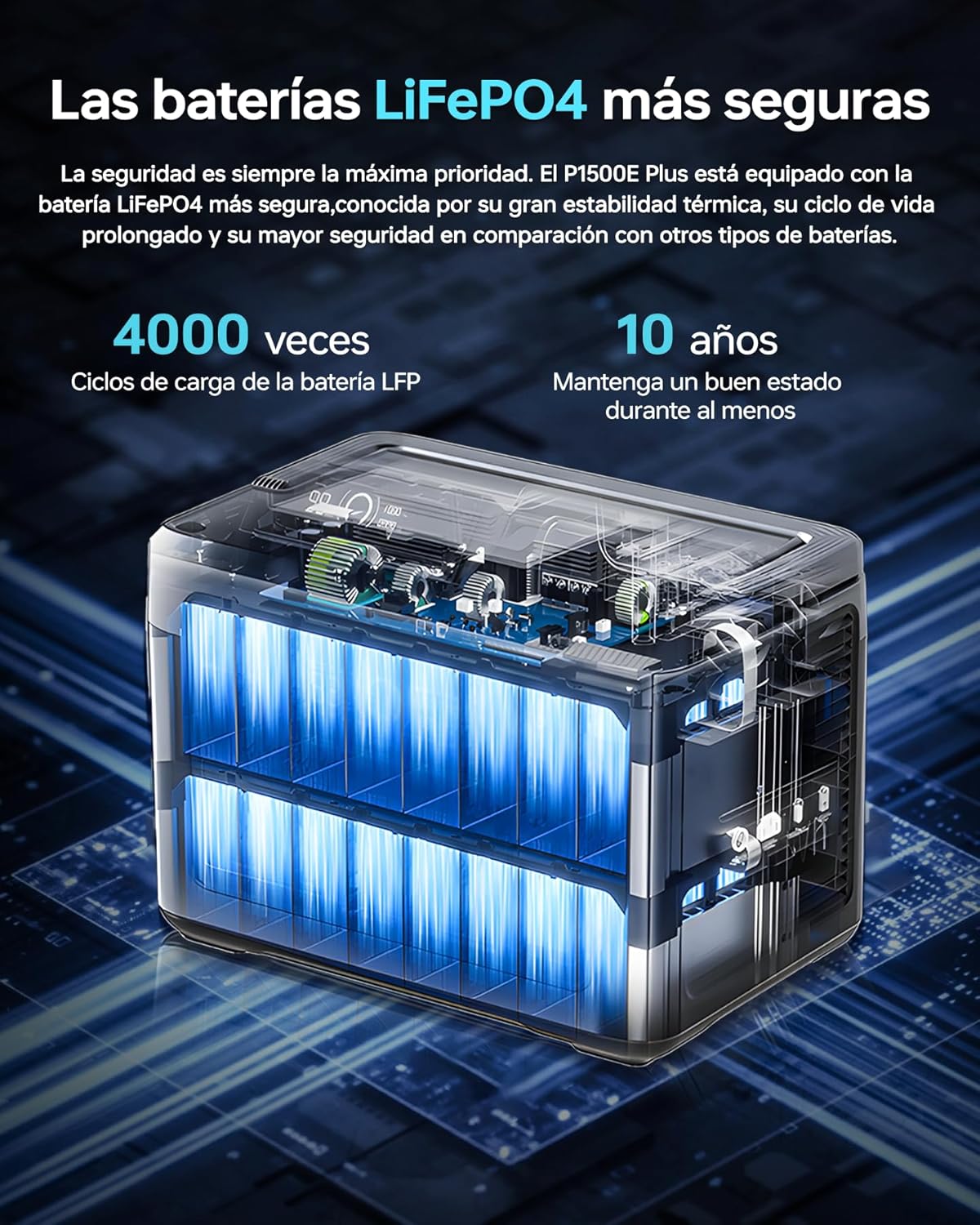
Figure 2.1: Diagram illustrating the internal structure of the OUKITEL P1500EPLUS LiFePO4 battery, highlighting its safety and longevity with 4000 charge cycles and 10 years lifespan.
3. Package Contents
Please check the package to ensure all items are present:
- OUKITEL P1500EPLUS Portable Power Station x 1
- PV100 Solar Panel x 1
- AC Power Cable x 1
- MC4 to XT60 Cable x 1
- Bluetooth Pairing Pin x 1
- Warranty Card x 1
- User Manual x 1
4. Product Overview
4.1. Physical Dimensions and Weight
The OUKITEL P1500EPLUS is designed to be compact and portable for its capacity.

Figure 4.1: OUKITEL P1500EPLUS portable power station with dimensions: 13.62in (L), 8.97in (W), 9.88in (H) and weight 31.30lb.
4.2. Control Panel and Output Ports
The front panel of the P1500EPLUS features a clear display and multiple output ports to power various devices simultaneously.

Figure 4.2: Close-up view of the OUKITEL P1500EPLUS control panel, detailing all 11 output ports including AC, DC, USB-A, USB-C, and car lighter socket.
The unit provides 11 output ports:
- AC Output: 4 x 1800W AC outlets (Pure Sine Wave)
- USB-C Output: 1 x USB Type-C PD100W, 1 x USB Type-C PD20W
- USB-A Output: 2 x USB QC3.0, 2 x USB-A 5V/2.4A
- DC Output: 2 x DC5521 (12V/3A)
- Car Port: 1 x Car Charging Port (12V/10A)

Figure 4.3: OUKITEL P1500EPLUS power station with 1536Wh capacity, showing 4 AC outputs, 1 USB-C 100W, 2 USB-A 5V/2.4A, 1 USB-QC3.0 20W, 2 DC 12V/3A, and 1 car port.
5. Setup
5.1. Initial Charging
Before first use, it is recommended to fully charge the OUKITEL P1500EPLUS. Connect the provided AC power cable to the AC input port on the power station and plug it into a wall outlet. The display will indicate the charging status. For optimal battery health, fully charge the unit at least once every three months if not in regular use.
5.2. Connecting the Solar Panel (PV100)
To charge using solar power, unfold the PV100 solar panel and position it in direct sunlight. Connect the MC4 connectors from the solar panel to the MC4 to XT60 cable, then connect the XT60 end to the XT60 input port on the power station. The unit will automatically detect solar input and begin charging.
6. Operating Instructions
6.1. Charging the P1500EPLUS
The P1500EPLUS supports multiple charging methods:
- AC Charging: Connect to a standard wall outlet using the AC power cable. Supports fast charging up to 1200W, reaching 100% in approximately 1 hour and 40 minutes. Slow charging (Max 500W) is also available to extend battery lifespan.
- Solar Charging: Connect the PV100 solar panel. Supports up to 500W solar input, charging to 100% in approximately 3 hours and 20 minutes under ideal sunlight conditions.
- Car Charging: Use a compatible car charger (not included) to charge from your vehicle's 12V/24V outlet. Charging time is approximately 12 hours (12V) or 6 hours (24V).
- AC + Solar Charging: Combine AC and solar input for the fastest charging, up to 1700W, achieving 100% in approximately 59 minutes.

Figure 6.1: OUKITEL P1500EPLUS power station being charged via AC outlet and a solar panel, showing charging times for different input methods.
6.2. Discharging Devices
To power your devices, press the corresponding output button (AC, DC, USB) on the control panel. The display will show the active outputs and power consumption. Ensure the total power draw of your devices does not exceed the unit's rated output of 1800W (3600W peak).
6.3. Uninterrupted Power Supply (UPS) Function
The P1500EPLUS features an Uninterrupted Power Supply (UPS) function with a switching time of less than 10 milliseconds. When connected to an AC wall outlet and simultaneously powering devices, the unit will automatically switch to battery power in the event of a power outage, ensuring continuous operation for sensitive electronics like computers, servers, and medical equipment.

Figure 6.2: OUKITEL P1500EPLUS power station providing uninterrupted power supply (UPS) to a desktop computer setup during a simulated power outage.
6.4. App Control
The OUKITEL P1500EPLUS can be controlled via a dedicated mobile application. Use the provided Bluetooth pairing pin to connect your smartphone to the power station. The app allows you to monitor battery status, adjust discharge limits, control charging speed, and manage other settings remotely.

Figure 6.3: A person using a smartphone to control the OUKITEL P1500EPLUS portable power station via its dedicated mobile application.
7. Maintenance
7.1. Storage
When storing the unit for extended periods, ensure it is charged to approximately 50-80% and stored in a cool, dry place away from direct sunlight. Recharge the unit every 3-6 months to maintain battery health.
7.2. Cleaning
Use a dry, soft cloth to clean the exterior of the power station. Do not use abrasive cleaners or immerse the unit in water.
8. Troubleshooting
If you encounter issues with your OUKITEL P1500EPLUS, please refer to the following common problems and solutions:
- Unit not turning on: Ensure the power button is pressed and held for a few seconds. Check if the battery is completely depleted and try charging it.
- No output from ports: Ensure the specific output button (AC, DC, USB) is activated. Check if the device you are trying to power is within the power station's output limits.
- Slow charging: Verify that the charging cable is securely connected. For solar charging, ensure the solar panel is in direct sunlight and not obstructed. Check if the slow charging mode is intentionally activated via the app or unit settings.
- Overload warning: If an overload warning appears, disconnect some devices to reduce the total power draw. The unit will automatically resume normal operation once the load is within limits.
- App connectivity issues: Ensure Bluetooth is enabled on your smartphone and the power station. Try restarting both devices and re-pairing using the Bluetooth pairing pin.
If the problem persists, please contact customer support.
9. Specifications
| Feature | Specification |
|---|---|
| Model | P1500EPLUS |
| Battery Type | LiFePO4 |
| Capacity | 1536Wh (480000mAh) |
| AC Output | 1800W (3600W Peak), 220-240V |
| USB-C Output | 1 x PD100W, 1 x PD20W |
| USB-A Output | 2 x QC3.0, 2 x 5V/2.4A |
| DC Output | 2 x DC5521 (12V/3A) |
| Car Port Output | 1 x 12V/10A |
| AC Input (Max) | 1200W |
| Solar Input (Max) | 500W |
| AC + Solar Input (Max) | 1700W |
| UPS Switching Time | ≤ 10ms |
| Dimensions (L x W x H) | 38.6 x 22.8 x 30.5 cm (13.62 x 8.97 x 9.88 inches) |
| Weight | Approx. 14.2 kg (31.30 lbs) |
| Battery Cycle Life | 4000 cycles to 80%+ capacity |
10. Warranty and Support
The OUKITEL P1500EPLUS Portable Power Station comes with a 2-year warranty from the date of purchase. This warranty covers manufacturing defects and workmanship under normal use.
For warranty claims, technical support, or any questions regarding the use of your product, please refer to the contact information provided on your warranty card or visit the official OUKITEL website. Please have your purchase receipt and product serial number ready when contacting support.


