Introduction
The ASUS RT-BE58 Go is a dual-band WiFi 7 portable travel router designed for versatile connectivity. It offers high-speed wireless performance, advanced security features, and multiple operating modes suitable for various environments, including travel, home, and office use. This manual provides instructions for setting up, operating, and maintaining your device.

Image: The ASUS RT-BE58 Go Portable Travel Router, a compact white device with foldable antennas, shown in a typical product view.
What's in the Box
Verify that all items are present in the package:
- RT-BE58 Go Travel router
- 1M RJ-45 Cable
- Power Adapter
- Quick Start Guide
- Warranty Card
Product Features
- Next-Gen WiFi 7 Speeds: Experience blazing-fast dual-band WiFi 7 speeds of up to 3600 Mbps with Multi-Link Operation (MLO) and 4K-QAM for low-latency connections.
- Enhanced Security: Protect sensitive data with comprehensive VPN features and commercial-grade security. Create a private hotspot over public WiFi (WISP mode) for privacy.
- Mobile Hotspot Capability: Transform your smartphone or mobile dongle into a powerful, shareable network using 4G LTE and 5G mobile tethering.
- USB-C Power Delivery: Power the router anywhere with universal USB-C Power Delivery 18W, using common chargers.
- AiMesh Technology: Create a reliable and extendable AiMesh network for seamless, whole-home coverage with rich security and networking features.
- Easy Management: Set up the router in minutes with a simple 3-step process and manage it via the ASUS Router mobile app. Use Guest Network Pro for functional subnetworks or guest portals.
- Connectivity Ports: Includes 1x 1G LAN port, 1x 2.5G WAN port, and 1x USB 3.0 port.
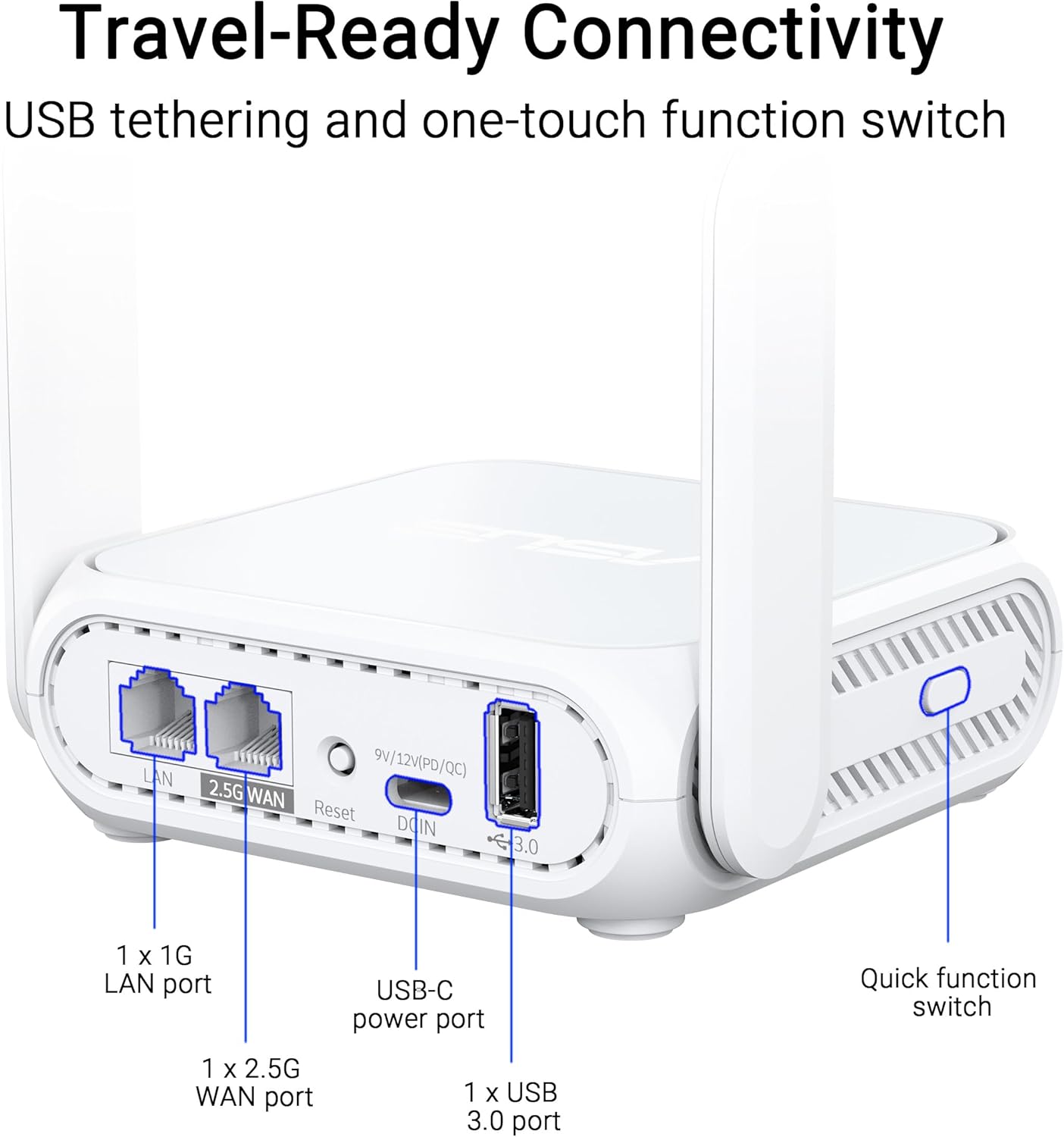
Image: A close-up view of the ASUS RT-BE58 Go router's rear panel, showing the 1G LAN port, 2.5G WAN port, USB-C power port, USB 3.0 port, and the quick function switch.
Setup
Initial Setup Steps:
- Connect Power: Plug the provided power adapter into the USB-C power port on the router and then into a power outlet.
- Connect to Internet Source:
- For wired internet: Connect an Ethernet cable from your modem or existing network to the 2.5G WAN port on the RT-BE58 Go.
- For public WiFi (WISP mode): Power on the router. You will configure WISP mode later via the app or web interface.
- For mobile tethering: Connect your smartphone or mobile dongle to the USB 3.0 port.
- Connect to Router:
- Wireless: Search for the default Wi-Fi network name (SSID) printed on the bottom of the router and connect using the default password.
- Wired: Connect a device (e.g., laptop) to the 1G LAN port using an Ethernet cable.
- Access Setup Interface: Open a web browser and navigate to http://router.asus.com or download the ASUS Router mobile app. Follow the on-screen instructions for initial configuration, including setting up your Wi-Fi name and password.
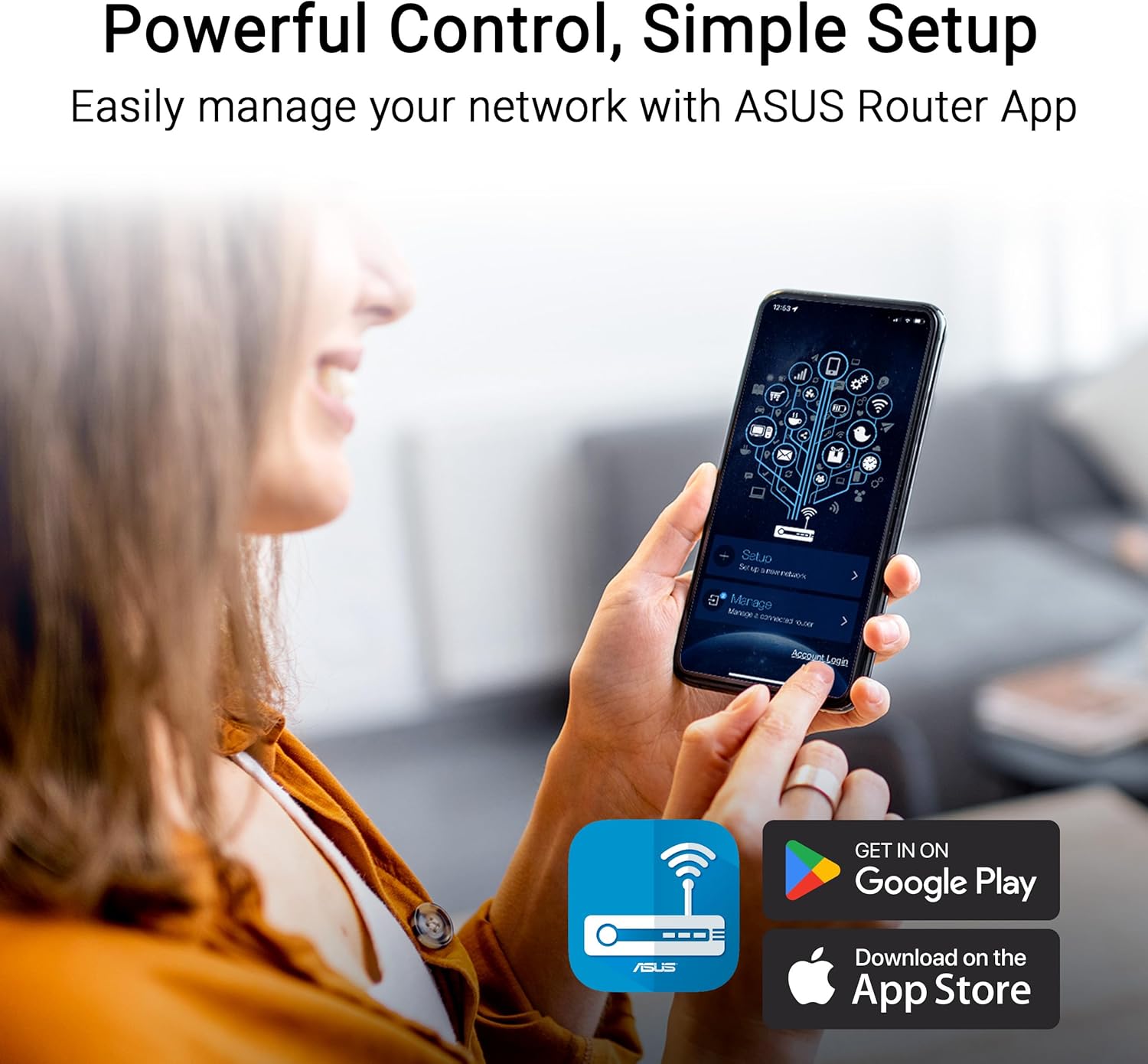
Image: A user interacting with the ASUS Router mobile app on a smartphone, demonstrating the ease of network management and setup.
Operating Modes
The RT-BE58 Go supports multiple operating modes to suit different network requirements:
- Wireless Router Mode: The standard mode where the device acts as your primary Wi-Fi router, connecting to an internet source (modem) and broadcasting a Wi-Fi network.
- AiMesh Node Mode: Integrates into an existing ASUS AiMesh system to extend Wi-Fi coverage.
- Range Extender Mode: Extends the coverage of an existing Wi-Fi network.
- Access Point (AP) Mode: Connects to a wired network and broadcasts a Wi-Fi signal, converting a wired network into a wireless one.
- Media Bridge Mode: Allows wired devices to connect to a Wi-Fi network.
- Repeater Mode: Repeats an existing Wi-Fi signal to extend its range.
- Public WiFi (WISP) Mode: Connects to a public Wi-Fi network (e.g., hotel, cafe) and creates a private, secure Wi-Fi network for your devices. This mode is ideal for travel security.

Image: A woman serving coffee to a customer using a laptop, illustrating a scenario where Public WiFi (WISP) mode can be used for secure internet access in a public setting.
Network Management & Security
The ASUS RT-BE58 Go provides robust tools for managing your network and ensuring security:
- ASUS Router App: Manage all router settings, monitor network traffic, and control connected devices from your smartphone.
- Guest Network Pro: Create separate subnetworks for guests or IoT devices. This isolates these devices from your main network for enhanced security and control.
- VPN Support: The router includes comprehensive VPN features, allowing you to establish secure connections. It supports various VPN protocols and can be configured as a VPN client or server.
- AiProtection: Commercial-grade network security features to protect against online threats.

Image: A screenshot of the ASUS Router app interface showing options for Guest Network Pro, VPN, and other security settings, with various VPN service logos (NordVPN, Surfshark, CyberGhost VPN) displayed.
AiMesh Setup
The RT-BE58 Go can be integrated into an ASUS AiMesh system to create a seamless whole-home Wi-Fi network. This allows you to extend your network coverage and eliminate Wi-Fi dead zones.
Steps to Add as an AiMesh Node:
- Ensure your existing ASUS router supports AiMesh and is running the latest firmware.
- Place the RT-BE58 Go within range of your AiMesh router.
- Power on the RT-BE58 Go.
- Access your main AiMesh router's web interface or the ASUS Router app.
- Navigate to the AiMesh section and select "Add AiMesh Node."
- The system will search for available AiMesh nodes. Select the RT-BE58 Go when it appears and follow the prompts to complete the setup.

Image: A diagram illustrating an ASUS AiMesh network, showing the RT-BE58 Go router extending Wi-Fi coverage from a main AiMesh router to cover a larger home area.
Maintenance
Regular maintenance ensures optimal performance and longevity of your router:
- Firmware Updates: Regularly check for and install the latest firmware updates via the ASUS Router app or web interface. Firmware updates often include performance improvements, security patches, and new features.
- Placement: Position the router in an open area, away from obstructions and sources of interference (e.g., microwaves, cordless phones). For optimal signal, avoid placing it inside cabinets or near large metal objects.
- Cleaning: Keep the router clean and free of dust. Use a soft, dry cloth to wipe the exterior. Do not use liquid cleaners or aerosols.
- Restarting: Periodically restart your router (unplug from power for 10 seconds, then plug back in) to refresh its connection and clear any temporary issues.
Troubleshooting
If you encounter issues with your RT-BE58 Go, try the following troubleshooting steps:
- No Internet Connection:
- Check if your modem or internet source is working correctly.
- Verify all cables are securely connected.
- Restart both your modem and the RT-BE58 Go router.
- Check the WAN connection status in the ASUS Router app or web interface.
- Slow Wi-Fi Speed:
- Ensure the router is placed optimally, away from interference.
- Check for firmware updates.
- Reduce the number of connected devices or bandwidth-intensive activities.
- Try changing Wi-Fi channels in the router settings to avoid congestion.
- Cannot Access Router Settings:
- Ensure your device is connected to the router's Wi-Fi or LAN port.
- Verify you are using the correct IP address (http://router.asus.com) or the ASUS Router app.
- Clear your browser's cache and cookies, or try a different browser.
- If you forgot your login credentials, you may need to perform a factory reset (refer to the Quick Start Guide for instructions).
- Wi-Fi Signal Drops Frequently:
- Adjust antenna positions.
- Check for physical obstructions.
- Consider adding an AiMesh node if coverage is insufficient.
Specifications
| Feature | Detail |
|---|---|
| Model Name | RT-BE58 GO |
| Network Standard | IEEE 802.11a/b/g, WiFi 4 (802.11n), WiFi 5 (802.11ac), WiFi 6 (802.11ax), WiFi 6E (802.11ax), WiFi 7 (802.11be), IPv4, IPv6 |
| Data Rate | WiFi 7 (2.4GHz): up to 688 Mbps; WiFi 7 (5GHz): up to 2882 Mbps (Total 3600 Mbps) |
| Antenna | External foldable antennas |
| Memory | DDR4 RAM 1GB; Flash 256MB |
| Ports | 1x 1G LAN, 1x 2.5G WAN, 1x USB 3.0, 1x USB-C Power Delivery |
| Operating Modes | Wireless router, AiMesh Node, Range Extender, Access Point, Media Bridge, Repeater, Public Wifi Mode |
| Dimensions | 4.4 x 3.9 x 1.4 inches |
| Item Weight | 8 ounces |
| Power Supply | USB-C Power Delivery 18W |
| Special Features | Dual-band WiFi 7, AiMesh, Advanced VPN, Guest Network Pro |
Warranty and Support
Warranty: The ASUS RT-BE58 Go comes with a 3-year manufacturer warranty. Please retain your proof of purchase for warranty claims.
Technical Support: For further assistance, troubleshooting, or detailed product information, please visit the official ASUS support website. You can find drivers, manuals, FAQs, and contact information for technical support there.
Online Resources:
- ASUS Official Website: https://www.asus.com
- ASUS Support: https://www.asus.com/support/