
Infinity Cutting Tools MPF-001
Infinity Tools Mini Power Feeder MPF-001 Instruction Manual
Model: MPF-001
Important Safety Information
Read and understand all instructions before operating the Infinity Tools Mini Power Feeder. Failure to follow these instructions may result in serious injury or property damage. Keep this manual for future reference.
General Safety Warnings:
- Always wear appropriate personal protective equipment (PPE), including safety glasses, hearing protection, and dust mask.
- Ensure the power feeder is securely mounted before operation.
- Disconnect power before making any adjustments, maintenance, or when changing accessories.
- Keep hands and fingers clear of moving parts, especially the feed rollers.
- Do not operate the power feeder in wet or damp conditions.
- Ensure the workpiece is properly supported and guided.
- Never force the workpiece into the feeder. Allow the feeder to control the feed rate.
- Keep the work area clean and well-lit.
- Do not operate if any parts are damaged or missing. Contact customer support for replacement parts.
Product Overview
The Infinity Tools Mini Power Feeder (MPF-001) is designed to provide consistent and controlled feeding of workpieces on various woodworking machines such as router tables, shapers, table saws, and bandsaws. Its compact design and versatile mounting options make it suitable for a wide range of applications.
Key Features:
- 1/8 HP motor for consistent torque.
- Variable feed speed from 6.5 to 56 FPM (Feet Per Minute).
- Reversible feed direction.
- Horizontal and vertical mounting capabilities.
- Three spring-loaded polyurethane rollers for secure grip without marring.
- Durable cast iron housing and metal drivetrain.
Components:
Familiarize yourself with the main components of your Mini Power Feeder:
- Motor Housing: Contains the 1/8 HP motor and internal drivetrain.
- Control Panel: Includes power switch, speed control dial, and direction switch.
- Feed Rollers: Three polyurethane rollers that grip and move the workpiece.
- Mounting Arm: Used to attach the feeder to your machine's table or fence. (Note: Mounting arm may be sold separately or as part of a kit like MPF-SET).
- Adjustment Knobs/Levers: For positioning and securing the feeder.
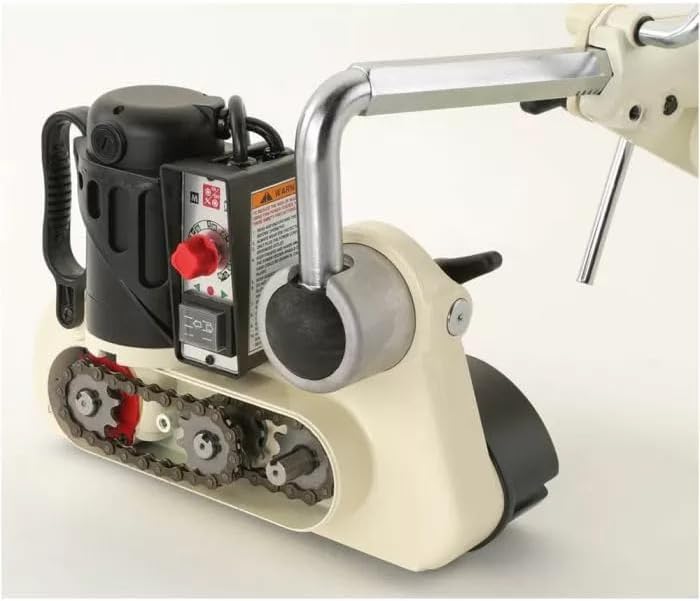
Figure 1: Top-down view of the Infinity Tools Mini Power Feeder MPF-001, highlighting the motor housing, control panel with speed and direction controls, and the internal chain drive mechanism.

Figure 2: Underside view of the Mini Power Feeder, illustrating the three yellow polyurethane feed rollers designed to grip the workpiece without marring its surface.
Specifications
| Attribute | Detail |
|---|---|
| Model Number | MPF-001 |
| Motor | 1/8 HP |
| Power Source | AC |
| Feed Speed | Variable, 6.5 - 56 FPM |
| Feed Direction | Reversible |
| Mounting Modes | Horizontal, Vertical |
| Rollers | 3, Spring-loaded Polyurethane |
| Weight | Approximately 26 lb |
| Housing Material | Cast Iron |
| Drivetrain | Metal |
Setup and Installation
Proper setup is crucial for safe and effective operation. Ensure your machine (router table, shaper, table saw, or bandsaw) is stable and capable of supporting the power feeder.
Mounting the Power Feeder:
The Mini Power Feeder can be mounted in either a horizontal or vertical orientation, depending on your application. A robust mounting arm (often sold separately or as part of a kit) is required.
- Attach Mounting Arm: Secure the mounting arm base to your machine's table or a dedicated stand. Ensure all fasteners are tightened securely.
- Connect Feeder to Arm: Attach the Mini Power Feeder to the mounting arm. The arm typically allows for various adjustments in height, angle, and reach.
- Positioning for Horizontal Feeding:
- For operations like jointing or routing on a router table, position the feeder so the rollers are parallel to the fence and slightly angled towards it (typically 1-2 degrees) to maintain consistent pressure against the fence.
- Adjust the height so the rollers compress the workpiece by approximately 1/16" to 1/8". This ensures a firm grip without stalling the motor.

Figure 3: Horizontal setup of the Mini Power Feeder on a table saw, demonstrating how it feeds a workpiece against the fence for consistent cuts.

Figure 4: The Mini Power Feeder configured for horizontal feeding on a router table, providing controlled movement for routing operations.
- Positioning for Vertical Feeding:
- For operations requiring feeding against a vertical fence (e.g., some router table or shaper operations), orient the feeder vertically.
- Adjust the feeder so the rollers are pressing firmly against the side of the workpiece, maintaining consistent contact with the fence.

Figure 5: Vertical setup of the Mini Power Feeder on a router table fence, ensuring consistent pressure and feed for edge work.
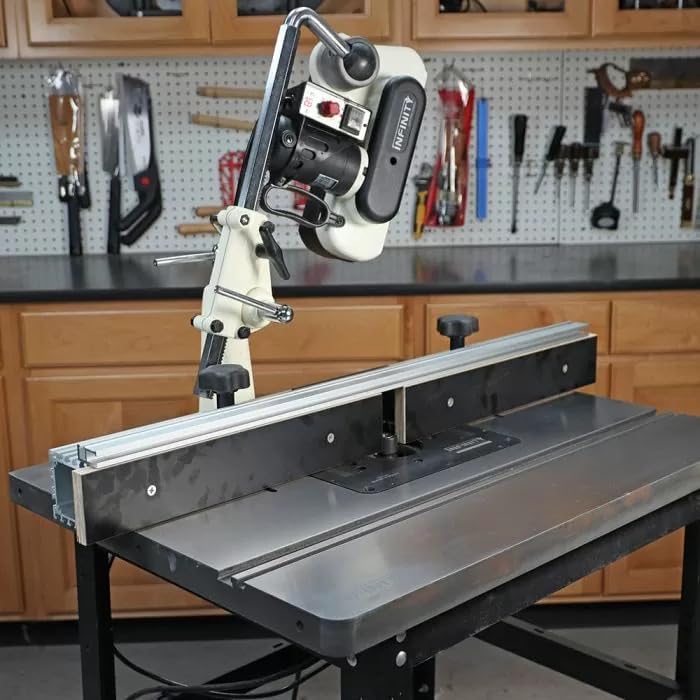
Figure 6: The Mini Power Feeder in a vertical orientation on a table saw fence, used to guide material for specific cutting tasks.
- Power Connection: Plug the power feeder into a grounded electrical outlet. Ensure the power switch is in the "OFF" position before plugging in.
Operating Instructions
Once the Mini Power Feeder is securely mounted and adjusted, you can begin operation. Always perform a test run with scrap material before working on your final piece.
Basic Operation:
- Power On: Flip the main power switch to the "ON" position. The motor should start.
- Adjust Feed Speed: Use the variable speed control dial to set the desired feed rate. Slower speeds are generally better for harder woods, larger cuts, or when a finer finish is required. Faster speeds can be used for softer woods or lighter cuts.
- Select Feed Direction: Use the direction switch to select forward or reverse feed. Forward feed is typically used for conventional cutting, while reverse feed can be useful for climb cutting (exercise extreme caution with climb cutting and only if experienced).
- Introduce Workpiece: Carefully introduce the workpiece to the feed rollers. Allow the rollers to grip the material and pull it through. Do not push or force the workpiece.
- Monitor Operation: Observe the workpiece as it feeds. Ensure it maintains consistent contact with the fence and the machine's table. Adjust speed if necessary.
- Power Off: Once the operation is complete, or if you need to make adjustments, turn the power feeder off.
Tips for Optimal Performance:
- For best results, ensure your workpiece edges are straight and parallel before feeding.
- When feeding long stock, consider using outfeed support.
- Regularly check the tension of the spring-loaded rollers to ensure adequate grip.
- Avoid feeding warped or severely twisted stock, as this can lead to inconsistent results or potential kickback.
Maintenance
Regular maintenance will prolong the life of your Mini Power Feeder and ensure consistent performance. Always disconnect the power feeder from the electrical outlet before performing any maintenance.
Cleaning:
- Feed Rollers: Periodically clean the polyurethane feed rollers with a damp cloth to remove sawdust, resin, and other debris. A mild detergent can be used for stubborn buildup. Ensure rollers are dry before use.
- Exterior: Wipe down the exterior of the power feeder with a clean, dry cloth. Avoid using harsh chemicals or solvents that could damage the finish or internal components.
- Ventilation Openings: Ensure the motor's ventilation openings are clear of dust and debris to prevent overheating. Use compressed air if necessary.
Lubrication:
- The internal metal drivetrain is designed for long-term operation. Refer to the manufacturer's recommendations for any specific lubrication requirements. Generally, the sealed bearings and gears do not require user lubrication.
Inspection:
- Regularly inspect the power cord for any signs of damage (fraying, cuts). Replace immediately if damaged.
- Check all mounting hardware for tightness.
- Examine the feed rollers for excessive wear, cracks, or hardening. Worn rollers may need replacement to maintain proper grip.
Troubleshooting
This section addresses common issues you might encounter with your Mini Power Feeder. If you experience a problem not listed here, or if the suggested solutions do not resolve the issue, contact Infinity Tools customer support.
| Problem | Possible Cause | Solution |
|---|---|---|
| Feeder does not turn on. | No power to the unit; Power switch off; Faulty power cord. | Check power outlet and circuit breaker; Ensure power switch is ON; Inspect power cord for damage and replace if necessary. |
| Workpiece stalls or slips. | Rollers not gripping; Insufficient roller pressure; Rollers dirty or worn; Feed speed too high for material/cut. | Clean rollers; Increase roller pressure (adjust height); Replace worn rollers; Reduce feed speed. |
| Inconsistent feed rate. | Uneven roller pressure; Workpiece not flat; Motor struggling. | Re-adjust roller height for even pressure; Ensure workpiece is flat; Reduce feed speed or depth of cut. |
| Excessive noise or vibration. | Loose mounting; Damaged internal components; Motor issue. | Check and tighten all mounting hardware; Discontinue use and contact customer support if internal damage is suspected. |
Warranty Information
Infinity Cutting Tools products are manufactured to high-quality standards. For specific warranty terms and conditions applicable to your Mini Power Feeder (MPF-001), please refer to the warranty card included with your purchase or visit the official Infinity Cutting Tools website. Keep your proof of purchase for warranty claims.
Customer Support
If you have any questions, require technical assistance, or need to order replacement parts for your Infinity Tools Mini Power Feeder, please contact Infinity Cutting Tools customer support:
- Website: www.infinitytools.com
- Phone: Refer to the contact information on the official website or your product packaging.
- Email: Refer to the contact information on the official website.
When contacting support, please have your model number (MPF-001) and purchase date available.
Related documentsMPF-001


Ask a question about this manual
Ask about setup, troubleshooting, compatibility, parts, safety, or missing instructions. Manuals+ will review the question and use this page’s manual context to help answer it.