1. Introduction
Thank you for choosing the Hoover HF610P011 Cordless Electric Broom. This manual provides essential information for the safe and efficient use of your new appliance. Please read it thoroughly before first use and keep it for future reference.
2. Safety Information
Important Safety Instructions:
- Always ensure the appliance is switched off before cleaning or performing maintenance.
- Do not use the appliance to pick up water or wet materials.
- Keep hair, loose clothing, fingers, and all parts of the body away from openings and moving parts.
- Use only Hoover recommended attachments and accessories.
- Store the appliance indoors in a dry place.
- Do not immerse the appliance in water.
3. Product Overview
The Hoover HF610P011 is a versatile cordless electric broom designed for efficient dry cleaning across various surfaces. It features a bagless design and a powerful motor for effective dirt collection.
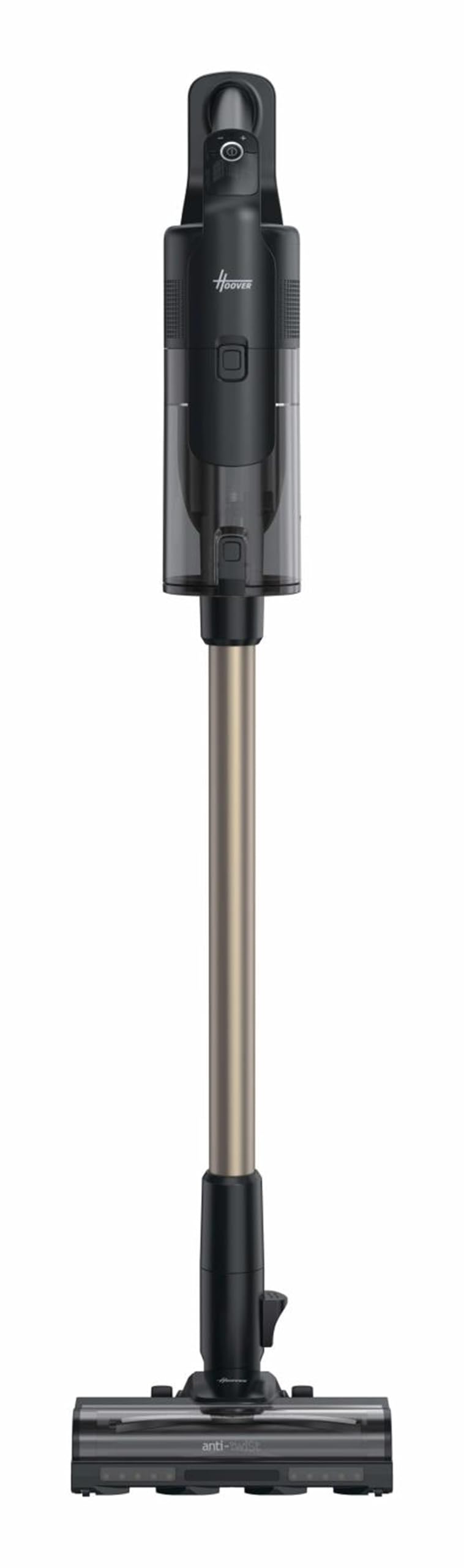
Figure 1: Hoover HF610P011 Cordless Electric Broom. This image shows the main unit with the extension tube and floor nozzle attached.
Components:
- Main Unit (with dust container and motor)
- Removable Battery
- Extension Tube
- SmartAdapt Floor Nozzle
- Charger
- Accessory Kit (various nozzles for different cleaning tasks)
4. Setup
4.1 Assembly
- Unpack all components and ensure all parts are present.
- Attach the extension tube to the main unit until it clicks into place.
- Connect the SmartAdapt floor nozzle to the other end of the extension tube, ensuring a secure fit.
- Insert the fully charged battery into the main unit until it locks.
4.2 Initial Charging
Before first use, fully charge the battery. The charging time is approximately 3.5 hours. The LED indicators on the main unit will show the battery level during charging.
- Connect the charger to the charging port on the main unit or directly to the removable battery.
- Plug the charger into a power outlet.
- The battery level indicator will illuminate to show charging progress.
5. Operating
5.1 Powering On/Off
Press the power button on the handle to turn the appliance on or off.
5.2 Mode Selection
The Hoover HF610P011 offers 3 speed settings for various cleaning needs:
- Standard Mode: For everyday cleaning on hard floors and light carpets.
- Medium Speed (with motorized nozzle): For deeper cleaning on carpets.
- Turbo Mode: Provides maximum suction power for stubborn dirt and pet hair.
Use the electronic control to switch between modes. The SmartAdapt brush with advanced sensors automatically adjusts to different surface types (carpet, hard surfaces, upholstery) and cleaning power requirements.
5.3 Using Attachments
The appliance includes a kit of accessories for specialized cleaning. To use, detach the floor nozzle and/or extension tube, and attach the desired accessory directly to the main unit or the extension tube.
- The removable handheld vacuum is ideal for cleaning furniture, car interiors, and hard-to-reach areas.
6. Maintenance
Regular maintenance ensures optimal performance and extends the lifespan of your Hoover HF610P011.
6.1 Emptying the Dust Container
The appliance features a 0.7 L bagless dust container. Empty it regularly to maintain suction power.
- Locate the release button for the dust container.
- Hold the container over a waste bin and press the release button to empty its contents.
6.2 Cleaning Filters
The Hoover HF610P011 uses an EPA filter system. The filter is removable and washable.
- Remove the filter from the dust container.
- Tap off any loose dirt.
- Rinse the filter under cold running water until the water runs clear.
- Allow the filter to air dry completely for at least 24 hours before reinserting. Do not use a dryer or direct heat.
6.3 Cleaning the Brush Roll
Periodically check the SmartAdapt floor nozzle's brush roll for tangled hair or debris.
- Turn off the appliance and disconnect the nozzle.
- Remove the brush roll cover (refer to the diagrams in the printed manual for specific instructions).
- Carefully remove any tangled hair or fibers.
- Reassemble the brush roll and cover.
6.4 Battery Care
The 21.6V Lithium-Ion battery is removable. For optimal battery life:
- Always fully charge the battery before storage.
- Avoid extreme temperatures.
- If storing for extended periods, charge the battery every 3-6 months.
7. Troubleshooting
If you encounter issues with your Hoover HF610P011, refer to the following common problems and solutions:
| Problem | Possible Cause | Solution |
|---|---|---|
| Appliance does not turn on | Battery not charged or not properly inserted. | Ensure battery is fully charged and correctly inserted. |
| Reduced suction power | Dust container full, filter clogged, or brush roll obstructed. | Empty dust container, clean filter, or clear brush roll. |
| Brush roll not rotating | Obstruction in the brush roll or incorrect mode selected. | Clear any obstructions. Ensure appropriate mode for surface. |
| Battery indicator flashing | Low battery or potential error. | Recharge the battery. If issue persists, contact support. |
8. Specifications
- Product Type: Cordless Electric Broom
- Model: HF610P011
- Power (Max Input): 660 W
- Suction Power: 250 AW
- Battery Type: Lithium-Ion
- Battery Voltage: 21.6 V
- Battery Capacity: 4 Ah
- Run Time: Up to 100 minutes (Standard mode); 40 minutes (Motorized nozzle, medium speed); 20 minutes (Motorized nozzle, high speed)
- Charging Time: 3.5 hours
- Dust Container Capacity: 0.7 L
- Filter System: EPA
- Number of Speeds: 3
- Special Features: SmartAdapt brush with advanced sensors, LED indicators (battery level, power), Removable handheld vacuum, Suitable for all surface types (carpet, hard surfaces, upholstery), Vertical storage.
- Dimensions (W x D x H): 222 mm x 298 mm x 1200 mm
- Weight: 3.3 kg
9. Warranty & Support
9.1 Warranty Information
The Hoover HF610P011 comes with a 5-year warranty from the date of purchase, covering manufacturing defects. Please retain your proof of purchase for warranty claims. A 14-day return policy may also apply, depending on your retailer.
9.2 Customer Support
For further assistance, troubleshooting, or to inquire about spare parts and accessories, please contact Hoover customer support. Contact details can typically be found on the official Hoover website or on your product packaging.


