
1. Introduction
This manual provides essential information for the safe and effective use of your AZZUNO 5-Pin TIG Welding Foot Pedal. This foot pedal is designed to offer precise amperage control for TIG welding operations, enhancing user comfort and control. It is specifically compatible with AZZUNO ACDC-200F and ACDC-200L TIG welders.
The foot pedal features a 5-pin plug, a 10-ft cable, and a 5K potentiometer, ensuring smooth and accurate amperage adjustment from 0 to 200 Amps. Its sturdy iron construction and spacious, non-slip surface are designed for durability and user comfort during extended use.
2. Setup
Follow these steps to properly set up your AZZUNO TIG Welding Foot Pedal:
- Compatibility Check: Ensure your TIG welder is an AZZUNO ACDC-200F or ACDC-200L model. This foot pedal is designed for these specific models to guarantee optimal performance and compatibility.
- Locate the Foot Pedal Receptacle: On your AZZUNO TIG welder, identify the 5-pin control receptacle. Refer to your welder's manual for its exact location.
- Connect the Foot Pedal: Align the 5-pin plug of the foot pedal cable with the receptacle on the TIG welder. Gently push the plug into the receptacle until it is securely seated. Ensure the connection is firm to prevent intermittent control issues.

Image: The 5-pin foot pedal plug connected to an AZZUNO ACDC-200F TIG welder, illustrating the correct connection point.
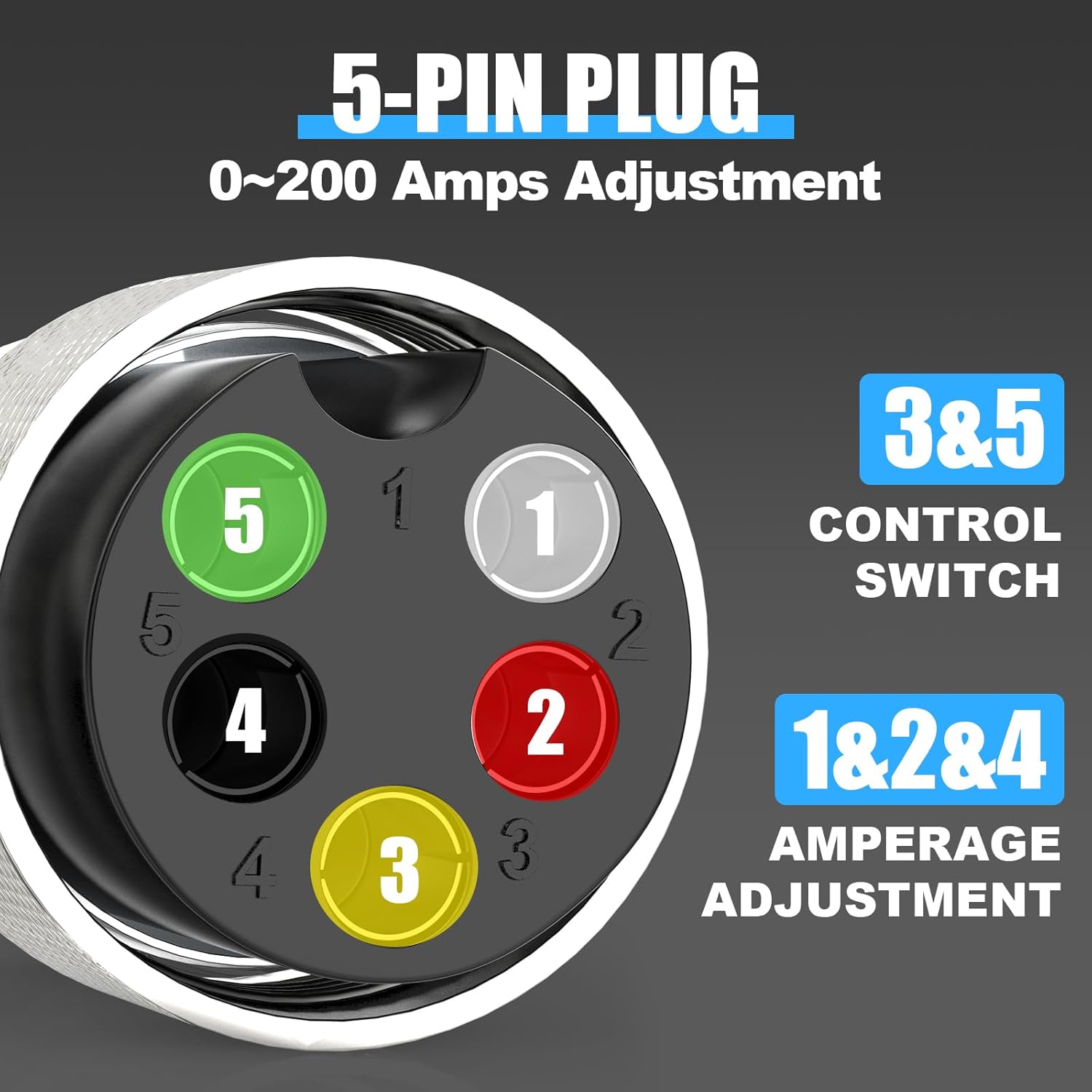
Image: A close-up view of the 5-pin plug, detailing the pin assignments for control switch (pins 3 & 5) and amperage adjustment (pins 1, 2, & 4), with a range of 0-200 Amps.
Once connected, the foot pedal is ready for operation. It will remotely control the power switch and allow for current adjustment, replacing the need to use the TIG torch switch for these functions.
3. Operating Instructions
The AZZUNO 5-Pin TIG Welding Foot Pedal provides precise and comfortable control over your welding process. Follow these guidelines for effective operation:
- Power On Welder: Ensure your AZZUNO TIG welder is powered on and set to the appropriate TIG welding mode.
- Foot Placement: Place your foot comfortably on the pedal's spacious, non-slip surface.
- Initiate Arc: Press down on the foot pedal to initiate the welding arc. The initial press acts as a power switch.
- Amperage Control: Continue to press down on the pedal to increase the welding amperage. The pedal allows for stepless current adjustment from 0 to 200 Amps. Release pressure to decrease amperage. This precise control enables fine-tuning of the weld puddle.
- Terminate Arc: Fully release the foot pedal to terminate the welding arc.

Image: A person's foot positioned on the AZZUNO TIG welding foot pedal, demonstrating its use for remote control and stepless current adjustment.
Always ensure you are wearing appropriate personal protective equipment (PPE) and following all safety guidelines for TIG welding.
4. Maintenance
Proper maintenance ensures the longevity and reliable performance of your foot pedal:
- Regular Cleaning: Keep the foot pedal clean and free from welding spatter, dust, and debris. Use a dry cloth to wipe down the surface. Avoid using harsh chemicals or solvents.
- Inspect Cable and Plug: Periodically inspect the 10-ft cable and the 5-pin plug for any signs of damage, such as cuts, fraying, or bent pins. Damaged cables or plugs can lead to intermittent operation or electrical hazards. Replace if damage is found.
- Storage: When not in use, store the foot pedal in a clean, dry environment, away from extreme temperatures and direct sunlight. Coil the cable neatly to prevent kinks or damage.
- Avoid Overloading: Do not place excessive weight or apply undue force to the pedal beyond normal operation.
5. Troubleshooting
If you encounter issues with your AZZUNO TIG Welding Foot Pedal, refer to the following common problems and solutions:
| Problem | Possible Cause | Solution |
|---|---|---|
| Foot pedal not responding / No arc initiation |
|
|
| Inaccurate or inconsistent amperage control |
|
|
| Pedal feels stiff or sticky |
|
|
For issues not listed here or if troubleshooting steps do not resolve the problem, please contact AZZUNO customer support.
6. Specifications
- Model: Foot Pedal-3
- Manufacturer: AZZUNO
- Compatibility: AZZUNO TIG Welder ACDC-200F, ACDC-200L
- Plug Type: 5-Pin
- Cable Length: 10 ft (approximately 3 meters)
- Potentiometer: 5K Ohm
- Amperage Control Range: 0-200 Amps
- Item Weight: 2.1 pounds (approximately 0.95 kg)
- Package Dimensions: 9.5 x 6.2 x 4.6 inches (approximately 24.1 x 15.7 x 11.7 cm)
- Construction: Sturdy Iron Structure

Image: A diagram illustrating the physical dimensions of the foot pedal, including its length (8.5 inches), width (5.4 inches), height (4.1 inches), and the 10-foot cord length.
7. Warranty & Support
For warranty information, product support, or technical assistance, please contact AZZUNO customer service. Details regarding warranty coverage and how to reach support can typically be found on the AZZUNO official website or through your purchase documentation.
When contacting support, please have your product model number (Foot Pedal-3) and purchase date available.