1. Introduction
This manual provides detailed instructions for the Mingtawn AI Smart Glasses, Model W610. Please read this manual thoroughly before using the product to ensure proper operation and to maximize its features. Keep this manual for future reference.
The Mingtawn AI Smart Glasses integrate a 4K HD camera, Bluetooth calling, AI object recognition, and simultaneous interpretation capabilities into a lightweight and comfortable design. They feature photochromic lenses that adapt to light conditions and offer UV protection.
2. Package Contents
Verify that all items are present in the package:
- Mingtawn AI Smart Glasses x 1
- Charging Cable x 1
- Storage Pouch x 1
- Microfiber Cloth x 1
- Temple Tips x 2
- User Manual x 1 (This document)
- Packaging Box x 1

Image: Contents of the Mingtawn AI Smart Glasses package, including the glasses, charging cable, storage pouch, microfiber cloth, temple tips, user manual, and packaging box.
3. Product Overview
3.1 Key Features
- 4K HD Video Recording: Built-in 800W HD camera supports 2K HD image capture and 1080P video recording with anti-shake algorithm.
- Automatic Sync to Phone: Low-power BT5.3 chip and Wi-Fi dual transmission for real-time transfer of images and videos.
- AI Object Recognition: Identifies objects, menus, landmarks, and plants with real-time analysis and announcements via built-in ChatGPT model.
- Voice-Assisted Chat and Calling: ENC dual microphones for noise reduction, touch controls for volume, and voice commands for smart assistant activation.
- Long Battery Life: 270mAh battery provides 15 hours of music playback and 7 days of standby.
- Photochromic Lenses: Lenses automatically transition from clear to tinted in sunlight, offering UV filtration. Lenses are detachable.
- Lightweight Design: Ultra-light at 42g, made of durable, skin-friendly material.
3.2 Components Diagram
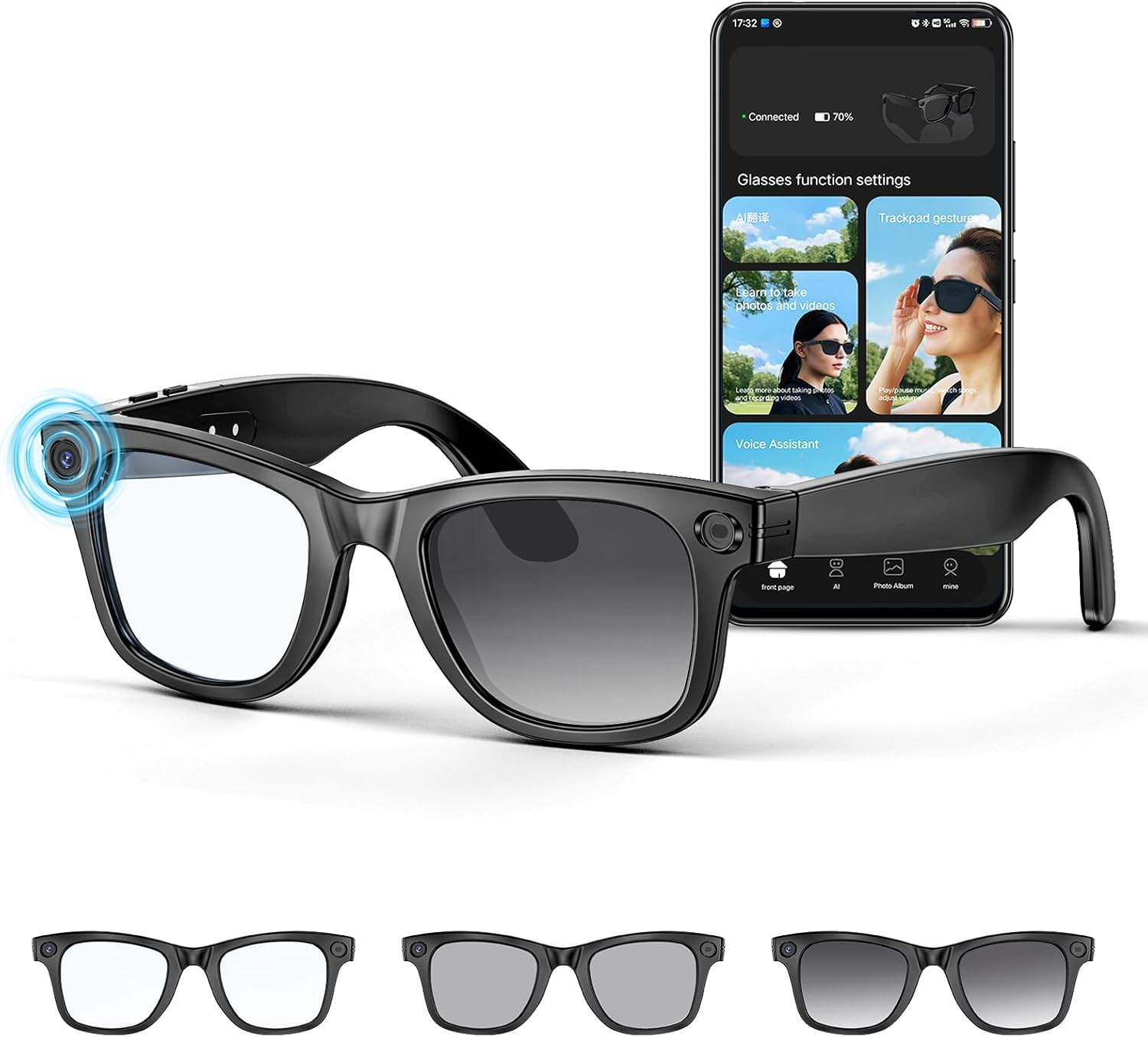
Image: Front view of the Mingtawn AI Smart Glasses, showing the camera lens on the frame and a smartphone displaying the companion app interface for function settings, trackpad gestures, and voice assistant.

Image: A detailed graphic highlighting key features of the Mingtawn AI Smart Glasses, including the 800W HD camera, EIS anti-shake, IP66 rating, WiFi transfer, audio recording, music playback, Bluetooth calling, and LPC (Low Power Consumption).
4. Setup
4.1 Charging the Glasses
Before first use, fully charge the Mingtawn AI Smart Glasses. Connect the provided charging cable to the charging port on the glasses and a USB power adapter (not included). The indicator light will show charging status.
- Charging time: Approximately 1.5 hours for a full charge.
- Battery capacity: 270mAh.

Image: A close-up of the Mingtawn AI Smart Glasses showing the charging port and an indicator light, illustrating the long battery life and charging process.
4.2 App Installation and Pairing
To unlock the full functionality of your smart glasses, download and install the companion app, "Hey Cyan".
- For iOS devices: Search for "Hey Cyan" in the Apple App Store.
- For Android devices: Download the latest QR code from the store manager (Google Play not supported yet) or search for "Hey Cyan" in APKPure App.
- Once installed, open the app and log in using your Apple or Google account.
- Turn on the smart glasses by unfolding the temples. They will automatically enter Bluetooth pairing mode (indicated by flashing red and blue lights).
- In the "Hey Cyan" app, follow the on-screen instructions to connect your glasses via Bluetooth.

Image: A graphic showing multiple smartphone screens with the "Hey Cyan" app interface, along with instructions for downloading the app from the Apple App Store or APKPure for Android.
5. Operating Instructions
5.1 Power On/Off
- Power On: Unfold the temples of the glasses. The glasses will automatically power on.
- Power Off: Fold the temples of the glasses. The glasses will automatically power off.
5.2 Camera Operation (Photo & Video)
The glasses feature an 800W HD camera for capturing photos and 1080P videos.
- Taking Photos: Refer to the "Hey Cyan" app for specific gestures or button presses to capture still images.
- Recording Videos: Refer to the "Hey Cyan" app for specific gestures or button presses to start/stop video recording. A single recording can last up to 3 minutes, with continuous recording up to an hour.
- Anti-Shake: The built-in anti-shake algorithm automatically optimizes image quality during recording.
Video: This video demonstrates the 4K HD camera capabilities of the Mingtawn AI Smart Glasses, showing first-person perspective video recording during activities like cycling and cooking, as well as the AI object recognition and Bluetooth call features.

Image: Two frames from a video recording, demonstrating the first-person perspective capture capability of the Mingtawn AI Smart Glasses. The top frame shows a person walking in a field, and the bottom frame shows people opening gifts, both with a "REC" indicator and "4K HD" label.
5.3 Data Transfer
Captured images and videos are transferred to your phone in real-time via Wi-Fi and Bluetooth dual transmission technology. This eliminates the need for manual export.
5.4 AI Object Recognition
The glasses can automatically recognize objects, menus, landmarks, and plants. The built-in ChatGPT model provides high-accuracy recognition, analyzing results and announcing them in real-time.
- To activate: Use the designated voice command or app function.
- Results: Analysis and answers are provided audibly and displayed in the "Hey Cyan" app.

Image: A woman petting a husky on a couch, with text overlays indicating "Plate", "Sofa", and "Throw pillow" as examples of AI object recognition. The text also states that photo recognition delivers answers via immediate voice and detailed information on the app.
5.5 Voice Assistant and Calling
The glasses feature ENC dual microphones for clear audio during calls and interactions with the smart assistant.
- Activating Voice Assistant: Use voice commands (e.g., "Hey Cyan") to activate the smart assistant for conversations, text input, and information searches.
- Making/Answering Calls: Use touch controls on the temples to answer or end calls.
- Volume Adjustment: Touch and click gestures on the temples can adjust the volume.

Image: A man driving a car wearing the smart glasses, with speech bubbles showing voice commands like "Hey Cyan!" and "What's the weather like today?", demonstrating the AI Q&A system powered by GPT-4.
5.6 Simultaneous Interpretation
The glasses support simultaneous interpretation, breaking down language barriers during conversations.
- Activation: Use the dedicated function within the "Hey Cyan" app.
- Functionality: The glasses capture speech and translate it audibly. The app provides live transcriptions on your phone screen.

Image: People in a meeting, with speech bubbles showing translated conversations in different languages, and a smartphone displaying live transcriptions in the "Hey Cyan" app, demonstrating the simultaneous interpretation feature.
5.7 Music Playback
Enjoy music playback through the integrated audio system.
- Connection: Connect via Bluetooth to your smartphone.
- Controls: Use touch controls on the temples for playback (play/pause, skip tracks) and volume adjustment.

Image: A woman wearing the smart glasses, with a graphic representation of sound waves, illustrating the 3D surround music feature for an immersive audio experience.
6. Maintenance
6.1 Cleaning
- Use the provided microfiber cloth to gently clean the lenses and frame.
- For stubborn smudges, slightly dampen the cloth with water or a lens cleaning solution. Avoid harsh chemicals.
6.2 Storage
- When not in use, store the glasses in the provided storage pouch to protect them from scratches and dust.
- Avoid exposing the glasses to extreme temperatures or direct sunlight for prolonged periods.
6.3 Lens Replacement
The lenses are detachable and can be replaced with prescription lenses or different types of photochromic lenses.
- Consult a qualified optician for professional lens replacement to avoid damaging the frame or electronic components.
- Ensure replacement lenses are compatible with the Mingtawn AI Smart Glasses W610 model.

Image: A close-up of the Mingtawn AI Smart Glasses with the lenses detached, showing that the lenses are removable and can be replaced with prescription ones.
7. Troubleshooting
| Problem | Possible Cause | Solution |
|---|---|---|
| Glasses do not power on. | Low battery. | Charge the glasses fully. |
| Cannot connect via Bluetooth. | Bluetooth is off on phone; glasses not in pairing mode; interference. | Ensure phone Bluetooth is on. Fold and unfold glasses to re-enter pairing mode. Move away from other wireless devices. |
| App not recognizing glasses. | App not updated; incorrect pairing. | Update the "Hey Cyan" app. Re-pair the glasses through the app. |
| Poor audio quality during calls/music. | Environmental noise; weak Bluetooth connection. | Move to a quieter environment. Ensure glasses are close to the paired device. |
| Object recognition inaccurate. | Poor lighting; object too far/unclear. | Ensure adequate lighting. Position the object clearly in view. |
8. Specifications
| Feature | Detail |
|---|---|
| Model Number | W610 |
| Camera | 800W HD (supports 2K HD image, 1080P video) |
| Anti-Shake | Built-in algorithm |
| Connectivity | Bluetooth 5.3, Wi-Fi |
| Microphones | ENC Dual Microphones |
| Battery Capacity | 270mAh Lithium Polymer |
| Music Playback Time | Up to 15 hours |
| Standby Time | Up to 7 days |
| Charging Time | Approx. 1.5 hours |
| Weight | 42g (1.48 ounces) |
| Dimensions | 5.91 x 1.57 x 1.57 inches |
| Lenses | Photochromic, Detachable, UV400 Protection |
| Operating System (App) | Android Wear 1.0 (for reference, actual app compatibility may vary) |
9. Warranty Information
Mingtawn products are covered by a 24-month warranty from the date of purchase. This warranty covers manufacturing defects and workmanship under normal use. It does not cover damage caused by misuse, accidents, unauthorized modifications, or normal wear and tear.
To claim warranty service, please retain your proof of purchase and contact customer support.
10. Customer Support
For technical assistance, troubleshooting, or general inquiries, please contact Mingtawn customer support. Our team is available 7 days a week, 24 hours a day.
- Online Support: Visit the official Mingtawn website for FAQs and support resources.
- Email Support: Refer to your product packaging or the official website for contact email.


