
1. Introduction
The Lefant M3 Max is an advanced robot vacuum and mop designed to provide comprehensive and hands-free floor cleaning. Equipped with dToF laser navigation, powerful 20000Pa suction, and an innovative all-in-one self-emptying station, it offers efficient cleaning for various floor types. This manual provides essential information for proper setup, operation, and maintenance of your device.
2. Safety Information
Always read and understand all safety warnings and instructions before using this appliance to prevent injury or damage. Keep this manual for future reference.
General Safety:
- This appliance can be used by children aged 8 years and above and persons with reduced physical, sensory or mental capabilities or lack of experience and knowledge if they have been given supervision or instruction concerning use of the appliance in a safe way and understand the hazards involved.
- Children shall not play with the appliance. Cleaning and user maintenance shall not be made by children without supervision.
- Do not allow the robot to pick up large objects, liquids, or burning/smoking materials.
- Ensure the charging station is placed on a level surface against a wall, with no obstacles within 1 meter (3 feet) in front and 0.5 meters (1.5 feet) on either side.
- For detailed safety guidelines, please consult the official Safety Information PDF provided with your product or available on the Lefant website.
3. Package Contents
Verify that all components are present in the package:
- Lefant M3 Max Robot Vacuum and Mop
- All-in-One Self-Emptying Station
- Power Cable
- Dust Bags (2x)
- Side Brushes (2x)
- Mop Pads (4x washable)
- HEPA Filters (2x)
- Detergent (1x)
- Cleaning Tool (1x)
- User Manual

Image: Contents of the package, including the robot, station, and accessories.
4. Product Overview
The Lefant M3 Max combines powerful vacuuming with effective mopping, featuring advanced technologies for a superior cleaning experience.
4.1 Key Features
- 20000Pa Cyclonic Suction: High-efficiency motor provides strong suction for dust, crumbs, and pet hair on various surfaces, including thick carpets.
- dToF 360° Laser Navigation: Scans the environment to create detailed maps, plan efficient cleaning paths, and supports multi-floor mapping (up to 3 maps).
- Dual Rotating Mops (200 RPM): Applies constant pressure to floors, simulating manual scrubbing to remove stubborn stains.
- Automatic Mop Lifting (9mm): Mops automatically lift by 9mm when carpets are detected, preventing wetting and allowing seamless cleaning transitions.
- All-in-One Station: Features automatic dust emptying (3.2L bag), 45°C hot water mop washing, and natural air drying for minimal maintenance.
- 190° PSD Obstacle Avoidance: 9 PSD sensors detect and avoid objects of various colors and materials, even in low light, protecting furniture and the robot.
- Extended Battery Life: 5200 mAh battery provides up to 210 minutes of cleaning, covering up to 210m² on a single charge. Automatically resumes cleaning after recharging.
- Smart Control: Manage via the Lefant App (WiFi 2.4G/5G), Alexa, and Google Assistant for scheduling, zone settings, and voice commands.

Image: All-in-One Station for automatic cleaning and maintenance.

Image: Maximum Suction Power of 20000Pa for adaptive cleaning.

Image: Anti-Tangle Design with V-shaped brush and double combs.

Image: Deep Cleaning for Resistant Stains with 200 RPM rotating mops.

Image: Automatic carpet detection and mop lifting.

Image: 360° LiDAR Precision Navigation with 15m range and multi-floor mapping.
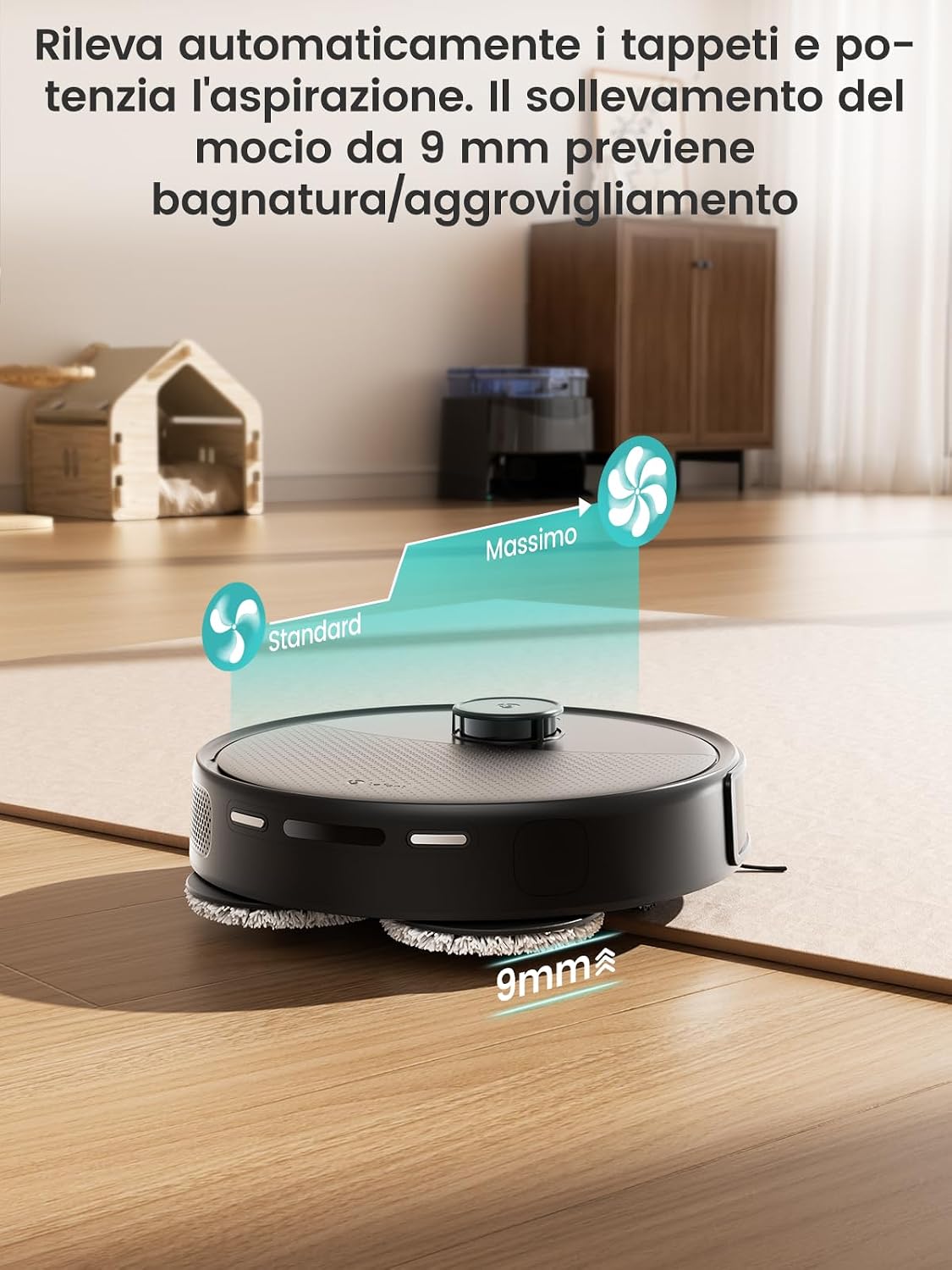
Image: 190° PSD Precision Obstacle Detection.
5. Setup
5.1 Charging Station Placement
Place the all-in-one station on a hard, level surface against a wall. Ensure there is at least 1 meter (3 feet) of clear space in front of the station and 0.5 meters (1.5 feet) on either side to allow the robot to dock properly.
5.2 Initial Charge
Before first use, fully charge the robot. Place the robot on the charging station. The indicator lights will show charging status. A full charge typically takes 4-5 hours.
5.3 Connecting to the Lefant App
The Lefant App allows you to control your robot, set cleaning schedules, define no-go zones, and more.
- Download the 'Lefant' app from your smartphone's app store.
- Register or log in to your account.
- Add your M3 Max robot vacuum to the app.
- Connect to your 2.4G/5G Wi-Fi network.
- Power on the robot vacuum by pressing the power button.
- Press and hold the start button for 6 seconds to enter pairing mode.
- Select 'M3 Max' in the app and wait for the robot to pair successfully.

Image: Steps to connect the Lefant robot to the app.
5.4 Connecting to Alexa / Google Assistant
Enable voice control for your Lefant M3 Max through Amazon Alexa or Google Assistant.
- Open the Lefant APP, go to "Mine" > "Voice of third parties" to access the service.
- Register your voice account and password from step 2.
- Open the Alexa APP, go to "More" > "Skills & Games".
- Search for "Smart Life".
- Click "Enable to use".
- Select your region and enter the voice account and password from step 2.
- Wait for the connection to complete successfully.

Image: Steps to connect to Alexa.
6. Operating Instructions
6.1 Starting and Pausing Cleaning
- Manual Start: Press the power button on the robot once to start or pause cleaning.
- App Control: Use the Lefant App to start, pause, or stop cleaning from anywhere.
6.2 Cleaning Modes and Customization
The Lefant App offers various cleaning modes and customization options:
- Scheduled Cleaning: Set weekly cleaning schedules for specific times and days.
- Zone Cleaning: Define specific areas for the robot to clean.
- No-Go Zones: Create virtual boundaries to prevent the robot from entering certain areas (e.g., pet bowls, delicate items).
- Carpet Boost: The robot automatically increases suction power when it detects carpets.
- Multi-Floor Mapping: Store up to 3 different floor maps for multi-level homes.

Image: Complete control, just as you desire, via app and smart features.

Image: All-in-one app control interface.

Image: Room-by-room customization.

Image: Multi-level mapping.
6.3 Voice Control
Once connected to Alexa or Google Assistant, you can use voice commands to control your robot. Examples:
- "Alexa, ask Lefant Robot to clean."
- "Hey Google, tell Lefant Robot to pause."

Image: Multiple control methods including app, voice, and Apple Watch.
6.4 Apple Watch Control
You can also control your Lefant M3 Max using your Apple Watch.
- Download the Lefant app on your phone and the Lefant app on your Apple Watch.
- Pair your Apple Watch with your iPhone.
- Select the Lefant app on your Apple Watch.
- Remember to click on the Lefant app on your phone and log in.
- Once logged in, connect your robot.
- Return to your Apple Watch, from which you can now control your robot.
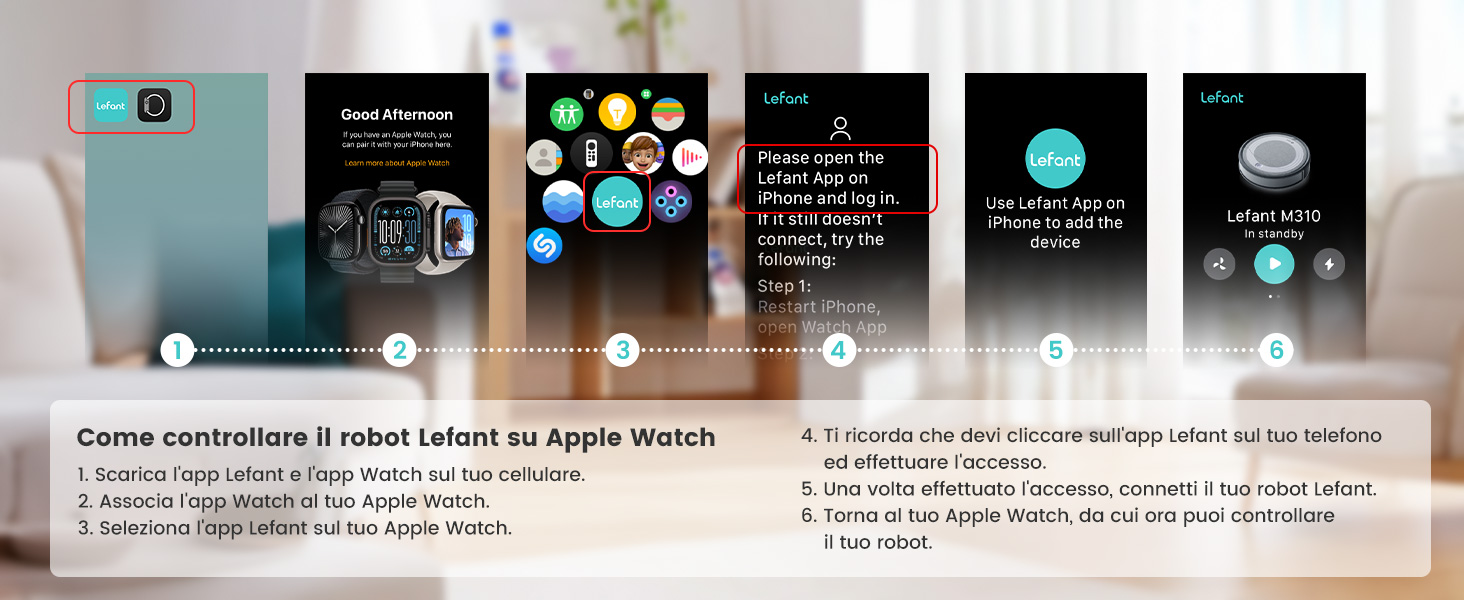
Image: Steps to control the Lefant robot on Apple Watch.
7. Maintenance
Regular maintenance ensures optimal performance and extends the lifespan of your Lefant M3 Max.
7.1 All-in-One Station Maintenance
- Automatic Dust Emptying: The 3.2L dust bag in the station needs replacement approximately every 8 weeks, depending on usage and environment.
- Automatic Mop Washing: The station automatically washes the mop pads with 45°C hot water after each cleaning cycle, effectively dissolving grease and dirt.
- Natural Air Drying: After washing, the mops are dried with natural air to prevent odors and bacterial growth.
- Detachable Base: The base of the station is removable for easy manual cleaning of any accumulated debris.

Image: 2 Months, Zero Effort: Automatic dust emptying.

Image: Mop self-cleaning with 45°C hot water.

Image: Natural air drying for mops.

Image: Self-cleaning system and removable base.
7.2 Robot Components Maintenance
- Main Brush: Regularly check and clean the V-shaped main brush. The anti-tangle design minimizes hair wrapping, but occasional cleaning may be needed.
- Side Brushes: Inspect side brushes for wear or damage. Replace them if necessary.
- Filters: Clean the HEPA filter regularly. Tap it gently to remove dust. Replace filters every 3-6 months depending on usage.
- Sensors: Wipe the robot's sensors (dToF laser, PSD sensors) with a soft, dry cloth to ensure accurate navigation and obstacle avoidance.
8. Troubleshooting
If you encounter issues with your Lefant M3 Max, refer to the following common solutions. For more complex problems, consult the full user manual or contact customer support.
| Problem | Possible Cause | Solution |
|---|---|---|
| Robot does not start or respond. | Low battery; Power switch off; Robot stuck. | Charge the robot; Turn on the power switch; Clear any obstructions. |
| Robot cannot return to charging station. | Charging station obstructed; Robot too far from station. | Ensure clear space around station; Manually place robot closer to station. |
| Poor cleaning performance. | Dustbin full; Brushes tangled; Filter clogged; Mop pads dirty. | Empty dustbin; Clean brushes; Clean/replace filter; Clean/replace mop pads. |
| App connection issues. | Incorrect Wi-Fi password; Robot not in pairing mode; Router issues. | Verify Wi-Fi credentials; Re-enter pairing mode; Restart router. |
| Mop not washing or drying properly. | Water tanks empty; Nozzle clogged; Station malfunction. | Refill water tanks; Clean nozzle; Contact support if issue persists. |
9. Specifications
| Feature | Detail |
|---|---|
| Brand | Lefant |
| Model Name | M3 Max |
| Suction Power | 20000Pa |
| Mop Rotation Speed | 200 RPM |
| Mop Lift Height | 9 mm |
| Dustbin Capacity (Station) | 3.2 Liters |
| Clean Water Tank Capacity | 2.5 Liters |
| Dirty Water Tank Capacity | 2.5 Liters |
| Battery Life | Up to 210 Minutes |
| Battery Type | Lithium-ion (5200 mAh) |
| Dimensions (Robot) | 32L x 32W x 9.7H cm |
| Weight (Item) | 9.7 Kilograms |
| Control Type | App Control, Voice Control |
| Compatible Devices | Smartphone (Alexa, Google Assistant) |
| Filter Type | Cyclone |
| Recommended Surfaces | Various surfaces |
10. Warranty and Support
Lefant products come with a standard manufacturer's warranty. Please refer to the warranty card included in your package or visit the official Lefant website for detailed warranty terms and conditions.
For technical support, troubleshooting assistance, or to purchase replacement parts, please contact Lefant customer service through their official website or the contact information provided in your product documentation.
Online Resources:
- Official Lefant Website: www.lefant.com (Please check for the most current URL)
- Lefant App: Available on iOS App Store and Google Play Store.


