
1. Product Overview
The VASAGLE Electric Standing Desk ULSD312BZ02S is designed to provide a versatile and ergonomic workspace, allowing users to easily switch between sitting and standing positions. This desk features a robust construction, quiet operation, and smart functions to enhance productivity and well-being.

Image 1.1: VASAGLE Electric Standing Desk in a typical setup.
Key Features:
- Adjustable Height: Seamlessly switch between sitting and standing with a height range of 28.3 inches to 46.1 inches (72 cm to 117 cm).
- Memory Presets: Four programmable memory height settings for quick adjustments to preferred positions.
- Sedentary Reminder: An integrated reminder function to encourage movement and prevent prolonged sitting.
- Sturdy Construction: Built with reinforced legs and a robust steel frame, supporting a maximum static load of 154 lb (70 kg).
- Quiet Operation: Motor operates at a noise level of ≤ 48 dB, ensuring a quiet working environment.
- Cable Management: Two integrated cable holes for organized wiring.
- Accessory Hooks: Two side hooks for hanging headphones or bags.
- Safety Features: Rounded corners and a safety lock function to prevent accidental adjustments.
2. Safety Information
Please read and understand all safety instructions before assembly and use to prevent injury or damage to the product.
- Ensure all electrical components are kept away from liquids. This desk is intended for indoor use only.
- Do not place the desk directly against a wall to avoid scratches during height adjustments.
- Do not exceed the maximum static load capacity of 154 lb (70 kg). Overloading can cause damage and instability.
- Keep children and pets away from the desk during operation to prevent accidents.
- Utilize the safety lock function to prevent unintended height adjustments, especially when children are present.
- Regularly check all screws and connections to ensure they are tight and secure.
3. Package Contents
Verify that all components are present before beginning assembly:
- 1 x Electric Standing Desk (Desktop and Frame Components)
- 1 x Accessory Kit (Hardware, Tools)
- 1 x Instructions Manual
4. Setup and Assembly
The VASAGLE Electric Standing Desk is designed for straightforward assembly. Follow the detailed instructions provided in the accessory kit for a smooth setup process.
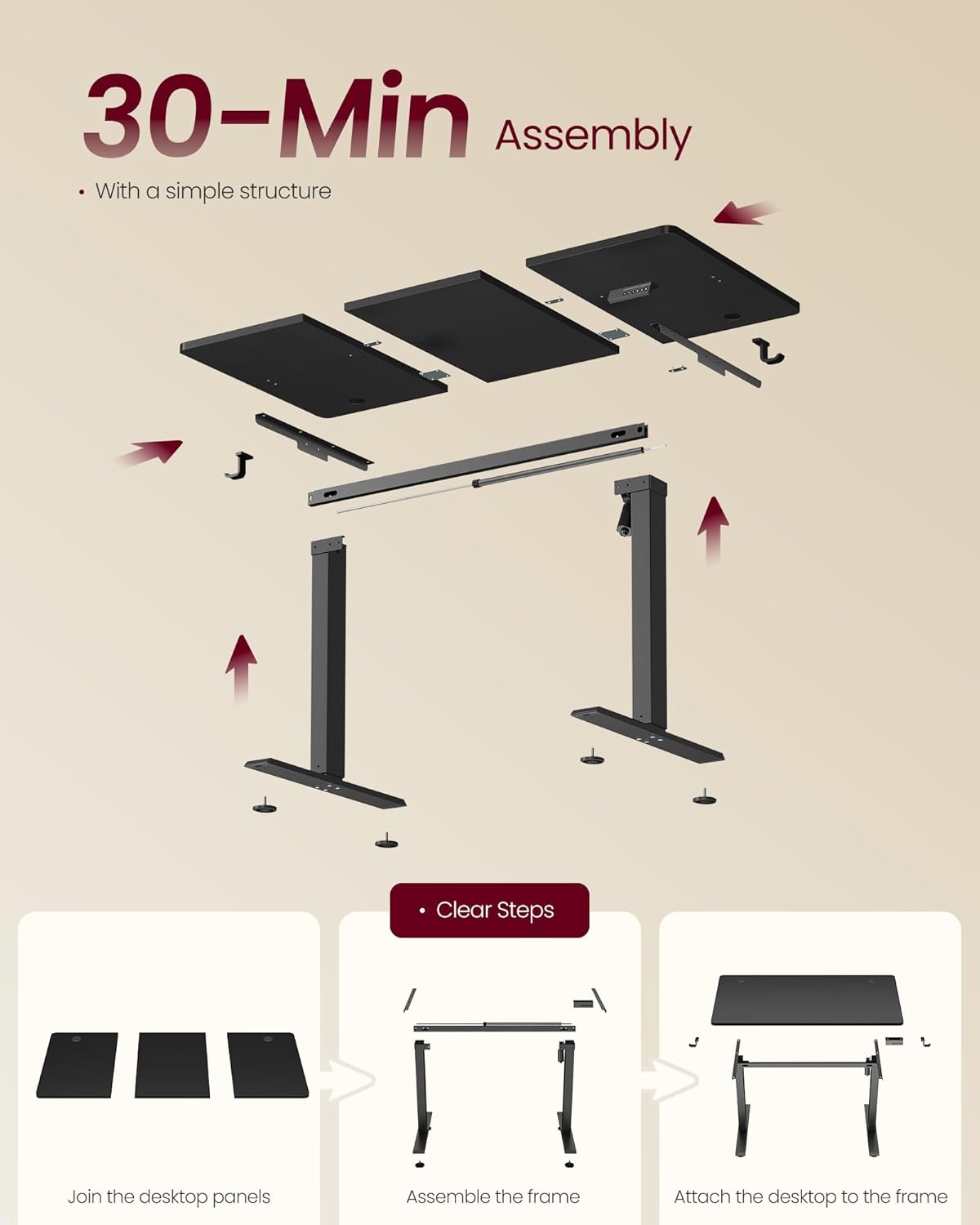
Image 4.1: Simplified assembly steps.
Assembly Steps Overview:
- Join the Desktop Panels: Connect the individual desktop sections securely using the provided hardware.
- Assemble the Frame: Construct the electric lifting frame, ensuring all components are correctly aligned and tightened.
- Attach the Desktop to the Frame: Securely fasten the assembled desktop onto the lifting frame.
Refer to the included instruction booklet for detailed diagrams and step-by-step guidance. Ensure all screws are tightened appropriately to maintain desk stability.
5. Operating Instructions
The desk features an intuitive control panel for height adjustment and memory functions.
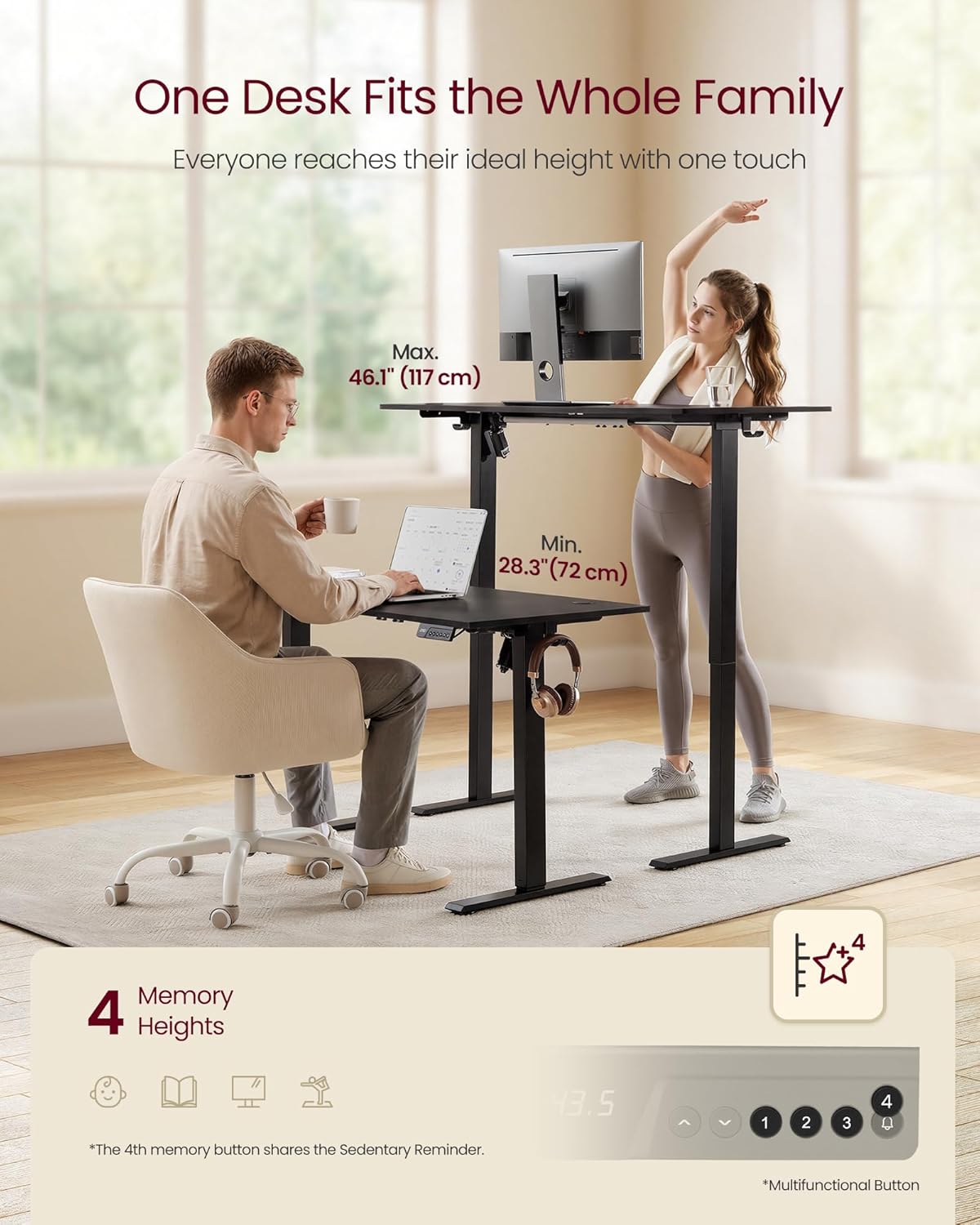
Image 5.1: Desk height adjustment and control panel.
Control Panel Functions:
- Up/Down Arrows (∧ / ∨): Press and hold to manually adjust the desk height. Release to stop at the desired level.
- Memory Presets (1, 2, 3, 4):
- Adjust the desk to your desired height using the up/down arrows.
- Press the 'M' button (if present, or hold the number button) until the display flashes.
- Press one of the number buttons (1, 2, 3, or 4) to save the current height to that preset.
- To recall a saved height, simply press the corresponding number button. The desk will automatically move to the saved position.
- Sedentary Reminder (often integrated with button 4): The 4th memory button may also function as a sedentary reminder. Consult your specific instruction manual for activation and setting details. This feature prompts you to change positions after a set period.
- Safety Lock: To activate or deactivate the safety lock, refer to your specific instruction manual. This feature prevents accidental height adjustments.
6. Maintenance
Proper maintenance ensures the longevity and optimal performance of your electric standing desk.
- Cleaning: Wipe the desk surface and frame with a soft, damp cloth. Avoid abrasive cleaners or harsh chemicals that could damage the finish.
- Electrical Components: Ensure all electrical connections are secure and free from dust. Do not spray liquids directly onto the control panel or motor.
- Fasteners: Periodically check all screws and bolts to ensure they remain tight. Re-tighten if necessary to maintain stability.
- Load Management: Avoid placing excessive weight on the desk, especially unevenly. Distribute items to prevent strain on the lifting mechanism.
7. Troubleshooting
If you encounter issues with your desk, refer to the following common troubleshooting steps:
- Desk Not Moving:
- Check if the power cord is securely plugged into both the desk and a working power outlet.
- Ensure the safety lock function is not activated.
- If an error code is displayed, consult the specific instruction manual for its meaning and resolution.
- Uneven Movement:
- Ensure the desk is not overloaded and weight is evenly distributed.
- Check that all assembly screws are tight and the desk is on a level surface.
- Noise During Operation:
- A slight motor hum is normal. If the noise is excessive or unusual, check for any obstructions or loose components.
- Memory Presets Not Working:
- Re-program the memory presets following the steps in Section 5.
If problems persist, please contact VASAGLE customer support for assistance.
8. Specifications
Detailed technical specifications for the VASAGLE Electric Standing Desk ULSD312BZ02S:

Image 8.1: Desk dimensions and load capacity.
| Specification | Detail |
|---|---|
| Model Number | ULSD312BZ02S |
| Product Size (W x D) | 47.2" x 23.6" (120 x 60 cm) |
| Height Adjustment Range | 28.3" - 46.1" (72 - 117 cm) |
| Max. Static Load Capacity | 154 lb (70 kg) |
| Product Weight | 36.3 lb (16.5 kg) |
| Operating Noise Level | ≤ 48 dB |
| Materials | Steel, Particleboard, PA Plastic |
| Color | Ink Black |
| Assembly Required | Yes |
9. Warranty and Support
For warranty information, product support, or to report any issues, please refer to the warranty card included with your product or visit the official VASAGLE website. Keep your purchase receipt for warranty claims.
Contact Information: Please refer to the contact details provided in your product packaging or on the official VASAGLE website for customer service.