
Introduction
This manual provides detailed instructions for the safe and efficient use of your KITPLUS Self-Cleaning Litter Box, Model Mini-Black. Please read this manual thoroughly before operating the device and keep it for future reference.
Important Safety Information
- Always ensure the device is placed on a stable, level surface.
- Keep the power cord away from water and out of reach of pets to prevent chewing.
- Do not allow children to play with the device.
- The device is equipped with multiple safety sensors (infrared and weight sensors) that will pause operation if a cat is detected entering or near the litter box during a cleaning cycle. This ensures your pet's safety.
- Ensure the waste drawer is properly installed before operation. An error may occur if it is not correctly seated.
- Use only clumping cat litter suitable for automatic litter boxes.

Image: The KITPLUS Self-Cleaning Litter Box features intelligent anti-pinch and anti-false alarm sensors for cat safety.
Setup
- Unboxing: Carefully remove all components from the packaging. Check for the main unit, waste bin, litter trapping mat, power adapter, user manual, and trash bags.
- Install Legs: Flip the main unit over. Attach the four labeled legs (L for left, R for right) into their designated slots on the base. The notches ensure correct placement.
- Reposition Globe: The globe may be pushed back for compact packaging. Unlock the side pieces, lift the globe, and reposition it so the litter mat is flat to the ground. Secure the side pieces back in place.
- Prepare Waste Bin: Insert a trash bag into the 10L waste bin, tucking it neatly into the slots. Place the included cat-shaped deodorizer inside the waste bin.
- Insert Waste Bin: Slide the prepared waste bin back into the base of the litter box.
- Add Litter: Pour clumping cat litter into the globe, ensuring the level is between the "MIN" and "MAX" lines indicated on the liner. The device is compatible with plant, bentonite, mineral, and mixed clumping litters.
- Power On: Plug the power adapter into the device and a wall outlet.
- App Connection (Optional): Download the "Tuya - Smart Life, Smart Living" app. Scan the QR code in the manual or search for the app. Register and log in. On the device, long-press the Wi-Fi button for 3 seconds until it starts flashing to connect to your 2.4GHz Wi-Fi network. Follow the in-app prompts to complete the binding process.
Video: This video demonstrates the unboxing and assembly process for the KITPLUS Self-Cleaning Litter Box, including how to install components and prepare the unit for first use.

Image: The removable washable liner simplifies cleaning and maintenance.
Operating Instructions
Automatic Cleaning Cycle:
The litter box is designed to automatically detect when your cat has used it and left. After a customizable delay (set via the app), it will initiate a quiet self-cleaning cycle. The globe rotates to sift clean litter from waste, depositing clumps into the sealed waste bin below.
Manual Operation (Buttons & Indicators):
- Wi-Fi Button: Long press to connect to Wi-Fi.
- Empty Mode Button: Long press to empty the cat litter into the waste bin. This is useful for full litter changes.
- Clean Mode Button: Press to initiate a cleaning cycle. This can also be used to level the litter.
- Reset: Press the Empty and Clean buttons simultaneously to reset the device.
- Error Indicator: If all three lights flash at the same time, please reinstall the waste drawer.
App Control Features:
The connected app provides enhanced control and monitoring:
- Automatic/Manual Mode: Switch between automatic cleaning or manual initiation.
- Delay Clean Time: Customize the delay before a cleaning cycle begins after your cat exits the box (e.g., 5 minutes to allow clumps to form).
- Operation Logs: View a history of cleaning cycles and cat usage.
- Cat Weight Tracking: The device can record the weight of your cats, allowing you to monitor their health and differentiate between multiple cats if they have different weights.
- Remote Control: Initiate cleaning cycles or empty the litter remotely.
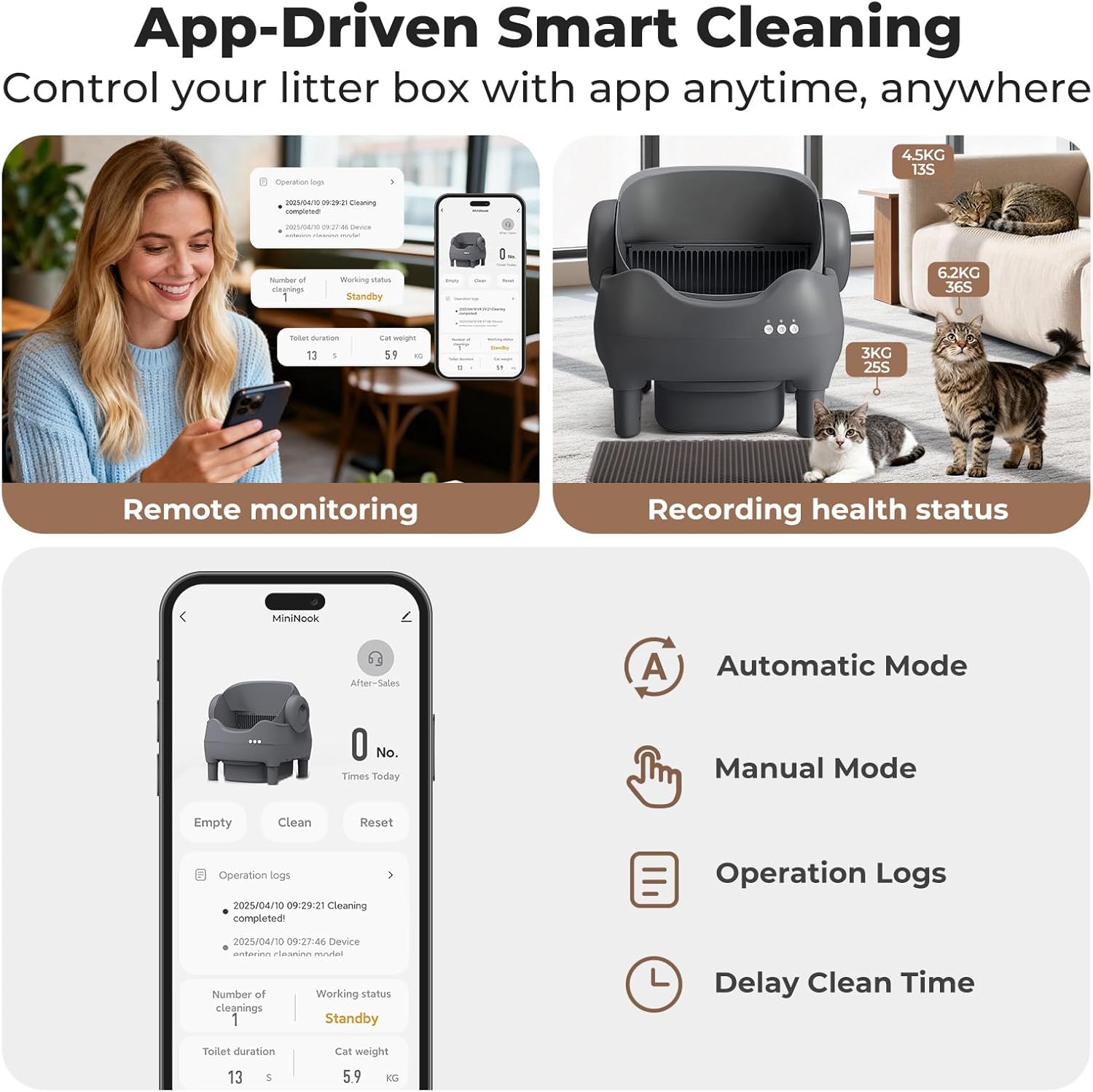
Image: The app interface allows for remote monitoring, recording of cat health status, and control over cleaning modes and delay times.
Maintenance
- Emptying Waste Bin: The 10L waste bin can hold up to 14 days of waste for a single cat. Regularly check and empty the waste bin by pulling out the drawer and disposing of the trash bag.
- Cleaning the Liner: The litter box features a high-quality, scratch-resistant removable liner. This liner can be easily removed for washing, reducing urine buildup and keeping the litter box odor-free.
- Deodorizer: Replace the solid-state deodorizer in the waste bin as needed to maintain an odor-free environment.
- General Cleaning: Periodically wipe down the exterior of the device with a damp cloth. Ensure no water enters electronic components.
Image: The removable washable liner simplifies cleaning and maintenance.

Image: Easy waste disposal by lifting the drawstring of the litter bag from the waste bin.
Troubleshooting
- Device Not Operating: Ensure the power adapter is securely plugged into both the device and a working wall outlet.
- Error Lights Flashing: If all three indicator lights flash simultaneously, it typically indicates an issue with the waste drawer. Remove and reinstall the waste drawer to ensure it is properly seated.
- Cleaning Cycle Pauses: The device's safety sensors will automatically pause any operation if a cat is detected. The cycle will resume once the cat has moved away.
- Litter Not Leveling: If the litter is uneven, you can manually initiate a cleaning cycle using the "Clean Mode" button or by unplugging and replugging the device to reset the litter level.
- Odor Issues: Ensure the waste bin is emptied regularly and the deodorizer is fresh. The sealed waste bin design helps contain odors.
- Cat Hesitation: For cats new to automatic litter boxes, allow them time to acclimate. You can run manual cleaning cycles frequently to familiarize them with the movement and sound. The open-top design helps anxious cats feel safer.
Video: This video demonstrates the safety features of the KITPLUS Self-Cleaning Litter Box, showing how it stops operation when a cat is detected, preventing pinching or trapping.
Specifications
| Feature | Detail |
|---|---|
| Brand | KITPLUS |
| Model Name | Mini-Black |
| Product Dimensions | 22.5"L x 21.4"W x 16"H |
| Item Weight | 10 Kilograms (22.05 Pounds) |
| Material | Acrylonitrile Butadiene Styrene (ABS), Polypropylene (PP) |
| Waste Bin Capacity | 10 Liters |
| Noise Level | Under 20 dB (whisper-quiet operation) |
| Supported Cat Weight | 2 lbs to 25 lbs (suitable for kittens and large adult cats) |
| Litter Compatibility | All clumping cat litter (Plant, Bentonite, Mineral, Mixed) |

Image: The spacious design accommodates cats ranging from 2 lbs to 25 lbs.

Image: The litter box is suitable for all types of clumping cat litter, including plant, bentonite, mineral, and mixed varieties.
Warranty and Support
The KITPLUS Self-Cleaning Litter Box comes with a 30-day free return and exchange policy. Additionally, 1 year of product after-sales support is provided. For any issues or questions, please refer to the contact information provided in your user manual or through the connected app's support section.