
1. Introduction
This manual provides detailed instructions for the setup, operation, maintenance, and troubleshooting of your MARS HYDRO Auto Drip Irrigation Kit with iControl. This system is designed to automate plant watering and environmental control within a grow tent, ensuring optimal conditions for plant growth. Please read this manual thoroughly before installation and use to ensure proper function and longevity of the product.
2. Product Overview
The MARS HYDRO Auto Drip Irrigation Kit is a comprehensive solution for automated plant care. It includes a large-capacity foldable bucket, an upgraded water pump, and the iControl system for smart environmental management.
2.1 Key Features
- Upgraded Water Pump: IPX8 waterproof rating, 900L/H flow rate, includes a strainer, and features an automatic shut-off when water level is below 1.97 inches (5cm).
- Safe Materials & Large Capacity: Constructed from high-quality nylon fabric and PVC, the 13-gallon (50L) foldable bucket is leakproof and corrosion-resistant with a visible water level indicator.
- Automatic Watering Control: Drip emitters feature 360° adjustable sprinkle heads for precise water flow control. Compatible with Mars Hydro digital timers (sold separately) for customized watering schedules.
- Environmental Responsive Control (iControl): Advanced temperature/humidity strategies and real-time VPD monitoring. Automatically adjusts fans, humidifiers, and dehumidifiers (RJ12 required) to maintain ideal growing conditions.
- Stage-Based Smart Automation: Scenario-based settings for customized lighting and climate strategies across seedling, vegetative, and flowering growth phases.
2.2 Components
The kit includes the following main components:
- Foldable Water Bucket (13 Gallon / 50L)
- 24W Water Pump with Strainer
- Drip Emitters with Adjustable Heads
- Water Tubing and Connectors
- iControl Grow Room Controller (if purchased as part of the kit or separately)

Figure 2.1: Overview of the MARS HYDRO Auto Drip Irrigation Kit integrated into a grow tent setup. This image displays the foldable water bucket, the iControl system, and the overall arrangement for automated plant watering and environmental management.
3. Setup Instructions
Follow these steps to set up your MARS HYDRO Auto Drip Irrigation Kit.
3.1 Assembling the Water Bucket and Pump
- Unfold the 13-gallon (50L) water bucket and place it on a stable, level surface near your grow tent.
- Insert the 24W water pump into the bucket. Ensure the pump's strainer is properly attached to prevent clogging.
- Connect the main water tubing to the pump's outlet.

Figure 3.1: Close-up view of the high-efficiency 24W water pump, highlighting its IPX8 waterproof rating, 900L/H power, and effective impurity filtration system. The strainer is visible at the bottom of the pump.
3.2 Installing Drip Emitters
- Route the main water tubing from the bucket to your plants within the grow tent.
- Attach the drip emitters to the main tubing at appropriate intervals, ensuring each plant receives water.
- Position the 360° adjustable sprinkle heads to direct water flow precisely to the plant's root zone.

Figure 3.2: Illustration of the 360° adjustable sprinkler heads, demonstrating how they can be configured to control water flow for precise irrigation, water conservation, and improved yield.
3.3 Connecting the iControl System
The iControl system allows for comprehensive environmental management. Ensure all compatible devices are connected correctly.
- Place the iControl unit in a convenient location within or near your grow tent.
- Connect the water pump to a power outlet controlled by the iControl or a compatible digital timer (sold separately).
- Connect other MARS HYDRO devices such as inline fans, humidifiers, dehumidifiers, and lights to the iControl using RJ12 ports as required.
- Ensure all connections are secure before powering on the system.

Figure 3.3: Diagram illustrating the essential connections for the MARS HYDRO iControl system, showing how it integrates with an inline fan (RJ12), MH-Sensor-TH3in1, 6L Humidifier, Clip Fan (RJ12), Adlite-100, and FC/FC-E Series grow lights. Note that iControl works only with Mars Hydro products featuring an RJ12 port.
4. Operating Instructions
Operating your MARS HYDRO Auto Drip Irrigation Kit involves managing both watering schedules and environmental conditions through the iControl system.
4.1 Initial Fill and Priming
- Fill the 13-gallon (50L) bucket with water. Monitor the visible water level indicator.
- Temporarily run the pump to prime the system and ensure water flows through all drip emitters. Adjust emitter heads as needed.
4.2 Using the iControl System
The iControl system provides comprehensive environmental management.
- Power On: Connect the iControl to a power source.
- Basic Navigation: Use the control panel buttons to navigate through menus and settings.
- Setting Parameters: Access the settings menu to configure target temperature, humidity, and VPD (Vapor Pressure Deficit) values.
- Automated Control: Once target parameters are set, the iControl will automatically manage connected fans, humidifiers, and dehumidifiers to maintain the desired environment.
- Stage-Based Automation: Utilize the scenario-based settings to create customized lighting and climate strategies for different growth phases (seedling, vegetative, flowering). The system will transition automatically based on your preset timelines.
- Watering Schedules: If using a compatible Mars Hydro digital timer (sold separately), connect it to the iControl or directly to the pump's power source to customize watering times and frequency.

Figure 4.1: The MARS HYDRO iControl Grow Room Controller 2.0 interface, demonstrating its capabilities for full environmental control including humidity, VPD, light, soil, CO2, and temperature management.
4.3 Smart Soil Monitoring (Optional)
If you have purchased a separate MARS HYDRO soil sensor, you can integrate it with your iControl system for real-time tracking of soil temperature, moisture, and EC (Electrical Conductivity) for optimized plant care.

Figure 4.2: A MARS HYDRO smart soil monitoring sensor inserted into a grow bag, displaying real-time data for substrate temperature, moisture, and EC. This sensor is sold separately.
5. Maintenance
Regular maintenance ensures the optimal performance and longevity of your irrigation system.
5.1 Water Pump Maintenance
- Strainer Cleaning: Periodically remove the water pump from the bucket and clean the strainer to remove any debris or sediment that may have accumulated. This prevents clogging and maintains efficient water flow.
- Water Level Monitoring: Ensure the water level in the bucket does not drop below 1.97 inches (5cm) to prevent the pump from running dry and automatically shutting off. Refill as necessary.
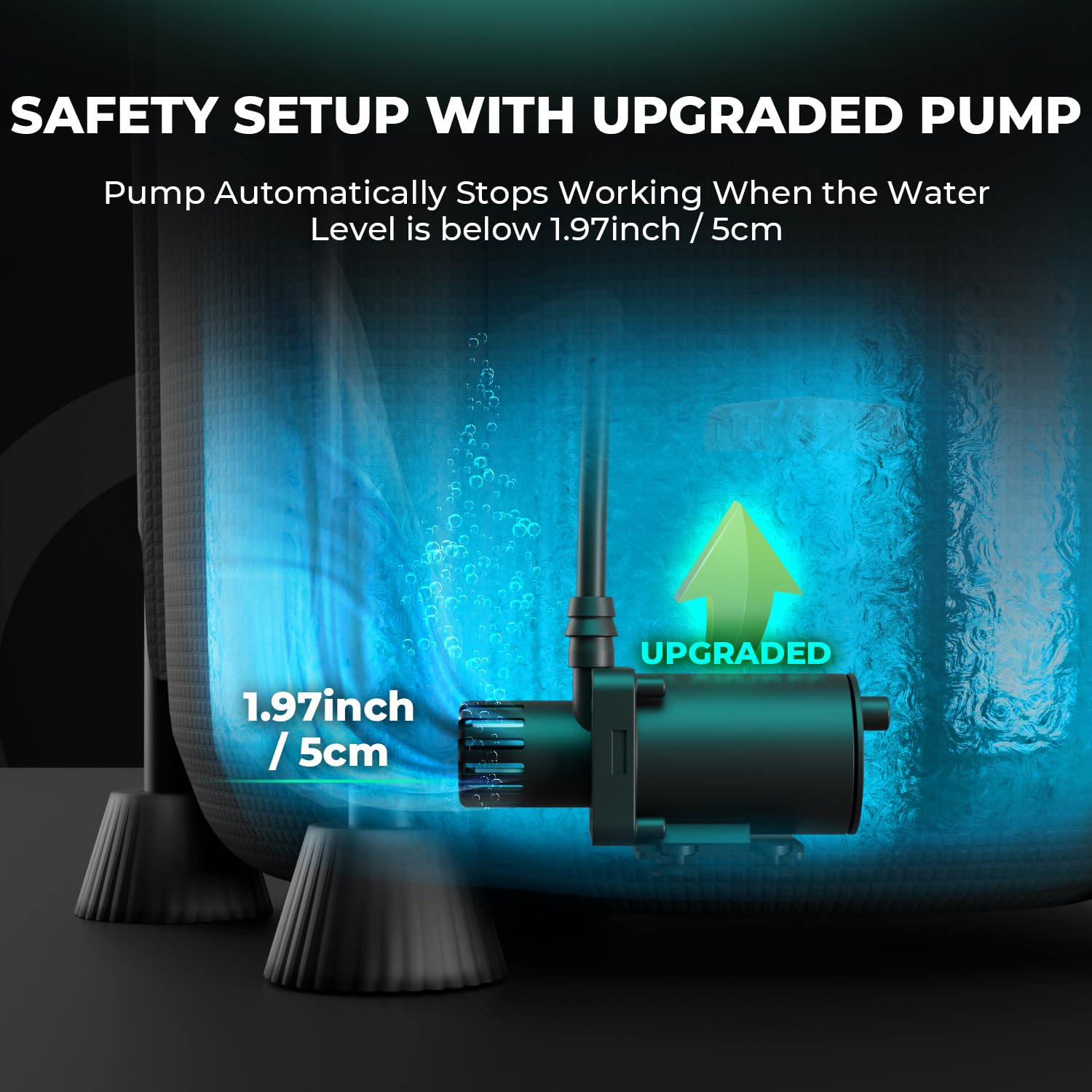
Figure 5.1: Illustration of the water pump's safety feature, which automatically stops operation when the water level drops below 1.97 inches (5cm) to prevent damage.
5.2 Bucket and Tubing Cleaning
- Bucket Cleaning: Regularly empty and clean the foldable bucket to prevent algae growth and sediment buildup.
- Tubing Inspection: Periodically inspect the water tubing and drip emitters for blockages or leaks. Clean or replace components as needed.
6. Troubleshooting
This section addresses common issues you might encounter with your irrigation system.
| Problem | Possible Cause | Solution |
|---|---|---|
| Pump not running | No power; Water level too low; Pump clogged | Check power connection; Refill water bucket above 1.97 inches (5cm); Clean pump strainer. |
| Insufficient water flow from emitters | Clogged emitters; Kinked tubing; Low pump efficiency | Clean or replace emitters; Straighten tubing; Clean pump strainer. |
| iControl not responding | No power; Loose RJ12 connections | Check power supply; Ensure all RJ12 cables are securely connected to compatible devices. |
| Environmental parameters not maintained | Incorrect iControl settings; Connected devices not functioning | Verify target settings in iControl; Check power and function of connected fans, humidifiers, etc. |
7. Specifications
- Product Name: MARS HYDRO Auto Drip Irrigation Kit with iControl
- Water Bucket Capacity: 13 Gallons (approx. 50 Liters)
- Water Pump Power: 24W
- Water Pump Flow Rate: Up to 900 L/H
- Water Pump Safety Feature: Automatic shut-off below 1.97 inches (5cm) water level
- Water Pump Rating: IPX8 Waterproof
- Bucket Material: High-quality Nylon Fabric and PVC
- Drip Emitters: 360° Adjustable Sprinkle Heads
- Controller: MARS HYDRO iControl (Environmental Responsive Control, Stage-Based Smart Automation)
- ASIN: B0FSKJ28W9
- Date First Available: July 1, 2025
8. Warranty and Support
For warranty information and technical support, please refer to the official MARS HYDRO website or contact their customer service directly. Keep your purchase receipt for warranty claims.
MARS HYDRO Official Website: www.marshydro.com