
Introduction
This manual provides detailed instructions for the installation, operation, and maintenance of your Hoenofly 42-inch Smart Low Profile Ceiling Fan with Light. Please read this manual thoroughly before installation and use to ensure safe and efficient operation. Keep this manual for future reference.

Image: Overview of the Hoenofly Smart Ceiling Fan highlighting reversible function, 6 speeds, timer, light memory, dimmable light, and control options (Alexa, Google, Tuya App, Remote Control).
Safety Information
WARNING: To reduce the risk of fire, electric shock, or personal injury, always follow these basic precautions:
- Read all instructions before installing and operating the fan.
- Ensure the power is turned off at the circuit breaker before installation or servicing.
- All wiring must be in accordance with national and local electrical codes. If you are unfamiliar with wiring, consult a qualified electrician.
- The fan must be mounted to a ceiling outlet box marked "Acceptable for Fan Support of 35 lbs (15.9 kg) or less" and supported directly by the building structure.
- Do not operate the fan with a damaged power cord or plug.
- Avoid placing objects in the path of the fan blades.
- This fan is suitable for indoor and covered outdoor wet-rated spaces. Not suitable for sloped or vaulted ceilings. Not applicable for plaster or drywall ceilings.

Image: Illustration of suitable ceiling types (metal, concrete, wood) and unsuitable types (plaster/drywall) for installation. Also shows flat vs. sloped ceiling compatibility and wall switch compatibility (ON/OFF only). Electrical safety reminder to turn off power.
Package Contents
Verify that all components listed below are included in your package:
- 5 Fan Blades
- Ceiling Fan Base
- Light Kit
- Remote Control
- Instruction Manual
- Mounting Hardware (screws, wire nuts, etc.)
Specifications
| Brand | Hoenofly |
| Model Number | YJ886 |
| Product Dimensions | 42"D x 42"W x 9.19"H |
| Color | Black & Walnut |
| Mounting Type | Flush Mount |
| Number of Blades | 5 |
| Motor Type | Quiet DC Motor |
| Air Flow Capacity | 2538 CFM |
| Wattage | 23 watts |
| Voltage | 110 Volts |
| Light Features | Dimmable LED (0-100%), 3 Color Temperatures (3000K, 4000K, 5000K), 2000 Lumens Max |
| Control Methods | Remote Control, Tuya APP, Alexa, Google Assistant |
| Special Features | 6 Reversible Speeds, Timer (0-8h), Light Memory Function |

Image: Diagram showing the fan's dimensions (42" diameter, 9.19" height) and recommended room sizes (10ft x 10ft to 15ft x 15ft).
Setup and Installation
Installation of the Hoenofly ceiling fan is designed to be straightforward. An installation video and detailed manual are provided to assist you. Typical installation time is 40-60 minutes for beginners and approximately 30 minutes for experienced users.
Pre-Installation Checklist:
- Ensure power is OFF at the circuit breaker.
- Confirm your ceiling is suitable for flush mount installation (metal, concrete, or wood joist). Not for plaster or drywall ceilings.
- Gather necessary tools (screwdriver, wire strippers, ladder, etc.).
Installation Steps:
- Mounting Bracket Installation: Secure the mounting bracket to the ceiling outlet box. Ensure the outlet box is rated for fan support.
- Wiring: Connect the fan's electrical wires to the household wiring according to the wiring diagram in the included manual. Ensure all connections are secure.
- Attach Fan Body: Carefully lift the fan body and attach it to the mounting bracket.
- Install Fan Blades: Attach the five fan blades to the motor housing. The blades are made of eco-plywood, designed to be durable and warp-resistant.
- Install Light Kit: Connect and secure the LED light kit to the fan body. The LED panel is eye-protecting and replaceable.
- Final Checks: Ensure all connections are tight and the fan is securely mounted. Restore power at the circuit breaker.

Image: Visual guide for easy installation, showing the fan's dimensions, suitable ceiling types, and wall switch compatibility. Highlights 40-60 minute installation time.

Image: A person installing a ceiling fan, emphasizing the ease of installation and the availability of an instruction manual and video.
Operating Instructions
Your Hoenofly smart ceiling fan can be controlled via the included remote, a smartphone app, or voice commands through Alexa or Google Assistant.
Remote Control Functions:

Image: Diagram of the remote control showing buttons for Fan ON/OFF, Light ON/OFF, Natural Wind Mode, 1/2/6H Timer, Fan Speed (1-6), Forward/Reverse, Light Dimmable Mode, and Light Color-changing.
- Fan ON/OFF: Press to turn the fan on or off.
- Light ON/OFF: Press to turn the light on or off.
- Natural Wind Mode: Activates a fluctuating fan speed to simulate natural breezes.
- Timer: Set the fan to turn off after 1, 2, or 6 hours.
- Fan Speed (1-6): Adjust fan speed from gentle (1-2) for sleeping, moderate (3-4) for relaxation, to strong (5-6) for cooling.
- Forward/Reverse: Changes the direction of blade rotation. Use forward (downward airflow) for cooling in summer and reverse (upward airflow) for circulating warm air in winter.
- Light Dimmable Mode: Adjust light brightness from 0% to 100%.
- Light Color-changing: Cycle through 3000K (warm white), 4000K (daylight), and 5000K (cool white) color temperatures. The light has a memory function to recall the last setting.

Image: Illustration of the fan's 6-speed and reversible function, showing airflow for summer cooling and winter warming. Recommends speeds 1-2 for sleeping, 3-4 for relaxation, and 5-6 for active cooling.
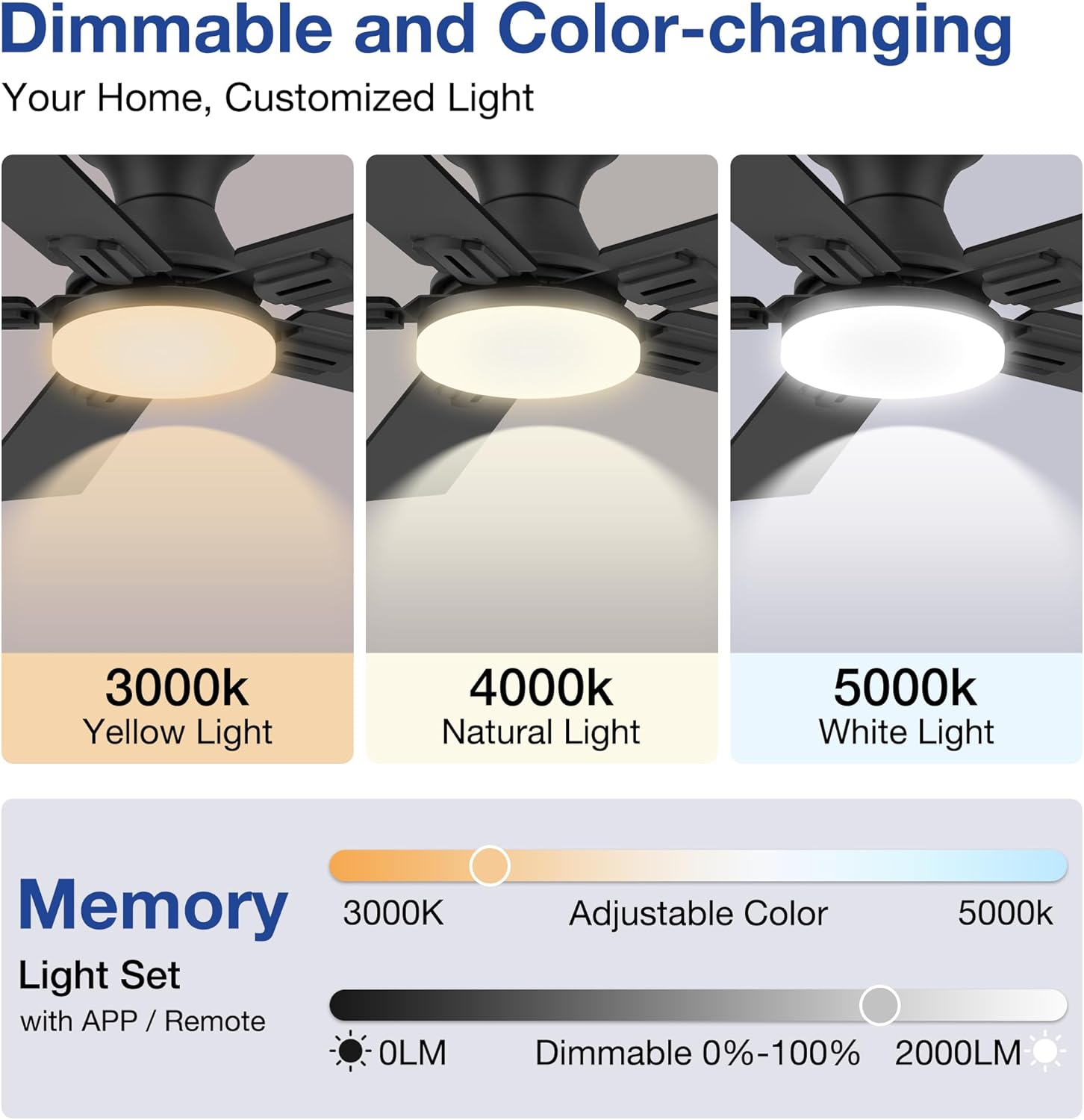
Image: Demonstrates the dimmable and color-changing LED light, showing 3000K (Yellow Light), 4000K (Natural Light), and 5000K (White Light) options, with a brightness range of 0-100% up to 2000 lumens.
Smart Control (App & Voice)
The Hoenofly smart ceiling fan integrates with your smart home ecosystem for convenient control.
Tuya App Control:
Download the Tuya Smart app from your smartphone's app store. Follow the in-app instructions to connect your fan to your home Wi-Fi network. Once connected, you can control all fan and light functions from anywhere.

Image: Depicts controlling the ceiling fan via the Tuya APP from various rooms in a house, illustrating remote access.
Voice Control (Alexa & Google Assistant):
Once connected to the Tuya App, enable the Tuya Smart skill in your Alexa or Google Home app. You can then use voice commands such as:
- "Alexa, turn on the bedroom fan."
- "Hey Google, set the fan speed to 3."
- "Alexa, turn on the light."

Image: Family using voice commands with Alexa and Google Assistant to control the smart ceiling fan, demonstrating hands-free operation.
Maintenance
Regular maintenance helps ensure the longevity and optimal performance of your ceiling fan.
- Cleaning: Periodically wipe the fan blades and motor housing with a soft, damp cloth. Do not use abrasive cleaners or solvents.
- Blade Inspection: Check fan blades for any signs of damage or warping. Replace if necessary.
- Tighten Screws: Over time, some screws may loosen. Periodically check and tighten all screws on the fan body and mounting bracket.
- Light Kit: The LED panel is replaceable. If the light fails, consult the manufacturer for replacement parts.
Troubleshooting
If you encounter issues with your Hoenofly ceiling fan, refer to the following common problems and solutions:
| Problem | Possible Cause | Solution |
|---|---|---|
| Fan does not start | No power, loose wiring, remote battery dead | Check circuit breaker, ensure all wires are connected securely, replace remote battery. |
| Light does not work | Loose wiring, LED panel failure | Check light kit wiring, contact support for LED panel replacement. |
| Fan wobbles | Loose blades, unbalanced blades, loose mounting | Ensure all blade screws are tight, check for balanced blades, verify mounting bracket is secure. |
| Fan makes a beeping sound | Default setting for remote commands | To disable the beep sound: While the fan is on, hold the 4H button, Light button, or Stop/On-Off button on the remote for 5-10 seconds until a double beep confirms it is off. |
| Smart control (App/Voice) not working | Wi-Fi connectivity issues, app not linked, smart module failure | Check Wi-Fi connection, re-link Tuya app/Alexa/Google Assistant, contact support if smart module is suspected to be faulty. |
Warranty and Support
Hoenofly offers a 3-year quality period for this smart ceiling fan. Our customer support team is available 24/7 online to assist you with any issues or questions. We also provide a 30-day return policy guarantee.
If you experience any problems with your product, please contact our customer service. Many issues can be resolved by providing replacement parts, as noted by other customers who received new controllers or parts when needed.
For support, please refer to the contact information provided with your purchase or visit the official Hoenofly store online.

Image: Graphic detailing Hoenofly's 100% service commitment, including a 3-Year Worry-Free Warranty, 24/7 Online Customer Service, and a 30-Day Return Policy Guarantee.