
1. Important Safety Information
Read and understand all instructions before assembling and using this loft bed. Failure to follow these warnings can result in serious injury.
- Weight Limit: Do not exceed the maximum weight capacity of 400 pounds for the loft bed.
- Assembly: Always assemble the bed strictly according to the provided manual. Ensure all components are securely fastened with screws.
- Anti-Tipping: Secure the bed to the wall using the provided anti-tip nails to prevent accidental tipping.
- Guardrail: The full-length raised guardrail must be in place at all times when the bed is in use.
- Children: Never leave young children unattended on the loft bed.
- Mattress: Use a mattress with a thickness between 4 and 6 inches to ensure the guardrail remains effective.

Image 1.1: Illustration of the heavy-duty metal frame, anti-tipping kit, and non-slip mat, highlighting key safety and stability features of the loft bed.

Image 1.2: Close-up view of the safety guardrail, indicating the recommended mattress thickness of 4 to 6 inches for optimal safety.
2. Setup and Assembly
Careful assembly is crucial for the stability and safety of your ANCTOR loft bed. It is recommended that two adults assemble this product.
2.1 Before You Begin
- Unpack: Carefully unpack all components and hardware. Place them on a clean, soft surface to prevent scratches.
- Verify Parts: Refer to the parts list in your included installation manual to ensure all pieces are present and undamaged.
- Tools: An Allen wrench and screwdriver are typically included. Additional tools may be helpful for faster assembly.
- Space: Ensure you have adequate space for assembly.
2.2 Assembly Steps
- Follow the step-by-step instructions provided in the separate installation manual.
- Do not fully tighten screws until instructed, or until the entire frame is loosely assembled. This allows for easier alignment of parts.
- Once all parts are in place, systematically tighten all screws using the provided tools. Re-check tightness after initial assembly.
- Install the anti-tipping kit to secure the bed to a wall stud.

Image 2.1: Dimensional diagram of the loft bed, showing overall measurements and the 6.56 ft power cord length for the charging station.
3. Operating Instructions
Your ANCTOR loft bed is designed for multi-functional use, providing a sleeping area, workspace, and storage.
3.1 Using the Loft Bed
- Access the bed using the integrated ladder/shelving unit.
- Ensure the mattress is properly seated within the bed frame and below the top of the guardrail.
- Do not jump on the bed or exceed the 400-pound weight limit.
3.2 Utilizing the L-shaped Desk
The integrated L-shaped desk provides a spacious area for work, study, or creative activities. Keep the desk surface clear of excessive weight.
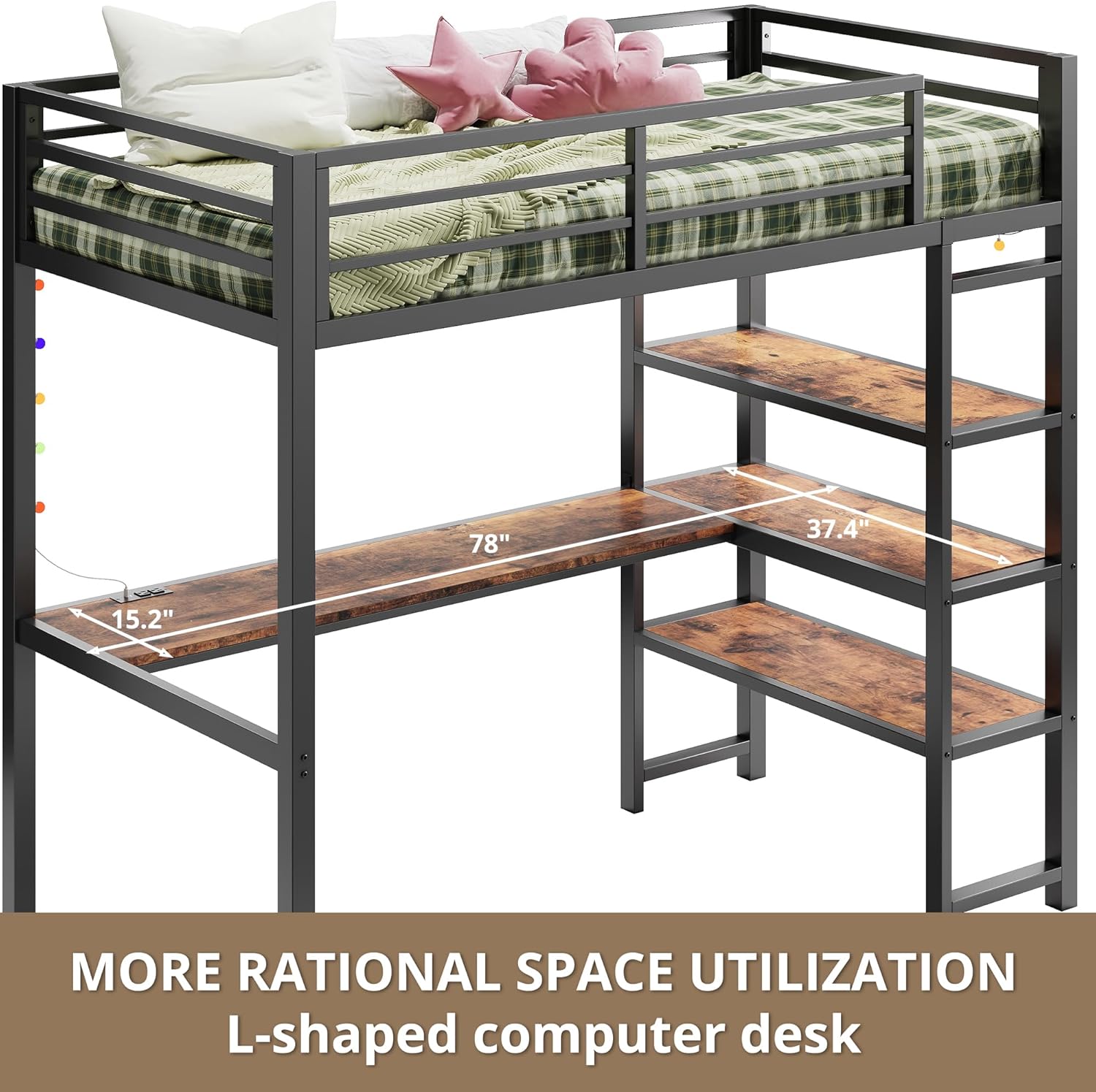
Image 3.1: Overview of the L-shaped computer desk, demonstrating its integration and space-saving design.
3.3 Using the Built-in Charging Station
The desk features a built-in power socket with two AC outlets and two USB ports for convenient charging of electronic devices.
- Plug the bed's power cord (6.56 ft) into a standard wall outlet.
- Connect your devices to the AC outlets or USB ports as needed.
- Avoid overloading the outlets.

Image 3.2: Close-up of the integrated charging station, showing the two AC outlets and two USB ports for easy device charging.
3.4 Operating the LED Lights
The loft bed includes a 13-foot LED light strip to enhance the ambiance of your space. The lights are controlled via a remote.
- Plug the LED light strip into a power source.
- Use the provided remote control to turn the lights on/off, change colors, adjust brightness, and select lighting modes.
- The light strip can be customized and positioned around the bed frame as desired.

Image 3.3: The LED light strip installed around the bed frame, illustrating its ability to create a vibrant atmosphere.
3.5 Utilizing the Storage Shelves
Three open storage shelves are integrated into the bed structure, providing convenient space for books, decorations, and other items.
- Each shelf has a maximum capacity of 88 pounds.
- Distribute weight evenly across the shelves.

Image 3.4: Detailed view of the three open storage shelves, indicating a capacity of 88 pounds per shelf.
4. Maintenance
Regular maintenance ensures the longevity and safety of your loft bed.
- Cleaning: Wipe down metal and wood surfaces with a soft, damp cloth. Avoid harsh chemicals that may damage the finish.
- Fasteners: Periodically check all screws and bolts to ensure they remain tight. Re-tighten as necessary to maintain structural integrity.
- Guardrail: Inspect the guardrail regularly for any signs of damage or looseness.
- Anti-Tip Kit: Verify that the anti-tip kit remains securely fastened to both the bed and the wall.
5. Troubleshooting
If you encounter any issues with your ANCTOR loft bed, refer to the following common solutions.
- Wobbling/Squeaking: This is often caused by loose fasteners. Re-tighten all screws and bolts. Ensure the anti-tip kit is properly installed and secured.
- Missing/Damaged Parts: If you find any parts missing or damaged upon arrival, do not proceed with assembly. Contact ANCTOR customer support immediately for replacement parts.
- LED Lights Not Working: Check if the light strip is properly plugged into a power source. Ensure the remote control has working batteries.
- Charging Station Not Working: Verify that the bed's main power cord is securely plugged into a functional wall outlet. Test with different devices.
6. Specifications
| Feature | Detail |
|---|---|
| Model Number | HK-BFT-06 |
| Brand | ANCTOR |
| Style | Industrial |
| Size | Twin |
| Color | Vintage Brown |
| Frame Material | Metal |
| Item Dimensions (L x W x H) | 78 x 40.6 x 71.1 inches |
| Item Weight | 114 pounds |
| Maximum Weight Capacity | 400 pounds |
| Mattress Thickness Recommendation | 4-6 inches |
| Desk Features | L-shaped desk, built-in charging station |
| Charging Station | 2 AC Outlets, 2 USB Ports, 6.56 ft Power Cord |
| Storage Shelves | 3 open shelves, 88 lbs capacity per shelf |
| LED Lighting | 13 ft light strip with remote control |
| Included Components | Loft bed frame, L-shaped desk, 3 shelves, charging station, LED light strip, installation manual |
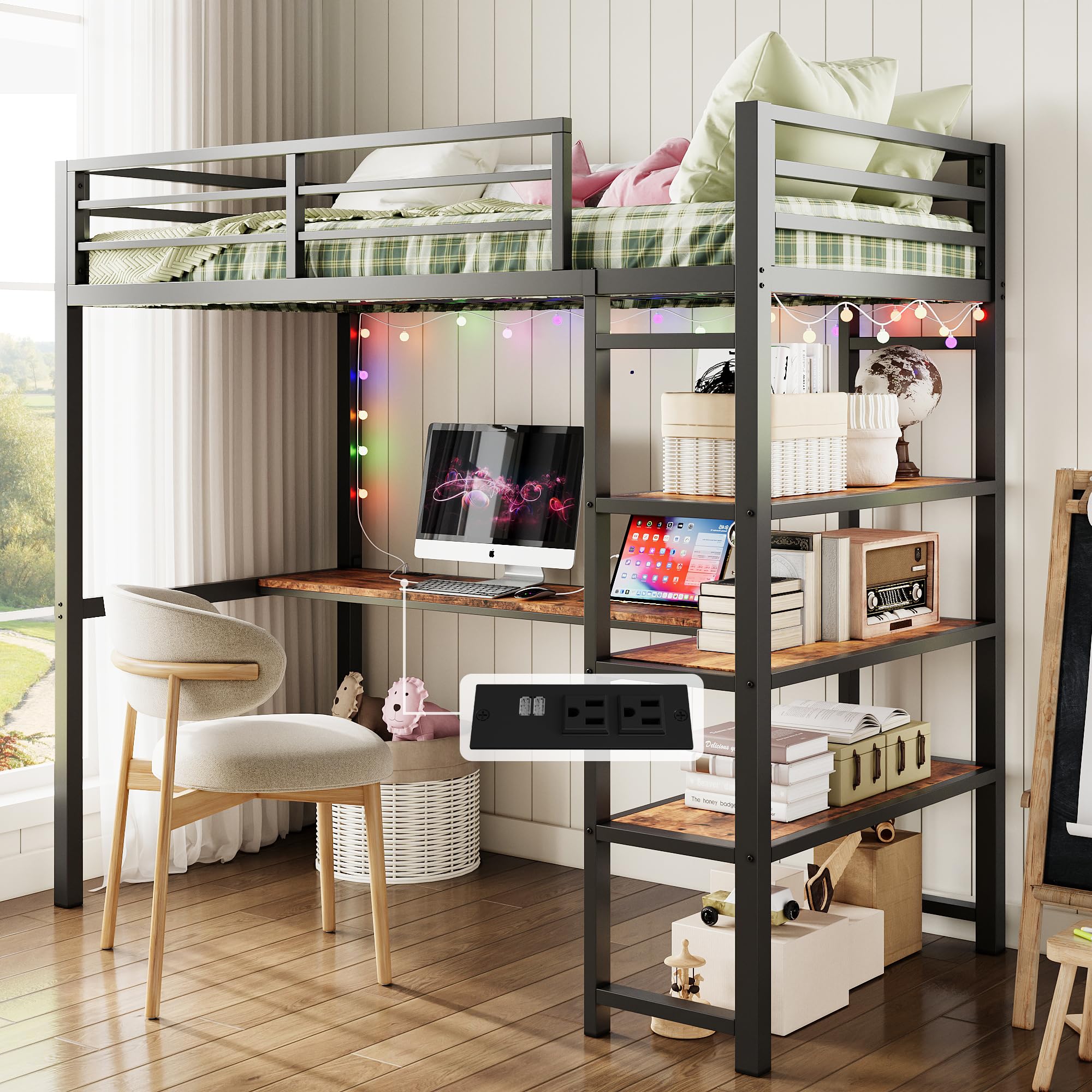
Image 6.1: The ANCTOR Twin Loft Bed fully assembled, showcasing its design and integrated features.