
Introduction
This manual provides detailed instructions for the assembly, operation, and maintenance of your new chartustriable 47-inch White Vanity Desk. Please read all instructions carefully before beginning assembly and retain this manual for future reference. Proper assembly and care will ensure the longevity and optimal performance of your vanity desk.
Safety Information
- Always assemble the vanity desk on a soft, clean surface (e.g., carpet) to prevent scratches or damage to the components.
- Ensure all parts are present and undamaged before beginning assembly. Do not use damaged parts.
- It is recommended that two adults assemble this product to ensure safety and ease of installation.
- Secure the vanity desk to the wall using the provided anti-tipping device to prevent accidental tipping, especially in households with children or pets.
- Handle tempered glass components with care to avoid breakage or injury.
- Do not overload drawers or shelves to maintain stability and prevent damage.
- Keep electrical components (LED lights, power outlet) away from water or excessive moisture.
Product Overview
The chartustriable 47-inch White Vanity Desk features a tempered glass top, LED lighting, a built-in power outlet, and ample storage. Below are some visual representations of the product's key features.

Figure 1: Overall view of the chartustriable 47-inch White Vanity Desk, showcasing its LED mirror, RGB cabinets, and multiple drawers.

Figure 2: The vanity desk with all drawers open, illustrating the extensive storage capacity for cosmetics and accessories.
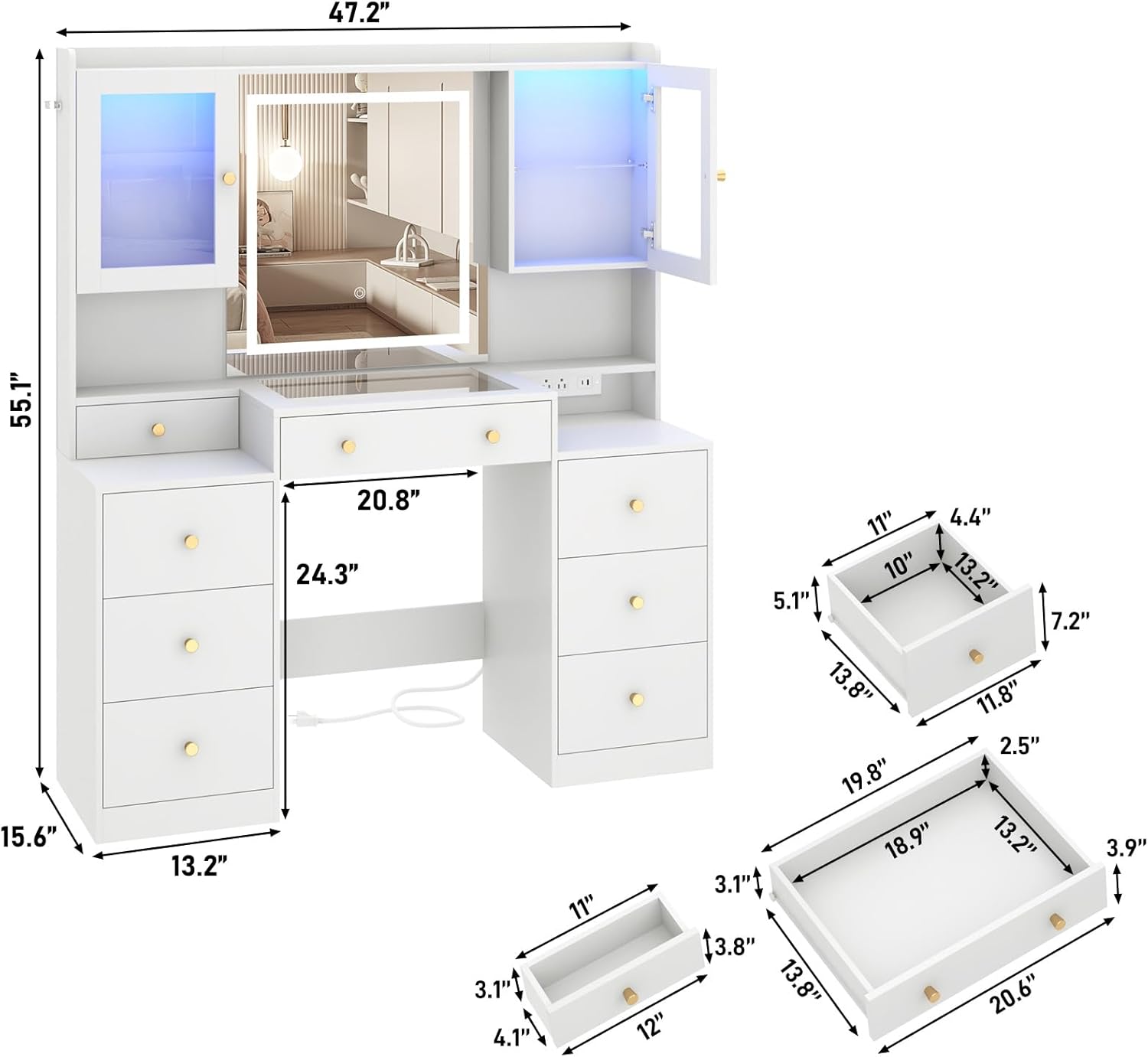
Figure 3: Technical drawing displaying the overall dimensions of the vanity desk and the internal measurements of its various drawers.
Assembly Instructions
For a comprehensive visual guide, please refer to the official assembly video provided below. It demonstrates each step of the assembly process in detail.
Video 1: Official assembly video for the 47-inch Vanity Desk. This video provides step-by-step visual guidance for the entire assembly process, from unboxing to final setup.
General Assembly Steps:
- Preparation: Lay out all components on a soft, clean surface. Identify each part using the provided labels and sort hardware. Recommended tools include a toolbox, tape measure, drill, screwdriver, utility knife, and tool hammer.
- Drawer Assembly: Assemble the individual drawers by fixing the front, back, and side panels together. Install the drawer slides and handles. There are three sizes of drawers, and their assembly process is similar.
- Side Unit Assembly: Construct the left and right side storage units, which include multiple shelves and compartments.
- Central Unit Assembly: Assemble the central section of the vanity, including the tempered glass tabletop and the mirror frame.
- Combine Units: Connect the assembled side units and central unit to form the main structure of the vanity desk.
- Install Electrical Components: Secure the power outlet strip into its designated slot. Connect the LED light strips for the mirror and RGB cabinets.
- Install Cabinet Doors: Attach the glass cabinet doors using the provided hinges and screws.
- Final Touches: Insert the assembled drawers into their respective slots. Peel off any protective films from the mirror and glass surfaces. Use screw covers (part C) for exposed screws for a clean finish.
Operating Instructions
LED Mirror Lights:
The LED mirror features 3 light color modes (Warm Light, Natural Light, Cold Light) and adjustable brightness. A touch sensor on the mirror controls these functions.
- Power On/Off: Tap the touch sensor to turn the mirror lights on or off.
- Change Light Color: Short press the touch sensor to cycle through Warm Light, Natural Light, and Cold Light modes.
- Adjust Brightness: Long press the touch sensor to adjust the brightness level (5% to 100%) within the selected color mode.

Figure 4: Illustration of the LED mirror's three light color modes and the touch control for brightness adjustment.
RGB Cabinet LED Lights:
The two clear tempered glass cabinets are equipped with 60,000-color RGB LED lights and multiple lighting modes. These lights can be controlled via a dedicated APP or an RF switch.
- Control Methods: Use the provided RF switch or download the compatible mobile application to control the RGB lights.
- Lighting Modes: Explore various modes including timing function, music sync, mic sync, and dynamic color changes.
- Color Selection: Choose from over 60,000 colors to customize the ambiance.

Figure 5: The vanity desk with RGB cabinet lighting active, demonstrating the range of colors and control options available through remote or mobile application.
Integrated Power Outlet:
The vanity desk includes a charging station with 2 standard AC plug sockets (125V/12A) and 2 USB ports (5V/2A) for convenient power access.
- Usage: Plug in hair dryers, curling irons, phone chargers, or other electronic devices directly into the vanity desk.
- Power Cord: The unit comes with a 4.9-foot power cord.

Figure 6: Close-up of the vanity desk's built-in power outlet, featuring two standard AC outlets and two USB charging ports.
Maintenance
- Cleaning: Wipe surfaces with a soft, damp cloth. Avoid harsh chemicals or abrasive cleaners that may damage the finish or glass. The tempered glass desktop is designed for easy cleaning.
- Glass Care: For tempered glass surfaces, use a glass cleaner and a lint-free cloth. Avoid placing heavy or sharp objects directly on the glass to prevent scratches or cracks.
- Drawer Slides: Periodically check and clean the smooth silent drawer slides to ensure smooth operation. Avoid forcing drawers if they stick.
- Hardware: Periodically check all screws and fasteners to ensure they are tight. Retighten if necessary to maintain stability.
Troubleshooting
Common Assembly Issues:
- Difficulty with Screws/Holes: If screw holes appear too large or screws do not fit properly, ensure you are using the correct hardware for each step. Some parts may require wood glue for added stability if holes are slightly oversized. A power drill with appropriate settings is recommended over manual screwdrivers for certain steps.
- Missing or Defective Parts: If any parts are missing or appear defective upon unboxing, please contact customer support immediately for replacements.
Lighting Issues:
- LED Strip Adhesive Failure: If the adhesive backing on the LED strips detaches, use a strong, clear adhesive to re-secure them in place.
- Mirror Light Touch Pad Malfunction: If the mirror's touch pad is loose or unresponsive, ensure all connections are secure. If it continues to malfunction, it may require re-securing or replacement.
- No White Light Option for RGB Cabinets: The RGB cabinet lights are designed for color-changing effects. If a pure white light is desired, adjust the color settings via the app or remote to achieve the closest possible white hue.
Specifications
| Feature | Detail |
|---|---|
| Brand | chartustriable |
| Model Number | Large Vanity Desk |
| Product Dimensions | 15.6"D x 47"W x 54"H (Desk: 15.6"D x 62"W x 54"H) |
| Item Weight | 133 pounds |
| Material | Engineered Wood, Tempered Glass |
| Color | White |
| LED Mirror | 3 Light Modes, Adjustable Brightness |
| RGB Cabinet Lights | 60,000+ Colors, Multiple Modes (Timing, Music Sync, Mic Sync), App/RF Switch Control |
| Power Outlet | 2 AC Outlets (125V/12A), 2 USB Ports (5V/2A), 4.9 ft Power Cord |
| Drawers | 8 Drawers with Smooth Silent Sliders |
| Safety Feature | Anti-tipping device included |
Warranty and Support
For any questions regarding product warranty, missing parts, or technical support, please contact chartustriable customer service. Refer to your purchase documentation for specific warranty terms and contact information.